In need of simplified install instructions for SSD (please read).

Because when talking about locations, you finished up by saying 'Do that for each file that has a location tab in properties. Some will not. Leave them alone, those are junction points.' I didn't go through each file, I went to each folder that constained the files and done it, dnd they all had location tabs. And when I now click on Start, then on Documents it shows 'E/users/Brett' (which has a couple of documents from before) then 'C/users/Brett' (which is empty) and then somehow 'contacts' got put in there underneath.

Also, the User folders 'Brett' and 'Public' didn't copy over smoothly, and now I'm not even sure if they copied over in their entirety because I still have some stray files left over in the C/Users/Public folders.

I don't know. It just feels a bit all over the place. I think I'd be much happier starting from scratch with the knowledge of any mistakes I may have made to this point.

So how about it? is there an easy way to wipe these drives and install windows fresh again?

Thanks again for the help so far.
 

My Computer My Computer

At a glance

Windows 7 Home Premium 64bit.Intel i5 2500kG Skill Ripjaws X 8GBEVGA GTX 580
OS
Windows 7 Home Premium 64bit.
CPU
Intel i5 2500k
Motherboard
ASRock Z68 Extreme4
Memory
G Skill Ripjaws X 8GB
Graphics Card(s)
EVGA GTX 580
Hard Drives
OCZ Vertex 2 60GB SSD
Samsung Spinpoint F3 1TB HDD
PSU
Seasonic X Series 760W
Case
Cooler Master HAF X
Cooling
Noctua NH-D14
You will lose everything, so back up anything you want to keep.
For the Samsung. Go to disk management, Right click on the Samsung and select delete partition(or volume), you will get a warning, then it will be deleted. Right click on it again, and select new simple volume, name it whatever you want nad quick format is good. Create a new volume. You did this yesterday except the delete part.

If you want to secure erase the ssd here is complete instructions from OCZ and a link to download Parted Magic.
Download the iso file and burn it to a CD. Unplug the power to the ssd and boot from the CD using the one time boot menu, mine is F11. Select the CD and it will boot from it. When the program gets fully loaded, plug the power cable back into the SSD and follow the instructions in the link. They are very explicit instructions. When completed, the SSD will be exactly like it was when brand new. then start over just like yesterday. That is also a very good program to have around, you will find other uses for it in the future.
 

My Computers My Computers

  • At a glance

    Windows 11 ProRyzen 9 5900X32GB G Skill DDR4-3600EVGA RTX 3080 FTW 3 Ultra
    Computer type
    PC/Desktop
    Computer Manufacturer/Model Number
    ALWAYS UNDER CONSTRUCTION
    OS
    Windows 11 Pro
    CPU
    Ryzen 9 5900X
    Motherboard
    Asus X570 Crosshair Viii Hero
    Memory
    32GB G Skill DDR4-3600
    Graphics Card(s)
    EVGA RTX 3080 FTW 3 Ultra
    Sound Card
    On Board/Sennheiser PC37X Headset
    Monitor(s) Displays
    3 X Asus 27"
    Screen Resolution
    2560x1440
    Hard Drives
    2 X 1 TB NVME drives
    PSU
    EVGA 850
    Case
    Phanteks Eclipse P400A
    Cooling
    EVGA 280 AIO
    Keyboard
    Logitech G510s/ Logitech G13
    Mouse
    Logitech G502
    Internet Speed
    24/1
    Antivirus
    ESET/MBAM Pro/SAS Pro
    Browser
    Chrome/ Firefox/ Edge
  • At a glance

    Windows 11 ProIntel Ultra 9 288V32 GB LPDDR5X 8533
    Computer type
    Laptop
    System Manufacturer/Model Number
    Dell 16 Plus
    OS
    Windows 11 Pro
    CPU
    Intel Ultra 9 288V
    Memory
    32 GB LPDDR5X 8533
    Monitor(s) Displays
    16" Mini-LED HDR600 Touch 90 Hz
    Screen Resolution
    2560X1600
    Hard Drives
    1 TB NVME
You will lose everything, so back up anything you want to keep.
For the Samsung. Go to disk management, Right click on the Samsung and select delete partition(or volume), you will get a warning, then it will be deleted. Right click on it again, and select new simple volume, name it whatever you want nad quick format is good. Create a new volume. You did this yesterday except the delete part.

If you want to secure erase the ssd here is complete instructions from OCZ and a link to download Parted Magic.
Download the iso file and burn it to a CD. Unplug the power to the ssd and boot from the CD using the one time boot menu, mine is F11. Select the CD and it will boot from it. When the program gets fully loaded, plug the power cable back into the SSD and follow the instructions in the link. They are very explicit instructions. When completed, the SSD will be exactly like it was when brand new. then start over just like yesterday. That is also a very good program to have around, you will find other uses for it in the future.

I don't have anything installed other than what was installed from the motherboard disc, so I don't need to back anything up.

I'll try and follow things as stated, and when everything is done, I'll come back here and carry on from where I left off.

Thanks again mate :)
 

My Computer My Computer

At a glance

Windows 7 Home Premium 64bit.Intel i5 2500kG Skill Ripjaws X 8GBEVGA GTX 580
OS
Windows 7 Home Premium 64bit.
CPU
Intel i5 2500k
Motherboard
ASRock Z68 Extreme4
Memory
G Skill Ripjaws X 8GB
Graphics Card(s)
EVGA GTX 580
Hard Drives
OCZ Vertex 2 60GB SSD
Samsung Spinpoint F3 1TB HDD
PSU
Seasonic X Series 760W
Case
Cooler Master HAF X
Cooling
Noctua NH-D14
Be sure to let me know how it goes. It is not as complicated as it seems. You don't have to secure erase there are other options.
and if it asks about enhanced secure erase select no.
 

My Computers My Computers

  • At a glance

    Windows 11 ProRyzen 9 5900X32GB G Skill DDR4-3600EVGA RTX 3080 FTW 3 Ultra
    Computer type
    PC/Desktop
    Computer Manufacturer/Model Number
    ALWAYS UNDER CONSTRUCTION
    OS
    Windows 11 Pro
    CPU
    Ryzen 9 5900X
    Motherboard
    Asus X570 Crosshair Viii Hero
    Memory
    32GB G Skill DDR4-3600
    Graphics Card(s)
    EVGA RTX 3080 FTW 3 Ultra
    Sound Card
    On Board/Sennheiser PC37X Headset
    Monitor(s) Displays
    3 X Asus 27"
    Screen Resolution
    2560x1440
    Hard Drives
    2 X 1 TB NVME drives
    PSU
    EVGA 850
    Case
    Phanteks Eclipse P400A
    Cooling
    EVGA 280 AIO
    Keyboard
    Logitech G510s/ Logitech G13
    Mouse
    Logitech G502
    Internet Speed
    24/1
    Antivirus
    ESET/MBAM Pro/SAS Pro
    Browser
    Chrome/ Firefox/ Edge
  • At a glance

    Windows 11 ProIntel Ultra 9 288V32 GB LPDDR5X 8533
    Computer type
    Laptop
    System Manufacturer/Model Number
    Dell 16 Plus
    OS
    Windows 11 Pro
    CPU
    Intel Ultra 9 288V
    Memory
    32 GB LPDDR5X 8533
    Monitor(s) Displays
    16" Mini-LED HDR600 Touch 90 Hz
    Screen Resolution
    2560X1600
    Hard Drives
    1 TB NVME
I just logged in. But I think Steve gave you all the answers.

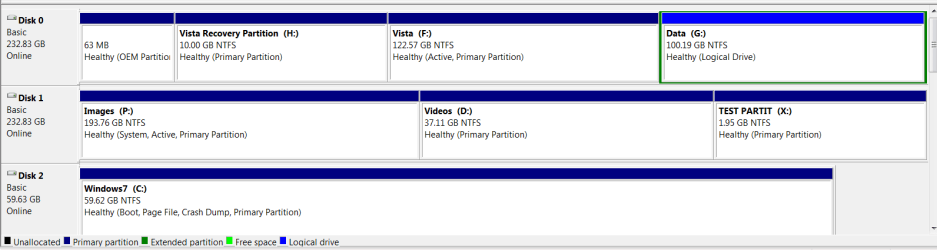
In terms of partitions - you need those in order to get a partition letter. Else you will not be able to see the drive other than in Disk Management. You can, of course, make a whole drive one partition and subdivide it with folders. That depends on your preferences whether you rather work withing folders only or with folders within a partition. Below is a picture of my 3 internal disks on this system - just to give you an idea.

PS: If you look closely, you may notice that the bootmgr for Windows7 is sitting in the images partition on one of the HDDs. When I installed Win7, I could not get the plugs off that HDD - LOL. I never fixed that because I sometimes use it as a "bad example". But maybe one day I should.
 

Attachments

  • 2011-06-17_1330.png
    2011-06-17_1330.png
    15.3 KB · Views: 17

My Computer My Computer

At a glance

Vista, Windows7, Mint Mate, Zorin, Windows 8from 1.6GHz Duo to i7
Computer Manufacturer/Model Number
HP, Dell, Gateway, Toshiba - 4 laptops and 2 desktops
OS
Vista, Windows7, Mint Mate, Zorin, Windows 8
CPU
from 1.6GHz Duo to i7
Monitor(s) Displays
2x HP w2207
Hard Drives
5x HDD, 7x SSD, 12x Externals
Keyboard
with trackball - no mices
Mouse
Trackball mice
Internet Speed
DSL 6000
theog, I think you covered them all. Thanks
 

My Computers My Computers

  • At a glance

    Windows 11 ProRyzen 9 5900X32GB G Skill DDR4-3600EVGA RTX 3080 FTW 3 Ultra
    Computer type
    PC/Desktop
    Computer Manufacturer/Model Number
    ALWAYS UNDER CONSTRUCTION
    OS
    Windows 11 Pro
    CPU
    Ryzen 9 5900X
    Motherboard
    Asus X570 Crosshair Viii Hero
    Memory
    32GB G Skill DDR4-3600
    Graphics Card(s)
    EVGA RTX 3080 FTW 3 Ultra
    Sound Card
    On Board/Sennheiser PC37X Headset
    Monitor(s) Displays
    3 X Asus 27"
    Screen Resolution
    2560x1440
    Hard Drives
    2 X 1 TB NVME drives
    PSU
    EVGA 850
    Case
    Phanteks Eclipse P400A
    Cooling
    EVGA 280 AIO
    Keyboard
    Logitech G510s/ Logitech G13
    Mouse
    Logitech G502
    Internet Speed
    24/1
    Antivirus
    ESET/MBAM Pro/SAS Pro
    Browser
    Chrome/ Firefox/ Edge
  • At a glance

    Windows 11 ProIntel Ultra 9 288V32 GB LPDDR5X 8533
    Computer type
    Laptop
    System Manufacturer/Model Number
    Dell 16 Plus
    OS
    Windows 11 Pro
    CPU
    Intel Ultra 9 288V
    Memory
    32 GB LPDDR5X 8533
    Monitor(s) Displays
    16" Mini-LED HDR600 Touch 90 Hz
    Screen Resolution
    2560X1600
    Hard Drives
    1 TB NVME
WHS, just a curiosity question. In your Vista drive, the MBR files are not in the recovery partition? On my Dell the boot files are in the recovery partition.
 

My Computers My Computers

  • At a glance

    Windows 11 ProRyzen 9 5900X32GB G Skill DDR4-3600EVGA RTX 3080 FTW 3 Ultra
    Computer type
    PC/Desktop
    Computer Manufacturer/Model Number
    ALWAYS UNDER CONSTRUCTION
    OS
    Windows 11 Pro
    CPU
    Ryzen 9 5900X
    Motherboard
    Asus X570 Crosshair Viii Hero
    Memory
    32GB G Skill DDR4-3600
    Graphics Card(s)
    EVGA RTX 3080 FTW 3 Ultra
    Sound Card
    On Board/Sennheiser PC37X Headset
    Monitor(s) Displays
    3 X Asus 27"
    Screen Resolution
    2560x1440
    Hard Drives
    2 X 1 TB NVME drives
    PSU
    EVGA 850
    Case
    Phanteks Eclipse P400A
    Cooling
    EVGA 280 AIO
    Keyboard
    Logitech G510s/ Logitech G13
    Mouse
    Logitech G502
    Internet Speed
    24/1
    Antivirus
    ESET/MBAM Pro/SAS Pro
    Browser
    Chrome/ Firefox/ Edge
  • At a glance

    Windows 11 ProIntel Ultra 9 288V32 GB LPDDR5X 8533
    Computer type
    Laptop
    System Manufacturer/Model Number
    Dell 16 Plus
    OS
    Windows 11 Pro
    CPU
    Intel Ultra 9 288V
    Memory
    32 GB LPDDR5X 8533
    Monitor(s) Displays
    16" Mini-LED HDR600 Touch 90 Hz
    Screen Resolution
    2560X1600
    Hard Drives
    1 TB NVME
WHS, just a curiosity question. In your Vista drive, the MBR files are not in the recovery partition? On my Dell the boot files are in the recovery partition.


His Disk 1 P: Images is the "System" system volume partition, we tried to get him to sort that a while back but whs seems to be pleased with the way things are. :shock:
 

My Computer My Computer

At a glance

W 7 64-bit UltimateIntel Q9550 Yorkfield8GB Dominator 8500C5DATI : XFX 5870
Computer Manufacturer/Model Number
* BFK Customs *
OS
W 7 64-bit Ultimate
CPU
Intel Q9550 Yorkfield
Motherboard
ASUS P5Q Pro
Memory
8GB Dominator 8500C5D
Graphics Card(s)
ATI : XFX 5870
Sound Card
Realtek HD Audio 7-1
Monitor(s) Displays
1x 47" LCD HDMI & 3x 26" LCD HDMI
Screen Resolution
1920x1080P & 1920x1200
Hard Drives
1x 80GB Intel X25-M G2 SSD : 1x 500GB & 1x 640GB WD Caviar Black(s)
PSU
Corsair 620HX
Case
Cooler Master RC-690
Cooling
Tuniq Tower 120, 2x 140mm and 3x 120mm case fans
Keyboard
Microsoft 500
Mouse
Razer Diamondback 3G
Internet Speed
14 Mb/s
Other Info
1x Koutech 3Gb/s SATA HDD Hot Swap Rack
WHS, just a curiosity question. In your Vista drive, the MBR files are not in the recovery partition? On my Dell the boot files are in the recovery partition.


His Disk 1 P: Images is the "System" system volume partition, we tried to get him to sort that a while back but whs seems to be pleased with the way things are. :shock:

I think he likes to use it for demonstration. I deleted my recovery on my Dell and did a clean install.
 

My Computers My Computers

  • At a glance

    Windows 11 ProRyzen 9 5900X32GB G Skill DDR4-3600EVGA RTX 3080 FTW 3 Ultra
    Computer type
    PC/Desktop
    Computer Manufacturer/Model Number
    ALWAYS UNDER CONSTRUCTION
    OS
    Windows 11 Pro
    CPU
    Ryzen 9 5900X
    Motherboard
    Asus X570 Crosshair Viii Hero
    Memory
    32GB G Skill DDR4-3600
    Graphics Card(s)
    EVGA RTX 3080 FTW 3 Ultra
    Sound Card
    On Board/Sennheiser PC37X Headset
    Monitor(s) Displays
    3 X Asus 27"
    Screen Resolution
    2560x1440
    Hard Drives
    2 X 1 TB NVME drives
    PSU
    EVGA 850
    Case
    Phanteks Eclipse P400A
    Cooling
    EVGA 280 AIO
    Keyboard
    Logitech G510s/ Logitech G13
    Mouse
    Logitech G502
    Internet Speed
    24/1
    Antivirus
    ESET/MBAM Pro/SAS Pro
    Browser
    Chrome/ Firefox/ Edge
  • At a glance

    Windows 11 ProIntel Ultra 9 288V32 GB LPDDR5X 8533
    Computer type
    Laptop
    System Manufacturer/Model Number
    Dell 16 Plus
    OS
    Windows 11 Pro
    CPU
    Intel Ultra 9 288V
    Memory
    32 GB LPDDR5X 8533
    Monitor(s) Displays
    16" Mini-LED HDR600 Touch 90 Hz
    Screen Resolution
    2560X1600
    Hard Drives
    1 TB NVME
WHS, just a curiosity question. In your Vista drive, the MBR files are not in the recovery partition? On my Dell the boot files are in the recovery partition.
In principle, the bootmgr does belong into C or as in Win7 into a seperate active 100MB partition. But I have seen some installations where it ended up in the recovery partition - but that is not the normal case.

Ted, LOL - I am so busy that I never got to it. But it never bothered me. This Dell box was a pain when it came to the HDDs. For one, they bolted the HDDs directly to the chassis - no trays. And then they fixed the wires so hard that you could not get them off. Plus it is a real pain to get to the mobo and change the ports. That was my first and last Dell.
 

My Computer My Computer

At a glance

Vista, Windows7, Mint Mate, Zorin, Windows 8from 1.6GHz Duo to i7
Computer Manufacturer/Model Number
HP, Dell, Gateway, Toshiba - 4 laptops and 2 desktops
OS
Vista, Windows7, Mint Mate, Zorin, Windows 8
CPU
from 1.6GHz Duo to i7
Monitor(s) Displays
2x HP w2207
Hard Drives
5x HDD, 7x SSD, 12x Externals
Keyboard
with trackball - no mices
Mouse
Trackball mice
Internet Speed
DSL 6000
My Dell looked like his vista disk except the recovery partition was labled D and was the active partition. I used your tutorial, wiped the disk clean and did a clean install.
 

My Computers My Computers

  • At a glance

    Windows 11 ProRyzen 9 5900X32GB G Skill DDR4-3600EVGA RTX 3080 FTW 3 Ultra
    Computer type
    PC/Desktop
    Computer Manufacturer/Model Number
    ALWAYS UNDER CONSTRUCTION
    OS
    Windows 11 Pro
    CPU
    Ryzen 9 5900X
    Motherboard
    Asus X570 Crosshair Viii Hero
    Memory
    32GB G Skill DDR4-3600
    Graphics Card(s)
    EVGA RTX 3080 FTW 3 Ultra
    Sound Card
    On Board/Sennheiser PC37X Headset
    Monitor(s) Displays
    3 X Asus 27"
    Screen Resolution
    2560x1440
    Hard Drives
    2 X 1 TB NVME drives
    PSU
    EVGA 850
    Case
    Phanteks Eclipse P400A
    Cooling
    EVGA 280 AIO
    Keyboard
    Logitech G510s/ Logitech G13
    Mouse
    Logitech G502
    Internet Speed
    24/1
    Antivirus
    ESET/MBAM Pro/SAS Pro
    Browser
    Chrome/ Firefox/ Edge
  • At a glance

    Windows 11 ProIntel Ultra 9 288V32 GB LPDDR5X 8533
    Computer type
    Laptop
    System Manufacturer/Model Number
    Dell 16 Plus
    OS
    Windows 11 Pro
    CPU
    Intel Ultra 9 288V
    Memory
    32 GB LPDDR5X 8533
    Monitor(s) Displays
    16" Mini-LED HDR600 Touch 90 Hz
    Screen Resolution
    2560X1600
    Hard Drives
    1 TB NVME
Ted, LOL - I am so busy that I never got to it. But it never bothered me. This Dell box was a pain when it came to the HDDs. For one, they bolted the HDDs directly to the chassis - no trays. And then they fixed the wires so hard that you could not get them off. Plus it is a real pain to get to the mobo and change the ports. That was my first and last Dell.

As it's already Disk 0 all that would need done is to expand the OEM partition to at least 200MB using the Partition Wizard boot disk and mark it Active and do at least 3 separate startup repairs to (re)create the "System" boot files to that location and mark the other(s) as Inactive and that would sort it.
 

My Computer My Computer

At a glance

W 7 64-bit UltimateIntel Q9550 Yorkfield8GB Dominator 8500C5DATI : XFX 5870
Computer Manufacturer/Model Number
* BFK Customs *
OS
W 7 64-bit Ultimate
CPU
Intel Q9550 Yorkfield
Motherboard
ASUS P5Q Pro
Memory
8GB Dominator 8500C5D
Graphics Card(s)
ATI : XFX 5870
Sound Card
Realtek HD Audio 7-1
Monitor(s) Displays
1x 47" LCD HDMI & 3x 26" LCD HDMI
Screen Resolution
1920x1080P & 1920x1200
Hard Drives
1x 80GB Intel X25-M G2 SSD : 1x 500GB & 1x 640GB WD Caviar Black(s)
PSU
Corsair 620HX
Case
Cooler Master RC-690
Cooling
Tuniq Tower 120, 2x 140mm and 3x 120mm case fans
Keyboard
Microsoft 500
Mouse
Razer Diamondback 3G
Internet Speed
14 Mb/s
Other Info
1x Koutech 3Gb/s SATA HDD Hot Swap Rack
Be sure to let me know how it goes. It is not as complicated as it seems. You don't have to secure erase there are other options.
and if it asks about enhanced secure erase select no.

I was gonna get on and do it tomorrow, cause I've had about all I can handle computer-wise today. But, now the HDD has been formatted, the SSD obviously has parts missing like the users folders, and according to this computer, even a desktop. Is there any way I can restore those things instead of a clean install? or even just reinstall windows over the windows installed now to restore lost files?

If not, I'll get on and sort this SSD out tomorrow.
 

My Computer My Computer

At a glance

Windows 7 Home Premium 64bit.Intel i5 2500kG Skill Ripjaws X 8GBEVGA GTX 580
OS
Windows 7 Home Premium 64bit.
CPU
Intel i5 2500k
Motherboard
ASRock Z68 Extreme4
Memory
G Skill Ripjaws X 8GB
Graphics Card(s)
EVGA GTX 580
Hard Drives
OCZ Vertex 2 60GB SSD
Samsung Spinpoint F3 1TB HDD
PSU
Seasonic X Series 760W
Case
Cooler Master HAF X
Cooling
Noctua NH-D14
Ted, LOL - I am so busy that I never got to it. But it never bothered me. This Dell box was a pain when it came to the HDDs. For one, they bolted the HDDs directly to the chassis - no trays. And then they fixed the wires so hard that you could not get them off. Plus it is a real pain to get to the mobo and change the ports. That was my first and last Dell.

As it's already Disk 0 all that would need done is to expand the OEM partition to at least 200MB using the Partition Wizard boot disk and mark it Active and do at least 3 separate startup repairs to (re)create the "System" boot files to that location and mark the other(s) as Inactive and that would sort it.
Yeah, that would be one way. But I would rather move it to the Win7 C partition on the SSD. Disk0 is just another HDD and that OEM partition is some Dell tools partition. One day when I have nothing else to do (and I find my installation disk) I will get to it.
 

My Computer My Computer

At a glance

Vista, Windows7, Mint Mate, Zorin, Windows 8from 1.6GHz Duo to i7
Computer Manufacturer/Model Number
HP, Dell, Gateway, Toshiba - 4 laptops and 2 desktops
OS
Vista, Windows7, Mint Mate, Zorin, Windows 8
CPU
from 1.6GHz Duo to i7
Monitor(s) Displays
2x HP w2207
Hard Drives
5x HDD, 7x SSD, 12x Externals
Keyboard
with trackball - no mices
Mouse
Trackball mice
Internet Speed
DSL 6000
Ted, LOL - I am so busy that I never got to it. But it never bothered me. This Dell box was a pain when it came to the HDDs. For one, they bolted the HDDs directly to the chassis - no trays. And then they fixed the wires so hard that you could not get them off. Plus it is a real pain to get to the mobo and change the ports. That was my first and last Dell.

As it's already Disk 0 all that would need done is to expand the OEM partition to at least 200MB using the Partition Wizard boot disk and mark it Active and do at least 3 separate startup repairs to (re)create the "System" boot files to that location and mark the other(s) as Inactive and that would sort it.
Yeah, that would be one way. But I would rather move it to the Win7 C partition on the SSD. Disk0 is just another HDD and that OEM partition is some Dell tools partition. One day when I have nothing else to do (and I find my installation disk) I will get to it.

Hello Wolfgang, if it ain't broke don't fix it eh! :thumbsup:
 

My Computer My Computer

At a glance

W 7 64-bit UltimateIntel Q9550 Yorkfield8GB Dominator 8500C5DATI : XFX 5870
Computer Manufacturer/Model Number
* BFK Customs *
OS
W 7 64-bit Ultimate
CPU
Intel Q9550 Yorkfield
Motherboard
ASUS P5Q Pro
Memory
8GB Dominator 8500C5D
Graphics Card(s)
ATI : XFX 5870
Sound Card
Realtek HD Audio 7-1
Monitor(s) Displays
1x 47" LCD HDMI & 3x 26" LCD HDMI
Screen Resolution
1920x1080P & 1920x1200
Hard Drives
1x 80GB Intel X25-M G2 SSD : 1x 500GB & 1x 640GB WD Caviar Black(s)
PSU
Corsair 620HX
Case
Cooler Master RC-690
Cooling
Tuniq Tower 120, 2x 140mm and 3x 120mm case fans
Keyboard
Microsoft 500
Mouse
Razer Diamondback 3G
Internet Speed
14 Mb/s
Other Info
1x Koutech 3Gb/s SATA HDD Hot Swap Rack
You can use Ted's tutorial to reinstall. However, your SSD is new and I would not use the 'Clean All' command, just use clean and follow the rest.
 

My Computers My Computers

  • At a glance

    Windows 11 ProRyzen 9 5900X32GB G Skill DDR4-3600EVGA RTX 3080 FTW 3 Ultra
    Computer type
    PC/Desktop
    Computer Manufacturer/Model Number
    ALWAYS UNDER CONSTRUCTION
    OS
    Windows 11 Pro
    CPU
    Ryzen 9 5900X
    Motherboard
    Asus X570 Crosshair Viii Hero
    Memory
    32GB G Skill DDR4-3600
    Graphics Card(s)
    EVGA RTX 3080 FTW 3 Ultra
    Sound Card
    On Board/Sennheiser PC37X Headset
    Monitor(s) Displays
    3 X Asus 27"
    Screen Resolution
    2560x1440
    Hard Drives
    2 X 1 TB NVME drives
    PSU
    EVGA 850
    Case
    Phanteks Eclipse P400A
    Cooling
    EVGA 280 AIO
    Keyboard
    Logitech G510s/ Logitech G13
    Mouse
    Logitech G502
    Internet Speed
    24/1
    Antivirus
    ESET/MBAM Pro/SAS Pro
    Browser
    Chrome/ Firefox/ Edge
  • At a glance

    Windows 11 ProIntel Ultra 9 288V32 GB LPDDR5X 8533
    Computer type
    Laptop
    System Manufacturer/Model Number
    Dell 16 Plus
    OS
    Windows 11 Pro
    CPU
    Intel Ultra 9 288V
    Memory
    32 GB LPDDR5X 8533
    Monitor(s) Displays
    16" Mini-LED HDR600 Touch 90 Hz
    Screen Resolution
    2560X1600
    Hard Drives
    1 TB NVME

My Computers My Computers

  • At a glance

    Windows 11 ProRyzen 9 5900X32GB G Skill DDR4-3600EVGA RTX 3080 FTW 3 Ultra
    Computer type
    PC/Desktop
    Computer Manufacturer/Model Number
    ALWAYS UNDER CONSTRUCTION
    OS
    Windows 11 Pro
    CPU
    Ryzen 9 5900X
    Motherboard
    Asus X570 Crosshair Viii Hero
    Memory
    32GB G Skill DDR4-3600
    Graphics Card(s)
    EVGA RTX 3080 FTW 3 Ultra
    Sound Card
    On Board/Sennheiser PC37X Headset
    Monitor(s) Displays
    3 X Asus 27"
    Screen Resolution
    2560x1440
    Hard Drives
    2 X 1 TB NVME drives
    PSU
    EVGA 850
    Case
    Phanteks Eclipse P400A
    Cooling
    EVGA 280 AIO
    Keyboard
    Logitech G510s/ Logitech G13
    Mouse
    Logitech G502
    Internet Speed
    24/1
    Antivirus
    ESET/MBAM Pro/SAS Pro
    Browser
    Chrome/ Firefox/ Edge
  • At a glance

    Windows 11 ProIntel Ultra 9 288V32 GB LPDDR5X 8533
    Computer type
    Laptop
    System Manufacturer/Model Number
    Dell 16 Plus
    OS
    Windows 11 Pro
    CPU
    Intel Ultra 9 288V
    Memory
    32 GB LPDDR5X 8533
    Monitor(s) Displays
    16" Mini-LED HDR600 Touch 90 Hz
    Screen Resolution
    2560X1600
    Hard Drives
    1 TB NVME
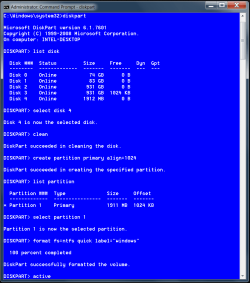
Bret, I just did my usb drive to serve as an example. The only difference is you will only have 1 disk and it should be disk 0. You put disk 0 where I put disk 4.
format sssd 1.PNG

Push enter, exit enter exit enter and you will be back at the language screen. then install as usual.
 

My Computers My Computers

  • At a glance

    Windows 11 ProRyzen 9 5900X32GB G Skill DDR4-3600EVGA RTX 3080 FTW 3 Ultra
    Computer type
    PC/Desktop
    Computer Manufacturer/Model Number
    ALWAYS UNDER CONSTRUCTION
    OS
    Windows 11 Pro
    CPU
    Ryzen 9 5900X
    Motherboard
    Asus X570 Crosshair Viii Hero
    Memory
    32GB G Skill DDR4-3600
    Graphics Card(s)
    EVGA RTX 3080 FTW 3 Ultra
    Sound Card
    On Board/Sennheiser PC37X Headset
    Monitor(s) Displays
    3 X Asus 27"
    Screen Resolution
    2560x1440
    Hard Drives
    2 X 1 TB NVME drives
    PSU
    EVGA 850
    Case
    Phanteks Eclipse P400A
    Cooling
    EVGA 280 AIO
    Keyboard
    Logitech G510s/ Logitech G13
    Mouse
    Logitech G502
    Internet Speed
    24/1
    Antivirus
    ESET/MBAM Pro/SAS Pro
    Browser
    Chrome/ Firefox/ Edge
  • At a glance

    Windows 11 ProIntel Ultra 9 288V32 GB LPDDR5X 8533
    Computer type
    Laptop
    System Manufacturer/Model Number
    Dell 16 Plus
    OS
    Windows 11 Pro
    CPU
    Intel Ultra 9 288V
    Memory
    32 GB LPDDR5X 8533
    Monitor(s) Displays
    16" Mini-LED HDR600 Touch 90 Hz
    Screen Resolution
    2560X1600
    Hard Drives
    1 TB NVME
Back
Top