Gittarackur
Cheeto Deleto
- Local time
- 10:28 AM
- Messages
- 18
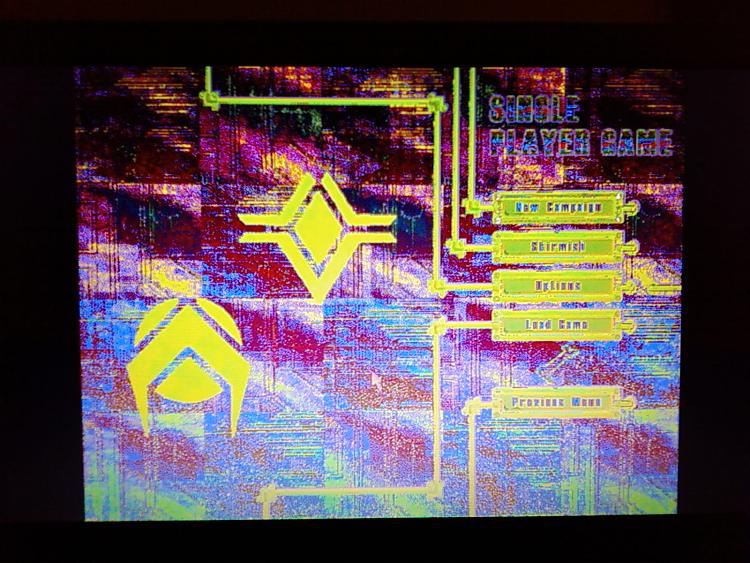
I have two copies of Total Annihilation, the GOG Commander Pack and the CD version. Neither display the correct colors, and what I mean by that is that the colors are all rainbow and insane, sort of like in this screenshot (They look a little crazier actually)
>> https://www.sevenforums.com/attachm...oblems-total-annihilation-042000_1903-00-.jpg <<
I have:
- Run as Admin
- Set my desktop background to pure black and turned off the Aero theme
- Run in every Windows compatibility mode I could find
- Installed the community patch (Gave me a DirectX error, wasn't able to fix it by installing the required version of DirectX)
- Installed the Community Patch patch That fixes the DirectX error and now we're back where we started with the color issue
- Morphological filtering is already off as one Redditor said fixed his, but hasn't fixed mine.
>> https://www.sevenforums.com/attachm...oblems-total-annihilation-042000_1903-00-.jpg <<
I have:
- Run as Admin
- Set my desktop background to pure black and turned off the Aero theme
- Run in every Windows compatibility mode I could find
- Installed the community patch (Gave me a DirectX error, wasn't able to fix it by installing the required version of DirectX)
- Installed the Community Patch patch That fixes the DirectX error and now we're back where we started with the color issue
- Morphological filtering is already off as one Redditor said fixed his, but hasn't fixed mine.
My Computer
- Computer type
- Laptop
- Computer Manufacturer/Model Number
- HP
- OS
- Windows 7 Pro x64
- CPU
- Intel Core i5 2520M
- Motherboard
- HP 161C
- Memory
- 8.00GB Dual-Channel DDR3 @ 665MHz
- Graphics Card(s)
- 1024MB ATI AMD Radeon HD 7400M Series (HP)
- Monitor(s) Displays
- Generic PnP Monitor
- Screen Resolution
- 1600x900 pixels
- Hard Drives
- 223GB PNY CS1311 240GB SSD ATA Device
- Antivirus
- McAfee Antivirus
- Browser
- Google Chrome
- Other Info
- lul