
Firstly, any help will be greatly appreciated 
I am currently experiencing startup problems after reinstalling Windows 7. I reinstalled to my 120GB SSD, however noticed that startup was fairly slow. After looking at Disk Management, my System disk is not the SSD, but rather a 1TB HDD I have. I have tried solutions such as bootrec, however when I try to boot to my SSD, it gives me a GRUB RESCUE console. I assume this was left from a past Linux installation.
My goal is to remove GRUB from my SSD, and have my SSD as the system drive, to be able to boot into Windows 7 through it, as well as remove any of the system files from the HDD.
Additional Notes: My computer doesn't seem to have a 100% boot rate. It took 3 tries to boot into Windows, the first 2 attempts giving me grey screens. This can be temporarily fixed by system restoring, but after a day or two will come back.
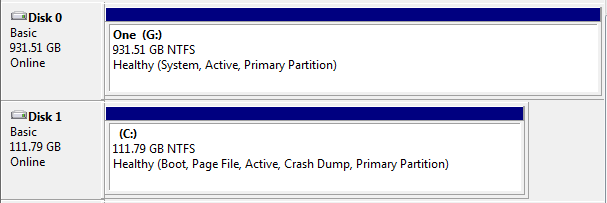
I am currently experiencing startup problems after reinstalling Windows 7. I reinstalled to my 120GB SSD, however noticed that startup was fairly slow. After looking at Disk Management, my System disk is not the SSD, but rather a 1TB HDD I have. I have tried solutions such as bootrec, however when I try to boot to my SSD, it gives me a GRUB RESCUE console. I assume this was left from a past Linux installation.
My goal is to remove GRUB from my SSD, and have my SSD as the system drive, to be able to boot into Windows 7 through it, as well as remove any of the system files from the HDD.
Additional Notes: My computer doesn't seem to have a 100% boot rate. It took 3 tries to boot into Windows, the first 2 attempts giving me grey screens. This can be temporarily fixed by system restoring, but after a day or two will come back.
My Computer
- Computer type
- PC/Desktop
- Computer Manufacturer/Model Number
- Custom Build
- OS
- Windows 7 Ultimate x64
- CPU
- AMD FX 8350
- Motherboard
- GB 970A-DS3P Rev.1
- Memory
- 12GB DDR3
- Graphics Card(s)
- EVGA GTX 960 SSC
- Hard Drives
- 120GB SSD
2x 1TB HDD
- Antivirus
- Avira
- Browser
- Chrome


