Increase internet speed

That's really cool
My speed has greatly improved thnx alot dude
 

My Computer My Computer

At a glance

Windows 7
OS
Windows 7
Super-angry

Hi all.I have an internet speed of 10Mbs on LAN.I average about 2-5Kbs.Sometimes more.I have seen it as high as 180.I know that there are restrictions on this network,but i think that i should be getting faster downloads than my current speed(0-3Kb).Can i stabalize this or is there nothing i can do?Please help.I am so frustrated i could strangle somebody.:mad:
 

My Computer My Computer

At a glance

MS Windows 7 Home Premium 64-bitAMD K8/AMD Athlon(tm) Processor TF-20 @1.6G2.0GB Dual-Channel DDR2 @ 319MHz 5-5-5-15ATI Radeon HD 3200 Graphics (Acer Incorporate...
Computer Manufacturer/Model Number
Acer Aspire 5517-5427 Notebook
OS
MS Windows 7 Home Premium 64-bit
CPU
AMD K8/AMD Athlon(tm) Processor TF-20 @1.6G
Motherboard
Acer Aspire 5517 (Socket S1G1)
Memory
2.0GB Dual-Channel DDR2 @ 319MHz 5-5-5-15
Graphics Card(s)
ATI Radeon HD 3200 Graphics (Acer Incorporated [ALI])
Sound Card
Realtek High Definition Audio
Monitor(s) Displays
Generic PnP Monitor @ 1366x768
Hard Drives
244.20GB Western Digital WDC WD2500BEVT-22A23T0 ATA Device (IDE)
PSU
Stock
Case
Stock
Cooling
Stock
Mouse
Gigaware-Wireless
Internet Speed
HA!
it is not giving me the permission to write in the system.ini even if i am logged into the administrative account,,, it straight way writes access denied
 

My Computer My Computer

At a glance

windows7 home premium
Computer Manufacturer/Model Number
hp pavilion dv-4 1506TX
OS
windows7 home premium
it is not giving me the permission to write in the system.ini even if i am logged into the administrative account,,, it straight way writes access denied


Try this:

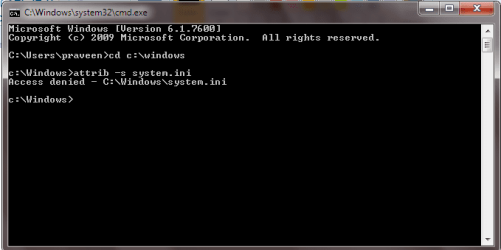
1. Click the Start Button, Type in "cmd" (without quotes), and then press enter.
2. Type in, "cd c:\windows" (without quotes), and then press enter.
3. Type in, "attrib -s system.ini" (without quotes), and then press enter.

Now try to write to the system.ini file.

Hopefully this should help.
 

My Computer My Computer

At a glance

Windows 7 Ultimate x64Intel i7 950 @ 4.0GHzCorsair 6GB XMS3 1600MHzSapphire Radeon HD6950
OS
Windows 7 Ultimate x64
CPU
Intel i7 950 @ 4.0GHz
Motherboard
Asus P6X58D-E
Memory
Corsair 6GB XMS3 1600MHz
Graphics Card(s)
Sapphire Radeon HD6950
Monitor(s) Displays
HP w2207h
Hard Drives
Seagate Barracuda 7200 RPM 320GB
PSU
Corsair HX650W
Case
Cooler Master CM690II Advanced
Try this: 1. Click the Start Button, Type in "cmd" (without quotes),

thanks for your quest but it is still not giving me permission
 

Attachments

  • Untitled.png
    Untitled.png
    10.4 KB · Views: 212

My Computer My Computer

At a glance

windows7 home premium
Computer Manufacturer/Model Number
hp pavilion dv-4 1506TX
OS
windows7 home premium
Second method:
If it did not work try this other method

1-go to run
2-type gpedit.msc
3-expand the administrative templates
4-expand the network
5-select Qos Packet Scheduler
6- double click limit reservable bandwidth
7-enable it and put 0 in the bandwidth limit
8-click apply and ok


this also doesnt help as
 

Attachments

  • Untitled.png
    Untitled.png
    7.1 KB · Views: 75

My Computer My Computer

At a glance

windows7 home premium
Computer Manufacturer/Model Number
hp pavilion dv-4 1506TX
OS
windows7 home premium
No gpedit.msc in Win7 Home Prem.
 

My Computer My Computer

At a glance

Windows 7 Home Premium 64bitQ66004GB.Sapphire Vapor-X 5750
Computer type
PC/Desktop
Computer Manufacturer/Model Number
Acer M5641
OS
Windows 7 Home Premium 64bit
CPU
Q6600
Motherboard
Nvidia MCP73PV
Memory
4GB.
Graphics Card(s)
Sapphire Vapor-X 5750
Sound Card
XFI Extreem music
Monitor(s) Displays
Acer X223W
Screen Resolution
1680x1050
Hard Drives
WD10 02FAEX
WD64 00AAKS
PSU
stock 450w
Case
acer
Cooling
stock
Keyboard
Microsoft Digital Media Pro.
Mouse
Logitech MX620
Internet Speed
49.51Mbs down 4.98Mbs up 17.6ms ping
Antivirus
MSE
Browser
Waterfox
Other Info
Shaw Cable
Netgear R6200
Can someone verify this does anything? It seems like snake oil.
 

My Computer My Computer

At a glance

W7 Professional x64Core 2 Duo 2.932 GBATI Radeon 4695
Computer Manufacturer/Model Number
HP 6000 Pro Micro Tower
OS
W7 Professional x64
CPU
Core 2 Duo 2.93
Memory
2 GB
Graphics Card(s)
ATI Radeon 4695
Monitor(s) Displays
Two HP 17's
Hard Drives
150GB Sata Drive
Case
Tiny. Kinda cute.
Keyboard
HP Supplied. Surprisingly nice.
Mouse
Gateway Mouse from an E2610D
Internet Speed
45 mbps
thanks for your quest but it is still not giving me permission

Ok, try this:

1. Open an elevated command prompt (Right click cmd and "Run as Administrator").
2. Type "takeown /f c:\windows\system.ini" (Without quotes).
3. Type "icacls system.ini /grant administrators:f" (Without quotes).
4. Use my previous method to modify the system.ini attributes.

Then try and write to the file.

Hope this helps.
 

My Computer My Computer

At a glance

Windows 7 Ultimate x64Intel i7 950 @ 4.0GHzCorsair 6GB XMS3 1600MHzSapphire Radeon HD6950
OS
Windows 7 Ultimate x64
CPU
Intel i7 950 @ 4.0GHz
Motherboard
Asus P6X58D-E
Memory
Corsair 6GB XMS3 1600MHz
Graphics Card(s)
Sapphire Radeon HD6950
Monitor(s) Displays
HP w2207h
Hard Drives
Seagate Barracuda 7200 RPM 320GB
PSU
Corsair HX650W
Case
Cooler Master CM690II Advanced
what has happened i have shown but still its writing access denied while saving the file after editing (as when after when i press ok when it asks to replace the file)
 

Attachments

  • Untitled.png
    Untitled.png
    10.2 KB · Views: 148

My Computer My Computer

At a glance

windows7 home premium
Computer Manufacturer/Model Number
hp pavilion dv-4 1506TX
OS
windows7 home premium
Oh, Im sorry!

That was supposed to be, "icacls C:\Windows\system.ini /grant administrators:f"
 

My Computer My Computer

At a glance

Windows 7 Ultimate x64Intel i7 950 @ 4.0GHzCorsair 6GB XMS3 1600MHzSapphire Radeon HD6950
OS
Windows 7 Ultimate x64
CPU
Intel i7 950 @ 4.0GHz
Motherboard
Asus P6X58D-E
Memory
Corsair 6GB XMS3 1600MHz
Graphics Card(s)
Sapphire Radeon HD6950
Monitor(s) Displays
HP w2207h
Hard Drives
Seagate Barracuda 7200 RPM 320GB
PSU
Corsair HX650W
Case
Cooler Master CM690II Advanced
yep!!! thanks it worked now lets see the effect....:)
 

My Computer My Computer

At a glance

windows7 home premium
Computer Manufacturer/Model Number
hp pavilion dv-4 1506TX
OS
windows7 home premium
How to increase internet speed

hi guys... i have found a way to increase your internet speed..

Watch the following video[YOU************//www.youtube.com/watch?v=or2l9nqt7ws&feature=feedu[/YOUTUBE]

Website : nunited95.webstarts.com

Hope this is helpfull.Thank You
 

My Computer My Computer

At a glance

Windows 7 Home Premium x64
OS
Windows 7 Home Premium x64
Silly. :)

If your DNS server is not performing well, it should be fixed.

So meanwhile, you choose an alternate DNS server and claim that your speed is improved? That's not an improvement. That's just fixing what was broken.
 

My Computer My Computer

At a glance

Win 7
OS
Win 7
DNS

Ihorwinkle makes a great point...

As I move forward improving my internet speed (latest improvement: upgrading my Cable Modem to DOCSIS 3.0 [Moto SB6120, if anyone cares]), ensuring the most responsive DNS Server for your network is the best bet at realizing faster internet browsing, etc. It may not directly improve your download speeds (a more effective DNS Server, that is) but it will allow you to get going where you're going at a faster rate. I shaved 44ms off of my DNS queries by switching DNS Servers.

Since I'm a Google Fanatic ("Fanboy" makes it seem like it's not a choice), I went with Google's DNS Servers...which were/are fast, but Comcast's DNS Servers were just better for me. An easy, definitive program that will figure this out for you is called NameBench. it's freeware, and small. The analysis took my machine about two to three minutes to complete. Just do a Google Search for namebench (one word) and it should be the first selection.

Hope this helps!!

As far as improving download speed, there are a few tweaks you can do, but truly, Microsoft spent a lot of time ensuring Win7 performed well. Look on the brightside: They already tweaked it for you. lol

Minus the graphical performance improvements (which aren't really improvements to me since I enjoy enjoying looking at my GUI--so 21st Century), most other tweaks that you do will take away a convenience. Disable Indexing...you lose the convenience of the search functionality; disable Aero...you lose the snap functionality (which is quite important if you multitask a lot)...

With all that said, I think we all want to believe that we can get more performance than the out of the box experience...ahem--I am here reading through the boards as you are lol Windows XP was not really optimized for the internet so there was much room for improvement... That just isn't the case with Windows 7 (a good thing, for sure). Even looking at the improvements to Window Firewall and the serious customization options of that alone is quite impressive; lightyears beyond WinXP...

I would still love to know if anyone has done anything to improve their network performance...

 

My Computer My Computer

At a glance

Windows 7 Home Premium x64Athlon X2 4200+3GB DDR2nVidia 9400GT, 128-bit 1GB DDR2
Computer Manufacturer/Model Number
Modded Gateway GT5034
OS
Windows 7 Home Premium x64
CPU
Athlon X2 4200+
Memory
3GB DDR2
Graphics Card(s)
nVidia 9400GT, 128-bit 1GB DDR2
Sound Card
SB Audigy 2 LS
Monitor(s) Displays
40" Sony Bravia 2
Hard Drives
500GB Seagate Barricuda 7200.11 (System)
750GB Seagate Barricuda 7200.12 (Data)
Really helped me. I went from 9 mbps to 13.
 

My Computer My Computer

At a glance

Windows 7 Home Premium 64bit
OS
Windows 7 Home Premium 64bit
This is imaginary

No matter you settings you make the internet speed will not change.

I tried everything, and usually I get in speedest.net 94-96Mb/s download speed, and I think is enough, only about 5-6Mb upload speed.

Just for the record right now I got this:


http://www.speedtest.net/result/2654667278.png

No matter you try since your internet provider is not a good one, and you don't pay enough money you'll never get decent speeds. In fact I'm quite happy with my speed now. I don't need more! Is optimal.
 

Attachments

  • 2654667278.png
    2654667278.png
    7.9 KB · Views: 41

My Computer My Computer

At a glance

Windows 7 Ultimate X64Intel G860 3.0 Ghz4Gb DDR3 Corsair Vengeance 1600Mhz 9-9-9-24 D...EVGA GT610
Computer type
PC/Desktop
Computer Manufacturer/Model Number
Custom Build
OS
Windows 7 Ultimate X64
CPU
Intel G860 3.0 Ghz
Motherboard
P8B75-V
Memory
4Gb DDR3 Corsair Vengeance 1600Mhz 9-9-9-24 Dual Kit
Graphics Card(s)
EVGA GT610
Hard Drives
Seagate 1T SATA III, 7200rpm, 64Mb buffer
Antivirus
Microsoft Security Essentials
Browser
Google Chrome
Hi actually in first emthod i couldnt find the below text in system.ini page buffer=10000000Tbps
load=10000000Tbps
Download=10000000Tbps
save=10000000Tbps
back=10000000Tbps
search=10000000Tbps
sound=10000000Tbps
webcam=10000000Tbps
voice=10000000Tbps
faxmodemfast=10000000Tbps
update=10000000Tbps

its not there?????????????????

In the second method i couldnt find QOS packet scheduler in the network tab.

Can you help me with this.??????????????
 

My Computer My Computer

At a glance

windows 7 and 32 bit2 GB RAM1 GB
Computer type
Laptop
Computer Manufacturer/Model Number
LENOVO
OS
windows 7 and 32 bit
Memory
2 GB RAM
Graphics Card(s)
1 GB
Hard Drives
150 GB
Antivirus
AVAST
Browser
GOOGLE CHROME
I have seen those system.ini settings at various times over the years and was never certain whether this was for real or just a joke. It of course can't work. In the NT platform the system.ini file exists for one purpose and one purpose only, to configure the 16 bit subsystem. The comment at the top of the file states "; for 16-bit app support". Settings for any other purpose will be ignored. In 64 bit Windows which does not support 16 bit applications the file itself will be ignored.

For anyone who might be tempted to take this seriously.

The second setting with QOS is also invalid. The setting changes the bandwidth that CAN be reserved, not is. Until such a reservation takes place, and Windows does not do it, 100% of bandwidth is available for application use. Windows Update does NOT use QOS. It uses idle bandwdth, that which is not in use by applications.

See this article:
Placebo setting: QoS bandwidth reservation - The Old New Thing - Site Home - MSDN Blogs

The author is Raymond Chen, a developer with Microsoft since prior to Windows 95. Also note the second link in the article.
 

My Computer My Computer

At a glance

Windows 7 Pro 64 bitXeon W35208 GBNvidia Geforce 210
Computer type
PC/Desktop
Computer Manufacturer/Model Number
HP
OS
Windows 7 Pro 64 bit
CPU
Xeon W3520
Memory
8 GB
Graphics Card(s)
Nvidia Geforce 210
Back
Top