
Increase space on C - any ideas?

lister

New member
Power User
Local time
5:06 AM
Messages
259
Hi I have very little space on my C Drive.

I have done the following:

Removed hibernation feature
Run disk cleaner
De-fragmented
Removed previous restore-points, (I think, not sure how to check though)

Any other ideas to delete items for space.

I keep getting warning that the space has run out.

(This is all my problem b/c when I installed the OS I gave W7 such a small amount of room. When I get the chance I will re-install.)

THANKS
 

My Computer My Computer

At a glance

Windows 7 Panasonic CF F9 (used to have CF F8)
Computer Manufacturer/Model Number
Panasonic Toughbook CF F9
OS
Windows 7 Panasonic CF F9 (used to have CF F8)

My Computer My Computer

At a glance

Windows 10, Home Clean InstallIntel Core2 processsor Q8200(2.33Ghz 1333FSB)...6 gbATI Radeon 256MB HD3650
Computer type
PC/Desktop
Computer Manufacturer/Model Number
Dell XPS 420
OS
Windows 10, Home Clean Install
CPU
Intel Core2 processsor Q8200(2.33Ghz 1333FSB) Quad Core Tech
Motherboard
Dell
Memory
6 gb
Graphics Card(s)
ATI Radeon 256MB HD3650
Sound Card
Intergrated 7.1 Channel Audio
Monitor(s) Displays
Dell SP2009W 20"
Hard Drives
640 GB Serial ATA Hard drive
Cooling
Fan
Keyboard
Dell USB Keyboard
Mouse
Dell Premium Optical USB
Internet Speed
DSL 2.85
Delete the Contents of the user Temp folder.

Click the Start Orb
In the search box type:
%temp%
Press Enter, and delete the contents.

Or manually browse there if you want.
C:\ Users \ user name \ AppData \ Local \ Temp
 

My Computer My Computer

At a glance

Windows 7 Home Premium 64bitIntel Core i7 2700k8GB Mushkin Redline Ridgebacks @1866EVGA GTX570 SC
Computer Manufacturer/Model Number
Custom (Self Build)
OS
Windows 7 Home Premium 64bit
CPU
Intel Core i7 2700k
Motherboard
eVGA P67 SLI
Memory
8GB Mushkin Redline Ridgebacks @1866
Graphics Card(s)
EVGA GTX570 SC
Sound Card
XiFi Titanium HD
Monitor(s) Displays
LG W2453V
Screen Resolution
1920x1080
Hard Drives
Intel 320 80GB -- Intel X25-V 40GB --WD Black 1TB x2 -- WD Blue 640GB
PSU
Seasonic x750
Case
Corsair 600T SE White
Cooling
eVGA Superclocked CPU Cooler
Keyboard
Saitek Cyborg
Antivirus
Kaspersky
Browser
IE
Other Info
LG BD/DVD
Hello lister.


Have a look at this tutorial at the link below to see if there's any way to retrieve space from another partition adjacent to the C: partition into the C: partition.


Partition Wizard : Use the Bootable CD
 

My Computer My Computer

At a glance

W 7 64-bit UltimateIntel Q9550 Yorkfield8GB Dominator 8500C5DATI : XFX 5870
Computer Manufacturer/Model Number
* BFK Customs *
OS
W 7 64-bit Ultimate
CPU
Intel Q9550 Yorkfield
Motherboard
ASUS P5Q Pro
Memory
8GB Dominator 8500C5D
Graphics Card(s)
ATI : XFX 5870
Sound Card
Realtek HD Audio 7-1
Monitor(s) Displays
1x 47" LCD HDMI & 3x 26" LCD HDMI
Screen Resolution
1920x1080P & 1920x1200
Hard Drives
1x 80GB Intel X25-M G2 SSD : 1x 500GB & 1x 640GB WD Caviar Black(s)
PSU
Corsair 620HX
Case
Cooler Master RC-690
Cooling
Tuniq Tower 120, 2x 140mm and 3x 120mm case fans
Keyboard
Microsoft 500
Mouse
Razer Diamondback 3G
Internet Speed
14 Mb/s
Other Info
1x Koutech 3Gb/s SATA HDD Hot Swap Rack
Just what you want to hear
Download this and we shall see
You can uninstall when done.
WinDirStat - Windows Directory Statistics

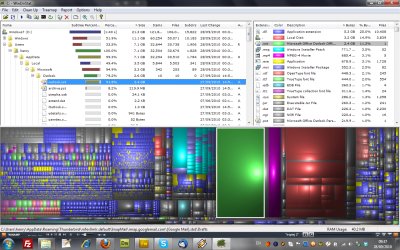
Hey thanks VERY much. That is a great app. Basically I think I have found a culprit that I would love to re-locate: Windows Outlook Email....

If you see the screenshot you will note that it occupies 2 GIG which I would love to re-locate to a D Drive I have, (which I made for media storage which has ample space).

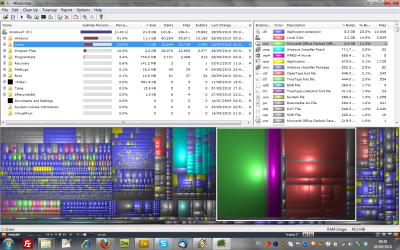
The other screenshot shows the overall "picture"

(Please note that this is a self-inflicted issue since I created the C Drive to have 20 GIG which in hindsight was a massive error. I am now desperately trying to gain some space on C)

My suggestion is to re-locate the Outlook Email which I suspect should not be a major issue...or will it?

Thanks!!!!!!!!!!!!!!

Update...I am compressing the outlook.ost folder following microsoft/outlook instructions, apparently this will free up a lot of space...i will let you know how i get on.
 

Attachments

  • OutlookCulprit.png
    OutlookCulprit.png
    223.9 KB · Views: 21
  • TheRest.png
    TheRest.png
    220.4 KB · Views: 13

My Computer My Computer

At a glance

Windows 7 Panasonic CF F9 (used to have CF F8)
Computer Manufacturer/Model Number
Panasonic Toughbook CF F9
OS
Windows 7 Panasonic CF F9 (used to have CF F8)
Delete the Contents of the user Temp folder.

Click the Start Orb
In the search box type:
%temp%
Press Enter, and delete the contents.

Or manually browse there if you want.
C:\ Users \ user name \ AppData \ Local \ Temp

Thanks - I tried that and it removed a little bit...I need like 2 gig back!

Thanks all the same.
 

My Computer My Computer

At a glance

Windows 7 Panasonic CF F9 (used to have CF F8)
Computer Manufacturer/Model Number
Panasonic Toughbook CF F9
OS
Windows 7 Panasonic CF F9 (used to have CF F8)
Glad that my appl was helpful. Now the rest is up to you. See something you dont need or want delete. See something you dont recognize, post. Someone here will be able to tell you it purpose and if needed.
 

My Computer My Computer

At a glance

Windows 10, Home Clean InstallIntel Core2 processsor Q8200(2.33Ghz 1333FSB)...6 gbATI Radeon 256MB HD3650
Computer type
PC/Desktop
Computer Manufacturer/Model Number
Dell XPS 420
OS
Windows 10, Home Clean Install
CPU
Intel Core2 processsor Q8200(2.33Ghz 1333FSB) Quad Core Tech
Motherboard
Dell
Memory
6 gb
Graphics Card(s)
ATI Radeon 256MB HD3650
Sound Card
Intergrated 7.1 Channel Audio
Monitor(s) Displays
Dell SP2009W 20"
Hard Drives
640 GB Serial ATA Hard drive
Cooling
Fan
Keyboard
Dell USB Keyboard
Mouse
Dell Premium Optical USB
Internet Speed
DSL 2.85
If you want to expand the C drive, post back a screenshot of your full Disk mgmt drive map using Snipping tool in Start Menu and we will give you the steps. How big do you want it?
 
If you want to expand the C drive, post back a screenshot of your full Disk mgmt drive map using Snipping tool in Start Menu and we will give you the steps. How big do you want it?

Yeah thanks but the issue is that I have a linux ext4 partition in the way....its problematic - thanks for the help though.

Great news though - I moved a HUGE 2 GIG folder that kept all the outlook emails into another parition which has massively helped the C Drive saga.

Thanks everyone.
 

My Computer My Computer

At a glance

Windows 7 Panasonic CF F9 (used to have CF F8)
Computer Manufacturer/Model Number
Panasonic Toughbook CF F9
OS
Windows 7 Panasonic CF F9 (used to have CF F8)
Great, that software has shown you a program that you no longer need. Keep looking you may find more. Be careful with the restore points, keep at least one or two. Otherwise, you will be sorry down the road.
 

My Computer My Computer

At a glance

Windows 10, Home Clean InstallIntel Core2 processsor Q8200(2.33Ghz 1333FSB)...6 gbATI Radeon 256MB HD3650
Computer type
PC/Desktop
Computer Manufacturer/Model Number
Dell XPS 420
OS
Windows 10, Home Clean Install
CPU
Intel Core2 processsor Q8200(2.33Ghz 1333FSB) Quad Core Tech
Motherboard
Dell
Memory
6 gb
Graphics Card(s)
ATI Radeon 256MB HD3650
Sound Card
Intergrated 7.1 Channel Audio
Monitor(s) Displays
Dell SP2009W 20"
Hard Drives
640 GB Serial ATA Hard drive
Cooling
Fan
Keyboard
Dell USB Keyboard
Mouse
Dell Premium Optical USB
Internet Speed
DSL 2.85
Back
Top