Information on buying RAM/Tips/Pointers.

XxGabrielxX

New member
Member
Local time
8:40 PM
Messages
30
Location
Hamilton, New Zealand
Hi,
I am wondering if someone can give me some advice on RAM, i was looking in Dicksmith at
DSE 1GB DDR2 800MHz Desktop RAM. Is this going to be compatible with my computer though, not being tech savvy can i please have some of your guys opinions. As well, i know you need my computer specs all i know how to acquire them is through DXDIAG.exe if you need any more information then I'll do the best i can to give them to you.
 

Attachments

My Computer

OS
Windows 7 Home Premium 32 bit
CPU
intel (R) Core (TM) i5 cpu 750 @ 2.67GHz (4 cpu's), ~2.7ghz
Motherboard
ASUS P7P55D LE
Memory
4096MB Ram
Graphics Card(s)
ATI Radeon HD 5830
Sound Card
VIA HD Audio Deck
Screen Resolution
1080 x 1020

My Computer

Computer Manufacturer/Model Number
HP Pavilion Elite 495UK
OS
Windows 7 Ultimate SP1 64-Bit
CPU
Intel Core i7 870 @ 2.93GHz
Motherboard
MSI 2A9C (CPU1)
Memory
8Gb Dual-Channel DDR3 @ 664MHz
Graphics Card(s)
nVidia GeForce GTX 460 1024MB dedicated RAM
Sound Card
Realtek HD Audio
Monitor(s) Displays
HP2310i
Screen Resolution
1920 x 1080
Hard Drives
1x1954GB Hitachi HDS22020ALA 330 (RAID), 1x1954GB Hitachi External for backup and storage
PSU
460W
Case
HP Elite
Cooling
Air cooled
Keyboard
Logitech K750 solar-powered keyboard
Mouse
Logitech Wireless M180 mouse
Internet Speed
2Mb
Other Info
Pure Avanti Flow Internet Radio with iPod Dock, 64Gb iPod, HP USB Speakers, Sony MDR-V500 Headphones, Sony Vaio F-Series Laptop

My Computer

Computer Manufacturer/Model Number
Custom built
OS
Windows 7 Ultimate 64 bit
CPU
AMD Phenom II X4 965 Black Edition
Motherboard
Gigabyte GA-MA790X-DS4
Memory
GSkill 4 X 2 GB PC 8500
Graphics Card(s)
XFX Radeon HD 6790 D
Sound Card
On board RealTek HD
Monitor(s) Displays
Dual monitors:Samsung SyncMaster S20B300
Screen Resolution
1600 X 900
Hard Drives
Seagate Barracuda 1TB (primary)
Seagate Barracuda 2 X 320 GB
PSU
Ultra X4 750 watt fully modular
Case
Thermaltake Overseer RX 1 full tower
Cooling
Core-Contact 92 mm CPU Cooler
Keyboard
Logitech G510
Mouse
Razor DeathAdder
Internet Speed
50/5 Mbps UL/DL
Other Info
Optical: Super Muliti DVD burner w/lightscribe, Hauppauge WinTV HVR-1800
Once Crucial tells you what type and how much memory you can use, then you are set to start shopping.

For the record, you have 4 GB of RAM and Windows 7 x86, so you are already wasting some of your memory. If you want to use all 4 GB, or have any intention of adding more, you will need Windows 7 x64. I know this is common knowledge by now, but I figured I'd mention it anyway.
 

My Computer

OS
Windows 7 Ultimate x64 SP1
CPU
Intel Core i7-2600
Motherboard
Gigabyte GA-P67A-UD3P-B3
Memory
12 GB Patriot Extreme DDR3-1333
Graphics Card(s)
Nvidia GTX 470
Monitor(s) Displays
Dell UltraSharp 2209WA
Hard Drives
OCZ Agility3 240 GB, WD5001AALS, WD7501AALS
PSU
OCZ ModStream 700W
Case
CoolerMaster HAF 912 Advanced
Cooling
CoolerMaster Hyper 212 Plus
So, i have to upgrade to Windows 7 x64 for more RAM. Would i need to buy a new windows 7 disk to upgrade? also can my hardware support W7 x64?
 
Last edited:

My Computer

OS
Windows 7 Home Premium 32 bit
CPU
intel (R) Core (TM) i5 cpu 750 @ 2.67GHz (4 cpu's), ~2.7ghz
Motherboard
ASUS P7P55D LE
Memory
4096MB Ram
Graphics Card(s)
ATI Radeon HD 5830
Sound Card
VIA HD Audio Deck
Screen Resolution
1080 x 1020

My Computer

Computer type
PC/Desktop
Computer Manufacturer/Model Number
Home made Desktop
OS
Windows 10 Pro. 64/ version 1709 Windows 7 Pro/64
CPU
Intel i7-6800K @ 4.3
Motherboard
ASUS X-99 Deluxe II
Memory
Corsair Platinum 16 gig @2400
Graphics Card(s)
EVGA GTX 1070 OC
Monitor(s) Displays
Asus 27" LED LCD/VE278Q
Screen Resolution
1920-1080 or 1280-720 HDMI
Hard Drives
INTEL SSD 730-240 Gb Sata 3.0/
PSU
EVGA Platium 1200W
Case
Phanteks Luxe Tempered Glass 8 fans/ one radiator
Cooling
XSPC/ Water Cooled CPU
Keyboard
Das 4 Professional
Mouse
Logitech M705/MX Anywhere 2-S
Internet Speed
100 mbits
Antivirus
Microsoft Security Essentials/ Malwarebytes Premium 3.0/ SAS
Browser
I.E. 11 default/Firefox/ ISP Time Warner Cable/Spectrum
Other Info
LG BluRay Burner/
Sound system-KLipsch-THX/
Icy Dock ssd Hot Swap bays.
So, i have to upgrade to Windows 7 x64 for more RAM. Would i need to buy a new windows 7 disk to upgrade? also can my hardware support Windows 7 x64?

1. Yes. You need a 64bit OS to recognize more than 4GB of memory.
2. Yes, you need Win 7 64 bit
3. Yes
 

My Computer

Computer Manufacturer/Model Number
Dell / Custom
OS
Windows 7 HP / Ultimate x64
CPU
Core i5 / X4 955 BE
Motherboard
OEM / Gigabyte 880GM-USB3
Memory
4GB DDR3 1333Mhz / 8GB DDR3 1600Mhz
Graphics Card(s)
HD5470 / HD5670
Sound Card
Onboard
Monitor(s) Displays
FullHD 15" / Dell 22" WS
Screen Resolution
1920x1080 / 1680x1050
Hard Drives
320GB / 1.5TB
PSU
CM
Case
CM
Cooling
CM, Antec
Keyboard
Logitech
Mouse
Logitech
  • Like
Reactions: JMH
So, i have to upgrade to Windows 7 x64 for more RAM. Would i need to buy a new windows 7 disk to upgrade? also can my hardware support W7 x64?

What sort of Windows 7 license do you have?

A retail Windows 7 license can be used to activate either a 32 bit or 64 bit installation. (I switched from 32 bit to 64 on my laptop.) I've never tried it, but I believe that the same is true of an OEM license.

The trick is coming up with an installation copy that matches the key. Alternately, There are legitimate copies of the .iso files available for download online (mydigitallife). The procedure to convert the installer to a generic one (by removing the ei.cfg file) is widely described on the Web.
 

My Computer

Computer Manufacturer/Model Number
homegrown
OS
Windows 7 Pro X64 SP1
CPU
Intel Core I7-3930k
Motherboard
Asus P9X79 Pro
Memory
16 GB Gskill DDR3-2133
Graphics Card(s)
eVGA GTX680
Sound Card
Creative X-Fi Titanium
Monitor(s) Displays
As PA246Q
Screen Resolution
1920 X 1200
Hard Drives
Corsair Force GT, 120 GB
WDC 1.5TB Caviar Black
PSU
PCP&C Silencer 750 Crossfire
Case
Silverstone FT02
Cooling
Noctua NH-D14
Keyboard
cheap Logitech USB
Mouse
Microsoft Intellimouse Explorer (old optical) USB
Internet Speed
6Mb cable
Other Info
Pioneer BDR-205
Samsung SH-203B
Monsoon 5.1 speakers
So, i have to upgrade to Windows 7 x64 for more RAM. Would i need to buy a new windows 7 disk to upgrade? also can my hardware support W7 x64?

What sort of Windows 7 license do you have?

A retail Windows 7 license can be used to activate either a 32 bit or 64 bit installation. (I switched from 32 bit to 64 on my laptop.) I've never tried it, but I believe that the same is true of an OEM license.

The trick is coming up with an installation copy that matches the key. Alternately, There are legitimate copies of the .iso files available for download online (mydigitallife). The procedure to convert the installer to a generic one (by removing the ei.cfg file) is widely described on the Web.

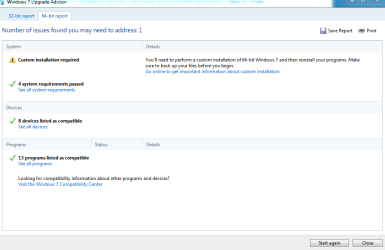
How would i find out what license i have? And all i know from looking at the disk i got with my computer is windows 7 32bit. K i used the advisor as directed too. this is what i got from results. Its as attached.
 

Attachments

  • Custom installation..PNG
    Custom installation..PNG
    16.4 KB · Views: 12

My Computer

OS
Windows 7 Home Premium 32 bit
CPU
intel (R) Core (TM) i5 cpu 750 @ 2.67GHz (4 cpu's), ~2.7ghz
Motherboard
ASUS P7P55D LE
Memory
4096MB Ram
Graphics Card(s)
ATI Radeon HD 5830
Sound Card
VIA HD Audio Deck
Screen Resolution
1080 x 1020
My OEM disc states on it, (Intended for distribution with a new PC) I don't know what a retail one states, I have never had one.
 

My Computer

Computer type
PC/Desktop
Computer Manufacturer/Model Number
Home made Desktop
OS
Windows 10 Pro. 64/ version 1709 Windows 7 Pro/64
CPU
Intel i7-6800K @ 4.3
Motherboard
ASUS X-99 Deluxe II
Memory
Corsair Platinum 16 gig @2400
Graphics Card(s)
EVGA GTX 1070 OC
Monitor(s) Displays
Asus 27" LED LCD/VE278Q
Screen Resolution
1920-1080 or 1280-720 HDMI
Hard Drives
INTEL SSD 730-240 Gb Sata 3.0/
PSU
EVGA Platium 1200W
Case
Phanteks Luxe Tempered Glass 8 fans/ one radiator
Cooling
XSPC/ Water Cooled CPU
Keyboard
Das 4 Professional
Mouse
Logitech M705/MX Anywhere 2-S
Internet Speed
100 mbits
Antivirus
Microsoft Security Essentials/ Malwarebytes Premium 3.0/ SAS
Browser
I.E. 11 default/Firefox/ ISP Time Warner Cable/Spectrum
Other Info
LG BluRay Burner/
Sound system-KLipsch-THX/
Icy Dock ssd Hot Swap bays.
My OEM disc states on it, (Intended for distribution with a new PC) I don't know what a retail one states, I have never had one.

Mine says that too. What does my screenshot mean of a custom install?
 

My Computer

OS
Windows 7 Home Premium 32 bit
CPU
intel (R) Core (TM) i5 cpu 750 @ 2.67GHz (4 cpu's), ~2.7ghz
Motherboard
ASUS P7P55D LE
Memory
4096MB Ram
Graphics Card(s)
ATI Radeon HD 5830
Sound Card
VIA HD Audio Deck
Screen Resolution
1080 x 1020
From your system specs, you have 4Gb of RAM & your motherboard will handle up to 16Gb. As others mentioned, you must have Win 7 64-bit to take advantage of additional RAM.

The Ram you referenced in your post is DDR2-800 - 1Gb module. You do NOT want this. Your board takes DDR3 Ram. I checked the QVL for your board & it doesn't even list DDR3-800 Ram. You want to get - at the least - DDR3-1067 Ram. Shop for a DDR3-1067 8Gb kit of Ram - AFTER you upgrade to Win 7 64 bit! The Ram could either be 2 - 4Gb modules, or 4 - 2Gb modules.
 

My Computer

Computer type
PC/Desktop
Computer Manufacturer/Model Number
Custom Build
OS
Windows 7 Professional 64 Bit SP1
CPU
Intel i7-3770K. Mild Overclock to 4.2 Ghz
Motherboard
ASUS Sabertooth Z77
Memory
Crucial Ballistix Sport 32GB DDR3-1600 (PC3-12800)
Graphics Card(s)
Intel 4000 - On CPU
Sound Card
On Board
Monitor(s) Displays
HP w2408h
Screen Resolution
1920 x 1200
Hard Drives
Samsung 840 Pro 256Gb SSD, --
Two - WDC WD1001FALS-00J7B0 SATA
PSU
Antec EarthWatts Green Series 650 Watt ATX
Case
Fractal Design Core 3000 ATX
Cooling
Corsair H80i Water Cooled
Keyboard
Logitech Illuminated
Mouse
Logitech Wireless Trackball M570 + Touchpad T650
Internet Speed
9.5 Mbps down - 25.4 Mbps upload
Antivirus
MSE
Browser
IE 10, Chrome
  • Like
Reactions: JMH
My OEM disc states on it, (Intended for distribution with a new PC) I don't know what a retail one states, I have never had one.

Mine says that too. What does my screenshot mean of a custom install?


A retail version disc will NOT have "Intended for distribution with a new PC" on it.
 

My Computer

Computer type
PC/Desktop
Computer Manufacturer/Model Number
Custom Build
OS
Windows 7 Professional 64 Bit SP1
CPU
Intel i7-3770K. Mild Overclock to 4.2 Ghz
Motherboard
ASUS Sabertooth Z77
Memory
Crucial Ballistix Sport 32GB DDR3-1600 (PC3-12800)
Graphics Card(s)
Intel 4000 - On CPU
Sound Card
On Board
Monitor(s) Displays
HP w2408h
Screen Resolution
1920 x 1200
Hard Drives
Samsung 840 Pro 256Gb SSD, --
Two - WDC WD1001FALS-00J7B0 SATA
PSU
Antec EarthWatts Green Series 650 Watt ATX
Case
Fractal Design Core 3000 ATX
Cooling
Corsair H80i Water Cooled
Keyboard
Logitech Illuminated
Mouse
Logitech Wireless Trackball M570 + Touchpad T650
Internet Speed
9.5 Mbps down - 25.4 Mbps upload
Antivirus
MSE
Browser
IE 10, Chrome
My OEM disc states on it, (Intended for distribution with a new PC) I don't know what a retail one states, I have never had one.

Mine says that too. What does my screenshot mean of a custom install?

A custom install means you have to install all your programs again but you will end up with a windows.old folder.

Here's an excellent walk-through tutorial,

http://www.sevenforums.com/tutorials/20146-custom-install-windows-7-a.html
 

My Computer

Computer type
PC/Desktop
Computer Manufacturer/Model Number
Self Built
OS
Win 10 Pro x64
CPU
Intel I5-2500K @3.3GHz
Motherboard
Asrock P67 Extreme4
Memory
16GB G.Skill Ripjaws X (4x4GB)
Graphics Card(s)
EVGA GeForce 750 Ti SC 2GB
Sound Card
ASUS Xonar DG 5.1 Channels 24-bit 96KHz PCI Interface Sound
Monitor(s) Displays
auria eq2367
Screen Resolution
1920 x 1080
Hard Drives
250GB Samsung 850 EVO SSD
1TB WD Blue
1TB Hitachi
PSU
SeaSonic X 650W 80 Plus Gold
Case
Corsair Obsidian 750D
Cooling
Corsair H60, Three 140mm case fans
Keyboard
Logitech Wireless Keyboard K520
Mouse
Logitech Wireless Mouse M310
Internet Speed
Wave Broadband ~ 100 dn 5 up
Antivirus
Windows Defender, Malwarebytes Premium
Browser
Edge, IE11, Chrome
Other Info
Laptop specs: HP g7-1365dx /
CPU: AMD A6-3420M APU with Radeon(tm) HD Graphics /
RAM: Crucial 8Gb (2x4Gb) /
SSD: Crucial M4-CT128M4SSD2 ATA Device/ FW 000F /
GFX: AMD Radeon HD 6520G /
OS: Windows 10 Pro x64
  • Like
Reactions: JMH
Once you have chose Windows 7/64 your motherboard is the next boss in town. Pick the Ram that your motherboard indicates it will except. If you look at my specs I have done so. Yet things are not that easy. I have chosen the top end of the motherboard specs 2000/oc but still can't get to work over 17xxx and it is because of the chip i7-960 memory controler and temps and volts. I would suggest doing a lot of research on your selection of ram speed for your motherboard. No motherboard, cpu, ram will work together the same as others. When you decide on your ram get lots of it; Windows 7/64 likes lots of ram.
 

My Computer

Computer type
PC/Desktop
Computer Manufacturer/Model Number
Home made Desktop
OS
Windows 10 Pro. 64/ version 1709 Windows 7 Pro/64
CPU
Intel i7-6800K @ 4.3
Motherboard
ASUS X-99 Deluxe II
Memory
Corsair Platinum 16 gig @2400
Graphics Card(s)
EVGA GTX 1070 OC
Monitor(s) Displays
Asus 27" LED LCD/VE278Q
Screen Resolution
1920-1080 or 1280-720 HDMI
Hard Drives
INTEL SSD 730-240 Gb Sata 3.0/
PSU
EVGA Platium 1200W
Case
Phanteks Luxe Tempered Glass 8 fans/ one radiator
Cooling
XSPC/ Water Cooled CPU
Keyboard
Das 4 Professional
Mouse
Logitech M705/MX Anywhere 2-S
Internet Speed
100 mbits
Antivirus
Microsoft Security Essentials/ Malwarebytes Premium 3.0/ SAS
Browser
I.E. 11 default/Firefox/ ISP Time Warner Cable/Spectrum
Other Info
LG BluRay Burner/
Sound system-KLipsch-THX/
Icy Dock ssd Hot Swap bays.
Back
Top