Initial Load of Folder/Directory Takes 10 Minutes - Slow

happyseven17

New member
Local time
7:13 PM
Messages
8
My Win 7 recently crashed. I believe it was due to a problem with an antivirus software update.

I was unable to return to Windows but was able to get into Safe Mode. From there, I was instructed by MS Tech to turn off all of my non-MS services through msconfig.

Then I successfully boot into Windows.

Now the computer opens and shuts down very quickly because unnecessary programs are no longer booting on startup.

There is only one mysterious issue that I am trying to resolve and I hope that someone here can steer me in the right direction.

The *initial* load of a folder (directory) takes nearly 10 minutes to load -- way too long.

After that, folders load quickly, so it is just an initial loading issue.

And the same problem does not apply to a document or program, just a folder.

Does anyone have any idea what is causing this issue? It is possible that a service was turned off or switched to Disable and not Manual or Automatic that is needed for this functionality but I have not determined which one.

Can anyone here help me figure it out?
 

My Computer My Computer

At a glance

Win 7
OS
Win 7
What is the folder or directory in question. Details of this could help diagnose your problem.
 

My Computer My Computer

At a glance

Windows 7 Home Premium 64 bit sp1Intel i5 3570 3.4Ghz Ivy Bridge SKT 1155 quad...G-Skill Rip Jaws 16Gb (8x2) DDR3 -1600 PC3 12...Gigabyte NVIDIA GT610 1Gb DDR3 810/1200 PCI-E...
Computer type
PC/Desktop
Computer Manufacturer/Model Number
Self built using existing case
OS
Windows 7 Home Premium 64 bit sp1
CPU
Intel i5 3570 3.4Ghz Ivy Bridge SKT 1155 quad core
Motherboard
Gigabyte Z77-HD3 SKT 1155 2xSata 3, 4x USB 3.0
Memory
G-Skill Rip Jaws 16Gb (8x2) DDR3 -1600 PC3 12800 CL 10 red
Graphics Card(s)
Gigabyte NVIDIA GT610 1Gb DDR3 810/1200 PCI-E 2.0 Silent
Sound Card
NVIDIA High Definition & Realtech High Definition Audio
Monitor(s) Displays
2 x Philips 226V4L 16:9 aspect ratio
Screen Resolution
1920 x 1080 HD
Hard Drives
Samsung 840 Pro 256gb SSD, SATA 3.
Hitachi Touro Portable 1tb, USB 3.0 HDD used for image b/ups.
PSU
Corsair VS450
Case
Codeng
Cooling
PSU fan & CPU fan
Keyboard
Logitech
Mouse
Logitech Wireless trackball M570
Internet Speed
Wireless 3G. 3mg down & 550kb up.
Antivirus
Bitdefender Internet Security 2020
Browser
Opera (Current Version) & Firefox
Other Info
MS Office 2013 Pro. Davis weather station software. MGE Nova 600 avr UPS.
It seems to be any folder/directory on my Startup menu and desktop shortcuts to folders on my local drive: (C:\Users\Me\Desktop).

I have lots of space left on my hard drive and the folders are reasonable sizes.

Documents and software open quickly but folders have a long initial delay. After that delay, all folders open quickly.
 

My Computer My Computer

At a glance

Win 7
OS
Win 7
Usually most people only have one folder or two that are sluggish, because maybe that folder contains a large number of files optimized for images which are thumbnails view, videos, musics, etc.. (normally from 8-10 seconds, not in minutes). But if you have whole folders include subfolders that are misbehaving, that is a big issue. It seems that have some corrupt files on your Windows. I recommend you to Re-install your Windows (better Clean install).
 

My Computer My Computer

At a glance

Windows 7 Ult x64AMD X4 Quad Core 3.1GHzDDR3 16GBRadeon R5 230 2GB
Computer type
PC/Desktop
Computer Manufacturer/Model Number
own assembly
OS
Windows 7 Ult x64
CPU
AMD X4 Quad Core 3.1GHz
Motherboard
Gigabyte socket FM2+
Memory
DDR3 16GB
Graphics Card(s)
Radeon R5 230 2GB
Sound Card
Xonar D-KARAX
Monitor(s) Displays
ViewSonic 24'
Hard Drives
SSD + WDC
PSU
Antec VP500W
Antivirus
Kaspersky
Browser
Firefox
Usually most people only have one folder or two that are sluggish, because maybe that folder contains a large number of files optimized for images which are thumbnails view, videos, musics, etc.. (normally from 8-10 seconds, not in minutes). But if you have whole folders include subfolders that are misbehaving, that is a big issue. It seems that have some corrupt files on your Windows. I recommend you to Re-install your Windows (better Clean install).


No, I do not need to do that because it is very fast after it opens. It is just an initial delay.

So, it is probably something on startup that needs a tweak.
 

My Computer My Computer

At a glance

Win 7
OS
Win 7
It seems to be any folder/directory on my Startup menu and desktop shortcuts to folders on my local drive: (C:\Users\Me\Desktop).

I have lots of space left on my hard drive and the folders are reasonable sizes.

Documents and software open quickly but folders have a long initial delay. After that delay, all folders open quickly.

Have a look at this Forum tutorial & look at "Method 3" in the tutorial. Could you also post screen shot of your Start Up in msconfig, similar to the one shown in the tutorial.
 

My Computer My Computer

At a glance

Windows 7 Home Premium 64 bit sp1Intel i5 3570 3.4Ghz Ivy Bridge SKT 1155 quad...G-Skill Rip Jaws 16Gb (8x2) DDR3 -1600 PC3 12...Gigabyte NVIDIA GT610 1Gb DDR3 810/1200 PCI-E...
Computer type
PC/Desktop
Computer Manufacturer/Model Number
Self built using existing case
OS
Windows 7 Home Premium 64 bit sp1
CPU
Intel i5 3570 3.4Ghz Ivy Bridge SKT 1155 quad core
Motherboard
Gigabyte Z77-HD3 SKT 1155 2xSata 3, 4x USB 3.0
Memory
G-Skill Rip Jaws 16Gb (8x2) DDR3 -1600 PC3 12800 CL 10 red
Graphics Card(s)
Gigabyte NVIDIA GT610 1Gb DDR3 810/1200 PCI-E 2.0 Silent
Sound Card
NVIDIA High Definition & Realtech High Definition Audio
Monitor(s) Displays
2 x Philips 226V4L 16:9 aspect ratio
Screen Resolution
1920 x 1080 HD
Hard Drives
Samsung 840 Pro 256gb SSD, SATA 3.
Hitachi Touro Portable 1tb, USB 3.0 HDD used for image b/ups.
PSU
Corsair VS450
Case
Codeng
Cooling
PSU fan & CPU fan
Keyboard
Logitech
Mouse
Logitech Wireless trackball M570
Internet Speed
Wireless 3G. 3mg down & 550kb up.
Antivirus
Bitdefender Internet Security 2020
Browser
Opera (Current Version) & Firefox
Other Info
MS Office 2013 Pro. Davis weather station software. MGE Nova 600 avr UPS.
Thanks, I'll see if I can locate what you are talking about.

I tried comparing the msconfig and services.msc before and after the issue to see if I could figure it out but am stumped.
 

My Computer My Computer

At a glance

Win 7
OS
Win 7
"...I was instructed by MS Tech to turn off all of my non-MS services through msconfig...."
Download, install, tweaking.com's Windows Repair (All in One). Boot into Safe Mode with Networking, after making registry and system restore backups, go to Repairs -- accept default, ensure items 26 & 27 are also checked. Restart twice, let Windows come to full Desktop. Please report back on your computer's progress.
 

My Computer My Computer

At a glance

Windows 7 Professional 64-bitDesktop i5; Acers i5 & i7desktop 16GB; 1 Acer 8GB & 1 Acer 16GB
Computer type
PC/Desktop
Computer Manufacturer/Model Number
Antec desktop; Acer Aspire laptops
OS
Windows 7 Professional 64-bit
CPU
Desktop i5; Acers i5 & i7
Memory
desktop 16GB; 1 Acer 8GB & 1 Acer 16GB
Hard Drives
1TB split into 2 equal partitions [OS and data] usable by RJS
Internet Speed
AT&T DSL
Browser
FF, GChrome, msIE
Other Info
Windows 7 Firewall, Emsisoft AM/AV, MSE [scan-only], SpywareBlaster, Ruiware/BillP combine
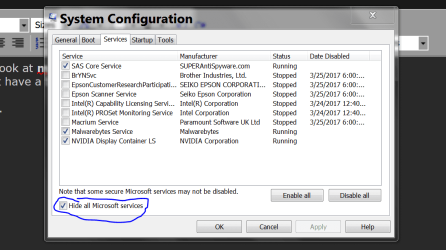
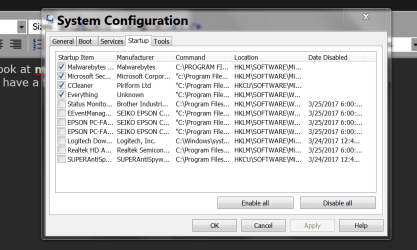
happyseven17, could you post a couple of pictures like these from one of my systems?

Msconfig Non Microsoft Services.PNG

Msconfig Startup.PNG

Jack
 

My Computer My Computer

At a glance

Windows 10 Pro. 64/ version 1709 Windows 7 Pr...Intel i7-6800K @ 4.3Corsair Platinum 16 gig @2400EVGA GTX 1070 OC
Computer type
PC/Desktop
Computer Manufacturer/Model Number
Home made Desktop
OS
Windows 10 Pro. 64/ version 1709 Windows 7 Pro/64
CPU
Intel i7-6800K @ 4.3
Motherboard
ASUS X-99 Deluxe II
Memory
Corsair Platinum 16 gig @2400
Graphics Card(s)
EVGA GTX 1070 OC
Monitor(s) Displays
Asus 27" LED LCD/VE278Q
Screen Resolution
1920-1080 or 1280-720 HDMI
Hard Drives
INTEL SSD 730-240 Gb Sata 3.0/
PSU
EVGA Platium 1200W
Case
Phanteks Luxe Tempered Glass 8 fans/ one radiator
Cooling
XSPC/ Water Cooled CPU
Keyboard
Das 4 Professional
Mouse
Logitech M705/MX Anywhere 2-S
Internet Speed
100 mbits
Antivirus
Microsoft Security Essentials/ Malwarebytes Premium 3.0/ SAS
Browser
I.E. 11 default/Firefox/ ISP Time Warner Cable/Spectrum
Other Info
LG BluRay Burner/
Sound system-KLipsch-THX/
Icy Dock ssd Hot Swap bays.
Probably couldn't hurt to disable superfetch from services.msc
 

My Computer My Computer

At a glance

Windows 7 Ultimate x643rd Generation i58GB GDDR3
Computer type
PC/Desktop
Computer Manufacturer/Model Number
Gateway
OS
Windows 7 Ultimate x64
CPU
3rd Generation i5
Memory
8GB GDDR3
Hard Drives
Samsung 840 Evo 250GB
Antivirus
None
Browser
Firefox Extended Support Release
Back
Top