Input devices freeze intermittently

JProgrammer

New member
Local time
7:31 PM
Messages
4
Location
Madison, WI
My mouse and keyboard freeze intermittently, so my mouse just freezes and the keyboard sometimes receives no input, sometimes acts like I'm still holding down the last button. The freezing happens about every 5 sec. when it's real bad and lasts 3-4 sec. (yes that’s more time with a frozen mouse then a working one)...
This has happened to me twice now and both times were right after playing Bioshock. The first time it went away after a reboot, but this time it continued after the reboot. I watch task manager on my second display constantly and there is no common spike when the freeze occurs, sometimes CPU usage is high, and sometimes it's low.
Now that I've started posting though is seems to have stopped, but trying to register took a long time with the constant freezing. My keyboard and mouse are both ps2 connected to a USB converter (my mother board only has 1 ps2 connector).
Any ideas?
 

My Computer

OS
Windows 7 Ultimate 64-bit
CPU
Intel core 2 duo
Memory
4 GB
Graphics Card(s)
8800 GTX
Monitor(s) Displays
2
Hard Drives
640 GB
Welcome!

What keyboard/mouse do you have? Have you tried updating drivers in Device Manager?

~JK
 

My Computer

Computer Manufacturer/Model Number
Custom
OS
Windows 7 Professional x64
CPU
Intel i7 2600K OC'd @ 4620 MHz
Motherboard
Asus P8Z68-V Pro
Memory
16GB GSkill Sniper 2133 Mhz (4x4GB)
Graphics Card(s)
EVGA GeForce GTX 480 SuperClocked+
Sound Card
Realtek High Definition Audio
Monitor(s) Displays
2x Acer S273HLbmii 27"
Screen Resolution
2 x 1920x1080
Hard Drives
64GB Crucial M4 SSD

Storage: Hitachi 1TB 5400RPM, Samsung 1.5TB 5400RPM
PSU
Corsair HW Series 750w (modular)
Case
Cooler Master HAF 932 Advanced Blue Edition
Cooling
CM Hyper 212+ CPU cooler, 3x 230mm + 1x 140mm case fans
Keyboard
Logitech MK320 (wireless)
Mouse
Logitech MK320 (wireless)
Internet Speed
30 Mb/s : 2 Mb/s
My mouse and keyboard freeze intermittently, so my mouse just freezes and the keyboard sometimes receives no input, sometimes acts like I'm still holding down the last button. The freezing happens about every 5 sec. when it's real bad and lasts 3-4 sec. (yes that’s more time with a frozen mouse then a working one)...
This has happened to me twice now and both times were right after playing Bioshock. The first time it went away after a reboot, but this time it continued after the reboot. I watch task manager on my second display constantly and there is no common spike when the freeze occurs, sometimes CPU usage is high, and sometimes it's low.
Now that I've started posting though is seems to have stopped, but trying to register took a long time with the constant freezing. My keyboard and mouse are both ps2 connected to a USB converter (my mother board only has 1 ps2 connector).
Any ideas?


Hi and welcome

there will be a log of it in event viewer. type eventvwr in search. goto the windows log>application tab. you are looking for critical errors(they have red in the left column) that say appp hang, app crash, etc.

When you find them use the snipping tool to make a screen shot (type snipping in search) and attach it using the attachment icon (shped like a paperclip) on the reply form

See pics


Ken
 
Last edited:

My Computer

Computer Manufacturer/Model Number
HP Pavillion dv-7 1005 Tx
OS
Win 8 Release candidate 8400
CPU
[email protected]
Memory
4 gigs
Graphics Card(s)
Nvidia 9600M
Sound Card
HD built-in
Monitor(s) Displays
17" Wxga
Screen Resolution
1440x900
Cooling
none
Internet Speed
45Mb down 5Mb up
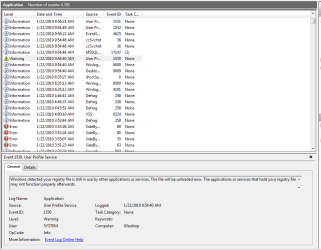
Drivers are up to date and I'm using a cheap logitech ps2 mouse and the keyboard from my original HP pavillion a630 (with window drivers, not HP's). There are no errors in my event log (ether system or application) around the time this was happening, but there is a warning...
 

Attachments

  • Capture.PNG
    Capture.PNG
    20.3 KB · Views: 96

My Computer

OS
Windows 7 Ultimate 64-bit
CPU
Intel core 2 duo
Memory
4 GB
Graphics Card(s)
8800 GTX
Monitor(s) Displays
2
Hard Drives
640 GB
It's happening again, this time after playing EVE (an online game). CPU usage has gone above 50% for a while and my mouse is still freezing every now and then. No warnings or errors in any log since this morning.
This is really getting annoying, I can't play any games on my GAMING PC.
 

My Computer

OS
Windows 7 Ultimate 64-bit
CPU
Intel core 2 duo
Memory
4 GB
Graphics Card(s)
8800 GTX
Monitor(s) Displays
2
Hard Drives
640 GB
Your mention of CPU usage makes me think that there is a possibility that there is a process that is interfering with operations overall, not just the mouse and keyboard. Duplicate the situation and then use either the Task Manager or Process Explorer to determine exactly what the process is, and what program it belongs to. Eliminate the problem by updating, reinstalling or just uninstalling the problem progam.
 

My Computer

Computer Manufacturer/Model Number
DIY
OS
W7x64 Pro, SuSe 12.1/** W7 x64 Pro, XP MCE
CPU
Phenom II 1090T w/Noctua NH-D14 /**4400+ X2 w/CM Hyper TX 3
Motherboard
ASRock 890FX Deluxe 4/**A8N-SLI
Memory
2 x 2GB Patriot PGS34g1600LLKA/**4x1GB Corsair VS
Graphics Card(s)
EVGA GTX460 SC/**EVGA 8800GTS
Sound Card
Asus Xonar D2X/**Xonar D1
Monitor(s) Displays
Acer X233H, Dell E152FPc /**LG M237-WD
Screen Resolution
1920x1080 & 1024x768/**1980x1080
Hard Drives
WDC 2TB, 1.5TB, 1TB, 500GB,Seagate 500GB , Maxtor 80GB /**500GB Seagate & WDC 1TB Black
PSU
CM RS600 w/ APC BX1000G/**Antec 500 TP w/ APC BX1000
Case
HAF922/**Antec 1040IIB
Cooling
3x200mm, 1x140 and 1x120mm/**5x80mm fans
Keyboard
Logitech Media USB/**Saitek Eclipse
Mouse
Cordless Trackman Wheel/**Ditto
Internet Speed
3.3Mbps
Other Info
SB 560 5.1 w/ Sennheiser RS140/**Creative T20 speakers, Dvico FusionHDTV7 Gold RT, Cisco E3000, HP 5510V AIO, Linksys E3000, Belkin F5U237 hub and **F5D8055 adapter
(** = 2nd rig)
It's at it again, only this time I was just using paint! I restarted, stopped all background programs (including gadgets), and moved my mouse in a circle to see if it was still freezing, it was...
I took a snap shot of my processes and services using powershell.
I really don't want to have to go back to XP after spending 2 weeks getting my PC set up how I like it...
 

Attachments

My Computer

OS
Windows 7 Ultimate 64-bit
CPU
Intel core 2 duo
Memory
4 GB
Graphics Card(s)
8800 GTX
Monitor(s) Displays
2
Hard Drives
640 GB
Don't give up so easily. It takes times to get accustomed to a new OS. The processes list did not show as high of CPU usage as you have had, so it would be difficult to pinpoint a particular problem, but it is clear that you do need to do some house cleaning. You have a bunch of unnecessary processes running. The list is too long to give you a specific rundown, but just off the top, chop to 2 instances of Jusched, the GoogleToolbar Notifier. Get rid of any process that autoruns, unless either you or the system really need it continuously. Google each and every process in the list to identify it's source, and if it isn't critical, get rid of it. If nothing else, that will make diagnosing any remaining problem much simpler, and the system run healthier.
 

My Computer

Computer Manufacturer/Model Number
DIY
OS
W7x64 Pro, SuSe 12.1/** W7 x64 Pro, XP MCE
CPU
Phenom II 1090T w/Noctua NH-D14 /**4400+ X2 w/CM Hyper TX 3
Motherboard
ASRock 890FX Deluxe 4/**A8N-SLI
Memory
2 x 2GB Patriot PGS34g1600LLKA/**4x1GB Corsair VS
Graphics Card(s)
EVGA GTX460 SC/**EVGA 8800GTS
Sound Card
Asus Xonar D2X/**Xonar D1
Monitor(s) Displays
Acer X233H, Dell E152FPc /**LG M237-WD
Screen Resolution
1920x1080 & 1024x768/**1980x1080
Hard Drives
WDC 2TB, 1.5TB, 1TB, 500GB,Seagate 500GB , Maxtor 80GB /**500GB Seagate & WDC 1TB Black
PSU
CM RS600 w/ APC BX1000G/**Antec 500 TP w/ APC BX1000
Case
HAF922/**Antec 1040IIB
Cooling
3x200mm, 1x140 and 1x120mm/**5x80mm fans
Keyboard
Logitech Media USB/**Saitek Eclipse
Mouse
Cordless Trackman Wheel/**Ditto
Internet Speed
3.3Mbps
Other Info
SB 560 5.1 w/ Sennheiser RS140/**Creative T20 speakers, Dvico FusionHDTV7 Gold RT, Cisco E3000, HP 5510V AIO, Linksys E3000, Belkin F5U237 hub and **F5D8055 adapter
(** = 2nd rig)
Back
Top