input layout changin automatically, how to turn it off?

Jorbazz

New member
Local time
5:54 PM
Messages
12
Location
Norway
input layout changing automatically[Solved]

Hi, I've just noticed that W7 changes input layout when I ex. open Winamp, It automatically changing from Norwegian to English all the time, It mostly happens when I minimize and maximize programs.
Can anyone help me to disable this, I google'd this but nothing came up.
This is really annoying -.-

Watch this vid if you didnt understand.
http://www.youtube.com/watch?v=oKDcYrMQu7w
 
Last edited:

My Computer My Computer

Computer Manufacturer/Model Number
Homebuilt
OS
Windows 7 Ultimate x64
CPU
AMD Phenom II x4 265, 3.4 Ghz
Motherboard
ASUS M4A79T Deluxe
Memory
4 x Patriot Memory DDR3 2.0GB 1600MHz PC12800 Extreme
Graphics Card(s)
XFX GTX 295
Sound Card
Integrated in MOBO
Monitor(s) Displays
BenQ G2411HD
Screen Resolution
1080x1920
Hard Drives
SAMSUNG F1 1TB 3.5" SATA2 7200RPM 32MB
PSU
OCZ TECH PSU 700W ModXStream Pro
Case
ANTEC NINE HUNDRED-II EU GAMER CASE
Cooling
6 x 120cm fans
Keyboard
Microsoft Sidewinder x6
Mouse
Logitech G9
Internet Speed
4 mbit up / 16 mbit down
Anyone?
 

My Computer My Computer

Computer Manufacturer/Model Number
Homebuilt
OS
Windows 7 Ultimate x64
CPU
AMD Phenom II x4 265, 3.4 Ghz
Motherboard
ASUS M4A79T Deluxe
Memory
4 x Patriot Memory DDR3 2.0GB 1600MHz PC12800 Extreme
Graphics Card(s)
XFX GTX 295
Sound Card
Integrated in MOBO
Monitor(s) Displays
BenQ G2411HD
Screen Resolution
1080x1920
Hard Drives
SAMSUNG F1 1TB 3.5" SATA2 7200RPM 32MB
PSU
OCZ TECH PSU 700W ModXStream Pro
Case
ANTEC NINE HUNDRED-II EU GAMER CASE
Cooling
6 x 120cm fans
Keyboard
Microsoft Sidewinder x6
Mouse
Logitech G9
Internet Speed
4 mbit up / 16 mbit down
Is is possible that the problem is in Winamp, instead of W7. Have you tried reinstalling it?
 

My Computer My Computer

Computer Manufacturer/Model Number
DIY
OS
W7x64 Pro, SuSe 12.1/** W7 x64 Pro, XP MCE
CPU
Phenom II 1090T w/Noctua NH-D14 /**4400+ X2 w/CM Hyper TX 3
Motherboard
ASRock 890FX Deluxe 4/**A8N-SLI
Memory
2 x 2GB Patriot PGS34g1600LLKA/**4x1GB Corsair VS
Graphics Card(s)
EVGA GTX460 SC/**EVGA 8800GTS
Sound Card
Asus Xonar D2X/**Xonar D1
Monitor(s) Displays
Acer X233H, Dell E152FPc /**LG M237-WD
Screen Resolution
1920x1080 & 1024x768/**1980x1080
Hard Drives
WDC 2TB, 1.5TB, 1TB, 500GB,Seagate 500GB , Maxtor 80GB /**500GB Seagate & WDC 1TB Black
PSU
CM RS600 w/ APC BX1000G/**Antec 500 TP w/ APC BX1000
Case
HAF922/**Antec 1040IIB
Cooling
3x200mm, 1x140 and 1x120mm/**5x80mm fans
Keyboard
Logitech Media USB/**Saitek Eclipse
Mouse
Cordless Trackman Wheel/**Ditto
Internet Speed
3.3Mbps
Other Info
SB 560 5.1 w/ Sennheiser RS140/**Creative T20 speakers, Dvico FusionHDTV7 Gold RT, Cisco E3000, HP 5510V AIO, Linksys E3000, Belkin F5U237 hub and **F5D8055 adapter
(** = 2nd rig)
It's not only Winamp, it happens with firefox, steam, an almost all my games
 

My Computer My Computer

Computer Manufacturer/Model Number
Homebuilt
OS
Windows 7 Ultimate x64
CPU
AMD Phenom II x4 265, 3.4 Ghz
Motherboard
ASUS M4A79T Deluxe
Memory
4 x Patriot Memory DDR3 2.0GB 1600MHz PC12800 Extreme
Graphics Card(s)
XFX GTX 295
Sound Card
Integrated in MOBO
Monitor(s) Displays
BenQ G2411HD
Screen Resolution
1080x1920
Hard Drives
SAMSUNG F1 1TB 3.5" SATA2 7200RPM 32MB
PSU
OCZ TECH PSU 700W ModXStream Pro
Case
ANTEC NINE HUNDRED-II EU GAMER CASE
Cooling
6 x 120cm fans
Keyboard
Microsoft Sidewinder x6
Mouse
Logitech G9
Internet Speed
4 mbit up / 16 mbit down
Language bar remembers the language set to individual applications as long as the process is running. In your case it looks like you have Nynorsk (New Norwegian) as your default language but you also have English keyboard layout installed.

At some point you have changed the input language in Messenger to English, so as long as Messenger process is running the input language is switched to the last used i.e. English every time Messenger has focus, being the active window.

If you have Nynorsk as your default input language, this small issue should fix itself when closing Messenger (completely exit it) and re-launching it.

Shortly: the chosen input language in an application resets to default only when application is closed. Otherwise the application uses the last used input language. Read more here.

Kari
 

My Computer My Computer

Computer type
Laptop
Computer Manufacturer/Model Number
HP ENVY 17-1150eg
OS
Windows 10 Pro x64 EN-GB
CPU
1.6 GHz Intel Core i7-720QM Processor
Memory
6 GB
Graphics Card(s)
ATI Mobility Radeon HD 5850 Graphics
Sound Card
Beats sound system with integrated subwoofer
Monitor(s) Displays
17" laptop display, 22" LED and 32" Full HD TV through HDMI
Screen Resolution
1600*900 (1), 1920*1080 (2&3)
Hard Drives
Internal: 2 x 500 GB SATA Hard Disk Drive 7200 rpm
External: 2TB for backups, 3TB USB3 network drive for media
Cooling
As Envy runs a bit warm, I have it on a Cooler Master pad
Keyboard
Logitech diNovo Media Desktop Laser (bluetooth)
Mouse
Logitech Performance Mouse MX
Internet Speed
50/10 Mbps VDSL
Antivirus
Windows Defender 4.3.9431.0
Browser
Maxthon 3.5.2., IE11
But is there any way to turn this off? in registry or something?
 

My Computer My Computer

Computer Manufacturer/Model Number
Homebuilt
OS
Windows 7 Ultimate x64
CPU
AMD Phenom II x4 265, 3.4 Ghz
Motherboard
ASUS M4A79T Deluxe
Memory
4 x Patriot Memory DDR3 2.0GB 1600MHz PC12800 Extreme
Graphics Card(s)
XFX GTX 295
Sound Card
Integrated in MOBO
Monitor(s) Displays
BenQ G2411HD
Screen Resolution
1080x1920
Hard Drives
SAMSUNG F1 1TB 3.5" SATA2 7200RPM 32MB
PSU
OCZ TECH PSU 700W ModXStream Pro
Case
ANTEC NINE HUNDRED-II EU GAMER CASE
Cooling
6 x 120cm fans
Keyboard
Microsoft Sidewinder x6
Mouse
Logitech G9
Internet Speed
4 mbit up / 16 mbit down
Go to control panel>region and languages>keyboards and languages>change keyboards, set english as default language.
I don't now will this help but you can try
cheers
 
Last edited:

My Computer My Computer

Computer Manufacturer/Model Number
Micro-Star International/MS-7529
OS
Windows 7 Ultimate x32
CPU
DualCore Intel Pentium E2200, 2218 MHz (11 x 202)
Motherboard
MSI G31M3 V2 (MS-7529) (2 PCI, 1 PCI-E x16,2 DDR2 DIMM)
Memory
2 GB DDR2-800 DDR2 SDRAM
Graphics Card(s)
nVIDIA GeForce 9500GT 1GB
Sound Card
Realtek ALC888/1200 @ Intel 82801GB ICH7
Monitor(s) Displays
Samsung SyncMaster 2253BW (Digital) 22'' LCD
Screen Resolution
1680x1050
Hard Drives
SAMSUNG HD322IJ ATA Device (298 GB , IDE)
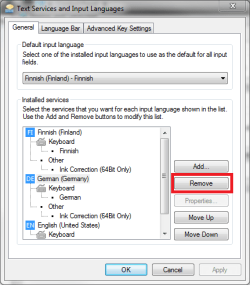
To add to what Grimmjow said, if you want to use just one keyboard layout you can remove the unnecessary ones and only use for example your native Norwegian layout.

Kari
 

Attachments

  • remove_lang.png
    remove_lang.png
    16.7 KB · Views: 73

My Computer My Computer

Computer type
Laptop
Computer Manufacturer/Model Number
HP ENVY 17-1150eg
OS
Windows 10 Pro x64 EN-GB
CPU
1.6 GHz Intel Core i7-720QM Processor
Memory
6 GB
Graphics Card(s)
ATI Mobility Radeon HD 5850 Graphics
Sound Card
Beats sound system with integrated subwoofer
Monitor(s) Displays
17" laptop display, 22" LED and 32" Full HD TV through HDMI
Screen Resolution
1600*900 (1), 1920*1080 (2&3)
Hard Drives
Internal: 2 x 500 GB SATA Hard Disk Drive 7200 rpm
External: 2TB for backups, 3TB USB3 network drive for media
Cooling
As Envy runs a bit warm, I have it on a Cooler Master pad
Keyboard
Logitech diNovo Media Desktop Laser (bluetooth)
Mouse
Logitech Performance Mouse MX
Internet Speed
50/10 Mbps VDSL
Antivirus
Windows Defender 4.3.9431.0
Browser
Maxthon 3.5.2., IE11
Problem solved ;) I had removed all other layouts, but it was something bugs with the default layout.
 

My Computer My Computer

Computer Manufacturer/Model Number
Homebuilt
OS
Windows 7 Ultimate x64
CPU
AMD Phenom II x4 265, 3.4 Ghz
Motherboard
ASUS M4A79T Deluxe
Memory
4 x Patriot Memory DDR3 2.0GB 1600MHz PC12800 Extreme
Graphics Card(s)
XFX GTX 295
Sound Card
Integrated in MOBO
Monitor(s) Displays
BenQ G2411HD
Screen Resolution
1080x1920
Hard Drives
SAMSUNG F1 1TB 3.5" SATA2 7200RPM 32MB
PSU
OCZ TECH PSU 700W ModXStream Pro
Case
ANTEC NINE HUNDRED-II EU GAMER CASE
Cooling
6 x 120cm fans
Keyboard
Microsoft Sidewinder x6
Mouse
Logitech G9
Internet Speed
4 mbit up / 16 mbit down
Back
Top