input to output

Thomas8472

New member
Local time
12:41 AM
Messages
2
Hi!

I have a speech error, and I had an idea that I could connect the audio output to the input. That way, I could use a speech synthesizer with Skype. I could also play music for my friends. The easiest way to do this is of course a wire, but I was wondering if this could be done from windows.

Thx
 

My Computer

OS
Windows 7 Home 64 bit
Hello Thomas, welcome to the Seven Forums.

Not knowing which audio devices you have, I can not tell you which device you have to choose, but in my opinion this can be done from Skype Audio Settings.

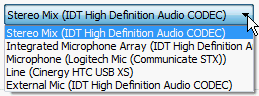
An example from my laptop with IDT Audio chip. I can select one of these devices:

Skype_Audio.2.png

Selecting Stereo Mix in my case sends the signal from mic when it is connected but when mic is not connected, it sends whatever sound I'm currently playing, for instance WMP, WMC or speech synthesizer.

With an image it's diffult to show audio ;) but I'll try: screenshot below shows (green signal strength bar) Skype is getting an audio signal to send. All mics currently disconnected, that signal comes from a YouTube video I'm watching, so if I now had a Skype chat with you, you would receive and hear what I'm listening now.
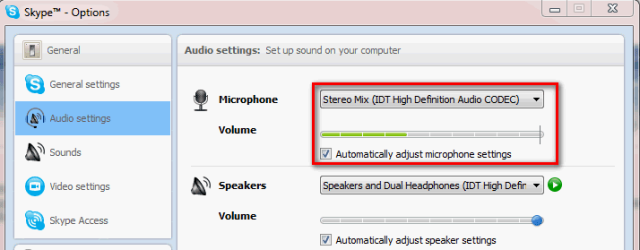
Skype_Audio.png

Kari
 

My Computer

Computer type
Laptop
Computer Manufacturer/Model Number
HP ENVY 17-1150eg
OS
Windows 10 Pro x64 EN-GB
CPU
1.6 GHz Intel Core i7-720QM Processor
Memory
6 GB
Graphics Card(s)
ATI Mobility Radeon HD 5850 Graphics
Sound Card
Beats sound system with integrated subwoofer
Monitor(s) Displays
17" laptop display, 22" LED and 32" Full HD TV through HDMI
Screen Resolution
1600*900 (1), 1920*1080 (2&3)
Hard Drives
Internal: 2 x 500 GB SATA Hard Disk Drive 7200 rpm
External: 2TB for backups, 3TB USB3 network drive for media
Cooling
As Envy runs a bit warm, I have it on a Cooler Master pad
Keyboard
Logitech diNovo Media Desktop Laser (bluetooth)
Mouse
Logitech Performance Mouse MX
Internet Speed
50/10 Mbps VDSL
Antivirus
Windows Defender 4.3.9431.0
Browser
Maxthon 3.5.2., IE11
You are welcome!

:) Kari
 

My Computer

Computer type
Laptop
Computer Manufacturer/Model Number
HP ENVY 17-1150eg
OS
Windows 10 Pro x64 EN-GB
CPU
1.6 GHz Intel Core i7-720QM Processor
Memory
6 GB
Graphics Card(s)
ATI Mobility Radeon HD 5850 Graphics
Sound Card
Beats sound system with integrated subwoofer
Monitor(s) Displays
17" laptop display, 22" LED and 32" Full HD TV through HDMI
Screen Resolution
1600*900 (1), 1920*1080 (2&3)
Hard Drives
Internal: 2 x 500 GB SATA Hard Disk Drive 7200 rpm
External: 2TB for backups, 3TB USB3 network drive for media
Cooling
As Envy runs a bit warm, I have it on a Cooler Master pad
Keyboard
Logitech diNovo Media Desktop Laser (bluetooth)
Mouse
Logitech Performance Mouse MX
Internet Speed
50/10 Mbps VDSL
Antivirus
Windows Defender 4.3.9431.0
Browser
Maxthon 3.5.2., IE11
Back
Top