Install of Windows 7 hangs after reboot

acliffe

New member
Local time
7:06 AM
Messages
4
I'm installing Windows 7 on my laptop with Windows 8. I've added a new partition and formatted it, but the installation hangs after the restart. Two options "Setup" and "Windows 8" on the screen, but "Setup" won't continue install.
 

My Computer My Computer

At a glance

Windows 8 64 bit
Computer type
PC/Desktop
Computer Manufacturer/Model Number
Lenovo Thinkpad X230
OS
Windows 8 64 bit
Antivirus
AVG
Browser
Firefox
Try deleting the partition and creating/formatting it again during the booted install.

Are you installing to UEFI BIOS or Legacy?

If Legacy try formatting an Active partition so that Win7 will have its own boot files and not depend upon Windows 8 for the reboot. Later you can add Windows 8 from the completed Win7 install using EasyBCD.
 
Not sure how I would create/format the partition during the installation. The wizard doesn't give me that option
 

My Computer My Computer

At a glance

Windows 8 64 bit
Computer type
PC/Desktop
Computer Manufacturer/Model Number
Lenovo Thinkpad X230
OS
Windows 8 64 bit
Antivirus
AVG
Browser
Firefox
looks like UEFI

Sounds like you're suggesting deleting Windows 8 completely, when I'm trying to retain it
 

My Computer My Computer

At a glance

Windows 8 64 bit
Computer type
PC/Desktop
Computer Manufacturer/Model Number
Lenovo Thinkpad X230
OS
Windows 8 64 bit
Antivirus
AVG
Browser
Firefox
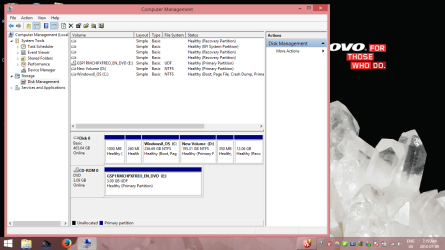
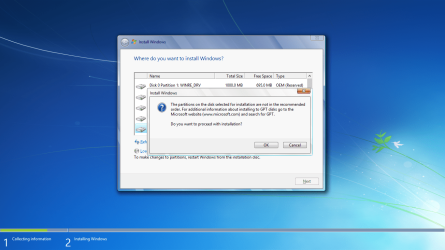
Thanks for you help. I hope those attachments help.
 

Attachments

  • Screenshot (1).png
    Screenshot (1).png
    89.2 KB · Views: 0
  • Screenshot (2).png
    Screenshot (2).png
    213.6 KB · Views: 2

My Computer My Computer

At a glance

Windows 8 64 bit
Computer type
PC/Desktop
Computer Manufacturer/Model Number
Lenovo Thinkpad X230
OS
Windows 8 64 bit
Antivirus
AVG
Browser
Firefox
As it says clearly at the bottom, to make changes to partitions you must restart Windows from the installation disk. You have not booted the Win7 installer which is the first thing that must be done. How to Boot A Computer from CD or DVD - YouTube

Reboot into disk this time and use the Drive Options which will appear at bottom to delete the Win7 target partition and the 350mb partition next to it if you don't need it and it didn't come with PC. Then Create and Format the new partition using the installer and click Next.

If it fails again then you may need to adjust UEFI, Legacy or CSM settings in BIOS setup. Let us know what those settings choices are. Camera snaps are preferred.
 
Back
Top