install problems

all the numbers i found online says that idle temps should be around 38-40 and under full load the temps got to 53ish... is my heatsink not seated properly?

edit: i know i said i was going to sleep... and i am, ill check back around tomorrow. have a good night.

edit II: did some more reading, and aparently the temp numbers in BIOS will always be higher because it is essentialy at full load because it doesnt apply any power saving settings, etc... any truth to this? I should expect lower numbers idling in the OS, not BIOS?
 
Last edited:

My Computer

Computer type
PC/Desktop
Computer Manufacturer/Model Number
My First Build
OS
Windows 7 64-bit Home
CPU
Intel Core i7-870 Lynnfield 2.93 Ghz
Motherboard
Asus P7P55D-E Pro
Memory
8GB 4x2 A-Data 1333 Mhz
Graphics Card(s)
HIS Radeon HD 5850 1GB
Sound Card
Onboard
Monitor(s) Displays
Dell S2440L 24"
Screen Resolution
1080p
Hard Drives
120 GB Intel X25-M SATA Solid State Drive ///
1 TB Western Digital Caviar Black SATA 6gb/s 7200rpm Drive
PSU
Corsair 650TX 650 Watt
Case
Antec Three Hundred
Cooling
Stock Intel /// 4 Antec Case Fans /// NZXT Sentry-2
Keyboard
Logitech LX 710
Mouse
Logitech LX 710
Other Info
LG Blu-Ray Drive
ok, i didnt get any progress last night.. girlfriend made me sleep at her place

anyways, ive removed everything from my case, reseated the heatsink/fan and now the temps are around 56C in bios, it says PECI afterwards, not sure if that means anything - why are the temps so high?

i moved my optical drive to a non marvell (sataIII) port and it is now recognized in the bios, not the HDD tho. but im pretty sure that it is because it is on the marvell controller, it flashes a screen before it boots to bios which lists the HDD and says its at SATA III speed. so now im not worried about that.. im just worried about the temps

the optical drive is in sata port #4, not #1... does that matter at all?
 
Last edited:

My Computer

Computer type
PC/Desktop
Computer Manufacturer/Model Number
My First Build
OS
Windows 7 64-bit Home
CPU
Intel Core i7-870 Lynnfield 2.93 Ghz
Motherboard
Asus P7P55D-E Pro
Memory
8GB 4x2 A-Data 1333 Mhz
Graphics Card(s)
HIS Radeon HD 5850 1GB
Sound Card
Onboard
Monitor(s) Displays
Dell S2440L 24"
Screen Resolution
1080p
Hard Drives
120 GB Intel X25-M SATA Solid State Drive ///
1 TB Western Digital Caviar Black SATA 6gb/s 7200rpm Drive
PSU
Corsair 650TX 650 Watt
Case
Antec Three Hundred
Cooling
Stock Intel /// 4 Antec Case Fans /// NZXT Sentry-2
Keyboard
Logitech LX 710
Mouse
Logitech LX 710
Other Info
LG Blu-Ray Drive
I still think you will have the best chances with HD in SATA1 & optical in Sata2 .
 

My Computer

Computer type
PC/Desktop
Computer Manufacturer/Model Number
Built them myself, Science Experiments !
OS
Win7 Enterprise, Win7 x86 (Ult 7600), Win7 x64 Ult 7600, TechNet RTM on AMD x64 (2.8Ghz)
CPU
AMD fx8350 4ghz, AMD-32 2400mhz, AMD-64 3200mhz, AMDx64 2.8G
Motherboard
SIS 755, ECS-K8M890M-M (Ult 7600), GigaByte & others
Memory
2gb, 4gb on the Ult 7600, 4gb on Technet RTM, 32gb on FX8350
Graphics Card(s)
Draw my own Graphics, several nVidia cards
Sound Card
on motherboard
Monitor(s) Displays
19" flat scr, 28" I-Inc widescr,22" Emprex Widescr, 23" Acer
Screen Resolution
1280 x 1024, 1440 x 900, 1920 x 1080
Hard Drives
6 pata Ide HD's & 2 Sata HD's
added 80gb external on Ult 7600 computer,
numerous extra 1tb, 2TB, 3Tb SATA HD's
A collection of ext HD Docks w/ HDs
PSU
430w, 550w, 600w, 700, 800, etc
Case
All Generic Full Towers
Cooling
Open Air & a few fans, some w/ colored LEDs
Keyboard
Compaq & Dell recycled from GoodWill
Mouse
Made in China Optical Wired Mouse
Internet Speed
Fast Cable InterNet
Antivirus
AVG Free on 24 different Desktops, NO Problems!
Browser
IE 8 is preferred, but use FireFox sometimes
Other Info
Linksys Routers, switches, & Hubs
Too Many USB Flash Drives to count, Biggest is 64GB !
Eight computers in my home network.
Sixteen computers at my business network.
Linked via TeamViewer !
Lots of old used spare computer parts everywhere!
if the HD is in sata 2 then it cant be in the SATAIII port, and i cant select AHCI mode from the get go, its installing now, with 1 stick of ram only... *cross my fingers* ill post back with updates
 

My Computer

Computer type
PC/Desktop
Computer Manufacturer/Model Number
My First Build
OS
Windows 7 64-bit Home
CPU
Intel Core i7-870 Lynnfield 2.93 Ghz
Motherboard
Asus P7P55D-E Pro
Memory
8GB 4x2 A-Data 1333 Mhz
Graphics Card(s)
HIS Radeon HD 5850 1GB
Sound Card
Onboard
Monitor(s) Displays
Dell S2440L 24"
Screen Resolution
1080p
Hard Drives
120 GB Intel X25-M SATA Solid State Drive ///
1 TB Western Digital Caviar Black SATA 6gb/s 7200rpm Drive
PSU
Corsair 650TX 650 Watt
Case
Antec Three Hundred
Cooling
Stock Intel /// 4 Antec Case Fans /// NZXT Sentry-2
Keyboard
Logitech LX 710
Mouse
Logitech LX 710
Other Info
LG Blu-Ray Drive
of course, 0x80070570 during expanding files.....

im not exactly sure what to try next
 

My Computer

Computer type
PC/Desktop
Computer Manufacturer/Model Number
My First Build
OS
Windows 7 64-bit Home
CPU
Intel Core i7-870 Lynnfield 2.93 Ghz
Motherboard
Asus P7P55D-E Pro
Memory
8GB 4x2 A-Data 1333 Mhz
Graphics Card(s)
HIS Radeon HD 5850 1GB
Sound Card
Onboard
Monitor(s) Displays
Dell S2440L 24"
Screen Resolution
1080p
Hard Drives
120 GB Intel X25-M SATA Solid State Drive ///
1 TB Western Digital Caviar Black SATA 6gb/s 7200rpm Drive
PSU
Corsair 650TX 650 Watt
Case
Antec Three Hundred
Cooling
Stock Intel /// 4 Antec Case Fans /// NZXT Sentry-2
Keyboard
Logitech LX 710
Mouse
Logitech LX 710
Other Info
LG Blu-Ray Drive
Next test the memory with memtest86 CD for 5-6 passes or overnight. Then test HD with maker's diag/repair full CD scan. http://www.tacktech.com/display.cfm?ttid=287

Check for newer BIOS version update, if not clear the CMOS: http://pcsupport.about.com/od/fixtheproblem/tp/clearcmos.htm

Try extracting the ISO from DVD using ImgBurn, then installing from USB flash stick: http://www.sevenforums.com/tutorials/2432-usb-windows-7-installation-key-drive-create.html There is something wrong with the way the DVD is being read, so try another DVD drive if necessary.

Do you have another machine you can move HD to try install? I do this when I have no more time to troubleshoot install failures and have had good luck with HD starting up when returned to problem machine, swapping out all drivers while requesting several restarts.

There is a program called Paragon Adaptive Restore that will remove the drivers so they can't conflict with startup on different hardware.

You can also boot into Safe Mode if it fails to start to change out mobo and display drivers to start. And run Startup Repair from booted WIn7 DVD Repair console. All of these have worked for this in the past.

Of course, Acronis 10+ can apply any Win7 image of your version to the HD with drivers removed before you start it up, so they autoinstall if they will.
 
i dont have another machine i can do the install on... just this old laptop

edit: sorry i only read half of your post...

ill test the memory tonight, do i put all 4 sticks in when i run memtest? i can boot that from a flash drive right?

there is a newer bios version, but the only update it offers is: "Fix some ODD may not be detected by Marvell controller" which sounds like it may be a problem, but now i have the optical drive in the intel controller and it was detecting it when it was in the marvell controller... so it doesnt seem like that would be the problem.

as far as clearing the CMOS, if all it does is reset the BIOS settings then i already did that, the only things i changed were the AHCI settings before installing windows

can i create the windows 7 x64 install USB key from my windows xp laptop?
 
Last edited:

My Computer

Computer type
PC/Desktop
Computer Manufacturer/Model Number
My First Build
OS
Windows 7 64-bit Home
CPU
Intel Core i7-870 Lynnfield 2.93 Ghz
Motherboard
Asus P7P55D-E Pro
Memory
8GB 4x2 A-Data 1333 Mhz
Graphics Card(s)
HIS Radeon HD 5850 1GB
Sound Card
Onboard
Monitor(s) Displays
Dell S2440L 24"
Screen Resolution
1080p
Hard Drives
120 GB Intel X25-M SATA Solid State Drive ///
1 TB Western Digital Caviar Black SATA 6gb/s 7200rpm Drive
PSU
Corsair 650TX 650 Watt
Case
Antec Three Hundred
Cooling
Stock Intel /// 4 Antec Case Fans /// NZXT Sentry-2
Keyboard
Logitech LX 710
Mouse
Logitech LX 710
Other Info
LG Blu-Ray Drive
Any errors when wiping the hard drive?

You connected the hard drive to SATA 1 port right? In the bios by default it should be set to Standard IDE mode. Did you change it?

How many sticks of RAM did you leave during the installation?
 

My Computers

System One System Two

  • Computer type
    PC/Desktop
    Computer Manufacturer/Model Number
    PowerSpec G164
    OS
    WIN10
    CPU
    AMD Ryzen 5 3600 6-Core Processor 3.59 GHz
    Memory
    16.0 GB
    Internet Speed
    VERY FAST>>>!!!
  • Antivirus
    ESET Security Premium
the hd had no errors when doing the diskpart>clean all the other night, said it successfully cleaned the drive

the HD is in the SATAIII port (marvell controller), and i set the bios to read sata as ahci - i thought i had to do this before installing the OS

i only have 1 stick in the board (2gb in slot A1)
 

My Computer

Computer type
PC/Desktop
Computer Manufacturer/Model Number
My First Build
OS
Windows 7 64-bit Home
CPU
Intel Core i7-870 Lynnfield 2.93 Ghz
Motherboard
Asus P7P55D-E Pro
Memory
8GB 4x2 A-Data 1333 Mhz
Graphics Card(s)
HIS Radeon HD 5850 1GB
Sound Card
Onboard
Monitor(s) Displays
Dell S2440L 24"
Screen Resolution
1080p
Hard Drives
120 GB Intel X25-M SATA Solid State Drive ///
1 TB Western Digital Caviar Black SATA 6gb/s 7200rpm Drive
PSU
Corsair 650TX 650 Watt
Case
Antec Three Hundred
Cooling
Stock Intel /// 4 Antec Case Fans /// NZXT Sentry-2
Keyboard
Logitech LX 710
Mouse
Logitech LX 710
Other Info
LG Blu-Ray Drive
EDIT:

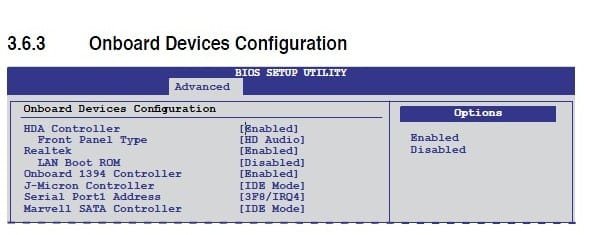
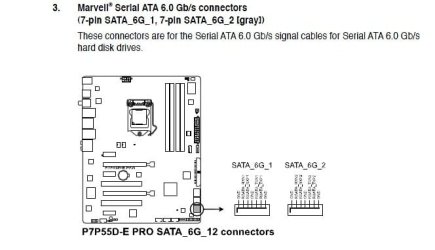
Since you not using SATA 3Gb/s hard drive you want to connect your hard drive to one of two SATA 6Gb/s connectors.

Then in the bios since its on Standard IDE mode you want to change it to change the Marvell SATA Controller in the bios to AHCI mode.
 

Attachments

  • Untitled2.jpg
    Untitled2.jpg
    26.9 KB · Views: 19
  • Untitled.jpg
    Untitled.jpg
    34.9 KB · Views: 12

My Computers

System One System Two

  • Computer type
    PC/Desktop
    Computer Manufacturer/Model Number
    PowerSpec G164
    OS
    WIN10
    CPU
    AMD Ryzen 5 3600 6-Core Processor 3.59 GHz
    Memory
    16.0 GB
    Internet Speed
    VERY FAST>>>!!!
  • Antivirus
    ESET Security Premium
right - i did that

got the 0x80070570 error when trying to install
 

My Computer

Computer type
PC/Desktop
Computer Manufacturer/Model Number
My First Build
OS
Windows 7 64-bit Home
CPU
Intel Core i7-870 Lynnfield 2.93 Ghz
Motherboard
Asus P7P55D-E Pro
Memory
8GB 4x2 A-Data 1333 Mhz
Graphics Card(s)
HIS Radeon HD 5850 1GB
Sound Card
Onboard
Monitor(s) Displays
Dell S2440L 24"
Screen Resolution
1080p
Hard Drives
120 GB Intel X25-M SATA Solid State Drive ///
1 TB Western Digital Caviar Black SATA 6gb/s 7200rpm Drive
PSU
Corsair 650TX 650 Watt
Case
Antec Three Hundred
Cooling
Stock Intel /// 4 Antec Case Fans /// NZXT Sentry-2
Keyboard
Logitech LX 710
Mouse
Logitech LX 710
Other Info
LG Blu-Ray Drive
Here's the location of where the hard drive should be connected too.

You want to change to AHCI mode before installing the OS.
 

Attachments

  • hard drive.jpg
    hard drive.jpg
    31.3 KB · Views: 11

My Computers

System One System Two

  • Computer type
    PC/Desktop
    Computer Manufacturer/Model Number
    PowerSpec G164
    OS
    WIN10
    CPU
    AMD Ryzen 5 3600 6-Core Processor 3.59 GHz
    Memory
    16.0 GB
    Internet Speed
    VERY FAST>>>!!!
  • Antivirus
    ESET Security Premium
the hd had no errors when doing the diskpart>clean all the other night, said it successfully cleaned the drive

the HD is in the SATAIII port (marvell controller), and i set the bios to read sata as ahci - i thought i had to do this before installing the OS

i only have 1 stick in the board (2gb in slot A1)


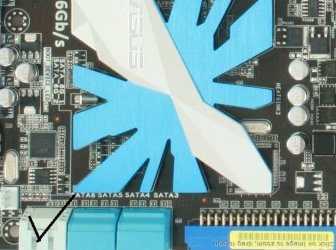
Not sure if we are talking about the same ports, SATAIII is not the same as the bottom two, check my post above to be sure its the same location. There are only two ports.
 

Attachments

  • pic.jpg
    pic.jpg
    59 KB · Views: 2

My Computers

System One System Two

  • Computer type
    PC/Desktop
    Computer Manufacturer/Model Number
    PowerSpec G164
    OS
    WIN10
    CPU
    AMD Ryzen 5 3600 6-Core Processor 3.59 GHz
    Memory
    16.0 GB
    Internet Speed
    VERY FAST>>>!!!
  • Antivirus
    ESET Security Premium
yeah, we are talking about the same ports.. the grey ones.. i may be confused on the terminology.. i thought SATAIII was SATA 6gb/s maybe not, either way the hard drive is in the right ports, when i first started the optical drive was also in a 6gb/s port, i have since moved it to one of the blue sata ports (#4)
 

My Computer

Computer type
PC/Desktop
Computer Manufacturer/Model Number
My First Build
OS
Windows 7 64-bit Home
CPU
Intel Core i7-870 Lynnfield 2.93 Ghz
Motherboard
Asus P7P55D-E Pro
Memory
8GB 4x2 A-Data 1333 Mhz
Graphics Card(s)
HIS Radeon HD 5850 1GB
Sound Card
Onboard
Monitor(s) Displays
Dell S2440L 24"
Screen Resolution
1080p
Hard Drives
120 GB Intel X25-M SATA Solid State Drive ///
1 TB Western Digital Caviar Black SATA 6gb/s 7200rpm Drive
PSU
Corsair 650TX 650 Watt
Case
Antec Three Hundred
Cooling
Stock Intel /// 4 Antec Case Fans /// NZXT Sentry-2
Keyboard
Logitech LX 710
Mouse
Logitech LX 710
Other Info
LG Blu-Ray Drive
the hd had no errors when doing the diskpart>clean all the other night, said it successfully cleaned the drive


Diskpart Clean commands don't look for errors, only write zeros.

Please read back over thread to catch up with all of the troubleshooting steps that have piled up, as the work has to be done to get to the fix. A memtest86 for 5-6 passes or overnight should have already been done.

You need to run both chkdsk and the maker's diag/repair CD scan.
http://www.sevenforums.com/tutorials/433-disk-check.html
http://www.tacktech.com/display.cfm?ttid=287

Yes you should be able to write the ISO to flash stick using XP. I also use UltraISO trial version, load ISO, select Write Image on Bootable tab, use Format button first, Write.
 
the hd had no errors when doing the diskpart>clean all the other night, said it successfully cleaned the drive


Diskpart Clean commands don't look for errors, only write zeros.

You need to run both chkdsk /f and the maker's diag/repair CD scan.
http://www.sevenforums.com/tutorials/433-disk-check.html
http://www.tacktech.com/display.cfm?ttid=287

In almost every unresolved install case, we see steps skipped or explained away. You've simply got to do the work to get to the fix.

True, but I thought writiing zeros across the whole drive would remove any potential bad sectors or errors?
 

My Computers

System One System Two

  • Computer type
    PC/Desktop
    Computer Manufacturer/Model Number
    PowerSpec G164
    OS
    WIN10
    CPU
    AMD Ryzen 5 3600 6-Core Processor 3.59 GHz
    Memory
    16.0 GB
    Internet Speed
    VERY FAST>>>!!!
  • Antivirus
    ESET Security Premium
I dont' think so. Someone else may know for sure. Formatting is supposed to quarantine bad sectors, but the combination of chkdsk and maker's CD scan are the sure way I know of to diagnose and even repair the HD, should be done on any problem install, and best are done anytime there's a reinstall to head off problems later.

Likewise the memtest86 CD scan for 5-6 passes or overnight for stress test should be done after you clear up the mobo ports issues with the expert help you're getting on that.
 
im very willing to do the work... this is my first computer build and install, im trying to learn as i go.. it would help if i could get the steps to go through from where im at now.. i dont want to leave anything out

1. diskpart > clean all
2. memtest
3. hd check
4. reset bios, and then change marvell to ahci mode
5. remove all but 1 stick and install windows

from everything ive learned and read so far on here, those are my next 5 steps... what should i do?
 

My Computer

Computer type
PC/Desktop
Computer Manufacturer/Model Number
My First Build
OS
Windows 7 64-bit Home
CPU
Intel Core i7-870 Lynnfield 2.93 Ghz
Motherboard
Asus P7P55D-E Pro
Memory
8GB 4x2 A-Data 1333 Mhz
Graphics Card(s)
HIS Radeon HD 5850 1GB
Sound Card
Onboard
Monitor(s) Displays
Dell S2440L 24"
Screen Resolution
1080p
Hard Drives
120 GB Intel X25-M SATA Solid State Drive ///
1 TB Western Digital Caviar Black SATA 6gb/s 7200rpm Drive
PSU
Corsair 650TX 650 Watt
Case
Antec Three Hundred
Cooling
Stock Intel /// 4 Antec Case Fans /// NZXT Sentry-2
Keyboard
Logitech LX 710
Mouse
Logitech LX 710
Other Info
LG Blu-Ray Drive

My Computer

Computer type
PC/Desktop
Computer Manufacturer/Model Number
My First Build
OS
Windows 7 64-bit Home
CPU
Intel Core i7-870 Lynnfield 2.93 Ghz
Motherboard
Asus P7P55D-E Pro
Memory
8GB 4x2 A-Data 1333 Mhz
Graphics Card(s)
HIS Radeon HD 5850 1GB
Sound Card
Onboard
Monitor(s) Displays
Dell S2440L 24"
Screen Resolution
1080p
Hard Drives
120 GB Intel X25-M SATA Solid State Drive ///
1 TB Western Digital Caviar Black SATA 6gb/s 7200rpm Drive
PSU
Corsair 650TX 650 Watt
Case
Antec Three Hundred
Cooling
Stock Intel /// 4 Antec Case Fans /// NZXT Sentry-2
Keyboard
Logitech LX 710
Mouse
Logitech LX 710
Other Info
LG Blu-Ray Drive
Looks like a plan. That Marvell controller might need the BIOS update for your OD to function correctly, could explain the read issues you're having with DVD. Problem is you need an OS to do the BIOS update safely.

A way to workaround that is to try install with USB flash stick which uses a different controller. I use Ultra ISO trial version to simply load in ISO, select Write ISO on Bootable tab, use Format button, then Write. It's easier than the tutorial version and works every time. Best to boot it from one-time BIOS Boot Menu key, prob under HD's.

Get your ports issues resolved first, even if you need to post it up in Hardware forum. Eldinv can help you sort it further, Doc should be around. Those are the experts I was referring to. It is not my specialty.
 
Back
Top