Install to new SSD from old HDD Recovery Partition

phoenix198

New member
Local time
12:39 AM
Messages
4
I have a Mesh i5 750 PC base unit which performs very well but I would like to add a Corsair 60GB Force SSD 2.5" SATA-II as a boot drive, and use the original 1TB HDD as a data/games store. Can anyone tell me whether it is possible to simply install the SSD then restore the Mesh's operating system (Windows 7 64-bit HP) onto the SSD from the original HDD's recovery partition?

I have previously done a 'clean' install of a retail copy of Windows 7 64-bit to a SSD boot drive on a home-built system and remember that it had a slightly different sequence from 'normal' installations to a HDD. As I recall it created a small (100MB?) hidden partition on the SSD for nefarious Windows purposes then I had to perform a couple of registry hacks to optimise Windows 7 for a SSD, and move my default Libraries and data stores to to the 'slave' HDD.

I suppose the real question is: does a reinstallation of Windows 7 from an OEM Recovery partition (or even from a Recovery Image backed up to DVD) go through the same installation process(es) if it recognises that it is being installed onto a SSD?

Thanks in advance.
 

My Computer My Computer

At a glance

Windows 7
OS
Windows 7
..As I recall it created a small (100MB?) hidden partition on the SSD for nefarious Windows purposes ...

Despite what you think, it was NOT for "nefarious Windows purposes"; instead, it's the default Win7 setup which creates what essentially is a boot partition. It does this to allow you to fully encrypt your other partition -- the Win7 OS partition.

IF you create an NTFS partition on a drive in advance, you can install to THAT partition and Win7 then will not create the separate boot partition.
 

My Computer My Computer

At a glance

Win7 Pro 32-bit, Win8 Pro 32-bitAMD Phenom II X6 1090T4GB ddr3 1300AMD HD 4290 onboard
Computer type
PC/Desktop
Computer Manufacturer/Model Number
Custom
OS
Win7 Pro 32-bit, Win8 Pro 32-bit
CPU
AMD Phenom II X6 1090T
Motherboard
Gigabyte
Memory
4GB ddr3 1300
Graphics Card(s)
AMD HD 4290 onboard
Sound Card
Builtin Realtek HD Audio
Monitor(s) Displays
Samsung 24" widescreen, LG 23" widescreen
Screen Resolution
1920x1200/1920x1080
Hard Drives
Kingston 256GB SSD
Keyboard
Logitech Illuminated Keyboard
Mouse
Logitech M705 wireless mouse
Antivirus
Norton Av 2013
Browser
IE v10
In addition to what Mark Phelps has said, it also contains a link to the Windows Recovery Console in the advanced boot options menu built into Windows 7 that you won't get without the 100MB System Reserved partition being present.


I have been working on methods to create this useful partition where needed, have a look at these links below.

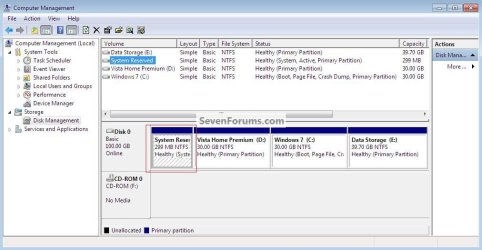
Boot Windows 7 from Logical

Boot Windows 7 from a Logical Partition

click to enlarge
Save.jpg


Now let's see if we can get you some help with the reason you're here.
 

My Computer My Computer

At a glance

W 7 64-bit UltimateIntel Q9550 Yorkfield8GB Dominator 8500C5DATI : XFX 5870
Computer Manufacturer/Model Number
* BFK Customs *
OS
W 7 64-bit Ultimate
CPU
Intel Q9550 Yorkfield
Motherboard
ASUS P5Q Pro
Memory
8GB Dominator 8500C5D
Graphics Card(s)
ATI : XFX 5870
Sound Card
Realtek HD Audio 7-1
Monitor(s) Displays
1x 47" LCD HDMI & 3x 26" LCD HDMI
Screen Resolution
1920x1080P & 1920x1200
Hard Drives
1x 80GB Intel X25-M G2 SSD : 1x 500GB & 1x 640GB WD Caviar Black(s)
PSU
Corsair 620HX
Case
Cooler Master RC-690
Cooling
Tuniq Tower 120, 2x 140mm and 3x 120mm case fans
Keyboard
Microsoft 500
Mouse
Razer Diamondback 3G
Internet Speed
14 Mb/s
Other Info
1x Koutech 3Gb/s SATA HDD Hot Swap Rack
Hello phoenix198.


Before we make any specific recommendations will you please post a snip/screen-shot of the entire disk management drive map with a full description as to which drive/partition is which, so we can see what you have going so far.

In the Windows start menu right click computer and click manage, in the left pane of the "Computer Management" window that opens click disk management and post a snip of that.


How to Upload and Post a Screenshot and File in Seven Forums


Be sure to post back with any further questions you may have and to keep us informed.
 

My Computer My Computer

At a glance

W 7 64-bit UltimateIntel Q9550 Yorkfield8GB Dominator 8500C5DATI : XFX 5870
Computer Manufacturer/Model Number
* BFK Customs *
OS
W 7 64-bit Ultimate
CPU
Intel Q9550 Yorkfield
Motherboard
ASUS P5Q Pro
Memory
8GB Dominator 8500C5D
Graphics Card(s)
ATI : XFX 5870
Sound Card
Realtek HD Audio 7-1
Monitor(s) Displays
1x 47" LCD HDMI & 3x 26" LCD HDMI
Screen Resolution
1920x1080P & 1920x1200
Hard Drives
1x 80GB Intel X25-M G2 SSD : 1x 500GB & 1x 640GB WD Caviar Black(s)
PSU
Corsair 620HX
Case
Cooler Master RC-690
Cooling
Tuniq Tower 120, 2x 140mm and 3x 120mm case fans
Keyboard
Microsoft 500
Mouse
Razer Diamondback 3G
Internet Speed
14 Mb/s
Other Info
1x Koutech 3Gb/s SATA HDD Hot Swap Rack
You can try cloning your Win7 installation over to the SSD, but you may be better off clean installing if the calibration doesn't come out correct.

You would need to make your Recovery Disks to use to install to the new SSD. Acer has extra procedures when installing to a new drive which you should read about in the Manual on Acer's Support Downloads webpage for your model. Who knows if Recov Disks work on an SSD - Acer tech support might but don't count on it.

Unless you want all of the bloatware you'd be better off starting fresh with a clean install while other HD is unplugged, then you can plug it back in afterward to copy files in or boot it if necessary using F2 BIOS Boot Menu key.
 

My Computer My Computer

At a glance

Windows 7 Ultimate (x64) SP1Intel 3770k 4.6GHz8GB (2x 4GB) Crucial BallistixSapphire 7950 (1060/1600)
Computer Manufacturer/Model Number
tw33k
OS
Windows 7 Ultimate (x64) SP1
CPU
Intel 3770k 4.6GHz
Motherboard
ASUS Maximus V Formula
Memory
8GB (2x 4GB) Crucial Ballistix
Graphics Card(s)
Sapphire 7950 (1060/1600)
Sound Card
On Board Realtek HD Audio
Monitor(s) Displays
27" Acer B273HU (via HDMI)
Screen Resolution
2048 x 1152
Hard Drives
Crucial M4 128GB
2TB WD Black
1TB Samsung F3 SATA
1TB WD Elite External
2TB WD USB 3.0
PSU
Corsair AX750 Gold
Case
Corsair Obsidian 800DW
Cooling
Corsair H100 (2x AP-121/2x UK-3000 push/pull)
Keyboard
Microsoft Wireless 5000
Mouse
Microsoft Wireless 5000
Internet Speed
5mb/s
Other Info
Logitech z-2300 2.1 speakers
Lamptron FC-5 v2
Phoenix,
We really need that snapshot of the output of DiskManagement to correctly advise you.

Clear up one confusion on my part--do you have a separate Win 7 DVD for this system in which you desire to install a SSD?
 

My Computer My Computer

At a glance

MS Windows 7 Ultimate SP1 64-bitAMD A10-4600M6.00 GB Dual-Channel DDR3 @ 798MHz (11-11-12-28)AMD Radeon HD 7660G
Computer Manufacturer/Model Number
Toshiba Satellite S875D-S7239 laptop
OS
MS Windows 7 Ultimate SP1 64-bit
CPU
AMD A10-4600M
Motherboard
AMD Pumori (Socket FT1)
Memory
6.00 GB Dual-Channel DDR3 @ 798MHz (11-11-12-28)
Graphics Card(s)
AMD Radeon HD 7660G
Sound Card
High Definition Audio Device
Monitor(s) Displays
Generic PnP Monitor (1600x900@60Hz)
Screen Resolution
1600x900@60Hz
Hard Drives
SSD 119GB Corsair CSSD-V128GB2 ATA Device
Keyboard
Standard PS/2 Keyboard
Mouse
HP Wireless Optical Mobile Mouse Model FHA-3410
Internet Speed
What the local pub, local coffee shop offers.
Other Info
Optical Drive:MATSHITA BD-CMB UJ160B ATA Device


Also have an Asus ha1002xp netbook with Win 7 Ultimate installed.
Apologies for delay in posting this - I had some wetware issues to deal with.

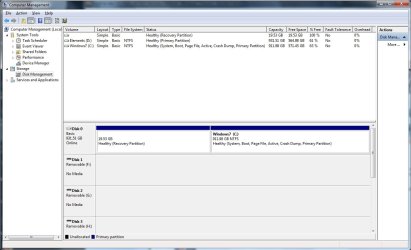
Disk management drive map is below

DiscManage.jpg

D drive is an external USB drive and not relevant to the issue.

In response to a number of other queries:

  • I have the original Windows 7 64-bit Home Premium OEM DVD. It is a 'Mesh' branded version but I don't think it has otherwise been crippled
  • I intend using a Corsair Force 60GB SATA II SSD
  • I realise that I cannot possibly squeeze a full image of my currently installed OS, App and games onto the SSD. I am therefore going to have to reinstall these after the basic Windows installation
I am starting to think it might be simpler in the long run to simply use the OEM disk for a clean install onto the SSD ...
 

My Computer My Computer

At a glance

Windows 7
OS
Windows 7
You can dual boot for while till you get things sorted; have a look at the info below to get some ideas.

How to Do a Clean Installation with Windows 7
   Information

The easiest way to do away with boot issues between separate Operating Systems (OS) is to use the BIOS one time boot menu to select which OS to boot at system startup, each motherboard has an individual hot-key to tap during system start-up to access this menu.

If you have 2 separate Hard Disk Drives (HDD) and have one OS installed to one HDD and you want to install another OS to the second HDD, disconnect the HDD with the first OS installed on it and leave only the HDD you want to install the second OS to connected.

Just be sure not to change where the original HDD SATA cable was connected, it has to be re-connected to the exact same port to avoid boot issues.

Install the second OS to the connected HDD and when complete and the system is booting good, power down and reconnect the first HDD with the first OS on it.

This way the OSs will boot independently of each other and there will be no boot conflicts between the 2 separate OSs to have to sort later.

Then set the BIOS to boot the HDD / OS you want as default and if you want to start the other (new) OS you use the BIOS one-time boot menu to select that HDD / OS to start when the PC is started.


My Computer My Computer

At a glance

W 7 64-bit UltimateIntel Q9550 Yorkfield8GB Dominator 8500C5DATI : XFX 5870
Computer Manufacturer/Model Number
* BFK Customs *
OS
W 7 64-bit Ultimate
CPU
Intel Q9550 Yorkfield
Motherboard
ASUS P5Q Pro
Memory
8GB Dominator 8500C5D
Graphics Card(s)
ATI : XFX 5870
Sound Card
Realtek HD Audio 7-1
Monitor(s) Displays
1x 47" LCD HDMI & 3x 26" LCD HDMI
Screen Resolution
1920x1080P & 1920x1200
Hard Drives
1x 80GB Intel X25-M G2 SSD : 1x 500GB & 1x 640GB WD Caviar Black(s)
PSU
Corsair 620HX
Case
Cooler Master RC-690
Cooling
Tuniq Tower 120, 2x 140mm and 3x 120mm case fans
Keyboard
Microsoft 500
Mouse
Razer Diamondback 3G
Internet Speed
14 Mb/s
Other Info
1x Koutech 3Gb/s SATA HDD Hot Swap Rack
I have an Acer desktop and made a duplicate HDD as an emergency backup. I used imaging and this included the recovery/hidden partition (PQService). MS imaging won't move the recovery partition and I used Macrium. I used MS imaging for the rest since this is my default imaging application.
I found it a very straightforward procedure. I am happy to help here but others will need to provide specific advice on the SSD.

Acer support in my part of the world is terrible. Maybe Acer US can give simple recovery advice using the recovery disks.

But as someone suggested you can use your COA key on the Acer machine with your Retail windows 7 disk to do a clean install. gregrocker the person for this I think.
 

My Computer My Computer

At a glance

Windows 7x64 Home Premium SP1Intel i7 2600kG.Skill Ripjaws (DDR3-1600) 2x4GBNvidia GeForce GTS 450; Intel HD Graphics 300...
Computer type
PC/Desktop
Computer Manufacturer/Model Number
Own build
OS
Windows 7x64 Home Premium SP1
CPU
Intel i7 2600k
Motherboard
ASUS P8Z68 Deluxe
Memory
G.Skill Ripjaws (DDR3-1600) 2x4GB
Graphics Card(s)
Nvidia GeForce GTS 450; Intel HD Graphics 3000(GT2+)
Monitor(s) Displays
Dell Ultrasharp IPS panel U2311H, Samsung SyncMaster P2350
Screen Resolution
1920x1080
Hard Drives
Samsung 850 Pro SSD 256GB, Samsung SSD 840 120GB, Seagates 1TB Barracuda ST31000528AS x2
PSU
Seasonic M12II 520W
Case
Lian Li Lancool PC-K60
Cooling
Case: 1x120mm, 3x140mm CPU: Hyper 212+
Keyboard
Logitech MK520 (wireless)
Mouse
Logitech MK520
Internet Speed
6-7 Mbps
Antivirus
Norton Security Premium, Malwarebytes on 2 (MSE on 3rd PC)
Browser
FireFox
Other Info
Audio: Logitech Z523 2.1
Yep, since although you are only using about 140 GB of that large partition, that is still much more than 60 GB.

When you get ready to install:

  1. Remove your present monster,
  2. Connect the SSD,
  3. Use the tutorials Greg gave you to make a clean install, complete with a Clean All.
  4. Don't sweat the alignment thing. Win 7 and your SSD will take care of that correctly for you. Don't worry about defrag, indexing--those will be turned off for you. Don't listen to all of the scare-mongers about only so many writes. Your computer will be long dead before that happens.
  5. After you've installed and updated Win 7, then you can reconnect your old drive.
Oh yes, I don't have one of those 100 MB reserved partitions. Hasn't interfered with anything.

Do make yourself a System Repair Disc.
[FONT=&quot]DISC - CREATE A SYSTEM REPAIR DISC[/FONT]
START | type System Repair | Enter key | Create Disc button
 

My Computer My Computer

At a glance

MS Windows 7 Ultimate SP1 64-bitAMD A10-4600M6.00 GB Dual-Channel DDR3 @ 798MHz (11-11-12-28)AMD Radeon HD 7660G
Computer Manufacturer/Model Number
Toshiba Satellite S875D-S7239 laptop
OS
MS Windows 7 Ultimate SP1 64-bit
CPU
AMD A10-4600M
Motherboard
AMD Pumori (Socket FT1)
Memory
6.00 GB Dual-Channel DDR3 @ 798MHz (11-11-12-28)
Graphics Card(s)
AMD Radeon HD 7660G
Sound Card
High Definition Audio Device
Monitor(s) Displays
Generic PnP Monitor (1600x900@60Hz)
Screen Resolution
1600x900@60Hz
Hard Drives
SSD 119GB Corsair CSSD-V128GB2 ATA Device
Keyboard
Standard PS/2 Keyboard
Mouse
HP Wireless Optical Mobile Mouse Model FHA-3410
Internet Speed
What the local pub, local coffee shop offers.
Other Info
Optical Drive:MATSHITA BD-CMB UJ160B ATA Device


Also have an Asus ha1002xp netbook with Win 7 Ultimate installed.
I have an Acer desktop and made a duplicate HDD as an emergency backup. I used imaging and this included the recovery/hidden partition (PQService). MS imaging won't move the recovery partition and I used Macrium. I used MS imaging for the rest since this is my default imaging application.
I found it a very straightforward procedure. I am happy to help here but others will need to provide specific advice on the SSD.

Acer support in my part of the world is terrible. Maybe Acer US can give simple recovery advice using the recovery disks.

But as someone suggested you can use your COA key on the Acer machine with your Retail windows 7 disk to do a clean install. gregrocker the person for this I think.

Win 7 Backup and Restore copies the 100 MB partition by default, the C partition (or whatever letter you used) by default and any other partitions you specify. Please see:
Backup Complete Computer - Create an Image Backup
 

My Computer My Computer

At a glance

MS Windows 7 Ultimate SP1 64-bitAMD A10-4600M6.00 GB Dual-Channel DDR3 @ 798MHz (11-11-12-28)AMD Radeon HD 7660G
Computer Manufacturer/Model Number
Toshiba Satellite S875D-S7239 laptop
OS
MS Windows 7 Ultimate SP1 64-bit
CPU
AMD A10-4600M
Motherboard
AMD Pumori (Socket FT1)
Memory
6.00 GB Dual-Channel DDR3 @ 798MHz (11-11-12-28)
Graphics Card(s)
AMD Radeon HD 7660G
Sound Card
High Definition Audio Device
Monitor(s) Displays
Generic PnP Monitor (1600x900@60Hz)
Screen Resolution
1600x900@60Hz
Hard Drives
SSD 119GB Corsair CSSD-V128GB2 ATA Device
Keyboard
Standard PS/2 Keyboard
Mouse
HP Wireless Optical Mobile Mouse Model FHA-3410
Internet Speed
What the local pub, local coffee shop offers.
Other Info
Optical Drive:MATSHITA BD-CMB UJ160B ATA Device


Also have an Asus ha1002xp netbook with Win 7 Ultimate installed.
Karlsnooks
the 100MB is not the recovery partition. It contains the boot manager, boot configuration data and sometimes some recover tools.
The Recovery partition most OEMs supply and the one I refer to typically contains around 9 GB which is used to build the OS.

Any newcomers - you can absorb the 100MB (active, system reserved) into your windows partition but don't just delete it your computer won't boot.
 

My Computer My Computer

At a glance

Windows 7x64 Home Premium SP1Intel i7 2600kG.Skill Ripjaws (DDR3-1600) 2x4GBNvidia GeForce GTS 450; Intel HD Graphics 300...
Computer type
PC/Desktop
Computer Manufacturer/Model Number
Own build
OS
Windows 7x64 Home Premium SP1
CPU
Intel i7 2600k
Motherboard
ASUS P8Z68 Deluxe
Memory
G.Skill Ripjaws (DDR3-1600) 2x4GB
Graphics Card(s)
Nvidia GeForce GTS 450; Intel HD Graphics 3000(GT2+)
Monitor(s) Displays
Dell Ultrasharp IPS panel U2311H, Samsung SyncMaster P2350
Screen Resolution
1920x1080
Hard Drives
Samsung 850 Pro SSD 256GB, Samsung SSD 840 120GB, Seagates 1TB Barracuda ST31000528AS x2
PSU
Seasonic M12II 520W
Case
Lian Li Lancool PC-K60
Cooling
Case: 1x120mm, 3x140mm CPU: Hyper 212+
Keyboard
Logitech MK520 (wireless)
Mouse
Logitech MK520
Internet Speed
6-7 Mbps
Antivirus
Norton Security Premium, Malwarebytes on 2 (MSE on 3rd PC)
Browser
FireFox
Other Info
Audio: Logitech Z523 2.1
Any newcomers - you can absorb the 100MB (active, system reserved) into your windows partition but don't just delete it your computer won't boot.


If you are referring to resizing the Windows partition to the left, which will take a 3rd party software, that is out-lined in Option Two of this tutorial at the link below; is this what you're referring to?


Partition Wizard : Use the Bootable CD
 

My Computer My Computer

At a glance

W 7 64-bit UltimateIntel Q9550 Yorkfield8GB Dominator 8500C5DATI : XFX 5870
Computer Manufacturer/Model Number
* BFK Customs *
OS
W 7 64-bit Ultimate
CPU
Intel Q9550 Yorkfield
Motherboard
ASUS P5Q Pro
Memory
8GB Dominator 8500C5D
Graphics Card(s)
ATI : XFX 5870
Sound Card
Realtek HD Audio 7-1
Monitor(s) Displays
1x 47" LCD HDMI & 3x 26" LCD HDMI
Screen Resolution
1920x1080P & 1920x1200
Hard Drives
1x 80GB Intel X25-M G2 SSD : 1x 500GB & 1x 640GB WD Caviar Black(s)
PSU
Corsair 620HX
Case
Cooler Master RC-690
Cooling
Tuniq Tower 120, 2x 140mm and 3x 120mm case fans
Keyboard
Microsoft 500
Mouse
Razer Diamondback 3G
Internet Speed
14 Mb/s
Other Info
1x Koutech 3Gb/s SATA HDD Hot Swap Rack
Any newcomers - you can absorb the 100MB (active, system reserved) into your windows partition but don't just delete it your computer won't boot.


If you are referring to resizing the Windows partition to the left, which will take a 3rd party software, that is out-lined in Option Two of this tutorial at the link below; is this what you're referring to?


Partition Wizard : Use the Bootable CD

Yes thankyou.
If you want an extra partition number this is a way to safely absorb the 100M partition.
 

My Computer My Computer

At a glance

Windows 7x64 Home Premium SP1Intel i7 2600kG.Skill Ripjaws (DDR3-1600) 2x4GBNvidia GeForce GTS 450; Intel HD Graphics 300...
Computer type
PC/Desktop
Computer Manufacturer/Model Number
Own build
OS
Windows 7x64 Home Premium SP1
CPU
Intel i7 2600k
Motherboard
ASUS P8Z68 Deluxe
Memory
G.Skill Ripjaws (DDR3-1600) 2x4GB
Graphics Card(s)
Nvidia GeForce GTS 450; Intel HD Graphics 3000(GT2+)
Monitor(s) Displays
Dell Ultrasharp IPS panel U2311H, Samsung SyncMaster P2350
Screen Resolution
1920x1080
Hard Drives
Samsung 850 Pro SSD 256GB, Samsung SSD 840 120GB, Seagates 1TB Barracuda ST31000528AS x2
PSU
Seasonic M12II 520W
Case
Lian Li Lancool PC-K60
Cooling
Case: 1x120mm, 3x140mm CPU: Hyper 212+
Keyboard
Logitech MK520 (wireless)
Mouse
Logitech MK520
Internet Speed
6-7 Mbps
Antivirus
Norton Security Premium, Malwarebytes on 2 (MSE on 3rd PC)
Browser
FireFox
Other Info
Audio: Logitech Z523 2.1
Is there really consensus that that the recovery disk will do the SSD installation? I am not so sure, but I have never tried that.

If not, then there is a lot more to it:

1.Move all the data from the current C to a data partition. Here is how: http://www.sevenforums.com/tutorials/72427-data-partition.html Hopefully there will be less than 60GBs left on C after that.
2. Clone C. Methods were posted earlier.
3. Align the SSD. Here is how: http://www.sevenforums.com/tutorials/113967-ssd-alignment.html?ltr=S
4. Define a primary, active partition on the SSD. Use the bootable PW that BFK linked.
5. (optional) Disconnect the HDD as Greg said - just to be on the safe side.
6. Dump the clone on the SSD.
7. Reconnect the HDD and try to boot from the SSD (change boot sequence in BIOS)
8. If the boot was successful, switch the defrag off.

Did I forget anything?
 

My Computer My Computer

At a glance

Vista, Windows7, Mint Mate, Zorin, Windows 8from 1.6GHz Duo to i7
Computer Manufacturer/Model Number
HP, Dell, Gateway, Toshiba - 4 laptops and 2 desktops
OS
Vista, Windows7, Mint Mate, Zorin, Windows 8
CPU
from 1.6GHz Duo to i7
Monitor(s) Displays
2x HP w2207
Hard Drives
5x HDD, 7x SSD, 12x Externals
Keyboard
with trackball - no mices
Mouse
Trackball mice
Internet Speed
DSL 6000
Karlsnooks
the 100MB is not the recovery partition. It contains the boot manager, boot configuration data and sometimes some recover tools.
The Recovery partition most OEMs supply and the one I refer to typically contains around 9 GB which is used to build the OS.

Any newcomers - you can absorb the 100MB (active, system reserved) into your windows partition but don't just delete it your computer won't boot.

Absolutely wrong! Let me say it slow for you..
I
do not
have
a
100 mb
partition.

I purposely do not have one.
 

My Computer My Computer

At a glance

MS Windows 7 Ultimate SP1 64-bitAMD A10-4600M6.00 GB Dual-Channel DDR3 @ 798MHz (11-11-12-28)AMD Radeon HD 7660G
Computer Manufacturer/Model Number
Toshiba Satellite S875D-S7239 laptop
OS
MS Windows 7 Ultimate SP1 64-bit
CPU
AMD A10-4600M
Motherboard
AMD Pumori (Socket FT1)
Memory
6.00 GB Dual-Channel DDR3 @ 798MHz (11-11-12-28)
Graphics Card(s)
AMD Radeon HD 7660G
Sound Card
High Definition Audio Device
Monitor(s) Displays
Generic PnP Monitor (1600x900@60Hz)
Screen Resolution
1600x900@60Hz
Hard Drives
SSD 119GB Corsair CSSD-V128GB2 ATA Device
Keyboard
Standard PS/2 Keyboard
Mouse
HP Wireless Optical Mobile Mouse Model FHA-3410
Internet Speed
What the local pub, local coffee shop offers.
Other Info
Optical Drive:MATSHITA BD-CMB UJ160B ATA Device


Also have an Asus ha1002xp netbook with Win 7 Ultimate installed.
Karlsnooks
the 100MB is not the recovery partition. It contains the boot manager, boot configuration data and sometimes some recover tools.
The Recovery partition most OEMs supply and the one I refer to typically contains around 9 GB which is used to build the OS.

Any newcomers - you can absorb the 100MB (active, system reserved) into your windows partition but don't just delete it your computer won't boot.

Absolutely wrong! Let me say it slow for you..
I
do not
have
a
100 mb
partition.

I purposely do not have one.
I think your enter key isn't the only thing stuck.

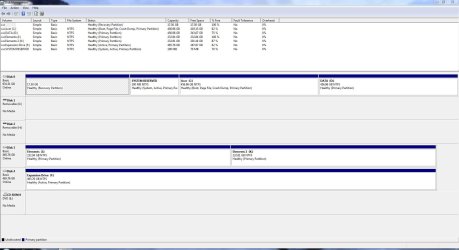
The screenshot is a typical partitioning of an OEM computer boot disk. This is a classic MS configuration for Windows 7.
1st Partition: contains the OEM factory recovery (Disk management suggests it's empty but it contains around 9 GB to recover your system to the original condition.
2nd Partition: 100MB marked System, Active. The BIOS in conjunction with the Master Boot Record (MBR), which is the first 512 bytes on the disk, pass control to the system active partition. In this partition is the boot manager which uses information in the Boot Configuration Data (BCD) to move to the next stage of the boot sequence.
3rd Partition: marked Boot, Page file,.... Control is passed to a program
c:\windows\system32\winload.exe which loads the windows 7 OS.

If you just delete the 100MB partition which is system, active the BIOS will report a boot error.
If you absorb the functions of the 100MB partition into the 3rd partition using for example the Barefootkid tutorial this partition becomes
System, Active, Boot ....
Some computers will already be configured this way.

Is that slow enough?
 

Attachments

  • disks.JPG
    disks.JPG
    143.5 KB · Views: 60

My Computer My Computer

At a glance

Windows 7x64 Home Premium SP1Intel i7 2600kG.Skill Ripjaws (DDR3-1600) 2x4GBNvidia GeForce GTS 450; Intel HD Graphics 300...
Computer type
PC/Desktop
Computer Manufacturer/Model Number
Own build
OS
Windows 7x64 Home Premium SP1
CPU
Intel i7 2600k
Motherboard
ASUS P8Z68 Deluxe
Memory
G.Skill Ripjaws (DDR3-1600) 2x4GB
Graphics Card(s)
Nvidia GeForce GTS 450; Intel HD Graphics 3000(GT2+)
Monitor(s) Displays
Dell Ultrasharp IPS panel U2311H, Samsung SyncMaster P2350
Screen Resolution
1920x1080
Hard Drives
Samsung 850 Pro SSD 256GB, Samsung SSD 840 120GB, Seagates 1TB Barracuda ST31000528AS x2
PSU
Seasonic M12II 520W
Case
Lian Li Lancool PC-K60
Cooling
Case: 1x120mm, 3x140mm CPU: Hyper 212+
Keyboard
Logitech MK520 (wireless)
Mouse
Logitech MK520
Internet Speed
6-7 Mbps
Antivirus
Norton Security Premium, Malwarebytes on 2 (MSE on 3rd PC)
Browser
FireFox
Other Info
Audio: Logitech Z523 2.1
This is the last I will say on this.
You do NOT need that 100 MB partition.

It isn't "absorbed" into anything.
 

My Computer My Computer

At a glance

MS Windows 7 Ultimate SP1 64-bitAMD A10-4600M6.00 GB Dual-Channel DDR3 @ 798MHz (11-11-12-28)AMD Radeon HD 7660G
Computer Manufacturer/Model Number
Toshiba Satellite S875D-S7239 laptop
OS
MS Windows 7 Ultimate SP1 64-bit
CPU
AMD A10-4600M
Motherboard
AMD Pumori (Socket FT1)
Memory
6.00 GB Dual-Channel DDR3 @ 798MHz (11-11-12-28)
Graphics Card(s)
AMD Radeon HD 7660G
Sound Card
High Definition Audio Device
Monitor(s) Displays
Generic PnP Monitor (1600x900@60Hz)
Screen Resolution
1600x900@60Hz
Hard Drives
SSD 119GB Corsair CSSD-V128GB2 ATA Device
Keyboard
Standard PS/2 Keyboard
Mouse
HP Wireless Optical Mobile Mouse Model FHA-3410
Internet Speed
What the local pub, local coffee shop offers.
Other Info
Optical Drive:MATSHITA BD-CMB UJ160B ATA Device


Also have an Asus ha1002xp netbook with Win 7 Ultimate installed.
Back
Top