Install VM on second hd with no operating system- possible?

Joe Golden

New member
With a second 240 gig HD, no operating system, will a VM install and run? :confused: Thanks!
 

My Computer

Computer type
PC/Desktop
Computer Manufacturer/Model Number
Power Spec
OS
Windows 7 Ultimate x64
CPU
i7 930
Motherboard
DX580G
Memory
12 Gigs
Graphics Card(s)
Nvida GeForce GTX650ti
Hard Drives
Hard Disk : CT250BX100SSD1 (250GB)
Hard Disk : OCZ-VERT EX3 MI SCSI Disk Device (240GB)
Antivirus
Microsoft Security Essentials
Browser
FireFox
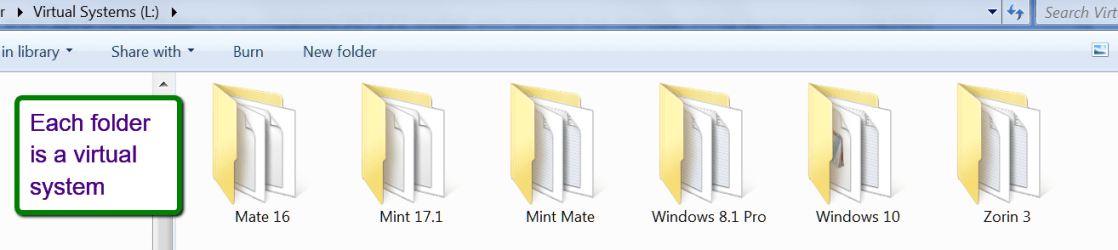
What you can do is to have e.g. VMware Player installed with the OS but then put the virtual systems on the other disk. Each virtual system is just a folder. I run 6 virtual systems that way from an external SSD. Here is a tutorial on how to install and operate those systems.


2015-04-15_1248.png
 

My Computer

Computer Manufacturer/Model Number
HP, Dell, Gateway, Toshiba - 4 laptops and 2 desktops
OS
Vista, Windows7, Mint Mate, Zorin, Windows 8
CPU
from 1.6GHz Duo to i7
Monitor(s) Displays
2x HP w2207
Hard Drives
5x HDD, 7x SSD, 12x Externals
Keyboard
with trackball - no mices
Mouse
Trackball mice
Internet Speed
DSL 6000
Exactly what I do myself.
 

My Computer

Computer type
PC/Desktop
Computer Manufacturer/Model Number
Home Build
OS
Windows 8.1 Pro
CPU
i5 3550 Ivy Bridge
Motherboard
Gigabyte Z77MX-D3H
Memory
8gb 1600 GSkill 9-9-9-24 xmp
Graphics Card(s)
Gigabyte GTX 760 OC
Sound Card
VIA VT2021 onboard
Monitor(s) Displays
BenQ GL2760H 27inch hdmi; LG Flatron E2351 23inch dvi
Screen Resolution
1920x1080
Hard Drives
1x Samsung 850 Evo 120GB
1x 4TB WD Green HDD
1x 3TB WD Green HDD
2x 2TB Seagate HDD
1x 1TB Seagate External HDD
PSU
Cooler Master V750
Case
Coolermaster HAF 912 Advanced
Cooling
Standard
Keyboard
Logitech K120 USB
Mouse
Razor Abyssus USB
Internet Speed
Broadband
Antivirus
MSE + Malwarebytes
Browser
Palemoon
Other Info
It's been the worst day since yesterday (thanks Flogging Molly) so apt!
What you can do is to have e.g. VMware Player installed with the OS but then put the virtual systems on the other disk. Each virtual system is just a folder. I run 6 virtual systems that way from an external SSD. Here is a tutorial on how to install and operate those systems.


View attachment 356349

Thank you! I had chores to do today but now i'm back on the project. I think i got it just like you said, installed VM on my c:drive and made VM folders on my external SSD.

I tried to load a clean install of 10056. It loaded but the start screen hangs then non function almost everything. maybe i have a bad 10056 build? Anyway i have a 10041 iso i'll try later.
 

My Computer

Computer type
PC/Desktop
Computer Manufacturer/Model Number
Power Spec
OS
Windows 7 Ultimate x64
CPU
i7 930
Motherboard
DX580G
Memory
12 Gigs
Graphics Card(s)
Nvida GeForce GTX650ti
Hard Drives
Hard Disk : CT250BX100SSD1 (250GB)
Hard Disk : OCZ-VERT EX3 MI SCSI Disk Device (240GB)
Antivirus
Microsoft Security Essentials
Browser
FireFox
Let us know whether the 10041 worked or whether there is a bigger problem. I had the 10041 working and now the 10049 works with that same setup.
 

My Computer

Computer Manufacturer/Model Number
HP, Dell, Gateway, Toshiba - 4 laptops and 2 desktops
OS
Vista, Windows7, Mint Mate, Zorin, Windows 8
CPU
from 1.6GHz Duo to i7
Monitor(s) Displays
2x HP w2207
Hard Drives
5x HDD, 7x SSD, 12x Externals
Keyboard
with trackball - no mices
Mouse
Trackball mice
Internet Speed
DSL 6000
Most people on this forum know what you're talking about but there may be a few that don't. You really should be more specific that you are trying to install Win 10 build 10041 and 10056 in a VM so that everyone is on the same page. It probably would be OK if we were discussing this on the Win 10 forum but since this in the Win 7 forum there may be some that aren't following Win 10.

As to your original question, absolutely. My main drive is an ssd so I don't want to use up it's limited space with VMs so I have all my VMs on a secondary drive (hdd) with lots more space.

You can use an external as WHS suggests but you will take somewhat of a performance hit which may or may not be acceptable to you.
 

My Computer

Computer type
PC/Desktop
Computer Manufacturer/Model Number
Home Built desktop, Dell G15 5511 Gaming laptop,MS Surface Pro 7 tablet
OS
W10 Pro desktop, W11 laptop, W11 Pro tablet (all 64-bit)
CPU
3.7Ghz 8700K i7, i7-11800H, i7-1065G7
Motherboard
ASUS TUF Z370-Pro Gaming in desktop
Memory
16G desktop, 16G laptop, 4G tablet
Graphics Card(s)
AMD Radeon RX580, RTX 3060, Intel Iris Plus
Sound Card
High Definition Audio (Built-in to mobo)
Monitor(s) Displays
Samsung U32J59 32" (2x), 15.6", 12"
Screen Resolution
3840x2160, 3840x2160, 1920x1080, 2160x1440
Hard Drives
500G SSD for OS; 2T, 10T & 15T HDDs for Data on Desktop, 1TB SSD laptop, 128G SSD tablet.
PSU
Corsair CX 750M
Case
Antec 100
Cooling
CM 212+
Keyboard
IBM Model M - used continuously since 1986
Mouse
Microsoft Pro IntelliMouse
Internet Speed
400M down 8M up
Antivirus
Windows Defender
Browser
FireFox
Other Info
Built my first computer (8Mhz 8088cpu, 640K RAM, 20MB HDD, 2 360K floppy drives) in 1985 and have been building them for myself, relatives and friends ever since.
You can use an external as WHS suggests but you will take somewhat of a performance hit which may or may not be acceptable to you.
If you use a SSD on USB3 or eSata, the performance hit is negligible.
 

My Computer

Computer Manufacturer/Model Number
HP, Dell, Gateway, Toshiba - 4 laptops and 2 desktops
OS
Vista, Windows7, Mint Mate, Zorin, Windows 8
CPU
from 1.6GHz Duo to i7
Monitor(s) Displays
2x HP w2207
Hard Drives
5x HDD, 7x SSD, 12x Externals
Keyboard
with trackball - no mices
Mouse
Trackball mice
Internet Speed
DSL 6000
Most people on this forum know what you're talking about but there may be a few that don't. You really should be more specific that you are trying to install Win 10 build 10041 and 10056 in a VM so that everyone is on the same page. It probably would be OK if we were discussing this on the Win 10 forum but since this in the Win 7 forum there may be some that aren't following Win 10.

As to your original question, absolutely. My main drive is an ssd so I don't want to use up it's limited space with V
Ms so I have all my VMs on a secondary drive (hdd) with lots more space.

You can use an external as WHS suggests but you will take somewhat of a performance hit which may or may not be acceptable to you.

I do appoligize for the error of my ways. I was non specific on purpose. If readers couldnot understand my "shorthand", i figured they would not be able to answer my question anyway. Again i appoligize for my error.

Last night i did move my external ssd to an internal hd with a sata 6 connection. I was concerned about the very thing you mentioned.

I'm trying to save space on my c:drive. Adding folders to my P: hd is going to solve my storage problem.
 

My Computer

Computer type
PC/Desktop
Computer Manufacturer/Model Number
Power Spec
OS
Windows 7 Ultimate x64
CPU
i7 930
Motherboard
DX580G
Memory
12 Gigs
Graphics Card(s)
Nvida GeForce GTX650ti
Hard Drives
Hard Disk : CT250BX100SSD1 (250GB)
Hard Disk : OCZ-VERT EX3 MI SCSI Disk Device (240GB)
Antivirus
Microsoft Security Essentials
Browser
FireFox
Let us know whether the 10041 worked or whether there is a bigger problem. I had the 10041 working and now the 10049 works with that same setup.

Win 10 10041 pree release build works perfeci in my VM. Is there a way i can i can update win 10041 with win 10 build 10056?
 

My Computer

Computer type
PC/Desktop
Computer Manufacturer/Model Number
Power Spec
OS
Windows 7 Ultimate x64
CPU
i7 930
Motherboard
DX580G
Memory
12 Gigs
Graphics Card(s)
Nvida GeForce GTX650ti
Hard Drives
Hard Disk : CT250BX100SSD1 (250GB)
Hard Disk : OCZ-VERT EX3 MI SCSI Disk Device (240GB)
Antivirus
Microsoft Security Essentials
Browser
FireFox
I am waiting for 10056 also. It will come eventually or one of the 1006x builds.
 

My Computer

Computer Manufacturer/Model Number
HP, Dell, Gateway, Toshiba - 4 laptops and 2 desktops
OS
Vista, Windows7, Mint Mate, Zorin, Windows 8
CPU
from 1.6GHz Duo to i7
Monitor(s) Displays
2x HP w2207
Hard Drives
5x HDD, 7x SSD, 12x Externals
Keyboard
with trackball - no mices
Mouse
Trackball mice
Internet Speed
DSL 6000
... I do appoligize for the error of my ways. I was non specific on purpose. If readers couldnot understand my "shorthand", i figured they would not be able to answer my question anyway. Again i appoligize for my error.

Last night i did move my external ssd to an internal hd with a sata 6 connection. I was concerned about the very thing you mentioned.

I'm trying to save space on my c:drive. Adding folders to my P: hd is going to solve my storage problem.
No need to apologize, I wouldn't even call it an error but you just need to keep in mind that not everyone on a forum will instantly now what you're talking about.
 
Last edited:

My Computer

Computer type
PC/Desktop
Computer Manufacturer/Model Number
Home Built desktop, Dell G15 5511 Gaming laptop,MS Surface Pro 7 tablet
OS
W10 Pro desktop, W11 laptop, W11 Pro tablet (all 64-bit)
CPU
3.7Ghz 8700K i7, i7-11800H, i7-1065G7
Motherboard
ASUS TUF Z370-Pro Gaming in desktop
Memory
16G desktop, 16G laptop, 4G tablet
Graphics Card(s)
AMD Radeon RX580, RTX 3060, Intel Iris Plus
Sound Card
High Definition Audio (Built-in to mobo)
Monitor(s) Displays
Samsung U32J59 32" (2x), 15.6", 12"
Screen Resolution
3840x2160, 3840x2160, 1920x1080, 2160x1440
Hard Drives
500G SSD for OS; 2T, 10T & 15T HDDs for Data on Desktop, 1TB SSD laptop, 128G SSD tablet.
PSU
Corsair CX 750M
Case
Antec 100
Cooling
CM 212+
Keyboard
IBM Model M - used continuously since 1986
Mouse
Microsoft Pro IntelliMouse
Internet Speed
400M down 8M up
Antivirus
Windows Defender
Browser
FireFox
Other Info
Built my first computer (8Mhz 8088cpu, 640K RAM, 20MB HDD, 2 360K floppy drives) in 1985 and have been building them for myself, relatives and friends ever since.
Bruce, I did my name get into the quote of Joe's posting, LOL
 

My Computer

Computer Manufacturer/Model Number
HP, Dell, Gateway, Toshiba - 4 laptops and 2 desktops
OS
Vista, Windows7, Mint Mate, Zorin, Windows 8
CPU
from 1.6GHz Duo to i7
Monitor(s) Displays
2x HP w2207
Hard Drives
5x HDD, 7x SSD, 12x Externals
Keyboard
with trackball - no mices
Mouse
Trackball mice
Internet Speed
DSL 6000
Okay Wolfgang I'm look for your original post the quote came from that is shown in strollin post # 11.
I can't find it.

I have been out of the hospital for about a week so my brain is back to all 3 brain cells. I still can't find where the quote came from.
 

My Computer

Computer type
PC/Desktop
Computer Manufacturer/Model Number
Home made Desktop
OS
Windows 10 Pro. 64/ version 1709 Windows 7 Pro/64
CPU
Intel i7-6800K @ 4.3
Motherboard
ASUS X-99 Deluxe II
Memory
Corsair Platinum 16 gig @2400
Graphics Card(s)
EVGA GTX 1070 OC
Monitor(s) Displays
Asus 27" LED LCD/VE278Q
Screen Resolution
1920-1080 or 1280-720 HDMI
Hard Drives
INTEL SSD 730-240 Gb Sata 3.0/
PSU
EVGA Platium 1200W
Case
Phanteks Luxe Tempered Glass 8 fans/ one radiator
Cooling
XSPC/ Water Cooled CPU
Keyboard
Das 4 Professional
Mouse
Logitech M705/MX Anywhere 2-S
Internet Speed
100 mbits
Antivirus
Microsoft Security Essentials/ Malwarebytes Premium 3.0/ SAS
Browser
I.E. 11 default/Firefox/ ISP Time Warner Cable/Spectrum
Other Info
LG BluRay Burner/
Sound system-KLipsch-THX/
Icy Dock ssd Hot Swap bays.
Now you lost me completely. That quote from Bruce is nothing I ever wrote. That would not be my style and the facts relate to nothing I have ever done. But it's no real problem, just curious where that came from.
 

My Computer

Computer Manufacturer/Model Number
HP, Dell, Gateway, Toshiba - 4 laptops and 2 desktops
OS
Vista, Windows7, Mint Mate, Zorin, Windows 8
CPU
from 1.6GHz Duo to i7
Monitor(s) Displays
2x HP w2207
Hard Drives
5x HDD, 7x SSD, 12x Externals
Keyboard
with trackball - no mices
Mouse
Trackball mice
Internet Speed
DSL 6000
Now you lost me completely. That quote from Bruce is nothing I ever wrote. That would not be my style and the facts relate to nothing I have ever done. But it's no real problem, just curious where that came from.
I can't explain it but I fixed it as it was a quote from the OP.
 

My Computer

Computer type
PC/Desktop
Computer Manufacturer/Model Number
Home Built desktop, Dell G15 5511 Gaming laptop,MS Surface Pro 7 tablet
OS
W10 Pro desktop, W11 laptop, W11 Pro tablet (all 64-bit)
CPU
3.7Ghz 8700K i7, i7-11800H, i7-1065G7
Motherboard
ASUS TUF Z370-Pro Gaming in desktop
Memory
16G desktop, 16G laptop, 4G tablet
Graphics Card(s)
AMD Radeon RX580, RTX 3060, Intel Iris Plus
Sound Card
High Definition Audio (Built-in to mobo)
Monitor(s) Displays
Samsung U32J59 32" (2x), 15.6", 12"
Screen Resolution
3840x2160, 3840x2160, 1920x1080, 2160x1440
Hard Drives
500G SSD for OS; 2T, 10T & 15T HDDs for Data on Desktop, 1TB SSD laptop, 128G SSD tablet.
PSU
Corsair CX 750M
Case
Antec 100
Cooling
CM 212+
Keyboard
IBM Model M - used continuously since 1986
Mouse
Microsoft Pro IntelliMouse
Internet Speed
400M down 8M up
Antivirus
Windows Defender
Browser
FireFox
Other Info
Built my first computer (8Mhz 8088cpu, 640K RAM, 20MB HDD, 2 360K floppy drives) in 1985 and have been building them for myself, relatives and friends ever since.
Thanks - strange things happen. We are surrounded by gremlins.
 

My Computer

Computer Manufacturer/Model Number
HP, Dell, Gateway, Toshiba - 4 laptops and 2 desktops
OS
Vista, Windows7, Mint Mate, Zorin, Windows 8
CPU
from 1.6GHz Duo to i7
Monitor(s) Displays
2x HP w2207
Hard Drives
5x HDD, 7x SSD, 12x Externals
Keyboard
with trackball - no mices
Mouse
Trackball mice
Internet Speed
DSL 6000
And i forgot to thank you WHS your excellent link to the tutorial video on VM's. Using Oracle for my first attempts at VM's i have switched to VMware . Your excellent tutorial made running VMware a snap to use!
 

My Computer

Computer type
PC/Desktop
Computer Manufacturer/Model Number
Power Spec
OS
Windows 7 Ultimate x64
CPU
i7 930
Motherboard
DX580G
Memory
12 Gigs
Graphics Card(s)
Nvida GeForce GTX650ti
Hard Drives
Hard Disk : CT250BX100SSD1 (250GB)
Hard Disk : OCZ-VERT EX3 MI SCSI Disk Device (240GB)
Antivirus
Microsoft Security Essentials
Browser
FireFox
You are welcome Joe. I am glad the tutorial was a help.
 

My Computer

Computer Manufacturer/Model Number
HP, Dell, Gateway, Toshiba - 4 laptops and 2 desktops
OS
Vista, Windows7, Mint Mate, Zorin, Windows 8
CPU
from 1.6GHz Duo to i7
Monitor(s) Displays
2x HP w2207
Hard Drives
5x HDD, 7x SSD, 12x Externals
Keyboard
with trackball - no mices
Mouse
Trackball mice
Internet Speed
DSL 6000
@OP: Who needs a virtual machine anyways? You can put a vhd file containing a preinstalled OS (Windows 7+) on the hard drive and native boot it. You do need to put Windows 7+ boot manager on the actual drive to make it work though...
 

My Computer

Computer type
PC/Desktop
OS
Windows 7 Home Premium 32 Bit
@OP: Who needs a virtual machine anyways? You can put a vhd file containing a preinstalled OS (Windows 7+) on the hard drive and native boot it. You do need to put Windows 7+ boot manager on the actual drive to make it work though...

Good idea but you may want to explain how to add the bootmgr because that is not obvious.
 

My Computer

Computer Manufacturer/Model Number
HP, Dell, Gateway, Toshiba - 4 laptops and 2 desktops
OS
Vista, Windows7, Mint Mate, Zorin, Windows 8
CPU
from 1.6GHz Duo to i7
Monitor(s) Displays
2x HP w2207
Hard Drives
5x HDD, 7x SSD, 12x Externals
Keyboard
with trackball - no mices
Mouse
Trackball mice
Internet Speed
DSL 6000
Back
Top