Install Windows 7 on an old non UEFI bios.

OldSchool297

Banned
Local time
7:46 AM
Messages
18
Hi. Is it possible to install windows 7 on an old bios that doesn't support UEFI/Legacy? I got an old Acer Aspire T120/1,9ghz x86, 2gb memory and geforce fx 5200 grafic card/BIOS-version/Phoenix Technologies, LTD R01-A1, 2003-12-02.
 

My Computer My Computer

At a glance

Windows Vista 32bit.
Computer type
PC/Desktop
OS
Windows Vista 32bit.
If it came with vista, then it should be able to run win7.
 

My Computers My Computers

  • At a glance

    7 X64i5 84002x8gb 3200mhz
    Computer type
    PC/Desktop
    OS
    7 X64
    CPU
    i5 8400
    Motherboard
    gigabyte b365m ds3h
    Memory
    2x8gb 3200mhz
    Hard Drives
    various
    PSU
    pure power 11 400w cm
    Case
    Coolermaster
    Cooling
    cryorig m9i
  • At a glance

    7x64g54008gb ddr4 2400
    Computer type
    PC/Desktop
    OS
    7x64
    CPU
    g5400
    Motherboard
    ga b365m ds3h
    Memory
    8gb ddr4 2400
    PSU
    xfx pro 450w
Hi. Is it possible to install windows 7 on an old bios that doesn't support UEFI/Legacy?


Windows 7 supports BIOS-boot with no problems.


I recommend you 32-bit version for old machines. It is MUCH faster than 64-bit one.
 

My Computer My Computer

At a glance

Windows 7 Professional x64
Computer type
PC/Desktop
OS
Windows 7 Professional x64
Not having UEFI will make the install ]much easier, with a normal BIOS everything just works.

Generally speaking, the older the system, the easier is to get it compatible with the software. But also be aware of some potential performance issues if you go on a too old system. Most systems which have Vista bundled weren't really capable of running Vista.
 

My Computer My Computer

At a glance

Windows 7 Ultimate x64Intel Core i7-740QM8 GB DDR3NVIDIA GeForce 330GT
Computer type
Laptop
Computer Manufacturer/Model Number
Toshiba Sattelite A665-S6092
OS
Windows 7 Ultimate x64
CPU
Intel Core i7-740QM
Memory
8 GB DDR3
Graphics Card(s)
NVIDIA GeForce 330GT
Screen Resolution
1366x768
Hard Drives
Samsung 840 SSD 500GB
1TB USB3 external HD
Cooling
Coolermaster Notepal U3 notebook cooling pad
Internet Speed
3mbps ASDL
Antivirus
ClamWin 0.98.7
Browser
Opera 12.17 x86 (main), Firefox 38 (sec), IE11 (last resort)
For some reason the dvd stops loading when the blue windows logo turns up at the installation, i tried to install vista and it worked so it can't be my dvd burner that is faulty. I can't even get to the choice harddrive window. i don't see any text at all only the logo.
 

My Computer My Computer

At a glance

Windows Vista 32bit.
Computer type
PC/Desktop
OS
Windows Vista 32bit.

My Computers My Computers

  • At a glance

    7 X64i5 84002x8gb 3200mhz
    Computer type
    PC/Desktop
    OS
    7 X64
    CPU
    i5 8400
    Motherboard
    gigabyte b365m ds3h
    Memory
    2x8gb 3200mhz
    Hard Drives
    various
    PSU
    pure power 11 400w cm
    Case
    Coolermaster
    Cooling
    cryorig m9i
  • At a glance

    7x64g54008gb ddr4 2400
    Computer type
    PC/Desktop
    OS
    7x64
    CPU
    g5400
    Motherboard
    ga b365m ds3h
    Memory
    8gb ddr4 2400
    PSU
    xfx pro 450w
If you have the space on your disk, I suggest creating a separate partition to install win7. That will leave your current vista installation intact, in case you screw something up.

It is also useful if there are some machine specific drivers- you can browse from your new 7 partition to your vista partition to get the drivers.
 

My Computers My Computers

  • At a glance

    7 X64i5 84002x8gb 3200mhz
    Computer type
    PC/Desktop
    OS
    7 X64
    CPU
    i5 8400
    Motherboard
    gigabyte b365m ds3h
    Memory
    2x8gb 3200mhz
    Hard Drives
    various
    PSU
    pure power 11 400w cm
    Case
    Coolermaster
    Cooling
    cryorig m9i
  • At a glance

    7x64g54008gb ddr4 2400
    Computer type
    PC/Desktop
    OS
    7x64
    CPU
    g5400
    Motherboard
    ga b365m ds3h
    Memory
    8gb ddr4 2400
    PSU
    xfx pro 450w
I don't get to the white bar with loading files, you can be right the logo is more green, I tried a Vista installation dvd and it worked so my dvd burner works. I can se the windows 7 dvd and files in Vista and acces the setup but not install in windows, i don't think it can be installed on old bios? I have read about it, or is it only the 64 one? I tried the Windows 7 boot installation for 2 hours but the only thing is that the green center logo shows and the red harddrive light och the green dvd light, lights together for about 1min then nothing happens.
 

My Computer My Computer

At a glance

Windows Vista 32bit.
Computer type
PC/Desktop
OS
Windows Vista 32bit.
Hi

Blue screens are usually driver related, when you downloaded W7 did you make sure it was the 32 bit version, 64bit wont process on a 32bit only motherboard

PS as you only have 2gb ram home or Business versions only - certainly not Ultimate.


Roy
 

My Computer My Computer

At a glance

W7 home premium 32bit/W7HP 64bit/w10 tp insid...E5300 dual core3gbNvidia Geforce 7100 Nforce 630i
Computer type
PC/Desktop
Computer Manufacturer/Model Number
medionl/Aspire 6930G/acer x55a
OS
W7 home premium 32bit/W7HP 64bit/w10 tp insider ring
CPU
E5300 dual core
Motherboard
medion MS7366
Memory
3gb
Graphics Card(s)
Nvidia Geforce 7100 Nforce 630i
Monitor(s) Displays
avixc
Internet Speed
n (isp resticted to 72)
Antivirus
mse/pands
Browser
palemoon
Other Info
Belkin Fd7050 n USB using Railink RT2870 drivers, more upto date
I don't even know if you should attempt to install Windows 7. I don't see on the Acer site drivers for a T120. And if there are you need the Vista drivers which should work in Win 7 or the Win 7 drivers if they provide them. You will want to use the 32 bit version of Windows 7 and 32 bit drivers as you only have 2 GB of RAM. If you had a 64 bit capable CPU and at least 4 GB of RAM, then you could use a 64 bit OS.

Yes, you can install Windows 7 in a regular BIOS. Windows 7 doesn't need UEFI to operate.

As to the boot issue on installing Windows 7, I'm not sure. The Acer T120 was built for XP and it's quite old.
 

My Computer My Computer

At a glance

Windows 7 Ultimate x64
Computer type
PC/Desktop
OS
Windows 7 Ultimate x64
I don't know what you mean by the green center logo.

If you aren't getting Windows Loading Files, it could be:

Either the iso was not burned to dvd correctly

Or your machine doesn't support the WIN7 el torito.

If your machine supports booting from usb:

You could create a bootable usb from the win7 iso - there are programs that will do it for you.

View attachment Usb7ice.zip


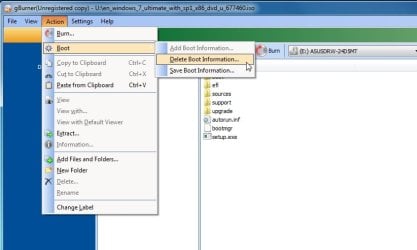
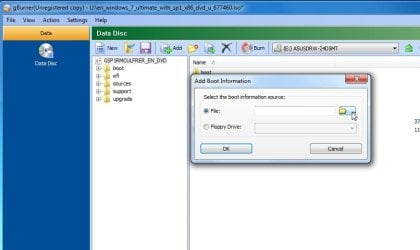
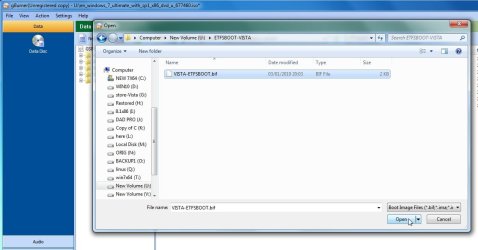
The other way that works for users of old hardware is to create a bootable iso using vista etfsboot.com

Easy way:

Use an iso handler to pick up a vista installation iso, delete the contents, then add the contents of the win7 32 bit iso and save it. That takes less than a minute.

OR replace the win7 iso bootsector with the vista version.


gburner trial is fully functional for 30 days, and easy to use.
gBurner - A powerful CD, DVD and BD burning software


I don't get to the white bar with loading files, you can be right the logo is more green, I tried a Vista installation dvd and it worked so my dvd burner works. I can se the windows 7 dvd and files in Vista and acces the setup but not install in windows, i don't think it can be installed on old bios? I have read about it, or is it only the 64 one? I tried the Windows 7 boot installation for 2 hours but the only thing is that the green center logo shows and the red harddrive light och the green dvd light, lights together for about 1min then nothing happens.
 
Last edited:

My Computers My Computers

  • At a glance

    7 X64i5 84002x8gb 3200mhz
    Computer type
    PC/Desktop
    OS
    7 X64
    CPU
    i5 8400
    Motherboard
    gigabyte b365m ds3h
    Memory
    2x8gb 3200mhz
    Hard Drives
    various
    PSU
    pure power 11 400w cm
    Case
    Coolermaster
    Cooling
    cryorig m9i
  • At a glance

    7x64g54008gb ddr4 2400
    Computer type
    PC/Desktop
    OS
    7x64
    CPU
    g5400
    Motherboard
    ga b365m ds3h
    Memory
    8gb ddr4 2400
    PSU
    xfx pro 450w
Last edited:

My Computers My Computers

  • At a glance

    7 X64i5 84002x8gb 3200mhz
    Computer type
    PC/Desktop
    OS
    7 X64
    CPU
    i5 8400
    Motherboard
    gigabyte b365m ds3h
    Memory
    2x8gb 3200mhz
    Hard Drives
    various
    PSU
    pure power 11 400w cm
    Case
    Coolermaster
    Cooling
    cryorig m9i
  • At a glance

    7x64g54008gb ddr4 2400
    Computer type
    PC/Desktop
    OS
    7x64
    CPU
    g5400
    Motherboard
    ga b365m ds3h
    Memory
    8gb ddr4 2400
    PSU
    xfx pro 450w
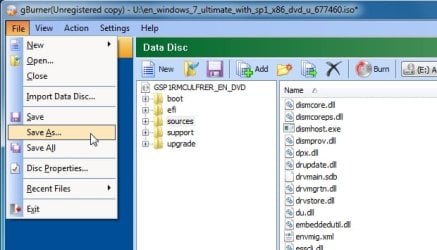
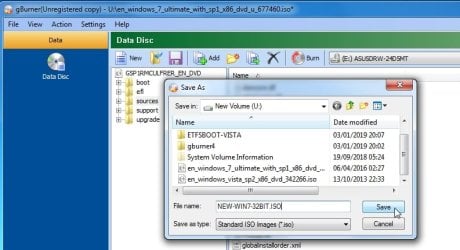
7. Save as

GBURNER-SAVE-AS.jpg

8. Give the new iso a name - it then takes a few seconds to save the new iso

GBURNER-SAVE-AS-2.jpg

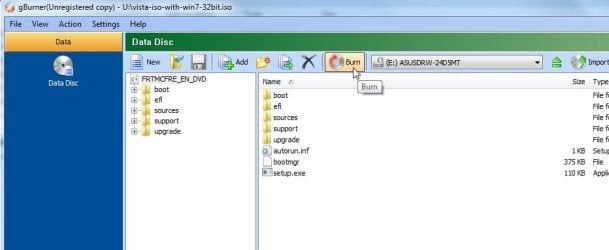
9. Click burn - after ticking the verify box

burn.jpg

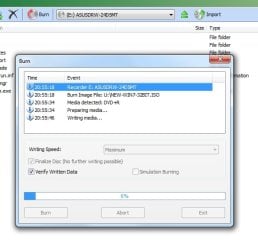
10. Burning new iso image to dvd

burn-2.jpg
 
Last edited:

My Computers My Computers

  • At a glance

    7 X64i5 84002x8gb 3200mhz
    Computer type
    PC/Desktop
    OS
    7 X64
    CPU
    i5 8400
    Motherboard
    gigabyte b365m ds3h
    Memory
    2x8gb 3200mhz
    Hard Drives
    various
    PSU
    pure power 11 400w cm
    Case
    Coolermaster
    Cooling
    cryorig m9i
  • At a glance

    7x64g54008gb ddr4 2400
    Computer type
    PC/Desktop
    OS
    7x64
    CPU
    g5400
    Motherboard
    ga b365m ds3h
    Memory
    8gb ddr4 2400
    PSU
    xfx pro 450w
That is a frankenstein iso. It probably uses windows 10 setup files. You could try replacing the boot info as described in my previous couple of posts. It might work.

I am more certain it will work with a proper win7 iso, but you can try it with the iso you have
 

My Computers My Computers

  • At a glance

    7 X64i5 84002x8gb 3200mhz
    Computer type
    PC/Desktop
    OS
    7 X64
    CPU
    i5 8400
    Motherboard
    gigabyte b365m ds3h
    Memory
    2x8gb 3200mhz
    Hard Drives
    various
    PSU
    pure power 11 400w cm
    Case
    Coolermaster
    Cooling
    cryorig m9i
  • At a glance

    7x64g54008gb ddr4 2400
    Computer type
    PC/Desktop
    OS
    7x64
    CPU
    g5400
    Motherboard
    ga b365m ds3h
    Memory
    8gb ddr4 2400
    PSU
    xfx pro 450w
Thank you for the help, i will try downloading another if it not work i will replace as you said.
 

My Computer My Computer

At a glance

Windows Vista 32bit.
Computer type
PC/Desktop
OS
Windows Vista 32bit.
Let us know how it goes
 

My Computers My Computers

  • At a glance

    7 X64i5 84002x8gb 3200mhz
    Computer type
    PC/Desktop
    OS
    7 X64
    CPU
    i5 8400
    Motherboard
    gigabyte b365m ds3h
    Memory
    2x8gb 3200mhz
    Hard Drives
    various
    PSU
    pure power 11 400w cm
    Case
    Coolermaster
    Cooling
    cryorig m9i
  • At a glance

    7x64g54008gb ddr4 2400
    Computer type
    PC/Desktop
    OS
    7x64
    CPU
    g5400
    Motherboard
    ga b365m ds3h
    Memory
    8gb ddr4 2400
    PSU
    xfx pro 450w
I downloaded WinISO.

Why? Gburner is fully functional free trial. I gave you the link and the screenshot instructions for gburner.
Follow the instructions I posted.
 

My Computers My Computers

  • At a glance

    7 X64i5 84002x8gb 3200mhz
    Computer type
    PC/Desktop
    OS
    7 X64
    CPU
    i5 8400
    Motherboard
    gigabyte b365m ds3h
    Memory
    2x8gb 3200mhz
    Hard Drives
    various
    PSU
    pure power 11 400w cm
    Case
    Coolermaster
    Cooling
    cryorig m9i
  • At a glance

    7x64g54008gb ddr4 2400
    Computer type
    PC/Desktop
    OS
    7x64
    CPU
    g5400
    Motherboard
    ga b365m ds3h
    Memory
    8gb ddr4 2400
    PSU
    xfx pro 450w
What to replace? I downloaded WinISO.
 

Attachments

  • Win7.jpg
    Win7.jpg
    55.9 KB · Views: 1

My Computer My Computer

At a glance

Windows Vista 32bit.
Computer type
PC/Desktop
OS
Windows Vista 32bit.
Back
Top