
Install windows 7 starter 32 bit no video controller device

Mynameisgelo

New member
Local time
1:15 PM
Messages
6
I installed windows 7 starter 32 bit on my acer travelmate 4070, no video controller device not installed, i tried to windows update but windows could not fin drivers for my device.. what should I do?? pls.. help me :( thanks..
 

My Computer

OS
windows 7 starter 32 bit
Maybe you have to install correct chipset driver first.
Visit manifacturer site, choose computer model and download specific drivers.
 

My Computer

Computer Manufacturer/Model Number
Acer Notebook
OS
Win 8 RP, Win 7, XP
CPU
Intel
As the acer travelmate 4070 was only sold with Win XP.
Where did you buy your Windows 7 Starter from?
 

My Computer

OS
ME/XP/Vista/Win7
Yeah, Acer Canada only shows XP drivers for the 4270. You can't actually buy Windows 7 can you? I think it's only available preinstalled on a PC.
 

My Computer

Computer type
PC/Desktop
Computer Manufacturer/Model Number
Home Built
OS
Windows 10 Education 64 bit
CPU
AMD Phenom II X4 980 Black Edition Deneb 3.7GHz
Motherboard
Asus M4N68T-M V2 µATX Motherboard
Memory
8GB 4GBx2 Kingston PC10600 DDR3 1333 Memory
Graphics Card(s)
Zotac NVIDIA Geforce GT640 2 Gig DDR3 PCIe
Sound Card
VIA VT1708s High Definition Audio 8-channel Onboard
Monitor(s) Displays
22" LG E2242 1080p and 2 19" I-INC AG191D
Screen Resolution
1280x1024 - 1920x1080 - 1280x1024
Hard Drives
Crucial M100 256 GB SSD and 500 GB WD Blue SATA
PSU
Thermaltake TR 620
Case
Power Up Black ATX Mid-Tower Case
Cooling
Stock heatsink and fan
Keyboard
Logitech Wireless K350 Wave
Mouse
Logitech Wireless M570 Trackman Wheel
Internet Speed
80 Mbps Down 30 Mbps Up
Antivirus
Windows Defender
Browser
Internet Explorer 11
Other Info
HP DVD1040e Lightscribe - External USB2
Duh, it just occurred to me that if you strip the ei.cfg file out of the 32 bit install media, making it universal install media, Windows 7 Starter will be in the list of install options. You'll still need a product code to go any longer than 30 days, but its a lot easier to obtain and install than I thought when I made my above post. Still one has to wonder why you would install it on a PC that didn't come with it in the first place. :confused:
 

My Computer

Computer type
PC/Desktop
Computer Manufacturer/Model Number
Home Built
OS
Windows 10 Education 64 bit
CPU
AMD Phenom II X4 980 Black Edition Deneb 3.7GHz
Motherboard
Asus M4N68T-M V2 µATX Motherboard
Memory
8GB 4GBx2 Kingston PC10600 DDR3 1333 Memory
Graphics Card(s)
Zotac NVIDIA Geforce GT640 2 Gig DDR3 PCIe
Sound Card
VIA VT1708s High Definition Audio 8-channel Onboard
Monitor(s) Displays
22" LG E2242 1080p and 2 19" I-INC AG191D
Screen Resolution
1280x1024 - 1920x1080 - 1280x1024
Hard Drives
Crucial M100 256 GB SSD and 500 GB WD Blue SATA
PSU
Thermaltake TR 620
Case
Power Up Black ATX Mid-Tower Case
Cooling
Stock heatsink and fan
Keyboard
Logitech Wireless K350 Wave
Mouse
Logitech Wireless M570 Trackman Wheel
Internet Speed
80 Mbps Down 30 Mbps Up
Antivirus
Windows Defender
Browser
Internet Explorer 11
Other Info
HP DVD1040e Lightscribe - External USB2
Maybe you have to install correct chipset driver first.
Visit manifacturer site, choose computer model and download specific drivers.

My chipset is VGA Graphics adapter.. the only problem is my video controller the games not working everytime I open games "Could Find any compatible Direct3D devices.:mad:.are flashing to my screen pls.. help me dude...
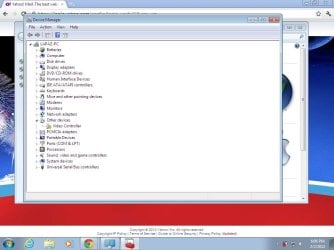
 

Attachments

  • Untitled.jpg
    Untitled.jpg
    74 KB · Views: 79

My Computer

OS
windows 7 starter 32 bit
Yeah, Acer Canada only shows XP drivers for the 4270. You can't actually buy Windows 7 can you? I think it's only available preinstalled on a PC.

I'm using Windows 7 starter 32 bit its working good.. the only problem is my video controller the games not working
 

My Computer

OS
windows 7 starter 32 bit
Your chip-set is a Mobile Intel 915GM/915PM Express chip-set. Standard VGA Graphics Adapter means Windows couldn't identify you video adapter and or couldn't find a driver for it. It using a very basic generic driver. Acer doesn't supply Windows 7 Drivers for that model so you'll probably have to search around the Intel support site to find them. Your Video is an Intel 915GM Integrated Graphics Media Accelerator 950. The one Intel driver package, if you can find it, will likely have both.
If your Windows 7 Starter is an OEM version you can't transfer it to another PC. How did you activate it?
 

My Computer

Computer type
PC/Desktop
Computer Manufacturer/Model Number
Home Built
OS
Windows 10 Education 64 bit
CPU
AMD Phenom II X4 980 Black Edition Deneb 3.7GHz
Motherboard
Asus M4N68T-M V2 µATX Motherboard
Memory
8GB 4GBx2 Kingston PC10600 DDR3 1333 Memory
Graphics Card(s)
Zotac NVIDIA Geforce GT640 2 Gig DDR3 PCIe
Sound Card
VIA VT1708s High Definition Audio 8-channel Onboard
Monitor(s) Displays
22" LG E2242 1080p and 2 19" I-INC AG191D
Screen Resolution
1280x1024 - 1920x1080 - 1280x1024
Hard Drives
Crucial M100 256 GB SSD and 500 GB WD Blue SATA
PSU
Thermaltake TR 620
Case
Power Up Black ATX Mid-Tower Case
Cooling
Stock heatsink and fan
Keyboard
Logitech Wireless K350 Wave
Mouse
Logitech Wireless M570 Trackman Wheel
Internet Speed
80 Mbps Down 30 Mbps Up
Antivirus
Windows Defender
Browser
Internet Explorer 11
Other Info
HP DVD1040e Lightscribe - External USB2
Your chip-set is a Mobile Intel 915GM/915PM Express chip-set. Standard VGA Graphics Adapter means Windows couldn't identify you video adapter and or couldn't find a driver for it. It using a very basic generic driver. Acer doesn't supply Windows 7 Drivers for that model so you'll probably have to search around the Intel support site to find them. Your Video is an Intel 915GM Integrated Graphics Media Accelerator 950. The one Intel driver package, if you can find it, will likely have both.
If your Windows 7 Starter is an OEM version you can't transfer it to another PC. How did you activate it?

Do you think this driver work for my laptop "nVidia Graphics Driver (Windows Vista 32-bit / Windows 7 32-bit)" ?
 

My Computer

OS
windows 7 starter 32 bit
My old Acer Aspire 5920 uses the Mobile Intel GM965 Express chip-set. I also had to hunt around the Intel site for drivers. The best I could do was Vista 64 bit drivers and they worked. It's running Windows 7 64 bit. Acer has some drivers but not all the ones I needed. Video was missing from the downloads for my 5920. All you can do is try them to see if they work. If you're worried it might mess things up create a system restore point before you try them as a backup plan.
 

My Computer

Computer type
PC/Desktop
Computer Manufacturer/Model Number
Home Built
OS
Windows 10 Education 64 bit
CPU
AMD Phenom II X4 980 Black Edition Deneb 3.7GHz
Motherboard
Asus M4N68T-M V2 µATX Motherboard
Memory
8GB 4GBx2 Kingston PC10600 DDR3 1333 Memory
Graphics Card(s)
Zotac NVIDIA Geforce GT640 2 Gig DDR3 PCIe
Sound Card
VIA VT1708s High Definition Audio 8-channel Onboard
Monitor(s) Displays
22" LG E2242 1080p and 2 19" I-INC AG191D
Screen Resolution
1280x1024 - 1920x1080 - 1280x1024
Hard Drives
Crucial M100 256 GB SSD and 500 GB WD Blue SATA
PSU
Thermaltake TR 620
Case
Power Up Black ATX Mid-Tower Case
Cooling
Stock heatsink and fan
Keyboard
Logitech Wireless K350 Wave
Mouse
Logitech Wireless M570 Trackman Wheel
Internet Speed
80 Mbps Down 30 Mbps Up
Antivirus
Windows Defender
Browser
Internet Explorer 11
Other Info
HP DVD1040e Lightscribe - External USB2
Back
Top