Solved Install XP alongside Windows 7

Derek10

New member
Member
Local time
1:33 PM
Messages
87
I have Windows 7 64 and I want to install XP alongside it. So I created a 10GB partition. I have another data partition too. I need to install it AFTER Windows 7 and make a dual boot later with EasyBCD. I did this on my netbook without any problem (the only diff is that my nebtook doesn't have a data partition) but I can't do it on my desktop.

XP won't install (after formating the 10GB partition and copying files and first reboot I get "A Disk read error occurred press ctrl alt del to restart") and thanks to hirens boot CD I can boot Windows 7 fine.

Any help to make XP install will be appreciated.


EDIT: I was following the tutorial http://www.sevenforums.com/tutorials/8057-dual-boot-installation-windows-7-xp.html , OPTION TWO When Windows 7 is Installed First
 

My Computer

Computer Manufacturer/Model Number
Custom
OS
Windows 7 Ultimate 64-bit SP1
CPU
Intel Celeron G530
Motherboard
Gigabyte GA-H61M-S2-B3
Memory
2 GB DDR3 Kingston 1333 (1066)
Graphics Card(s)
POV Nvidia Geforce GT530
Sound Card
Onboard
Monitor(s) Displays
Samsung SyncMaster S19B150
Screen Resolution
1366x768
Hard Drives
Laptop HDD TOSHIBA MK3265GSX
PSU
Generic 500W
Cooling
Stock
Keyboard
Logitech S 510 Wireless
Mouse
IBM MO28UO
Internet Speed
30 mbps
EasyBCD repaired Windows 7 boot, but it doesn't want to add a XP entry on boot menu. I add it manually following the tutorial, it reports everything OK yet the boot menu doesn't appear and the XP entry disappears from EasyBCD after booting.
 

My Computer

Computer Manufacturer/Model Number
Custom
OS
Windows 7 Ultimate 64-bit SP1
CPU
Intel Celeron G530
Motherboard
Gigabyte GA-H61M-S2-B3
Memory
2 GB DDR3 Kingston 1333 (1066)
Graphics Card(s)
POV Nvidia Geforce GT530
Sound Card
Onboard
Monitor(s) Displays
Samsung SyncMaster S19B150
Screen Resolution
1366x768
Hard Drives
Laptop HDD TOSHIBA MK3265GSX
PSU
Generic 500W
Cooling
Stock
Keyboard
Logitech S 510 Wireless
Mouse
IBM MO28UO
Internet Speed
30 mbps
Before proceeding any further be sure to check if XP compatible drivers are available. Manufacturers are finding it increasingly difficult to justify the considerable effort required to produce drivers for what is essentially an obsolete OS. Many do not.
 

My Computer

Computer type
PC/Desktop
Computer Manufacturer/Model Number
HP
OS
Windows 7 Pro 64 bit
CPU
Xeon W3520
Memory
8 GB
Graphics Card(s)
Nvidia Geforce 210
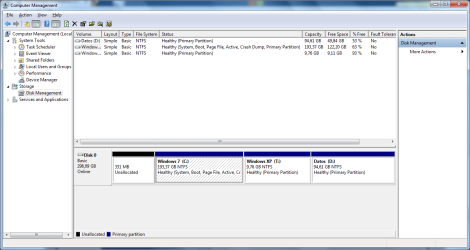
The unallocated part is the deleted System partition.

attachment.php


Before proceeding any further be sure to check if XP compatible drivers are available. Manufacturers are finding it increasingly difficult to justify the considerable effort required to produce drivers for what is essentially an obsolete OS. Many do not.

Many thanks, yes, Gigabyte has XP drivers for my mobo and everyhting I have has XP drivers :).
 

Attachments

  • Untitled.png
    Untitled.png
    32.8 KB · Views: 17

My Computer

Computer Manufacturer/Model Number
Custom
OS
Windows 7 Ultimate 64-bit SP1
CPU
Intel Celeron G530
Motherboard
Gigabyte GA-H61M-S2-B3
Memory
2 GB DDR3 Kingston 1333 (1066)
Graphics Card(s)
POV Nvidia Geforce GT530
Sound Card
Onboard
Monitor(s) Displays
Samsung SyncMaster S19B150
Screen Resolution
1366x768
Hard Drives
Laptop HDD TOSHIBA MK3265GSX
PSU
Generic 500W
Cooling
Stock
Keyboard
Logitech S 510 Wireless
Mouse
IBM MO28UO
Internet Speed
30 mbps
Well seem that EasyBCD worked fine after deleting the system partition and I am into the second part of the XP install


But I have another issue (yawn)

Windows 7 refuses to boot in IDE mode (needed for XP as I can't get SATA drivers for it) and XP refuses to boot into SATA mode.

I have read editing the registry (W7) changing two parameters but I have did that on my netbook and ended ruining Windows 7 beyond repair having to reinstall it. Does anyone know a better solution for this? Thanks
 

My Computer

Computer Manufacturer/Model Number
Custom
OS
Windows 7 Ultimate 64-bit SP1
CPU
Intel Celeron G530
Motherboard
Gigabyte GA-H61M-S2-B3
Memory
2 GB DDR3 Kingston 1333 (1066)
Graphics Card(s)
POV Nvidia Geforce GT530
Sound Card
Onboard
Monitor(s) Displays
Samsung SyncMaster S19B150
Screen Resolution
1366x768
Hard Drives
Laptop HDD TOSHIBA MK3265GSX
PSU
Generic 500W
Cooling
Stock
Keyboard
Logitech S 510 Wireless
Mouse
IBM MO28UO
Internet Speed
30 mbps

My Computer

OS
ME/XP/Vista/Win7
Gigabyte has XP drivers for my mobo and everyhting I have has XP drivers

Windows 7 refuses to boot in IDE mode (needed for XP as I can't get SATA drivers for it) and XP refuses to boot into SATA mode.

Use the Sata Controller drivers from the Gigabyte web site.

GIGABYTE - Motherboard - Socket 1155 - GA-H61M-S2-B3 (rev. 1.0)

Many thanks installed them manually through device manager, BSODed, and now seems to work fine in AHCI mode :party: Thought they worked only during install but I have no floppy.
 

My Computer

Computer Manufacturer/Model Number
Custom
OS
Windows 7 Ultimate 64-bit SP1
CPU
Intel Celeron G530
Motherboard
Gigabyte GA-H61M-S2-B3
Memory
2 GB DDR3 Kingston 1333 (1066)
Graphics Card(s)
POV Nvidia Geforce GT530
Sound Card
Onboard
Monitor(s) Displays
Samsung SyncMaster S19B150
Screen Resolution
1366x768
Hard Drives
Laptop HDD TOSHIBA MK3265GSX
PSU
Generic 500W
Cooling
Stock
Keyboard
Logitech S 510 Wireless
Mouse
IBM MO28UO
Internet Speed
30 mbps
Back
Top