Installation/Bios problem

Cadman26

New member
Local time
4:48 PM
Messages
3
Hello everyone!
I hope one of you kind people can give me some advise on a rather anoying problem that my PC has at the moment.

Last week i upgraded my PC and decided to go 64bit and install windows 7 RC. I firstly had a problem with the RAM. My PC would boot up and just after the sign on screen would go straight to the BSOD. This only happened when both sticks of Ram (matched) were installed. I managed to solve this by updating my bios. However in hindsight, i probably ballsed it up because now my PC will boot and work fine for anywhere between 10 mins and 3 hours but will always eventually freeze, however now i cannot access my bios or format my hard drive because my monitor does not recieve any signal from my PC until it reaches the sign in screen.
Anyone help!

PC Spec
Intel core 2 Quad processor Q8200
Motherboard: Gigabyte GA-P43-ES3G
Corsair matched 2xDDR2 2Gb Ram
 

My Computer

OS
windows 7
Hello everyone!
I hope one of you kind people can give me some advise on a rather anoying problem that my PC has at the moment.

Last week i upgraded my PC and decided to go 64bit and install windows 7 RC. I firstly had a problem with the RAM. My PC would boot up and just after the sign on screen would go straight to the BSOD. This only happened when both sticks of Ram (matched) were installed. I managed to solve this by updating my bios. However in hindsight, i probably ballsed it up because now my PC will boot and work fine for anywhere between 10 mins and 3 hours but will always eventually freeze, however now i cannot access my bios or format my hard drive because my monitor does not recieve any signal from my PC until it reaches the sign in screen.
Anyone help!

PC Spec
Intel core 2 Quad processor Q8200
Motherboard: Gigabyte GA-P43-ES3G
Corsair matched 2xDDR2 2Gb Ram

Hi and welcome

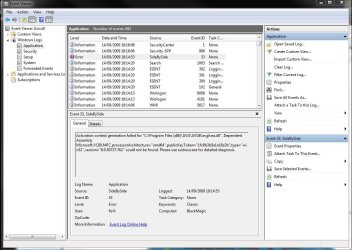
Besides the obvious shortaage of ram (64 bit miniumun is 2 gigs), if you are just freezing with no blue screens could you go into event viewer (type event viewer in search) and go to the windows log>application tab. there you will find erors (lines with red X's) could you use the built in snipping tool (type snip) to take screenshot of the errors and upload them to us.

If you are having blue screens go to c:\windows\minidump, zip the dump file and upload it to us. If its not in minidump search for *.dmp

Ken
 

My Computer

Computer Manufacturer/Model Number
HP Pavillion dv-7 1005 Tx
OS
Win 8 Release candidate 8400
CPU
[email protected]
Memory
4 gigs
Graphics Card(s)
Nvidia 9600M
Sound Card
HD built-in
Monitor(s) Displays
17" Wxga
Screen Resolution
1440x900
Cooling
none
Internet Speed
45Mb down 5Mb up
Thanks for the reply Ken

Here is the error that keeps popping up. By the way, i'm running 4Gb Ram, it's just the cack handed way i wrote it!!!
 

Attachments

  • Capture.JPG
    Capture.JPG
    110.4 KB · Views: 278

My Computer

OS
windows 7
Thanks for the reply Ken

Here is the error that keeps popping up. By the way, i'm running 4Gb Ram, it's just the cack handed way i wrote it!!!


this is an easy one AVG is preventing all sorts of things. UNinstall it and see if you work. If you do try either microsoft security essentials, or my pick eset smart security.

If that doesn't fix it let us know

Ken
 

My Computer

Computer Manufacturer/Model Number
HP Pavillion dv-7 1005 Tx
OS
Win 8 Release candidate 8400
CPU
[email protected]
Memory
4 gigs
Graphics Card(s)
Nvidia 9600M
Sound Card
HD built-in
Monitor(s) Displays
17" Wxga
Screen Resolution
1440x900
Cooling
none
Internet Speed
45Mb down 5Mb up
Thanks for the reply Ken

Here is the error that keeps popping up. By the way, i'm running 4Gb Ram, it's just the cack handed way i wrote it!!!


this is an easy one AVG is preventing all sorts of things. UNinstall it and see if you work. If you do try either microsoft security essentials, or my pick eset smart security.

If that doesn't fix it let us know

Ken

Ok thanks for that Ken.

Do you have any idea how i can access my Bios tho? As i said my Monitor doesn't recieve a signal until the sign on screen.

I have pre-ordered Wndows 7 Premium and i won't be able to install it as it stands?
Sorry for all the questions but as you can tell i'm no expert!!!
 

My Computer

OS
windows 7
Thanks for the reply Ken

Here is the error that keeps popping up. By the way, i'm running 4Gb Ram, it's just the cack handed way i wrote it!!!


this is an easy one AVG is preventing all sorts of things. UNinstall it and see if you work. If you do try either microsoft security essentials, or my pick eset smart security.

If that doesn't fix it let us know

Ken

Ok thanks for that Ken.

Do you have any idea how i can access my Bios tho? As i said my Monitor doesn't recieve a signal until the sign on screen. getting to your bios is easy. when booting repeated hit the F2 (on most computers) key and instead of booting into the OS it shoot boot into BIOS

I have pre-ordered Wndows 7 Premium and i won't be able to install it as it stands?
Sorry for all the questions but as you can tell i'm no expert!!!


If you fix the problems before hand Microsoft is running a 90 day trial for win 7 so you could install it before and use the legit key when you get it.

Dont worry about questions the only dumb ones are the ones never asked. we love them

Hope this helps


Ken
 

My Computer

Computer Manufacturer/Model Number
HP Pavillion dv-7 1005 Tx
OS
Win 8 Release candidate 8400
CPU
[email protected]
Memory
4 gigs
Graphics Card(s)
Nvidia 9600M
Sound Card
HD built-in
Monitor(s) Displays
17" Wxga
Screen Resolution
1440x900
Cooling
none
Internet Speed
45Mb down 5Mb up
hey, i have kinda the same problem, i have a gigabyte P43-ES3G motherboard, if I boot up with 2x1 GB modules (nomatter the firm) is stable and i can work (i'm doin' a lot of after effects), but is not enough ram, i;'m running windows 7 64bit, if I boot up with 2x2gb modules or all the modules (6GB) i get a blue screen after a couple of minutes, with dump memorry etc.

i've uploaded the dump files, if u guys can figure it out i'll be more then grateful

10x


here is the zip: dump.rar
 

My Computer

OS
windows 7
CPU
pentium d 3ghz
Motherboard
gigabyte p43-es3g
Memory
2x 1gb kingmax ddr2 800 mhz, 2x 2gb kingston ddr2 800mhz
Graphics Card(s)
nvidia 7500LE
Sound Card
creative live 5.1
Monitor(s) Displays
JQ
Hard Drives
1 Seagate 250GB
2 Seagate 1000GB
2 WD 1000GB
1 WD 500GB
Cooling
Scythe Ninja
I would first run memtest 86 for at least 5-6 passes, maybe overnight.
 
did that, also tried with 5 diferent brands of dual channel 2x2gb modules (like kingston, kingmax, corsair etc., if i instal in xp i have no problem, i'm tryin' now win 7 32bit, it could be a problem with my processor? it's a P4 3ghz D930.
 

My Computer

OS
windows 7
CPU
pentium d 3ghz
Motherboard
gigabyte p43-es3g
Memory
2x 1gb kingmax ddr2 800 mhz, 2x 2gb kingston ddr2 800mhz
Graphics Card(s)
nvidia 7500LE
Sound Card
creative live 5.1
Monitor(s) Displays
JQ
Hard Drives
1 Seagate 250GB
2 Seagate 1000GB
2 WD 1000GB
1 WD 500GB
Cooling
Scythe Ninja
did that, also tried with 5 diferent brands of dual channel 2x2gb modules (like kingston, kingmax, corsair etc., if i instal in xp i have no problem, i'm tryin' now win 7 32bit, it could be a problem with my processor? it's a P4 3ghz D930.


hi and welcome

its the memory. plus you have many old drivers that need to be updated

memtestx86 run for at least 5 passes
system file check type cmd in search>right click and run as admin>sfc /scannow

Code:
122409-34398-01.dmp    12/24/2009 6:05:09 PM    BAD_POOL_HEADER    0x00000019    00000000`00000003    fffffa80`04e752f0    00000000`00000000    fffffa80`04e752f0    ntoskrnl.exe    ntoskrnl.exe+71f00                    
122409-30451-01.dmp    12/24/2009 6:41:14 PM    DRIVER_VERIFIER_DETECTED_VIOLATION    0x000000c4    00000000`00000091    00000000`00000000    fffffa80`05261060    00000000`00000000    ntoskrnl.exe    ntoskrnl.exe+71f00                    
122409-35131-01.dmp    12/24/2009 6:10:10 PM    MEMORY_MANAGEMENT    0x0000001a    00000000`00041284    00000000`e856b001    00000000`0002976f    fffff700`01080000    ntoskrnl.exe    ntoskrnl.exe+71f00                    
122409-31668-01.dmp    12/24/2009 6:19:49 PM    NTFS_FILE_SYSTEM    0x00000024    00000000`001904fb    fffff880`076c4208    fffff880`076c3a60    fffff880`012d3c55    Ntfs.sys    Ntfs.sys+acc55
Code:
ctgame.sys        fffff880`03e49000    fffff880`03e4dc80    0x00004c80    0x40734e89    4/6/2004 7:42:49 PM                        
ha10kx2k.sys        fffff880`06416000    fffff880`065d0000    0x001ba000    0x44dc3099    8/11/2006 2:24:09 AM                        
secdrv.SYS        fffff880`0632f000    fffff880`0633a000    0x0000b000    0x4508052e    9/13/2006 8:18:38 AM                        
hardlock.sys        fffff880`02171000    fffff880`021bdc00    0x0004cc00    0x456f10e7    11/30/2006 12:12:07 PM                        
emupia2k.sys        fffff880`06646000    fffff880`06697000    0x00051000    0x457e8fdc    12/12/2006 6:17:48 AM                        
ctsfm2k.sys        fffff880`06697000    fffff880`066e1000    0x0004a000    0x457e8fdd    12/12/2006 6:17:49 AM                        
ctoss2k.sys        fffff880`03e00000    fffff880`03e3b000    0x0003b000    0x457e8fe0    12/12/2006 6:17:52 AM                        
ctprxy2k.sys        fffff880`03e3b000    fffff880`03e43000    0x00008000    0x457e8ff1    12/12/2006 6:18:09 AM                        
COMMONFX.DLL        fffff880`0678f000    fffff880`067ba000    0x0002b000    0x457e8ff6    12/12/2006 6:18:14 AM                        
CTSBLFX.DLL        fffff880`066e1000    fffff880`0678c000    0x000ab000    0x457e8ffa    12/12/2006 6:18:18 AM                        
aksdf.sys        fffff880`02888000    fffff880`02897e00    0x0000fe00    0x458033cc    12/13/2006 12:09:32 PM                        
ctaud2k.sys        fffff880`03e89000    fffff880`03f59700    0x000d0700    0x4675ff92    6/17/2007 10:44:18 PM                        
PxHlpa64.sys        fffff880`010f4000    fffff880`010ffae0    0x0000bae0    0x475dd06d    12/10/2007 6:49:01 PM                        
Rtnic64.sys        fffff880`03e52000    fffff880`03e66000    0x00014000    0x47f0791a    3/31/2008 12:39:38 AM                        
adfs.SYS        fffff880`02870000    fffff880`02888000    0x00018000    0x48640195    6/26/2008 3:52:37 PM                        
SCDEmu.SYS        fffff880`02c14000    fffff880`02c2d000    0x00019000    0x490aac15    10/31/2008 1:56:21 AM
 

My Computer

Computer Manufacturer/Model Number
HP Pavillion dv-7 1005 Tx
OS
Win 8 Release candidate 8400
CPU
[email protected]
Memory
4 gigs
Graphics Card(s)
Nvidia 9600M
Sound Card
HD built-in
Monitor(s) Displays
17" Wxga
Screen Resolution
1440x900
Cooling
none
Internet Speed
45Mb down 5Mb up
If you fix the problems before hand Microsoft is running a 90 day trial for win 7 so you could install it before and use the legit key when you get it.

Doesn't Enterprise 90 day trial require a special type of volume activation?

I believe it's similar to Ultimate but with volume licensing so Ultimate key won't work?

Can the installer be made all-versions as others can by removing ei.cfg from Sources?

It would be nice if someone knows for sure.
 
Back
Top