Solved installed new hard drive, windows 7 pro, can't access internet

darmab

New member
Local time
2:19 AM
Messages
9
I have a direct connection to the router and am trying to connect to my local area network. All I can get in unrecognized network, no internet connection. I have a current network adapter driver from manufacturer's website. The network is a home network and I know my internet is working because I have other devices connected. Any help would be appreciated. thx
 

My Computer My Computer

At a glance

win7 professional 64bitAMD Phenom II X6 1100T 3.31 GHz16 GB RAMNVidia Quadro K620
Computer type
PC/Desktop
Computer Manufacturer/Model Number
custom
OS
win7 professional 64bit
CPU
AMD Phenom II X6 1100T 3.31 GHz
Motherboard
ASUSTek Crosshair V Formula Z
Memory
16 GB RAM
Graphics Card(s)
NVidia Quadro K620
Hard Drives
WDC WD30 EZRX-00DC0B0 Sata Disk Drive
Antivirus
Eset NOD32
Browser
Chrome, Firefox
Hi please show us a screen shot of device manager with the network group expanded. Are you sure you have all drivers installed
 

My Computer My Computer

At a glance

win 10
Computer type
PC/Desktop
Computer Manufacturer/Model Number
dell xps 9000
OS
win 10
If the driver is installed and the NIC is functioning correctly, it's probably an IP configuration issue.

Open "Network Connections" (Control Panel > Network and Internet > Network Connections), right-click on the network device icon and select 'Status', then click the 'Details...' button. Post a screenshot of the dialog that appears. Alternately, post the output of 'ipconfig /all' from cmd or PowerShell.
 

My Computer My Computer

At a glance

Windows 7 Professional x64, Arch Linux
Computer type
PC/Desktop
OS
Windows 7 Professional x64, Arch Linux
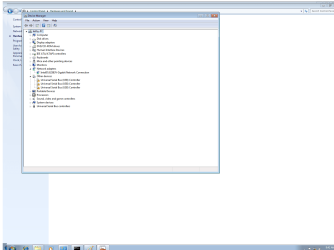
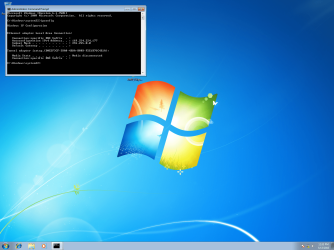
thx for response. I have only the chipset for motherboard, win 7 pro and the intel network adaptor loaded so far so not sure if I'm missing something. Here are two .pngs of screenshots. all i have is paint to work with, sorry.
 

Attachments

  • device mgr.png
    device mgr.png
    42.5 KB · Views: 9
  • ipconfig.png
    ipconfig.png
    42.5 KB · Views: 2

My Computer My Computer

At a glance

win7 professional 64bitAMD Phenom II X6 1100T 3.31 GHz16 GB RAMNVidia Quadro K620
Computer type
PC/Desktop
Computer Manufacturer/Model Number
custom
OS
win7 professional 64bit
CPU
AMD Phenom II X6 1100T 3.31 GHz
Motherboard
ASUSTek Crosshair V Formula Z
Memory
16 GB RAM
Graphics Card(s)
NVidia Quadro K620
Hard Drives
WDC WD30 EZRX-00DC0B0 Sata Disk Drive
Antivirus
Eset NOD32
Browser
Chrome, Firefox
The NIC appears to be properly installed as you believed. Now we need to see the IP configuration.
 

My Computer My Computer

At a glance

Windows 7 Professional x64, Arch Linux
Computer type
PC/Desktop
OS
Windows 7 Professional x64, Arch Linux
here it is
 

Attachments

  • config.png
    config.png
    474.4 KB · Views: 5

My Computer My Computer

At a glance

win7 professional 64bitAMD Phenom II X6 1100T 3.31 GHz16 GB RAMNVidia Quadro K620
Computer type
PC/Desktop
Computer Manufacturer/Model Number
custom
OS
win7 professional 64bit
CPU
AMD Phenom II X6 1100T 3.31 GHz
Motherboard
ASUSTek Crosshair V Formula Z
Memory
16 GB RAM
Graphics Card(s)
NVidia Quadro K620
Hard Drives
WDC WD30 EZRX-00DC0B0 Sata Disk Drive
Antivirus
Eset NOD32
Browser
Chrome, Firefox
That IP (169.X.X.X) indicates your NIC is configured for automatic IP assignment via DHCP but it's not working.

There are a lot of possibilities: (1) your NIC can't communicate with your router at all, (2) your router doesn't support automatic IP assignment, (3) your router's full range of auto-assignable IPs is in use by other devices, (4) your router is malfunctioning.

(1) is unlikely since you say you have a direct connection. For troubleshooting purposes, try plugging into a different port on the router, and/or a different cable.
(2) is unlikely because auto-assignment is the default. It would have to be manually disabled, and if disabled every device on your network would require manual IP configuration.
 

My Computer My Computer

At a glance

Windows 7 Professional x64, Arch Linux
Computer type
PC/Desktop
OS
Windows 7 Professional x64, Arch Linux
we do have a laptop, another desktop and a tablet connected to this router but wirelessly. Also we have another router that has been linked into this network. But everything was working perfectly until I replaced my crashed hard drive with a new one and now I'm just not sure how to configure things.
 

My Computer My Computer

At a glance

win7 professional 64bitAMD Phenom II X6 1100T 3.31 GHz16 GB RAMNVidia Quadro K620
Computer type
PC/Desktop
Computer Manufacturer/Model Number
custom
OS
win7 professional 64bit
CPU
AMD Phenom II X6 1100T 3.31 GHz
Motherboard
ASUSTek Crosshair V Formula Z
Memory
16 GB RAM
Graphics Card(s)
NVidia Quadro K620
Hard Drives
WDC WD30 EZRX-00DC0B0 Sata Disk Drive
Antivirus
Eset NOD32
Browser
Chrome, Firefox
It could be that the wireless side uses auto assignment but the wired side does not. Unfortunately it's all guesswork (for me at least) without knowing how the router is configured. :/
 

My Computer My Computer

At a glance

Windows 7 Professional x64, Arch Linux
Computer type
PC/Desktop
OS
Windows 7 Professional x64, Arch Linux
as its an ethernet connection try the 30 30 30 option.
1 Unplug the ethernet connection >> 2 turn off the laptop >> 3 turn off the router >> wait 30 seconds (min)
then reverse the process. 3 -2 -1
it should reset the connection.

Roy
 

My Computer My Computer

At a glance

W7 home premium 32bit/W7HP 64bit/w10 tp insid...E5300 dual core3gbNvidia Geforce 7100 Nforce 630i
Computer type
PC/Desktop
Computer Manufacturer/Model Number
medionl/Aspire 6930G/acer x55a
OS
W7 home premium 32bit/W7HP 64bit/w10 tp insider ring
CPU
E5300 dual core
Motherboard
medion MS7366
Memory
3gb
Graphics Card(s)
Nvidia Geforce 7100 Nforce 630i
Monitor(s) Displays
avixc
Internet Speed
n (isp resticted to 72)
Antivirus
mse/pands
Browser
palemoon
Other Info
Belkin Fd7050 n USB using Railink RT2870 drivers, more upto date
maybe I should be a bit more clear, we hooked another computer to the network cable that was attached to my computer and online access was immediate. We also have another computer that is hard wired into this router and it is working with no problem. Don't know if this helps the troubleshooting but this is all I know. The only thing that is different in my computer setup is that my motherboard disk was missing so I only got some of the drivers installed while waiting a replacement. could it be the missing drivers are effecting my network access?
 

My Computer My Computer

At a glance

win7 professional 64bitAMD Phenom II X6 1100T 3.31 GHz16 GB RAMNVidia Quadro K620
Computer type
PC/Desktop
Computer Manufacturer/Model Number
custom
OS
win7 professional 64bit
CPU
AMD Phenom II X6 1100T 3.31 GHz
Motherboard
ASUSTek Crosshair V Formula Z
Memory
16 GB RAM
Graphics Card(s)
NVidia Quadro K620
Hard Drives
WDC WD30 EZRX-00DC0B0 Sata Disk Drive
Antivirus
Eset NOD32
Browser
Chrome, Firefox
Most definately,
go to the motherboard manufactuerers website download the CHIPSET drivers to a usb, then install on the problem comp.

Roy
 

My Computer My Computer

At a glance

W7 home premium 32bit/W7HP 64bit/w10 tp insid...E5300 dual core3gbNvidia Geforce 7100 Nforce 630i
Computer type
PC/Desktop
Computer Manufacturer/Model Number
medionl/Aspire 6930G/acer x55a
OS
W7 home premium 32bit/W7HP 64bit/w10 tp insider ring
CPU
E5300 dual core
Motherboard
medion MS7366
Memory
3gb
Graphics Card(s)
Nvidia Geforce 7100 Nforce 630i
Monitor(s) Displays
avixc
Internet Speed
n (isp resticted to 72)
Antivirus
mse/pands
Browser
palemoon
Other Info
Belkin Fd7050 n USB using Railink RT2870 drivers, more upto date
I see in your Device Manager screenshot that the only malfunctioning hardware is several USB controllers. Keep in mind that you won't be able to plug your USB device containing drivers into whatever ports those indicate. Hopefully it's just a USB3 issue and all your USB2 ports are functional...

I just noticed your ipconfig output didn't show an IPv6 address. Did you disable IPv6?
 

My Computer My Computer

At a glance

Windows 7 Professional x64, Arch Linux
Computer type
PC/Desktop
OS
Windows 7 Professional x64, Arch Linux
thats why he needs the chipset driver, read his last post, there arnt any USB3 w7 generic drivers

Roy
 

My Computer My Computer

At a glance

W7 home premium 32bit/W7HP 64bit/w10 tp insid...E5300 dual core3gbNvidia Geforce 7100 Nforce 630i
Computer type
PC/Desktop
Computer Manufacturer/Model Number
medionl/Aspire 6930G/acer x55a
OS
W7 home premium 32bit/W7HP 64bit/w10 tp insider ring
CPU
E5300 dual core
Motherboard
medion MS7366
Memory
3gb
Graphics Card(s)
Nvidia Geforce 7100 Nforce 630i
Monitor(s) Displays
avixc
Internet Speed
n (isp resticted to 72)
Antivirus
mse/pands
Browser
palemoon
Other Info
Belkin Fd7050 n USB using Railink RT2870 drivers, more upto date
Sorry, I'm inclined to disagree. On numerous boards with numerous hardware configurations I've never needed to install anything other than NIC drivers to get the NIC to work...

Not saying it's a bad suggestion, just not hopeful.
 

My Computer My Computer

At a glance

Windows 7 Professional x64, Arch Linux
Computer type
PC/Desktop
OS
Windows 7 Professional x64, Arch Linux
From post #11.

The only thing that is different in my computer setup is that my motherboard disk was missing so I only got some of the drivers installed while waiting a replacement. could it be the missing drivers are effecting my network access?
In my opinion because you did not get motherboard CD I also suggest going on line and get the download the chipset and USB 3 drivers. Then install them on the troubled computer. Of course you will also need the NIC driver.

Will it solve all your problems, who knows.
It still needs to be done.
Trying to figure out a problem without the proper chipset installed is a long row to hoe.

I guess I'm lucky. I have never got a new motherboard that didn't come with the proper installation CD/DVD.
 

My Computer My Computer

At a glance

Windows 10 Pro. 64/ version 1709 Windows 7 Pr...Intel i7-6800K @ 4.3Corsair Platinum 16 gig @2400EVGA GTX 1070 OC
Computer type
PC/Desktop
Computer Manufacturer/Model Number
Home made Desktop
OS
Windows 10 Pro. 64/ version 1709 Windows 7 Pro/64
CPU
Intel i7-6800K @ 4.3
Motherboard
ASUS X-99 Deluxe II
Memory
Corsair Platinum 16 gig @2400
Graphics Card(s)
EVGA GTX 1070 OC
Monitor(s) Displays
Asus 27" LED LCD/VE278Q
Screen Resolution
1920-1080 or 1280-720 HDMI
Hard Drives
INTEL SSD 730-240 Gb Sata 3.0/
PSU
EVGA Platium 1200W
Case
Phanteks Luxe Tempered Glass 8 fans/ one radiator
Cooling
XSPC/ Water Cooled CPU
Keyboard
Das 4 Professional
Mouse
Logitech M705/MX Anywhere 2-S
Internet Speed
100 mbits
Antivirus
Microsoft Security Essentials/ Malwarebytes Premium 3.0/ SAS
Browser
I.E. 11 default/Firefox/ ISP Time Warner Cable/Spectrum
Other Info
LG BluRay Burner/
Sound system-KLipsch-THX/
Icy Dock ssd Hot Swap bays.
thx for all your response. I should have mentioned I downloaded chipset from asus website. that was the first thing I did. the disk is on its way. I downloaded driver for NIC. but I still can't get an internet connection. Yes, I was browsing around and someone mentioned disabling the Ipv6. but I can check that box again if that's a problem. So, basically does anyone have any suggestions as to where I go from herre?
 

My Computer My Computer

At a glance

win7 professional 64bitAMD Phenom II X6 1100T 3.31 GHz16 GB RAMNVidia Quadro K620
Computer type
PC/Desktop
Computer Manufacturer/Model Number
custom
OS
win7 professional 64bit
CPU
AMD Phenom II X6 1100T 3.31 GHz
Motherboard
ASUSTek Crosshair V Formula Z
Memory
16 GB RAM
Graphics Card(s)
NVidia Quadro K620
Hard Drives
WDC WD30 EZRX-00DC0B0 Sata Disk Drive
Antivirus
Eset NOD32
Browser
Chrome, Firefox
I mainly mentioned IPv6 to jog your memory if you had done anything else when you disabled it. FWIW, the official MS position is that it should be left enabled.

As for a solution, I'm still inclined to think the router is the issue one way or another. Just this weekend one of my machines couldn't get an IP because all the leases were in use...
 

My Computer My Computer

At a glance

Windows 7 Professional x64, Arch Linux
Computer type
PC/Desktop
OS
Windows 7 Professional x64, Arch Linux
Again, thank you for all your responses. My husband finally solved the problem and I'd like to share in case anyone else encounters this. He went into the device manager and selected the network adaptor driver and right clicked on it. He selected properties and there was a button there to restore default settings and Voila!!

We had our internet connection. so simple but it worked! I will check the box that the issue has been solved and I am sure it was largely due to working through all these suggestions and comments which helped us contiinue to troubleshoot around this problem!

regards, Kathy
 

My Computer My Computer

At a glance

win7 professional 64bitAMD Phenom II X6 1100T 3.31 GHz16 GB RAMNVidia Quadro K620
Computer type
PC/Desktop
Computer Manufacturer/Model Number
custom
OS
win7 professional 64bit
CPU
AMD Phenom II X6 1100T 3.31 GHz
Motherboard
ASUSTek Crosshair V Formula Z
Memory
16 GB RAM
Graphics Card(s)
NVidia Quadro K620
Hard Drives
WDC WD30 EZRX-00DC0B0 Sata Disk Drive
Antivirus
Eset NOD32
Browser
Chrome, Firefox
Glad you got it sorted good job.
 

My Computer My Computer

At a glance

win 10
Computer type
PC/Desktop
Computer Manufacturer/Model Number
dell xps 9000
OS
win 10
Back
Top