Installed new RAM, shows 8GB installed but still says (2.75GB)usable.

dijon6444

New member
Local time
3:47 PM
Messages
26
Location
Bushey, London
So before it used to say 4GB installed (2.75 Usable) now I got new RAM (4x2GB DDR2 800MHz RAM) from CEX, installed, (all are same speed and type and brand) turned on PC and well says 8GB installed, (2.75GB usable). I then opened up task manager, yup 2.75GB is max as it could go. I tried the msconfig solution, did not work, I tried taking out the RAM, mixing with old ones, reseating the, nope nothing. I tried taking CPU out and putting it back again, still same. Went into BIOS, says I should have 7168mb RAM memory avaliable. Unfortunatly my BIOS does not have the option to remap memory location or any of that. I basically tried everything but here is a funny thing I found out. You know when you open up resource monitor? Well I opened it up, went to memory tab and get this, it said "349MB free", but the weird thing was it said "4354MB reserved for hardware" and it keeps saying this no matter what. Should'nt it say for "reserved hardware2 max 100MB? Now I dont know if this is the cause of the problem but it could be. If any one could answer me with a solution, I would be very grateful.
Down here are the specs:
MEDION MT7 490G Desktop
Intel Core 2 Duo E6750 2.66GHz
8GB DDR2 PC2-6400 800MHz RAM, all sticks are the same (2.75GB usable)
300WATT FSP PSU
750 HDD Storage (500GB one drive, 250GB the other, No SSD)
Windows 7 Ultimate 64 bit
ASUS Nvidia GeForce GT 240 GPU
MS-7358 Motherboard
 

My Computer My Computer

At a glance

Windows 7 Ultimate 64bitIntel Core 2 Duo E67507GB DDR2 PC2-6400 (2GB in each slot) 800MHz, ...ASUS Nvidia GeForce GT 240
Computer type
PC/Desktop
Computer Manufacturer/Model Number
Medion
OS
Windows 7 Ultimate 64bit
CPU
Intel Core 2 Duo E6750
Motherboard
MS-7358
Memory
7GB DDR2 PC2-6400 (2GB in each slot) 800MHz, (2.75GB usable)
Graphics Card(s)
ASUS Nvidia GeForce GT 240
Hard Drives
500GB HDD WESTERN
250GB HDD WESTERN
Altogether=750GB
Antivirus
BullGuard
Browser
Mozilla Firefox
Are you sure your running a 64bit o/s as its giving the symptoms of a 32bit windows
 

My Computer My Computer

At a glance

win 8 32 bit
Computer type
PC/Desktop
OS
win 8 32 bit
Trust me it is, it says there even, 64 bit operating system. And in the System Information says, x64 based system.
 

My Computer My Computer

At a glance

Windows 7 Ultimate 64bitIntel Core 2 Duo E67507GB DDR2 PC2-6400 (2GB in each slot) 800MHz, ...ASUS Nvidia GeForce GT 240
Computer type
PC/Desktop
Computer Manufacturer/Model Number
Medion
OS
Windows 7 Ultimate 64bit
CPU
Intel Core 2 Duo E6750
Motherboard
MS-7358
Memory
7GB DDR2 PC2-6400 (2GB in each slot) 800MHz, (2.75GB usable)
Graphics Card(s)
ASUS Nvidia GeForce GT 240
Hard Drives
500GB HDD WESTERN
250GB HDD WESTERN
Altogether=750GB
Antivirus
BullGuard
Browser
Mozilla Firefox
So what do you reckon this will tell us?
 

My Computer My Computer

At a glance

Windows 7 Ultimate 64bitIntel Core 2 Duo E67507GB DDR2 PC2-6400 (2GB in each slot) 800MHz, ...ASUS Nvidia GeForce GT 240
Computer type
PC/Desktop
Computer Manufacturer/Model Number
Medion
OS
Windows 7 Ultimate 64bit
CPU
Intel Core 2 Duo E6750
Motherboard
MS-7358
Memory
7GB DDR2 PC2-6400 (2GB in each slot) 800MHz, (2.75GB usable)
Graphics Card(s)
ASUS Nvidia GeForce GT 240
Hard Drives
500GB HDD WESTERN
250GB HDD WESTERN
Altogether=750GB
Antivirus
BullGuard
Browser
Mozilla Firefox
Ok I just did a Live chat with Microsoft. They did a remote access diagnosis, nothing is wrong with the RAM, they said the problem is that I need to update my BIOS. They said MSI will have more info. MSI does not have live chat, I tried emailing them, "page 505 something went wrong" error came up. I will call them tomorrow as tonight it is a bit late. But do I need any sort of disk to update the BIOS? Or can I just download it from MSI and install it here on Windows?
 

My Computer My Computer

At a glance

Windows 7 Ultimate 64bitIntel Core 2 Duo E67507GB DDR2 PC2-6400 (2GB in each slot) 800MHz, ...ASUS Nvidia GeForce GT 240
Computer type
PC/Desktop
Computer Manufacturer/Model Number
Medion
OS
Windows 7 Ultimate 64bit
CPU
Intel Core 2 Duo E6750
Motherboard
MS-7358
Memory
7GB DDR2 PC2-6400 (2GB in each slot) 800MHz, (2.75GB usable)
Graphics Card(s)
ASUS Nvidia GeForce GT 240
Hard Drives
500GB HDD WESTERN
250GB HDD WESTERN
Altogether=750GB
Antivirus
BullGuard
Browser
Mozilla Firefox
Its a funny chipset which is 32 bit but with sort of addons to emulate 64bit which could be a bios setting or maybe bios update. thatswhat a live linux will tell us it doesnt effect the c drive it boots all from dvd if that say all the ram its windows if it doesnt then its bios
 

My Computer My Computer

At a glance

win 8 32 bit
Computer type
PC/Desktop
OS
win 8 32 bit
Ok can you guide me thorugh what do once I download it on a USB and boot it into my PC?
 

My Computer My Computer

At a glance

Windows 7 Ultimate 64bitIntel Core 2 Duo E67507GB DDR2 PC2-6400 (2GB in each slot) 800MHz, ...ASUS Nvidia GeForce GT 240
Computer type
PC/Desktop
Computer Manufacturer/Model Number
Medion
OS
Windows 7 Ultimate 64bit
CPU
Intel Core 2 Duo E6750
Motherboard
MS-7358
Memory
7GB DDR2 PC2-6400 (2GB in each slot) 800MHz, (2.75GB usable)
Graphics Card(s)
ASUS Nvidia GeForce GT 240
Hard Drives
500GB HDD WESTERN
250GB HDD WESTERN
Altogether=750GB
Antivirus
BullGuard
Browser
Mozilla Firefox
Last edited:

My Computers My Computers

  • At a glance

    Windows 7 HP 64i5 6600K - 800MHz to 4200MHz4+4G GSkill DDR4 3000IG - Intel 530
    Computer type
    PC/Desktop
    Computer Manufacturer/Model Number
    custom build
    OS
    Windows 7 HP 64
    CPU
    i5 6600K - 800MHz to 4200MHz
    Motherboard
    GA-Z170-HD3P
    Memory
    4+4G GSkill DDR4 3000
    Graphics Card(s)
    IG - Intel 530
    Monitor(s) Displays
    Samsung 226BW
    Screen Resolution
    1680x1050
    Hard Drives
    (1) -1 SM951 – 128GB M.2 AHCI PCIe SSD drive for Windows 7 and Lubuntu
    (2) -1 WD SATA 3 - 1T for Data
    (3) -1 WD SATA 3 - 1T for backup
    PSU
    Thermaltake 450W TR2 gold
    Keyboard
    Old and good Chicony mechanical keyboard
    Mouse
    Logitech mX performance - 9 buttons (had to disable some)
    Internet Speed
    500Mb/s
    Browser
    Firefox 64
    Other Info
    TinyWall firewall
  • At a glance

    Windows 7 Proi7-4500U 800MHz to 3.0GHz(4+4)G DDR3 1600IG intel 4400 + NVIDIA GeForce GT 745M
    Computer type
    Laptop
    System Manufacturer/Model Number
    Asus Q550LF
    OS
    Windows 7 Pro
    CPU
    i7-4500U 800MHz to 3.0GHz
    Motherboard
    Asus Q550LF
    Memory
    (4+4)G DDR3 1600
    Graphics Card(s)
    IG intel 4400 + NVIDIA GeForce GT 745M
    Sound Card
    Realtek
    Monitor(s) Displays
    LG Display LP156WF4-SPH1
    Screen Resolution
    1920 x 1080
    Hard Drives
    BX500 120G SSD for Windows and programs +
    1T HDD for data
    Internet Speed
    500 Mb/s
    Browser
    Firefox
    Other Info
    TinyWall firewall
Ok I just ordered a USB, when it arrives I will try this method, thanks alot for the guide I really do appreciate it, I will keep you updated soon.
 

My Computer My Computer

At a glance

Windows 7 Ultimate 64bitIntel Core 2 Duo E67507GB DDR2 PC2-6400 (2GB in each slot) 800MHz, ...ASUS Nvidia GeForce GT 240
Computer type
PC/Desktop
Computer Manufacturer/Model Number
Medion
OS
Windows 7 Ultimate 64bit
CPU
Intel Core 2 Duo E6750
Motherboard
MS-7358
Memory
7GB DDR2 PC2-6400 (2GB in each slot) 800MHz, (2.75GB usable)
Graphics Card(s)
ASUS Nvidia GeForce GT 240
Hard Drives
500GB HDD WESTERN
250GB HDD WESTERN
Altogether=750GB
Antivirus
BullGuard
Browser
Mozilla Firefox
some things to try:

to check current bios level do

start > run > cmd > enter > wmic bios get smbiosbiosversion > enter

the final bios level for your board is 3.3. Get it here

Support For Q35MDO | Motherboard - The world leader in motherboard design | MSI Global

note that memory that is not actually validated by MSI for the board can produce hardware reserved issues. Here are the dimms that msi tested for your board

Support For Q35MDO | Motherboard - The world leader in motherboard design | MSI Global

here is a video by msi telling you how to update your bios

MSI-How to flash Motherboard BIOS - YouTube

you may just need to enable memory remapping in bios. Look under advanced>chipset
 

My Computer My Computer

At a glance

Win7 pro x64stock i7 7700kCorsair Vengeance LPX 16GB (2x8GB) DDR4 @ 320...integrated Intel HD 630
Computer type
PC/Desktop
Computer Manufacturer/Model Number
diy
OS
Win7 pro x64
CPU
stock i7 7700k
Motherboard
Gigabyte Z270N-WIFI mini-ITX
Memory
Corsair Vengeance LPX 16GB (2x8GB) DDR4 @ 3200MHz
Graphics Card(s)
integrated Intel HD 630
Sound Card
onboard Realtek ALC1220
Monitor(s) Displays
two vertically mounted samsung 55" 4k un55mu8000
Screen Resolution
1920x1280
Hard Drives
256GB Samsung EVO 960 M.2 pci-e NVMe SSD
PSU
SilverStone Nightjar ST45NF 450Watt Fanless
Case
No case. Motherboard is mounted directly onto power supply
Cooling
Evercool low profile 815EP with Panaflow 12L fan at 7v
Keyboard
Ortek MCK-86 mini
Mouse
Belkin 5-button USB
Internet Speed
spectrum 400mbps
Oh ok but by flashing the BIOS will it then update? Also is 8GB on a USB plenty for it? And last question, will my data be wiped if I flash it, and will this method work 100% and my RAM to 7GB instead of "2.75GB usable"?
Sorry for so many questions I just wanna be sure.
 

My Computer My Computer

At a glance

Windows 7 Ultimate 64bitIntel Core 2 Duo E67507GB DDR2 PC2-6400 (2GB in each slot) 800MHz, ...ASUS Nvidia GeForce GT 240
Computer type
PC/Desktop
Computer Manufacturer/Model Number
Medion
OS
Windows 7 Ultimate 64bit
CPU
Intel Core 2 Duo E6750
Motherboard
MS-7358
Memory
7GB DDR2 PC2-6400 (2GB in each slot) 800MHz, (2.75GB usable)
Graphics Card(s)
ASUS Nvidia GeForce GT 240
Hard Drives
500GB HDD WESTERN
250GB HDD WESTERN
Altogether=750GB
Antivirus
BullGuard
Browser
Mozilla Firefox
If you flash the bios once done you need to clear the CMOS by removing the battery or by jumper you will need to then reset the BIOS and you could find extra settings. It doesn't wipe anything from the hd its a very small update size wise
 

My Computer My Computer

At a glance

win 8 32 bit
Computer type
PC/Desktop
OS
win 8 32 bit
Ahh ok, this might sound stupid but CMOS? I have no cluse what it is and the battery I have never taken out in my life, do you have to do it to make it work?
 

My Computer My Computer

At a glance

Windows 7 Ultimate 64bitIntel Core 2 Duo E67507GB DDR2 PC2-6400 (2GB in each slot) 800MHz, ...ASUS Nvidia GeForce GT 240
Computer type
PC/Desktop
Computer Manufacturer/Model Number
Medion
OS
Windows 7 Ultimate 64bit
CPU
Intel Core 2 Duo E6750
Motherboard
MS-7358
Memory
7GB DDR2 PC2-6400 (2GB in each slot) 800MHz, (2.75GB usable)
Graphics Card(s)
ASUS Nvidia GeForce GT 240
Hard Drives
500GB HDD WESTERN
250GB HDD WESTERN
Altogether=750GB
Antivirus
BullGuard
Browser
Mozilla Firefox
when you flash the bios the cmos resets. Cmos is just the physical location of your bios. I see no reason to remove the battery. Just follow the video from earlier
 

My Computer My Computer

At a glance

Win7 pro x64stock i7 7700kCorsair Vengeance LPX 16GB (2x8GB) DDR4 @ 320...integrated Intel HD 630
Computer type
PC/Desktop
Computer Manufacturer/Model Number
diy
OS
Win7 pro x64
CPU
stock i7 7700k
Motherboard
Gigabyte Z270N-WIFI mini-ITX
Memory
Corsair Vengeance LPX 16GB (2x8GB) DDR4 @ 3200MHz
Graphics Card(s)
integrated Intel HD 630
Sound Card
onboard Realtek ALC1220
Monitor(s) Displays
two vertically mounted samsung 55" 4k un55mu8000
Screen Resolution
1920x1280
Hard Drives
256GB Samsung EVO 960 M.2 pci-e NVMe SSD
PSU
SilverStone Nightjar ST45NF 450Watt Fanless
Case
No case. Motherboard is mounted directly onto power supply
Cooling
Evercool low profile 815EP with Panaflow 12L fan at 7v
Keyboard
Ortek MCK-86 mini
Mouse
Belkin 5-button USB
Internet Speed
spectrum 400mbps
Oh ok but by flashing the BIOS will it then update?
flashing the bios is updating the bios

Also is 8GB on a USB plenty for it?
way more than enough
And last question, will my data be wiped if I flash it, and will this method work 100% and my RAM to 7GB instead of "2.75GB usable"?
there is no way to know if flashing the bios will fix the problem. Based on the fact that you have gotten 2.75GB with two different sets of memory dimms, first thing I would check is

start > run > msconfig > boot > advanced > make sure maximum memory is UNchecked
 

My Computer My Computer

At a glance

Win7 pro x64stock i7 7700kCorsair Vengeance LPX 16GB (2x8GB) DDR4 @ 320...integrated Intel HD 630
Computer type
PC/Desktop
Computer Manufacturer/Model Number
diy
OS
Win7 pro x64
CPU
stock i7 7700k
Motherboard
Gigabyte Z270N-WIFI mini-ITX
Memory
Corsair Vengeance LPX 16GB (2x8GB) DDR4 @ 3200MHz
Graphics Card(s)
integrated Intel HD 630
Sound Card
onboard Realtek ALC1220
Monitor(s) Displays
two vertically mounted samsung 55" 4k un55mu8000
Screen Resolution
1920x1280
Hard Drives
256GB Samsung EVO 960 M.2 pci-e NVMe SSD
PSU
SilverStone Nightjar ST45NF 450Watt Fanless
Case
No case. Motherboard is mounted directly onto power supply
Cooling
Evercool low profile 815EP with Panaflow 12L fan at 7v
Keyboard
Ortek MCK-86 mini
Mouse
Belkin 5-button USB
Internet Speed
spectrum 400mbps
what bios level are you on now? Post #11 tells how to know
 

My Computer My Computer

At a glance

Win7 pro x64stock i7 7700kCorsair Vengeance LPX 16GB (2x8GB) DDR4 @ 320...integrated Intel HD 630
Computer type
PC/Desktop
Computer Manufacturer/Model Number
diy
OS
Win7 pro x64
CPU
stock i7 7700k
Motherboard
Gigabyte Z270N-WIFI mini-ITX
Memory
Corsair Vengeance LPX 16GB (2x8GB) DDR4 @ 3200MHz
Graphics Card(s)
integrated Intel HD 630
Sound Card
onboard Realtek ALC1220
Monitor(s) Displays
two vertically mounted samsung 55" 4k un55mu8000
Screen Resolution
1920x1280
Hard Drives
256GB Samsung EVO 960 M.2 pci-e NVMe SSD
PSU
SilverStone Nightjar ST45NF 450Watt Fanless
Case
No case. Motherboard is mounted directly onto power supply
Cooling
Evercool low profile 815EP with Panaflow 12L fan at 7v
Keyboard
Ortek MCK-86 mini
Mouse
Belkin 5-button USB
Internet Speed
spectrum 400mbps
what bios level are you on now? Post #11 tells how to know
Ok thanks for all the help, my current BIOS level (I just check using the Post11# for help), it is "6.00PG".
 

My Computer My Computer

At a glance

Windows 7 Ultimate 64bitIntel Core 2 Duo E67507GB DDR2 PC2-6400 (2GB in each slot) 800MHz, ...ASUS Nvidia GeForce GT 240
Computer type
PC/Desktop
Computer Manufacturer/Model Number
Medion
OS
Windows 7 Ultimate 64bit
CPU
Intel Core 2 Duo E6750
Motherboard
MS-7358
Memory
7GB DDR2 PC2-6400 (2GB in each slot) 800MHz, (2.75GB usable)
Graphics Card(s)
ASUS Nvidia GeForce GT 240
Hard Drives
500GB HDD WESTERN
250GB HDD WESTERN
Altogether=750GB
Antivirus
BullGuard
Browser
Mozilla Firefox
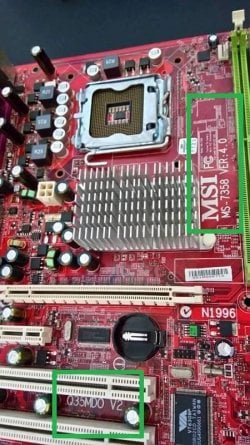
one more thing. You said your motherboard is an MS-7358. A search of the MSI website shows that this can be one of two different motherboards, so you need to be sure which one you have. The best way to know is to get a flashlight and physically inspect the board. Here's a pic of a version 2 of Q35MDO board. Its better to refer to your board as an MSI Q35MDO V1 or an MSI Q35MDO V2 than as an MS-7358, since MS-7358 is not as specific.


Digging into this a little further, you should really be looking at the Medion website for your bios. I can't figure out what model you have though since the MT7 does not appear in a search of the Medion link below. I recommend you look up your product number and see where it takes you...

Medion Site
MEDION UK - Driver
 

Attachments

  • 2.jpg
    2.jpg
    82.2 KB · Views: 1

My Computer My Computer

At a glance

Win7 pro x64stock i7 7700kCorsair Vengeance LPX 16GB (2x8GB) DDR4 @ 320...integrated Intel HD 630
Computer type
PC/Desktop
Computer Manufacturer/Model Number
diy
OS
Win7 pro x64
CPU
stock i7 7700k
Motherboard
Gigabyte Z270N-WIFI mini-ITX
Memory
Corsair Vengeance LPX 16GB (2x8GB) DDR4 @ 3200MHz
Graphics Card(s)
integrated Intel HD 630
Sound Card
onboard Realtek ALC1220
Monitor(s) Displays
two vertically mounted samsung 55" 4k un55mu8000
Screen Resolution
1920x1280
Hard Drives
256GB Samsung EVO 960 M.2 pci-e NVMe SSD
PSU
SilverStone Nightjar ST45NF 450Watt Fanless
Case
No case. Motherboard is mounted directly onto power supply
Cooling
Evercool low profile 815EP with Panaflow 12L fan at 7v
Keyboard
Ortek MCK-86 mini
Mouse
Belkin 5-button USB
Internet Speed
spectrum 400mbps
The cmos battery in the photo above is just bove the botom green frame round black holder some bios upadatesmay work but with a lot you have to clear the cmos
 

My Computer My Computer

At a glance

win 8 32 bit
Computer type
PC/Desktop
OS
win 8 32 bit
Back
Top