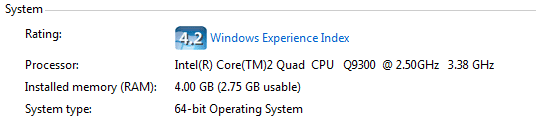
4GB installed RAM, 2.75GB usable =[

X7X

New member
Local time
4:03 PM
Messages
7
Okay, I had this problem with Vista and now again with 7.
And before you ask, yes I have searched the forums but there have always been caveats which make me think that there might be something else.

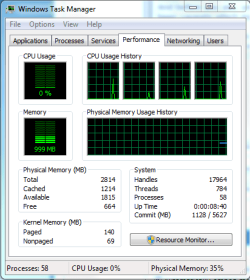
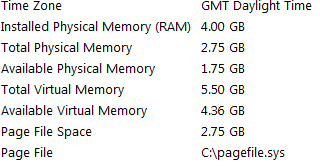
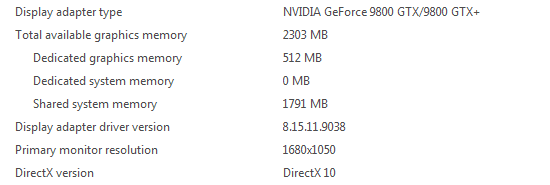
Now, onto the problem. I have a custom built machine with 4GB of RAM installed. The system is recognising that I have 4GB installed, but it's telling me that I only have 2.75GB usable.

Screenshots attached.

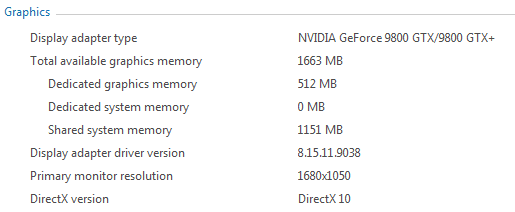
So, shared graphics has far too much memory on tap, and windows can't use more than 2.75GB. Okay I do play games at the highest possible detail, but not that frequently. My graphics card having nearly half my ram all the time is just pointless.
I get that it's shared so it'll only be used if nothing else is using it, but then why does Windows report only 2.75GB usable? The numbers roughly add up to support my thought that it's because of the graphics card.

I've spent several hours today trying to reduce the shared memory but I can't seem to do it. My BIOS allows me to manually set resources (IRQ11-16 I think), but the only two options in are PCI and Reserved. Whatever combination I try, it makes no difference - except for setting them all to reserved which nearly bricked my computer (it froze after POST).
I read that it's because Vista (and presumably 7 too) manage the shared RAM through the WDDM drivers, but I guessed my way through RivaTuner's PowerUser tab and altered stuff to do with system memory, all to no effect.

So firstly, am I right in assuming that only 2.75GB is usable because of the shared ram? If so, how the hell do I reduce that? I don't mind a bit of driver hacking as long as someone can show me how to do it without bricking my computer.

And if it's not because of the shared RAM, what it is? I'm on x64 and it's driving me up the wall!

Any help would be much appreciated, by me and my dear keyboard which at the moment is bearing the grunt of my frustation.
 

Attachments
  • sys.PNG
    sys.PNG
    3.9 KB · Views: 242
  • gfx.PNG
    gfx.PNG
    3.8 KB · Views: 226
  • tsk.PNG
    tsk.PNG
    15.2 KB · Views: 310
  • sysinfo.PNG
    sysinfo.PNG
    2.8 KB · Views: 205

My Computer My Computer

Computer Manufacturer/Model Number
Custom
OS
Windows 7 x64
CPU
Intel Core 2 Quad Q9300 OC@3375MHz
Motherboard
XFX 780i
Memory
4GB OCZ DDR2 OC@900MHz
Graphics Card(s)
Nvidia 9800GTX OC
Monitor(s) Displays
ViewSonic VX1962wm
Screen Resolution
1680x1050
PSU
PCPC Turbocool 860w
Case
Antec 900
Internet Speed
20Mb / 768Kb
Just installed two sticks of 2GB in my laptop just now and I'm having the same issue :(

I searched online if my laptops board would support 4GB (Intel 945PM express), some sources said 3 GB max (the laptop originally had a 32-bit processor, but I upgraded to 64-bit) and other sources said 4GB max. I would have at least hoped for 3GB system usage. :(

I'll play around with it and let you know if I figure anything out.
 

My Computer My Computer

Computer Manufacturer/Model Number
ASUS W2JB
OS
Windows 7 Pro x64 RTM
CPU
Merom T7400
Motherboard
Intel 945PM Express
Memory
2GB PC5300
Graphics Card(s)
Ati Mobility 1600
Sound Card
RealTek High Definition Audio/EMU 0202 USB
Hard Drives
WD 320 GB 7200 RPM
Hey guys,

This came up the other day if I recall correctly. Try running msconfig, going to boot, then advanced options and see if the Max memory button is checked. The general consensus was that it should not be. Mine isn't checked and I see all 8 GB available on my system.
 

My Computer My Computer

Computer Manufacturer/Model Number
Self-Built in July 2009
OS
Windows 7 Ultimate x64
CPU
Intel Q9550 2.83Ghz OC'd to 3.40Ghz
Motherboard
Gigabyte GA-EP45-UD3R rev. 1.1, F12 BIOS
Memory
8GB G.Skill PI DDR2-800, 4-4-4-12 timings
Graphics Card(s)
EVGA 1280MB Nvidia GeForce GTX570
Sound Card
Realtek ALC899A 8 channel onboard audio
Monitor(s) Displays
23" Acer x233H
Screen Resolution
1920x1080
Hard Drives
Intel X25-M 80GB Gen 2 SSD
Western Digital 1TB Caviar Black, 32MB cache. WD1001FALS
PSU
Corsair 620HX modular
Case
Antec P182
Cooling
stock
Keyboard
ABS M1 Mechanical
Mouse
Logitech G9 Laser Mouse
Internet Speed
15/2 cable modem
Other Info
Windows and Linux enthusiast. Logitech G35 Headset.
  • Like
Reactions: X7X
Hey guys,

This came up the other day if I recall correctly. Try running msconfig, going to boot, then advanced options and see if the Max memory button is checked. The general consensus was that it should not be. Mine isn't checked and I see all 8 GB available on my system.

Good thinking, but unfortunately this did not work for me. My BIOS is reporting 2816MB of System Memory, so I'm not sure if it's a limitation with my board. From other posts on this forum, doing a clean install of Windows 7 fixes the problem, but I just spent the last 2 days restoring all my backed up things and I do not feel like going through that again.

Also, from other searches online enabling "Hardware Memory hole" has worked for people with that option in their BIOS, but unfortunately I do not have any memory options in my BIOS.
 

My Computer My Computer

Computer Manufacturer/Model Number
ASUS W2JB
OS
Windows 7 Pro x64 RTM
CPU
Merom T7400
Motherboard
Intel 945PM Express
Memory
2GB PC5300
Graphics Card(s)
Ati Mobility 1600
Sound Card
RealTek High Definition Audio/EMU 0202 USB
Hard Drives
WD 320 GB 7200 RPM
Good thinking, but unfortunately this did not work for me. My BIOS is reporting 2816MB of System Memory, so I'm not sure if it's a limitation with my board. From other posts on this forum, doing a clean install of Windows 7 fixes the problem, but I just spent the last 2 days restoring all my backed up things and I do not feel like going through that again.

Also, from other searches online enabling "Hardware Memory hole" has worked for people with that option in their BIOS, but unfortunately I do not have any memory options in my BIOS.

If your BIOS is only seeing 2.8GB of RAM...reloading Windows isn't going to fix your problem.
 

My Computer My Computer

Computer Manufacturer/Model Number
Self-Built in July 2009
OS
Windows 7 Ultimate x64
CPU
Intel Q9550 2.83Ghz OC'd to 3.40Ghz
Motherboard
Gigabyte GA-EP45-UD3R rev. 1.1, F12 BIOS
Memory
8GB G.Skill PI DDR2-800, 4-4-4-12 timings
Graphics Card(s)
EVGA 1280MB Nvidia GeForce GTX570
Sound Card
Realtek ALC899A 8 channel onboard audio
Monitor(s) Displays
23" Acer x233H
Screen Resolution
1920x1080
Hard Drives
Intel X25-M 80GB Gen 2 SSD
Western Digital 1TB Caviar Black, 32MB cache. WD1001FALS
PSU
Corsair 620HX modular
Case
Antec P182
Cooling
stock
Keyboard
ABS M1 Mechanical
Mouse
Logitech G9 Laser Mouse
Internet Speed
15/2 cable modem
Other Info
Windows and Linux enthusiast. Logitech G35 Headset.
If your BIOS is only seeing 2.8GB of RAM...reloading Windows isn't going to fix your problem.

Yeah that's what I figured... oh well, I guess I just paid $50 for 0.75GBs of RAM
:doh:
 

My Computer My Computer

Computer Manufacturer/Model Number
ASUS W2JB
OS
Windows 7 Pro x64 RTM
CPU
Merom T7400
Motherboard
Intel 945PM Express
Memory
2GB PC5300
Graphics Card(s)
Ati Mobility 1600
Sound Card
RealTek High Definition Audio/EMU 0202 USB
Hard Drives
WD 320 GB 7200 RPM
ATh

Have you checked the max memory in BIOS. It should be unchecked

Ken
 

My Computer My Computer

Computer Manufacturer/Model Number
HP Pavillion dv-7 1005 Tx
OS
Win 8 Release candidate 8400
CPU
[email protected]
Memory
4 gigs
Graphics Card(s)
Nvidia 9600M
Sound Card
HD built-in
Monitor(s) Displays
17" Wxga
Screen Resolution
1440x900
Cooling
none
Internet Speed
45Mb down 5Mb up
Just a guess, but do you have a 1GB Video Card in your computer, or perhaps a RAID Controler?

Mia
 

My Computer My Computer

OS
Windows 7 RTM x64
ATh

Have you checked the max memory in BIOS. It should be unchecked

Ken

I don't have any kind of memory options in my BIOS (it's a laptop)

Just a guess, but do you have a 1GB Video Card in your computer, or perhaps a RAID Controler?

Mia

Nope, my video card is an ati mobility x1600 256MB (Dedicated) 1151 (Shared system memory), no RAID controller that I know of.
 

My Computer My Computer

Computer Manufacturer/Model Number
ASUS W2JB
OS
Windows 7 Pro x64 RTM
CPU
Merom T7400
Motherboard
Intel 945PM Express
Memory
2GB PC5300
Graphics Card(s)
Ati Mobility 1600
Sound Card
RealTek High Definition Audio/EMU 0202 USB
Hard Drives
WD 320 GB 7200 RPM
Hey guys,

This came up the other day if I recall correctly. Try running msconfig, going to boot, then advanced options and see if the Max memory button is checked. The general consensus was that it should not be. Mine isn't checked and I see all 8 GB available on my system.

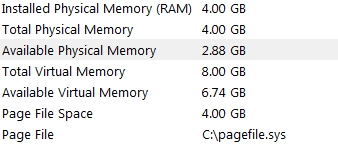
Thank you! Task manager and and windows both show 4GB now. BUT, system information is showing 2.88 GB usable, and now my system is sharing even more RAM with graphics! I'll upload screenshots in a minute (I'm typing this on my laptop).
Edit: This number varies - at the moment it's saying 2.12, but a few minutes ago it was 2.17. I figure that's normal, but still very low :(

Just a guess, but do you have a 1GB Video Card in your computer, or perhaps a RAID Controler?

Mia
I've got a 512mb 9800GTX and a RAID Controller, but I don't use RAID.


Update: Screenshots attached
 

Attachments

  • sysinfo2.PNG
    sysinfo2.PNG
    2.9 KB · Views: 148
  • gfx2.PNG
    gfx2.PNG
    3.6 KB · Views: 150

My Computer My Computer

Computer Manufacturer/Model Number
Custom
OS
Windows 7 x64
CPU
Intel Core 2 Quad Q9300 OC@3375MHz
Motherboard
XFX 780i
Memory
4GB OCZ DDR2 OC@900MHz
Graphics Card(s)
Nvidia 9800GTX OC
Monitor(s) Displays
ViewSonic VX1962wm
Screen Resolution
1680x1050
PSU
PCPC Turbocool 860w
Case
Antec 900
Internet Speed
20Mb / 768Kb
I believe that I can help here, Windows 7 uses 1.25gb of your memory as a cache, leaving you with 2.75gb of usable memory for other programs and software.
 

My Computer My Computer

OS
Windows 7
I believe that I can help here, Windows 7 uses 1.25gb of your memory as a cache, leaving you with 2.75gb of usable memory for other programs and software.

Nice necrobump ;)

Your statement is incorrect. No offence intended of course. Disparities between the amounts reported as "installed" and "usable" come down to hardware configuration and hardware address range needs.
 

My Computer My Computer

Computer Manufacturer/Model Number
Multiple machines in various stages of decomposition.
OS
Win7x64
now my system is sharing even more RAM with graphics!

Don't concern yourself with that. Memory shared with graphics in this manner is still usable by other applications if/when they need it. You will also see in your screenshot that dedicated system memory is 0 MB. If that number was higher then it could take away from the memory available to the OS and applications. But since it is zero, there is no cause for alarm.

For some more detail about the problem H2SO4 just addressed, refer to my post here:
http://www.sevenforums.com/performance-maintenance/32734-6gb-memory-3-99-usable.html#post337321
 

My Computer My Computer

Computer Manufacturer/Model Number
Too many to list.
OS
XP, Seven, 2008R2
CPU
AMD, Intel, VIA
Motherboard
Various
Memory
Corsair, Kingston, etc.
Graphics Card(s)
ATI, NVIDIA
Monitor(s) Displays
Samsung
Hard Drives
Maxtor, Western Digital
Keyboard
qwerty
Internet Speed
22 Mb/s @ home, 1 Gb/s @ server
Other Info
All of my systems still run fastest on XP 32-bit for the most part. Win7 is fun to play with, but I still prefer XP for raw speed, security, and functionality.
Wow I have this same problem!!

WTH!

I don't think Windows 7 64 did when I first installed it.
 

My Computer My Computer

OS
Windows 7 x64
CPU
Q6600
Memory
4GB 667Mhz
Graphics Card(s)
HD Radeon 4850x2
Sound Card
Asus Xonar DX
Hard Drives
2 x WD 750 Gb in Raid 1
PSU
1,000 Watt
Cooling
BTX :(
This is interesting indeed.

Since I have a Radeon HD4800 X2 with 2GB RAM!!!!
Why does my resource meter show
1283 GB Hardware reserved????

Computer Properties:

4.00 GB (2.75 GB usable)
 

My Computer My Computer

OS
Windows 7 x64
CPU
Q6600
Memory
4GB 667Mhz
Graphics Card(s)
HD Radeon 4850x2
Sound Card
Asus Xonar DX
Hard Drives
2 x WD 750 Gb in Raid 1
PSU
1,000 Watt
Cooling
BTX :(
I've got it again too with Win 7 Pro x64.
My desktop, which I was referring to last time at the beginning of the thread is fine, but my laptop, which has 3GB of installed RAM is only seeing 2.75GB as usable. I've checked the Max. Memory which fixed it last time but to no avail.

- I am using x64.
- I've got a 256MB NVidia 8200M G, which again is using 1151MB shared memory.
- No RAID as far as I know, after all, it is a laptop with a single HDD.

Any other ideas?
 

My Computer My Computer

Computer Manufacturer/Model Number
Custom
OS
Windows 7 x64
CPU
Intel Core 2 Quad Q9300 OC@3375MHz
Motherboard
XFX 780i
Memory
4GB OCZ DDR2 OC@900MHz
Graphics Card(s)
Nvidia 9800GTX OC
Monitor(s) Displays
ViewSonic VX1962wm
Screen Resolution
1680x1050
PSU
PCPC Turbocool 860w
Case
Antec 900
Internet Speed
20Mb / 768Kb
4.0GB - 1.25GB = 2.75GB usable I think that says it all.:)
 

My Computer My Computer

OS
2003
Activate memory hole remapping in BIOS and you will get the "harware reserved" memory back.
 

My Computer My Computer

OS
Windows 7
Back
Top