Installed new RAM, shows 8GB installed but still says (2.75GB)usable.

Dijon, did you enter BIOS to see if BIOS recognize the memory you added?


- Yes I did, I did it with each one in (so put the first one, booted up PC and so on) and yes the BIOS did defintly recognise them.


Did you inserted the new memory sticks in the right position all the way down, till the lockers moves up?


- Yep I defintly did, watched many videos and even called MSI, the motherboards manufacterer and yes defintly did it the right way.


Did you tried to remove the original memory sticks leaving on only the new ones?


- I removed all the original sticks (currently they are in my cupboard) and inserted the new ones the correct way.


Remember, to insert or take out memory sticks, you MUST unplug the the PS from the wall outlet and wait a minute to capacitors discharge


- I did know this and yes I did wait in fact 5 minutes just to be sure.
 

My Computer My Computer

At a glance

Windows 7 Ultimate 64bitIntel Core 2 Duo E67507GB DDR2 PC2-6400 (2GB in each slot) 800MHz, ...ASUS Nvidia GeForce GT 240
Computer type
PC/Desktop
Computer Manufacturer/Model Number
Medion
OS
Windows 7 Ultimate 64bit
CPU
Intel Core 2 Duo E6750
Motherboard
MS-7358
Memory
7GB DDR2 PC2-6400 (2GB in each slot) 800MHz, (2.75GB usable)
Graphics Card(s)
ASUS Nvidia GeForce GT 240
Hard Drives
500GB HDD WESTERN
250GB HDD WESTERN
Altogether=750GB
Antivirus
BullGuard
Browser
Mozilla Firefox
Well done Dijon.
So if BIOS recognized all the four sticks (8G), I think a BIOS update won't change much.
Not sure but It must be a Windows configuration issue.
 

My Computers My Computers

  • At a glance

    Windows 7 HP 64i5 6600K - 800MHz to 4200MHz4+4G GSkill DDR4 3000IG - Intel 530
    Computer type
    PC/Desktop
    Computer Manufacturer/Model Number
    custom build
    OS
    Windows 7 HP 64
    CPU
    i5 6600K - 800MHz to 4200MHz
    Motherboard
    GA-Z170-HD3P
    Memory
    4+4G GSkill DDR4 3000
    Graphics Card(s)
    IG - Intel 530
    Monitor(s) Displays
    Samsung 226BW
    Screen Resolution
    1680x1050
    Hard Drives
    (1) -1 SM951 – 128GB M.2 AHCI PCIe SSD drive for Windows 7 and Lubuntu
    (2) -1 WD SATA 3 - 1T for Data
    (3) -1 WD SATA 3 - 1T for backup
    PSU
    Thermaltake 450W TR2 gold
    Keyboard
    Old and good Chicony mechanical keyboard
    Mouse
    Logitech mX performance - 9 buttons (had to disable some)
    Internet Speed
    500Mb/s
    Browser
    Firefox 64
    Other Info
    TinyWall firewall
  • At a glance

    Windows 7 Proi7-4500U 800MHz to 3.0GHz(4+4)G DDR3 1600IG intel 4400 + NVIDIA GeForce GT 745M
    Computer type
    Laptop
    System Manufacturer/Model Number
    Asus Q550LF
    OS
    Windows 7 Pro
    CPU
    i7-4500U 800MHz to 3.0GHz
    Motherboard
    Asus Q550LF
    Memory
    (4+4)G DDR3 1600
    Graphics Card(s)
    IG intel 4400 + NVIDIA GeForce GT 745M
    Sound Card
    Realtek
    Monitor(s) Displays
    LG Display LP156WF4-SPH1
    Screen Resolution
    1920 x 1080
    Hard Drives
    BX500 120G SSD for Windows and programs +
    1T HDD for data
    Internet Speed
    500 Mb/s
    Browser
    Firefox
    Other Info
    TinyWall firewall
Do you think I should try the Windows 10 solution anyways?
 

My Computer My Computer

At a glance

Windows 7 Ultimate 64bitIntel Core 2 Duo E67507GB DDR2 PC2-6400 (2GB in each slot) 800MHz, ...ASUS Nvidia GeForce GT 240
Computer type
PC/Desktop
Computer Manufacturer/Model Number
Medion
OS
Windows 7 Ultimate 64bit
CPU
Intel Core 2 Duo E6750
Motherboard
MS-7358
Memory
7GB DDR2 PC2-6400 (2GB in each slot) 800MHz, (2.75GB usable)
Graphics Card(s)
ASUS Nvidia GeForce GT 240
Hard Drives
500GB HDD WESTERN
250GB HDD WESTERN
Altogether=750GB
Antivirus
BullGuard
Browser
Mozilla Firefox
Just to throw out a little new info here...

If you run cpu-z, under the mainboard tab it may tell you your correct bios level. The wmic command told us your level is 6.00PG, but that's a non-specific reference to an AWARD bios so is not helpful, but maybe cpu-z will figure it out.

CPU-Z | Softwares | CPUID

Based on this link:

CPU BIOS Setting for Win 10 Compatibility - Microsoft Community

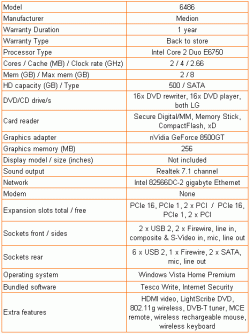
your Medion 10010513 is also known as model 6486, and the original bios is level 1.0V from 6/29/2007, and we know the final level was 1.1D from 3/16/2010, almost three years later. That's a big difference.

A review of the 6486 done in 2011 showed that the machine came with 2GB of memory and is indeed upgradeable to 8GB. See this link and the below pic from the link. The fact that the review was done in 2011 says it was likely done on a machine with the final bios, 1.1D.

https://www.trustedreviews.com/reviews/medion-6486-pc-feature-table-page-3

It would be nice if cpu-z could tell us your bios level because if its 1.1D then we know you can get to 8GB. It may take different dimms, or it could be that the problem is not hardware related.
 

Attachments

  • 5188-specs-1.gif
    5188-specs-1.gif
    10.6 KB · Views: 20

My Computer My Computer

At a glance

Win7 pro x64stock i7 7700kCorsair Vengeance LPX 16GB (2x8GB) DDR4 @ 320...integrated Intel HD 630
Computer type
PC/Desktop
Computer Manufacturer/Model Number
diy
OS
Win7 pro x64
CPU
stock i7 7700k
Motherboard
Gigabyte Z270N-WIFI mini-ITX
Memory
Corsair Vengeance LPX 16GB (2x8GB) DDR4 @ 3200MHz
Graphics Card(s)
integrated Intel HD 630
Sound Card
onboard Realtek ALC1220
Monitor(s) Displays
two vertically mounted samsung 55" 4k un55mu8000
Screen Resolution
1920x1280
Hard Drives
256GB Samsung EVO 960 M.2 pci-e NVMe SSD
PSU
SilverStone Nightjar ST45NF 450Watt Fanless
Case
No case. Motherboard is mounted directly onto power supply
Cooling
Evercool low profile 815EP with Panaflow 12L fan at 7v
Keyboard
Ortek MCK-86 mini
Mouse
Belkin 5-button USB
Internet Speed
spectrum 400mbps
if cpu-z says that you are on the oldest 2007 bios then its just a matter of getting a DOS environment to boot to flash you up to the 2010 bios. You could pick up a cheap optical drive to boot from a CD, or if you have an old hard drive laying around that you don't need, you could just format it in DOS and boot from it.
 

My Computer My Computer

At a glance

Win7 pro x64stock i7 7700kCorsair Vengeance LPX 16GB (2x8GB) DDR4 @ 320...integrated Intel HD 630
Computer type
PC/Desktop
Computer Manufacturer/Model Number
diy
OS
Win7 pro x64
CPU
stock i7 7700k
Motherboard
Gigabyte Z270N-WIFI mini-ITX
Memory
Corsair Vengeance LPX 16GB (2x8GB) DDR4 @ 3200MHz
Graphics Card(s)
integrated Intel HD 630
Sound Card
onboard Realtek ALC1220
Monitor(s) Displays
two vertically mounted samsung 55" 4k un55mu8000
Screen Resolution
1920x1280
Hard Drives
256GB Samsung EVO 960 M.2 pci-e NVMe SSD
PSU
SilverStone Nightjar ST45NF 450Watt Fanless
Case
No case. Motherboard is mounted directly onto power supply
Cooling
Evercool low profile 815EP with Panaflow 12L fan at 7v
Keyboard
Ortek MCK-86 mini
Mouse
Belkin 5-button USB
Internet Speed
spectrum 400mbps
Ah I just checked the link you posted me and your right, I guess the guy who had this before me added a new GPU (the GT 240 DDR3) and improved the RAM to 4GB, also the guy in the Windows 10 forum, has the exact same processor as I have, the E6750 2.66GHz, so I guess upgradung to Windows wont be avaliable to me but again I do not mind. I will consider doing the DOS enviroment you mentioned earlier, as soon as I get my hands on a optical drive and a blank CD...


Also I found out something intresting. The old RAM I completely took out (4x1GB DDR2 667MHz the Corsair ones being 400MHz) were not the same brand. 2 of them were Corsair, the other two from Samsung, also the Samsung RAM'S were 667MHz, while the Corsaire RAM'S were 400MHz, could this possibly be a link to why this is happening. But then that would not make sense as I took all the old RAM'S out and put the new ones in which should of resolved the issue.


Also sorry for not posting it before, but this is a SS of CPU-Z on the Mainboard tab: View attachment CPUZ.docx
 

My Computer My Computer

At a glance

Windows 7 Ultimate 64bitIntel Core 2 Duo E67507GB DDR2 PC2-6400 (2GB in each slot) 800MHz, ...ASUS Nvidia GeForce GT 240
Computer type
PC/Desktop
Computer Manufacturer/Model Number
Medion
OS
Windows 7 Ultimate 64bit
CPU
Intel Core 2 Duo E6750
Motherboard
MS-7358
Memory
7GB DDR2 PC2-6400 (2GB in each slot) 800MHz, (2.75GB usable)
Graphics Card(s)
ASUS Nvidia GeForce GT 240
Hard Drives
500GB HDD WESTERN
250GB HDD WESTERN
Altogether=750GB
Antivirus
BullGuard
Browser
Mozilla Firefox
From your cpu-z I see your bios is dated 6/29/2007, which was the very first bios issued for that machine and the oldest, so upgrading to the latest bios does stand a chance of fixing the issue. On that score, note that you can get used laptop optical R/W drives for $10. It may not be mountable in your computer but since you only need it once, who cares if its mountable.

Since you have replaced the memory I would not think that it matters that you used to have different memory speeds.

But another thing to try is simply a bios reset, and/or different bios settings. Somewhere in your bios menus it may have a place you can load "fail safe defaults" or "default performance bios" or some such. Try them all. My thinking is that IF your motherboard currently DOES support 8GB of memory then the reason its giving you such a high hardware reserved figure is probably because the bios is in a compatibility struggle with your memory, so the safe or the performance settings may allow it to become fully compatible with your memory. Its worth a try.

If that does not help, try a reset of the bios, also known as a cmos reset. Unplug your power supply, then remove the motherboard battery for a minute, then put the battery back in, then plug the power supply back in, all that will reset the bios. Your motherboard may also have a bios jumper, I don't know, but removing the battery does the same thing so no need to deal with the jumper. What we're after here is trying to get your bios to mate with your hardware in a different way tha it is right now, in hopes that memory compatibility is the result.
 

My Computer My Computer

At a glance

Win7 pro x64stock i7 7700kCorsair Vengeance LPX 16GB (2x8GB) DDR4 @ 320...integrated Intel HD 630
Computer type
PC/Desktop
Computer Manufacturer/Model Number
diy
OS
Win7 pro x64
CPU
stock i7 7700k
Motherboard
Gigabyte Z270N-WIFI mini-ITX
Memory
Corsair Vengeance LPX 16GB (2x8GB) DDR4 @ 3200MHz
Graphics Card(s)
integrated Intel HD 630
Sound Card
onboard Realtek ALC1220
Monitor(s) Displays
two vertically mounted samsung 55" 4k un55mu8000
Screen Resolution
1920x1280
Hard Drives
256GB Samsung EVO 960 M.2 pci-e NVMe SSD
PSU
SilverStone Nightjar ST45NF 450Watt Fanless
Case
No case. Motherboard is mounted directly onto power supply
Cooling
Evercool low profile 815EP with Panaflow 12L fan at 7v
Keyboard
Ortek MCK-86 mini
Mouse
Belkin 5-button USB
Internet Speed
spectrum 400mbps
Aha that would make more sense and yes I would legit use the optical drive once. But this CMOS method taking out the mobo battery, will it somehow delete any of my data? I really dont want that too happen as I have very valuable data here that I need for studying for exams, and its a huge file, meaning I would have to buy at least a 32GB USB to house all of it, Many Thanks for the previous help though.
 

My Computer My Computer

At a glance

Windows 7 Ultimate 64bitIntel Core 2 Duo E67507GB DDR2 PC2-6400 (2GB in each slot) 800MHz, ...ASUS Nvidia GeForce GT 240
Computer type
PC/Desktop
Computer Manufacturer/Model Number
Medion
OS
Windows 7 Ultimate 64bit
CPU
Intel Core 2 Duo E6750
Motherboard
MS-7358
Memory
7GB DDR2 PC2-6400 (2GB in each slot) 800MHz, (2.75GB usable)
Graphics Card(s)
ASUS Nvidia GeForce GT 240
Hard Drives
500GB HDD WESTERN
250GB HDD WESTERN
Altogether=750GB
Antivirus
BullGuard
Browser
Mozilla Firefox
removing the battery deletes ONLY the changes you have made to bios settings that are within the bios itself. Most folks have never made any changes to their bios. But IF you have for instance turned on or off wake on lan, or changed the boot order, things like that that are simply bios settings, in that case you will need to go back into the bios and make those changes again after resetting the bios. No data on your hard drive is impacted when you reset the bios.
 

My Computer My Computer

At a glance

Win7 pro x64stock i7 7700kCorsair Vengeance LPX 16GB (2x8GB) DDR4 @ 320...integrated Intel HD 630
Computer type
PC/Desktop
Computer Manufacturer/Model Number
diy
OS
Win7 pro x64
CPU
stock i7 7700k
Motherboard
Gigabyte Z270N-WIFI mini-ITX
Memory
Corsair Vengeance LPX 16GB (2x8GB) DDR4 @ 3200MHz
Graphics Card(s)
integrated Intel HD 630
Sound Card
onboard Realtek ALC1220
Monitor(s) Displays
two vertically mounted samsung 55" 4k un55mu8000
Screen Resolution
1920x1280
Hard Drives
256GB Samsung EVO 960 M.2 pci-e NVMe SSD
PSU
SilverStone Nightjar ST45NF 450Watt Fanless
Case
No case. Motherboard is mounted directly onto power supply
Cooling
Evercool low profile 815EP with Panaflow 12L fan at 7v
Keyboard
Ortek MCK-86 mini
Mouse
Belkin 5-button USB
Internet Speed
spectrum 400mbps
Ah OK well I will perhaps change the BIOS boot sequence back to normal, since that really was the only thing I changed but right now I will be away from home for a bit, once I get back I will definetly try this method and hope for the best. However I checked the Motherboard Manual and it had nothing that could tell me how to remove or put back in the CMOS battery could you perhaps just tell me how to do it? Is it really that easy? I would be very grateful for this, again thanks in advance for the help, Dijon.
 

My Computer My Computer

At a glance

Windows 7 Ultimate 64bitIntel Core 2 Duo E67507GB DDR2 PC2-6400 (2GB in each slot) 800MHz, ...ASUS Nvidia GeForce GT 240
Computer type
PC/Desktop
Computer Manufacturer/Model Number
Medion
OS
Windows 7 Ultimate 64bit
CPU
Intel Core 2 Duo E6750
Motherboard
MS-7358
Memory
7GB DDR2 PC2-6400 (2GB in each slot) 800MHz, (2.75GB usable)
Graphics Card(s)
ASUS Nvidia GeForce GT 240
Hard Drives
500GB HDD WESTERN
250GB HDD WESTERN
Altogether=750GB
Antivirus
BullGuard
Browser
Mozilla Firefox
video describing how to reset bios by removing battery
Dell Optiplex 745: How to Reset BIOS CMOS Battery - YouTube

but there is no reason to remove the battery if you can get the bios to flash correctly, and I found the below video which should allow you to create a bootable usb that will boot on your system. It formats the USB to emulate a removable floppy disk. Since your system wants a removable boot disk I am thinking it will avoid the Verfying DMI error you got the last time you tried to boot from USB. Right at the start of the video you will need to select "dos bootable disk" and "1.44MG" on the first menu, then format the usb like he describes.

Formatting USB Stick for Floppy Drive Emulator - YouTube

then copy over the bios files onto that usb that I think you already have from the linustechtips forum, then boot from the usb, then run the bios update utility

here is the program he is using to create the usb to look like a bootable floppy disk. It runs in windows 7, I just tried it.

http://search-ext.abb.com/library/D...LanguageCode=en&DocumentPartId=&Action=Launch
 

My Computer My Computer

At a glance

Win7 pro x64stock i7 7700kCorsair Vengeance LPX 16GB (2x8GB) DDR4 @ 320...integrated Intel HD 630
Computer type
PC/Desktop
Computer Manufacturer/Model Number
diy
OS
Win7 pro x64
CPU
stock i7 7700k
Motherboard
Gigabyte Z270N-WIFI mini-ITX
Memory
Corsair Vengeance LPX 16GB (2x8GB) DDR4 @ 3200MHz
Graphics Card(s)
integrated Intel HD 630
Sound Card
onboard Realtek ALC1220
Monitor(s) Displays
two vertically mounted samsung 55" 4k un55mu8000
Screen Resolution
1920x1280
Hard Drives
256GB Samsung EVO 960 M.2 pci-e NVMe SSD
PSU
SilverStone Nightjar ST45NF 450Watt Fanless
Case
No case. Motherboard is mounted directly onto power supply
Cooling
Evercool low profile 815EP with Panaflow 12L fan at 7v
Keyboard
Ortek MCK-86 mini
Mouse
Belkin 5-button USB
Internet Speed
spectrum 400mbps
Wow ok this is legit what I needed, thanks for putting your time into this I really do appreciate it. As I said I am away and will be for at least a month now, but when I get back home, I will definetly try your method out and update you if it worked, Many Thanks, Dijon
 

My Computer My Computer

At a glance

Windows 7 Ultimate 64bitIntel Core 2 Duo E67507GB DDR2 PC2-6400 (2GB in each slot) 800MHz, ...ASUS Nvidia GeForce GT 240
Computer type
PC/Desktop
Computer Manufacturer/Model Number
Medion
OS
Windows 7 Ultimate 64bit
CPU
Intel Core 2 Duo E6750
Motherboard
MS-7358
Memory
7GB DDR2 PC2-6400 (2GB in each slot) 800MHz, (2.75GB usable)
Graphics Card(s)
ASUS Nvidia GeForce GT 240
Hard Drives
500GB HDD WESTERN
250GB HDD WESTERN
Altogether=750GB
Antivirus
BullGuard
Browser
Mozilla Firefox
Back
Top