Installed Secondary HDD, Screen Now Flickers on Startup

I doubt it's the monitor. It did the same thing with the newer monitor last night.
Test 1: No, it takes quite a while to come up. It never used to.
Test 2: It comes on immediately.

Did you write that backwards? Because Test 1 result above shows a problem with the monitor.
If the PC is up and running and you can see the image on the monitor, then you turn off the monitor and wait for it to cool down, and it takes a long time to show that same image again when you turn the monitor back on - that's a problem with the monitor.


That's what I would have thought too, but it did the same thing with a brand new monitor (tests 1 and 2), which also flickered.
 

My Computer My Computer

At a glance

Windows 7 Home Premium 64-bitIntel Core i7-980x Gulftown 3.33GHz Six-Core9GB DDR3ATI Radeon 5800 Series
Computer type
PC/Desktop
Computer Manufacturer/Model Number
Hewlett-Packard HPE-190t
OS
Windows 7 Home Premium 64-bit
CPU
Intel Core i7-980x Gulftown 3.33GHz Six-Core
Motherboard
Pegatron IPMTB-TK Truckee
Memory
9GB DDR3
Graphics Card(s)
ATI Radeon 5800 Series
Monitor(s) Displays
HP 2159m
Screen Resolution
1920x1080
Hard Drives
OS: Samsung 840 Pro 128 SSD;
Secondary: Western Digital Black 500GB WD5003AZEX HDD, 3.5", 7200 RPM, SATA III, 64MB Cache
PSU
Corsair GS600
Case
Yes. Yes...
Keyboard
Filco Majestouch 2 Tenkeyless, Cherry MX Blues
Mouse
Corsair Raptor M45
Antivirus
Norton
Browser
Mozilla Firefox
The common factor is the cable. I assume HDMI? Have you tried a different cable?
 

My Computer My Computer

At a glance

Windows 7 64 Bit Home Premium SP1i7-3820GSkill F3-14900CL9Q - 16GBEVGA GeForce GTX660 - Driver 352.86
Computer type
PC/Desktop
Computer Manufacturer/Model Number
Home Built - Jan 2013
OS
Windows 7 64 Bit Home Premium SP1
CPU
i7-3820
Motherboard
Asus P9X79-PRO - Bios 4608
Memory
GSkill F3-14900CL9Q - 16GB
Graphics Card(s)
EVGA GeForce GTX660 - Driver 352.86
Sound Card
On board Realtek ALC898
Monitor(s) Displays
Acer S271HL
Screen Resolution
1920 x 1080
Hard Drives
#1- Samsung 840 Pro Series
#2- Western Digital WD1002FAEX Sata3 Black
#3- Western Digital WD1002FAEX Sata3 Black
PSU
Corsair CMPSU-850TX-V2 - 850 watt (by Seasonic)
Case
Corsair Obsidian 550D
Cooling
Standard 3 120mm case fans, Cooler Master Hyper 212 EVO
Keyboard
MS KC-0405
Mouse
Intellimouse 5-button
Internet Speed
56 Mbits/Sec (on a good day)
Antivirus
Avast & Malwarebytes
Browser
Firefox
Other Info
Asus DVD - DRW-24B1ST 24X
Thought of that one too. I tried a mix of old and new DVI and HDMI cables on both monitors and it didn't change anything.
 

My Computer My Computer

At a glance

Windows 7 Home Premium 64-bitIntel Core i7-980x Gulftown 3.33GHz Six-Core9GB DDR3ATI Radeon 5800 Series
Computer type
PC/Desktop
Computer Manufacturer/Model Number
Hewlett-Packard HPE-190t
OS
Windows 7 Home Premium 64-bit
CPU
Intel Core i7-980x Gulftown 3.33GHz Six-Core
Motherboard
Pegatron IPMTB-TK Truckee
Memory
9GB DDR3
Graphics Card(s)
ATI Radeon 5800 Series
Monitor(s) Displays
HP 2159m
Screen Resolution
1920x1080
Hard Drives
OS: Samsung 840 Pro 128 SSD;
Secondary: Western Digital Black 500GB WD5003AZEX HDD, 3.5", 7200 RPM, SATA III, 64MB Cache
PSU
Corsair GS600
Case
Yes. Yes...
Keyboard
Filco Majestouch 2 Tenkeyless, Cherry MX Blues
Mouse
Corsair Raptor M45
Antivirus
Norton
Browser
Mozilla Firefox
Mmmm. Odd.

I suppose it could still be the video card (and/or driver) causing that. Just can't wrap my head around the "how".
 

My Computer My Computer

At a glance

Windows 7 64 Bit Home Premium SP1i7-3820GSkill F3-14900CL9Q - 16GBEVGA GeForce GTX660 - Driver 352.86
Computer type
PC/Desktop
Computer Manufacturer/Model Number
Home Built - Jan 2013
OS
Windows 7 64 Bit Home Premium SP1
CPU
i7-3820
Motherboard
Asus P9X79-PRO - Bios 4608
Memory
GSkill F3-14900CL9Q - 16GB
Graphics Card(s)
EVGA GeForce GTX660 - Driver 352.86
Sound Card
On board Realtek ALC898
Monitor(s) Displays
Acer S271HL
Screen Resolution
1920 x 1080
Hard Drives
#1- Samsung 840 Pro Series
#2- Western Digital WD1002FAEX Sata3 Black
#3- Western Digital WD1002FAEX Sata3 Black
PSU
Corsair CMPSU-850TX-V2 - 850 watt (by Seasonic)
Case
Corsair Obsidian 550D
Cooling
Standard 3 120mm case fans, Cooler Master Hyper 212 EVO
Keyboard
MS KC-0405
Mouse
Intellimouse 5-button
Internet Speed
56 Mbits/Sec (on a good day)
Antivirus
Avast & Malwarebytes
Browser
Firefox
Other Info
Asus DVD - DRW-24B1ST 24X
Well that narrows it down a bit to EITHER the graphics card or the graphics driver.

So let's try this. I"m going to have you do a 2-part clean install of the driver.

  • First, go to the AMD website and download the most current known good driver for your video card. Save the file where you can find it.
  • Next, go into Windows Explorer and in the (usually) C: drive find the Program Files > ATI folder (inside will be Drivers > and your driver version) and delete it (the whole folder).
  • Next, Go into Start > Control Panel > Remove a Program and uninstall all programs for the video card. Do the actual driver last. For AMD, you may be able to select “AMD Catalyst Install Manager” and click on “Change”, then “Uninstall All Components”.
  • Restart the computer.
  • When the computer reboots to the desktop Windows will install it's own generic WDDM1.1 driver and you will be asked to restart again. You must do so in order to install the new Drivers > Restart.
At this point you should run the computer with the Windows generic driver for a while. See if the flickering stops.

If it does, then you could try installing the newest AMD driver from your download.

Let's see what you find.

AMD Instructions > go to Windows 7 section:
How-To Uninstall AMD Catalyst Drivers From A Windows Based System


So I uninstalled everything through Catalyst Install Manager, deleted the AMD folders, and it asked me to restart. I did, the flickering was a little less pronounced but still there upon start up, and when it booted to the desktop it didn't do anything else. If it was installing generic drivers, it didn't alert me. It didn't ask me to restart again. I searched the system for WDDM1.1 but the system didn't find it.
 

My Computer My Computer

At a glance

Windows 7 Home Premium 64-bitIntel Core i7-980x Gulftown 3.33GHz Six-Core9GB DDR3ATI Radeon 5800 Series
Computer type
PC/Desktop
Computer Manufacturer/Model Number
Hewlett-Packard HPE-190t
OS
Windows 7 Home Premium 64-bit
CPU
Intel Core i7-980x Gulftown 3.33GHz Six-Core
Motherboard
Pegatron IPMTB-TK Truckee
Memory
9GB DDR3
Graphics Card(s)
ATI Radeon 5800 Series
Monitor(s) Displays
HP 2159m
Screen Resolution
1920x1080
Hard Drives
OS: Samsung 840 Pro 128 SSD;
Secondary: Western Digital Black 500GB WD5003AZEX HDD, 3.5", 7200 RPM, SATA III, 64MB Cache
PSU
Corsair GS600
Case
Yes. Yes...
Keyboard
Filco Majestouch 2 Tenkeyless, Cherry MX Blues
Mouse
Corsair Raptor M45
Antivirus
Norton
Browser
Mozilla Firefox
If the drivers completely uninstalled, and the generic Windows driver did not install, then you should be in VGA mode (poor resolution - 640x480) with no options for display on the desktop (just like Safe Mode).

If the desktop looks normal resolution then you have still got some driver installed.
Go to Device Manager > Display Adapters > and see what it lists for a graphics card. If the Windows driver is installed it will say WDDM1.1 there. If it says AMD then the original driver did not uninstall or reinstalled itself from a backup folder.

If you are in VGA mode you could go to Windows Update and see if Windows is offering you the generic driver there. That driver may have never been installed on your PC previously.

Otherwise, go ahead and install the AMD driver.
 

My Computer My Computer

At a glance

Windows 7 64 Bit Home Premium SP1i7-3820GSkill F3-14900CL9Q - 16GBEVGA GeForce GTX660 - Driver 352.86
Computer type
PC/Desktop
Computer Manufacturer/Model Number
Home Built - Jan 2013
OS
Windows 7 64 Bit Home Premium SP1
CPU
i7-3820
Motherboard
Asus P9X79-PRO - Bios 4608
Memory
GSkill F3-14900CL9Q - 16GB
Graphics Card(s)
EVGA GeForce GTX660 - Driver 352.86
Sound Card
On board Realtek ALC898
Monitor(s) Displays
Acer S271HL
Screen Resolution
1920 x 1080
Hard Drives
#1- Samsung 840 Pro Series
#2- Western Digital WD1002FAEX Sata3 Black
#3- Western Digital WD1002FAEX Sata3 Black
PSU
Corsair CMPSU-850TX-V2 - 850 watt (by Seasonic)
Case
Corsair Obsidian 550D
Cooling
Standard 3 120mm case fans, Cooler Master Hyper 212 EVO
Keyboard
MS KC-0405
Mouse
Intellimouse 5-button
Internet Speed
56 Mbits/Sec (on a good day)
Antivirus
Avast & Malwarebytes
Browser
Firefox
Other Info
Asus DVD - DRW-24B1ST 24X
I've got to leave now for meetings. I will check back to see what you've found later today.
 

My Computer My Computer

At a glance

Windows 7 64 Bit Home Premium SP1i7-3820GSkill F3-14900CL9Q - 16GBEVGA GeForce GTX660 - Driver 352.86
Computer type
PC/Desktop
Computer Manufacturer/Model Number
Home Built - Jan 2013
OS
Windows 7 64 Bit Home Premium SP1
CPU
i7-3820
Motherboard
Asus P9X79-PRO - Bios 4608
Memory
GSkill F3-14900CL9Q - 16GB
Graphics Card(s)
EVGA GeForce GTX660 - Driver 352.86
Sound Card
On board Realtek ALC898
Monitor(s) Displays
Acer S271HL
Screen Resolution
1920 x 1080
Hard Drives
#1- Samsung 840 Pro Series
#2- Western Digital WD1002FAEX Sata3 Black
#3- Western Digital WD1002FAEX Sata3 Black
PSU
Corsair CMPSU-850TX-V2 - 850 watt (by Seasonic)
Case
Corsair Obsidian 550D
Cooling
Standard 3 120mm case fans, Cooler Master Hyper 212 EVO
Keyboard
MS KC-0405
Mouse
Intellimouse 5-button
Internet Speed
56 Mbits/Sec (on a good day)
Antivirus
Avast & Malwarebytes
Browser
Firefox
Other Info
Asus DVD - DRW-24B1ST 24X
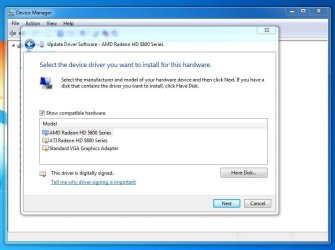
Here's what I've got. No WDDM1.1 but both an AMD and ATI driver listed. There's no option in Windows Update to download WDDM1.1 either. I also want to extend an in-progress thank-you to you and everyone else who's taken the time to help me out with this. Absolutely the right way to grow a real community here and I very much appreciate it.
 

Attachments

  • Capture.JPG
    Capture.JPG
    56.6 KB · Views: 1

My Computer My Computer

At a glance

Windows 7 Home Premium 64-bitIntel Core i7-980x Gulftown 3.33GHz Six-Core9GB DDR3ATI Radeon 5800 Series
Computer type
PC/Desktop
Computer Manufacturer/Model Number
Hewlett-Packard HPE-190t
OS
Windows 7 Home Premium 64-bit
CPU
Intel Core i7-980x Gulftown 3.33GHz Six-Core
Motherboard
Pegatron IPMTB-TK Truckee
Memory
9GB DDR3
Graphics Card(s)
ATI Radeon 5800 Series
Monitor(s) Displays
HP 2159m
Screen Resolution
1920x1080
Hard Drives
OS: Samsung 840 Pro 128 SSD;
Secondary: Western Digital Black 500GB WD5003AZEX HDD, 3.5", 7200 RPM, SATA III, 64MB Cache
PSU
Corsair GS600
Case
Yes. Yes...
Keyboard
Filco Majestouch 2 Tenkeyless, Cherry MX Blues
Mouse
Corsair Raptor M45
Antivirus
Norton
Browser
Mozilla Firefox
When you go to Control Panel > Programs, do you see the AMD driver listed? Any AMD software?

Could I also see what is under that "Update Driver Software" window?

BTW - That window just says it recognizes a AMD Radeon 5800 Series video card. It's asking you if you want to find a driver to install for it.

Is your desktop VGA or normal?
 

My Computer My Computer

At a glance

Windows 7 64 Bit Home Premium SP1i7-3820GSkill F3-14900CL9Q - 16GBEVGA GeForce GTX660 - Driver 352.86
Computer type
PC/Desktop
Computer Manufacturer/Model Number
Home Built - Jan 2013
OS
Windows 7 64 Bit Home Premium SP1
CPU
i7-3820
Motherboard
Asus P9X79-PRO - Bios 4608
Memory
GSkill F3-14900CL9Q - 16GB
Graphics Card(s)
EVGA GeForce GTX660 - Driver 352.86
Sound Card
On board Realtek ALC898
Monitor(s) Displays
Acer S271HL
Screen Resolution
1920 x 1080
Hard Drives
#1- Samsung 840 Pro Series
#2- Western Digital WD1002FAEX Sata3 Black
#3- Western Digital WD1002FAEX Sata3 Black
PSU
Corsair CMPSU-850TX-V2 - 850 watt (by Seasonic)
Case
Corsair Obsidian 550D
Cooling
Standard 3 120mm case fans, Cooler Master Hyper 212 EVO
Keyboard
MS KC-0405
Mouse
Intellimouse 5-button
Internet Speed
56 Mbits/Sec (on a good day)
Antivirus
Avast & Malwarebytes
Browser
Firefox
Other Info
Asus DVD - DRW-24B1ST 24X
Nothing is up with that second one that says ATI Radeon HD 5800 Series? I thought it might mean something is redundant or duplicated where it shouldn't be, since AMD retired the ATI brand sometime after I bought my card
 

My Computer My Computer

At a glance

Windows 7 Home Premium 64-bitIntel Core i7-980x Gulftown 3.33GHz Six-Core9GB DDR3ATI Radeon 5800 Series
Computer type
PC/Desktop
Computer Manufacturer/Model Number
Hewlett-Packard HPE-190t
OS
Windows 7 Home Premium 64-bit
CPU
Intel Core i7-980x Gulftown 3.33GHz Six-Core
Motherboard
Pegatron IPMTB-TK Truckee
Memory
9GB DDR3
Graphics Card(s)
ATI Radeon 5800 Series
Monitor(s) Displays
HP 2159m
Screen Resolution
1920x1080
Hard Drives
OS: Samsung 840 Pro 128 SSD;
Secondary: Western Digital Black 500GB WD5003AZEX HDD, 3.5", 7200 RPM, SATA III, 64MB Cache
PSU
Corsair GS600
Case
Yes. Yes...
Keyboard
Filco Majestouch 2 Tenkeyless, Cherry MX Blues
Mouse
Corsair Raptor M45
Antivirus
Norton
Browser
Mozilla Firefox
No, I don't think so. That is just the way the hardware ID is being seen by Windows.

See the Standard VGA Graphics Adapter? That is also the same video card, just being seen by the system as a generic video card.
Might be interesting to see what it offers up for a driver if you clicked next. Since you deleted the folders you can be assured it won't find those old drivers.
 

My Computer My Computer

At a glance

Windows 7 64 Bit Home Premium SP1i7-3820GSkill F3-14900CL9Q - 16GBEVGA GeForce GTX660 - Driver 352.86
Computer type
PC/Desktop
Computer Manufacturer/Model Number
Home Built - Jan 2013
OS
Windows 7 64 Bit Home Premium SP1
CPU
i7-3820
Motherboard
Asus P9X79-PRO - Bios 4608
Memory
GSkill F3-14900CL9Q - 16GB
Graphics Card(s)
EVGA GeForce GTX660 - Driver 352.86
Sound Card
On board Realtek ALC898
Monitor(s) Displays
Acer S271HL
Screen Resolution
1920 x 1080
Hard Drives
#1- Samsung 840 Pro Series
#2- Western Digital WD1002FAEX Sata3 Black
#3- Western Digital WD1002FAEX Sata3 Black
PSU
Corsair CMPSU-850TX-V2 - 850 watt (by Seasonic)
Case
Corsair Obsidian 550D
Cooling
Standard 3 120mm case fans, Cooler Master Hyper 212 EVO
Keyboard
MS KC-0405
Mouse
Intellimouse 5-button
Internet Speed
56 Mbits/Sec (on a good day)
Antivirus
Avast & Malwarebytes
Browser
Firefox
Other Info
Asus DVD - DRW-24B1ST 24X
Tried again. There's nothing AMD or ATI listed under Control Panel/Programs, but everything still looked normal after the restart. Under Device Manager it no longer says AMD Radeon... but it still lists ATI Radeon HD 5800 Series. When I clicked Next on ATI Radeon..., it said something to effect of "Drivers updated/loaded successfully."
 

My Computer My Computer

At a glance

Windows 7 Home Premium 64-bitIntel Core i7-980x Gulftown 3.33GHz Six-Core9GB DDR3ATI Radeon 5800 Series
Computer type
PC/Desktop
Computer Manufacturer/Model Number
Hewlett-Packard HPE-190t
OS
Windows 7 Home Premium 64-bit
CPU
Intel Core i7-980x Gulftown 3.33GHz Six-Core
Motherboard
Pegatron IPMTB-TK Truckee
Memory
9GB DDR3
Graphics Card(s)
ATI Radeon 5800 Series
Monitor(s) Displays
HP 2159m
Screen Resolution
1920x1080
Hard Drives
OS: Samsung 840 Pro 128 SSD;
Secondary: Western Digital Black 500GB WD5003AZEX HDD, 3.5", 7200 RPM, SATA III, 64MB Cache
PSU
Corsair GS600
Case
Yes. Yes...
Keyboard
Filco Majestouch 2 Tenkeyless, Cherry MX Blues
Mouse
Corsair Raptor M45
Antivirus
Norton
Browser
Mozilla Firefox
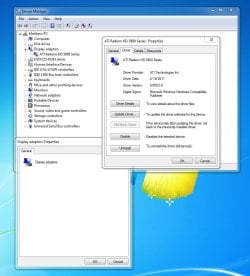
Could you post a screenshot of Device Manager with the Display Adapters expanded?

Then another showing what is in the window when you right click on the Display Adapter > Properties > Driver TAB?
 

My Computer My Computer

At a glance

Windows 7 64 Bit Home Premium SP1i7-3820GSkill F3-14900CL9Q - 16GBEVGA GeForce GTX660 - Driver 352.86
Computer type
PC/Desktop
Computer Manufacturer/Model Number
Home Built - Jan 2013
OS
Windows 7 64 Bit Home Premium SP1
CPU
i7-3820
Motherboard
Asus P9X79-PRO - Bios 4608
Memory
GSkill F3-14900CL9Q - 16GB
Graphics Card(s)
EVGA GeForce GTX660 - Driver 352.86
Sound Card
On board Realtek ALC898
Monitor(s) Displays
Acer S271HL
Screen Resolution
1920 x 1080
Hard Drives
#1- Samsung 840 Pro Series
#2- Western Digital WD1002FAEX Sata3 Black
#3- Western Digital WD1002FAEX Sata3 Black
PSU
Corsair CMPSU-850TX-V2 - 850 watt (by Seasonic)
Case
Corsair Obsidian 550D
Cooling
Standard 3 120mm case fans, Cooler Master Hyper 212 EVO
Keyboard
MS KC-0405
Mouse
Intellimouse 5-button
Internet Speed
56 Mbits/Sec (on a good day)
Antivirus
Avast & Malwarebytes
Browser
Firefox
Other Info
Asus DVD - DRW-24B1ST 24X
Sure. The original and only hard drive died in December, so I bought a new one and did a clean install of Windows a couple of months ago
 

Attachments

  • Capture.JPG
    Capture.JPG
    91.5 KB · Views: 0

My Computer My Computer

At a glance

Windows 7 Home Premium 64-bitIntel Core i7-980x Gulftown 3.33GHz Six-Core9GB DDR3ATI Radeon 5800 Series
Computer type
PC/Desktop
Computer Manufacturer/Model Number
Hewlett-Packard HPE-190t
OS
Windows 7 Home Premium 64-bit
CPU
Intel Core i7-980x Gulftown 3.33GHz Six-Core
Motherboard
Pegatron IPMTB-TK Truckee
Memory
9GB DDR3
Graphics Card(s)
ATI Radeon 5800 Series
Monitor(s) Displays
HP 2159m
Screen Resolution
1920x1080
Hard Drives
OS: Samsung 840 Pro 128 SSD;
Secondary: Western Digital Black 500GB WD5003AZEX HDD, 3.5", 7200 RPM, SATA III, 64MB Cache
PSU
Corsair GS600
Case
Yes. Yes...
Keyboard
Filco Majestouch 2 Tenkeyless, Cherry MX Blues
Mouse
Corsair Raptor M45
Antivirus
Norton
Browser
Mozilla Firefox
Yeah, that is showing me that an ATI driver has been installed for that display adapter. If you did not install that manually then you have not achieved a true clean (Un)installation.
The adapter should say either "Standard VGA Graphics Adapter" or "Windows Adapter WDDM1.1" (or similar).

If you did not do it manually then that means that Windows is finding the driver and installing it automatically. For our purposes we do not want it doing that.

One thing you can check: Start > type: Device Installation Settings > click on that > select "No, Let me choose what to do", and then check "Never install driver software from Windows Update". (You can change this back to whatever you like later).

Then do a search in Windows Explorer to find any folder from ATI or AMD. Make note of their location. Then the next time you attempt the clean installation you can delete these before you start. Otherwise Windows will find them and install the old driver again.

Check to see if the ATI Driver is listed in the Programs removal list in Control Panel. If there is no CCC available, and no entries in the Programs uninstall folder, to do the clean install this time you will need to select the Display Adapter in Device Manager and uninstall it, then restart the computer. If you are asked to remove the driver also say Yes.
 

My Computer My Computer

At a glance

Windows 7 64 Bit Home Premium SP1i7-3820GSkill F3-14900CL9Q - 16GBEVGA GeForce GTX660 - Driver 352.86
Computer type
PC/Desktop
Computer Manufacturer/Model Number
Home Built - Jan 2013
OS
Windows 7 64 Bit Home Premium SP1
CPU
i7-3820
Motherboard
Asus P9X79-PRO - Bios 4608
Memory
GSkill F3-14900CL9Q - 16GB
Graphics Card(s)
EVGA GeForce GTX660 - Driver 352.86
Sound Card
On board Realtek ALC898
Monitor(s) Displays
Acer S271HL
Screen Resolution
1920 x 1080
Hard Drives
#1- Samsung 840 Pro Series
#2- Western Digital WD1002FAEX Sata3 Black
#3- Western Digital WD1002FAEX Sata3 Black
PSU
Corsair CMPSU-850TX-V2 - 850 watt (by Seasonic)
Case
Corsair Obsidian 550D
Cooling
Standard 3 120mm case fans, Cooler Master Hyper 212 EVO
Keyboard
MS KC-0405
Mouse
Intellimouse 5-button
Internet Speed
56 Mbits/Sec (on a good day)
Antivirus
Avast & Malwarebytes
Browser
Firefox
Other Info
Asus DVD - DRW-24B1ST 24X
Ok, so I set Device Installation Setings to "Never install driver software from Windows Update." I uninstalled through the Catalyst program. I searched for and deleted all AMD and ATI folders. I went back to Device Manager and uninstalled the "ATI Radeon HD 5800 Series" driver that still somehow remained. When I did, the screen flicked to 600x800 and said it needed to reboot. I did and everything seemed fine. No flickering on startup and it booted to a 600x800 screen. I downloaded the newest driver and Catalyst program from AMD. It said it needed to restart to take effect, so I clicked OK. When the computer rebooted to the (now 1920x1080) desktop, I got a ton of flickering.
 

My Computer My Computer

At a glance

Windows 7 Home Premium 64-bitIntel Core i7-980x Gulftown 3.33GHz Six-Core9GB DDR3ATI Radeon 5800 Series
Computer type
PC/Desktop
Computer Manufacturer/Model Number
Hewlett-Packard HPE-190t
OS
Windows 7 Home Premium 64-bit
CPU
Intel Core i7-980x Gulftown 3.33GHz Six-Core
Motherboard
Pegatron IPMTB-TK Truckee
Memory
9GB DDR3
Graphics Card(s)
ATI Radeon 5800 Series
Monitor(s) Displays
HP 2159m
Screen Resolution
1920x1080
Hard Drives
OS: Samsung 840 Pro 128 SSD;
Secondary: Western Digital Black 500GB WD5003AZEX HDD, 3.5", 7200 RPM, SATA III, 64MB Cache
PSU
Corsair GS600
Case
Yes. Yes...
Keyboard
Filco Majestouch 2 Tenkeyless, Cherry MX Blues
Mouse
Corsair Raptor M45
Antivirus
Norton
Browser
Mozilla Firefox
Does not look good for that video card.

It seems that the card will function fine at low graphics and no load, but the minute you push it to run on the higher settings it is failing. Is it possible to borrow another video card just to test to see if it is indeed a bad card?

Keep in mind that a power problem could be the reason that the video card can not perform, so that part is not completely ruled out yet.

Did you ever get the generic Windows driver to load? It would be a good test to see if the card could work without flickering using a plain vanilla driver. I wonder why that driver is not being offered on your PC? It always has on the PCs I've worked on.
 

My Computer My Computer

At a glance

Windows 7 64 Bit Home Premium SP1i7-3820GSkill F3-14900CL9Q - 16GBEVGA GeForce GTX660 - Driver 352.86
Computer type
PC/Desktop
Computer Manufacturer/Model Number
Home Built - Jan 2013
OS
Windows 7 64 Bit Home Premium SP1
CPU
i7-3820
Motherboard
Asus P9X79-PRO - Bios 4608
Memory
GSkill F3-14900CL9Q - 16GB
Graphics Card(s)
EVGA GeForce GTX660 - Driver 352.86
Sound Card
On board Realtek ALC898
Monitor(s) Displays
Acer S271HL
Screen Resolution
1920 x 1080
Hard Drives
#1- Samsung 840 Pro Series
#2- Western Digital WD1002FAEX Sata3 Black
#3- Western Digital WD1002FAEX Sata3 Black
PSU
Corsair CMPSU-850TX-V2 - 850 watt (by Seasonic)
Case
Corsair Obsidian 550D
Cooling
Standard 3 120mm case fans, Cooler Master Hyper 212 EVO
Keyboard
MS KC-0405
Mouse
Intellimouse 5-button
Internet Speed
56 Mbits/Sec (on a good day)
Antivirus
Avast & Malwarebytes
Browser
Firefox
Other Info
Asus DVD - DRW-24B1ST 24X
The VGA driver? That one did load, 600x800 and everything and seemed to work fine. Anything labeled WDDM1.1, no, I haven't seen anything named that appear
 

My Computer My Computer

At a glance

Windows 7 Home Premium 64-bitIntel Core i7-980x Gulftown 3.33GHz Six-Core9GB DDR3ATI Radeon 5800 Series
Computer type
PC/Desktop
Computer Manufacturer/Model Number
Hewlett-Packard HPE-190t
OS
Windows 7 Home Premium 64-bit
CPU
Intel Core i7-980x Gulftown 3.33GHz Six-Core
Motherboard
Pegatron IPMTB-TK Truckee
Memory
9GB DDR3
Graphics Card(s)
ATI Radeon 5800 Series
Monitor(s) Displays
HP 2159m
Screen Resolution
1920x1080
Hard Drives
OS: Samsung 840 Pro 128 SSD;
Secondary: Western Digital Black 500GB WD5003AZEX HDD, 3.5", 7200 RPM, SATA III, 64MB Cache
PSU
Corsair GS600
Case
Yes. Yes...
Keyboard
Filco Majestouch 2 Tenkeyless, Cherry MX Blues
Mouse
Corsair Raptor M45
Antivirus
Norton
Browser
Mozilla Firefox
The standard VGA driver only runs at low resolution. The generic Windows driver I am talking about will run in normal resolution. It gives the card pretty much the same functionality as the AMD driver, just without all the higher end functions (for gaming) and the bells and whistles. It is a good test to try and determine whether the problem is actually the card or just the driver.

I think that it might come through Windows Update if you wait long enough while in VGA graphics (24 hours or so). But I can't be sure where it originally comes from. I thought it was native to the Windows installation, but I could be wrong about that.

Another thing people try is to find and download an older version of the AMD driver, under the assumption that the newest driver may be causing the problem and the older driver won't.
 

My Computer My Computer

At a glance

Windows 7 64 Bit Home Premium SP1i7-3820GSkill F3-14900CL9Q - 16GBEVGA GeForce GTX660 - Driver 352.86
Computer type
PC/Desktop
Computer Manufacturer/Model Number
Home Built - Jan 2013
OS
Windows 7 64 Bit Home Premium SP1
CPU
i7-3820
Motherboard
Asus P9X79-PRO - Bios 4608
Memory
GSkill F3-14900CL9Q - 16GB
Graphics Card(s)
EVGA GeForce GTX660 - Driver 352.86
Sound Card
On board Realtek ALC898
Monitor(s) Displays
Acer S271HL
Screen Resolution
1920 x 1080
Hard Drives
#1- Samsung 840 Pro Series
#2- Western Digital WD1002FAEX Sata3 Black
#3- Western Digital WD1002FAEX Sata3 Black
PSU
Corsair CMPSU-850TX-V2 - 850 watt (by Seasonic)
Case
Corsair Obsidian 550D
Cooling
Standard 3 120mm case fans, Cooler Master Hyper 212 EVO
Keyboard
MS KC-0405
Mouse
Intellimouse 5-button
Internet Speed
56 Mbits/Sec (on a good day)
Antivirus
Avast & Malwarebytes
Browser
Firefox
Other Info
Asus DVD - DRW-24B1ST 24X
Back
Top