
Solved Installed Win 7 Ult x64 on mSata SSD, EFI System Part on other drive?

Actually Win7 can also be installed to UEFI (Unified Extensible Firmware Interface) - Install Windows 7 with - Windows 7 Forums.'

But a Win8 PC not only has UEFI but also Secure Boot.

So to install Win7 you must at least turn off Secure Boot in BIOS setup, then either install to UEFI per above tutorial or Bypass UEFI to Install WIn7 to a normal MBR hard drive you've wiped to clear the GPT formatting.

In this case if you say that copying to the HD the EFI System partition allows it to boot then it is likely UEFI but still seems unusual since that normally requires two special partitions as such.

You can confirm that the disk is a GPT disk if you right click on the disk # in Disk Mgmt and it has Convert to MBR Disk now. (See screenshot below)


So I do recall having to disable secure boot. I also remember having a problem allowing partitions during the Windows 7 Install process (manual) to let Windows get installed to them. I would see the yellow warning symbol saying I can't install. I was booting up via Legacy DVD mode, but once I booted via UEFI dvd mode, then it worked.

It's interesting, I never saw a "Convert to MBR" option when right clicking (the new or the old). I do remember I attempted, prior to installing Windows 7, of using the command prompt on the Windows DVD and tried to convert to MBR..and it gave me an error saying it couldn't do it.

When I tried last night to select my SSD disk, then select the partition and choose "ACTIVE" via the cmd prompt, it gave me the error that a GPT partition cannot be set to active.

So maybe I have a real unusual fringe case here that just happens to be working for some odd reason.
 

My Computer My Computer

At a glance

Windows 7 Ultimate x64i516gb
Computer type
PC/Desktop
Computer Manufacturer/Model Number
Dell Inspiron 15R SE
OS
Windows 7 Ultimate x64
CPU
i5
Memory
16gb
Hard Drives
256gb mSata SSD Crucial
750gb Western Digital
So you have a GPT disk now, for certain?

I realize you copied the UEFI partition onto the HD to make it boot, but that itself could have been overwritten with Win7 MBR System Active boot files earlier even though not named System now. Everything else is strange about this.
 
Guess I should clarify something.

Before installing the mSATA SSD, I had installed a copy of Windows 7 on the 750GB HDD just to try it. I remember the process was difficult, because even though I deleted the partitions and erased them..and they were empty, it wouldn't allow me to install Windows to it. I changed something in my BIOS, and I remember booting from the UEFI dvd...and at some point, the warning symbols on the Windows install partition screen went away and I was able to select one.
 

My Computer My Computer

At a glance

Windows 7 Ultimate x64i516gb
Computer type
PC/Desktop
Computer Manufacturer/Model Number
Dell Inspiron 15R SE
OS
Windows 7 Ultimate x64
CPU
i5
Memory
16gb
Hard Drives
256gb mSata SSD Crucial
750gb Western Digital
Was it the AHCI inside bios ?
 

My Computer My Computer

At a glance

Windows 7 Ultimate 32-Bit & Windows 7 Ultimat...Intel Core i7 CPU 950 @ 3.07GHzOCZ 6GB (3 x 2GB) 240-Pin DDR3 SDRAM DDR3 160...ATI Radeon HD 5700 Series
Computer Manufacturer/Model Number
Custom Built
OS
Windows 7 Ultimate 32-Bit & Windows 7 Ultimate 64-Bit
CPU
Intel Core i7 CPU 950 @ 3.07GHz
Motherboard
ASUS P6T DELUXE V2
Memory
OCZ 6GB (3 x 2GB) 240-Pin DDR3 SDRAM DDR3 1600 OCZ3X1600R2
Graphics Card(s)
ATI Radeon HD 5700 Series
Sound Card
OnBoard
Hard Drives
WD6400AACS-00M3B0 (640GB SATA )
PSU
CORSAIR 850w
Case
NZXT LEXA
Cooling
Intel Stock Heatsink Fan
Keyboard
Microsoft Wireless Laser Keyboard 7000
Mouse
Microsoft Wireless Laser Mouse 7000
So you have a GPT disk now, for certain?

I realize you copied the UEFI partition onto the HD to make it boot, but that itself could have been overwritten with Win7 MBR System Active boot files earlier even though not named System now. Everything else is strange about this.

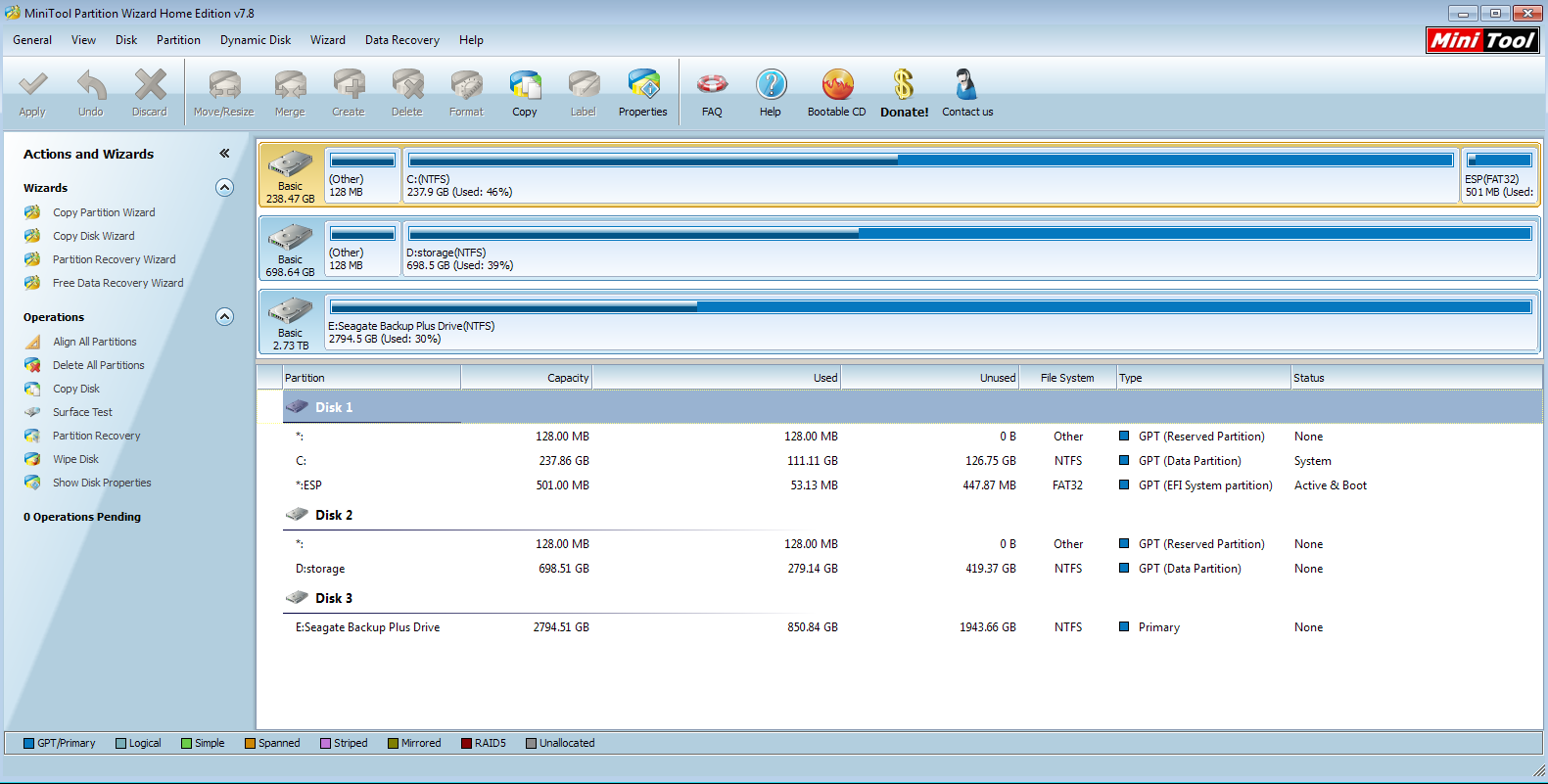
I just loaded up MiniTool Partition Wizard and I see this

o8rCEvh.png
 

My Computer My Computer

At a glance

Windows 7 Ultimate x64i516gb
Computer type
PC/Desktop
Computer Manufacturer/Model Number
Dell Inspiron 15R SE
OS
Windows 7 Ultimate x64
CPU
i5
Memory
16gb
Hard Drives
256gb mSata SSD Crucial
750gb Western Digital
Was it the AHCI inside bios ?

I have ATA, AHCI, and Intel Smart Response something.

So I have it enabled right now to Intel Smart Response...I think to install Windows 7 the first time, I did use AHCI.
 

My Computer My Computer

At a glance

Windows 7 Ultimate x64i516gb
Computer type
PC/Desktop
Computer Manufacturer/Model Number
Dell Inspiron 15R SE
OS
Windows 7 Ultimate x64
CPU
i5
Memory
16gb
Hard Drives
256gb mSata SSD Crucial
750gb Western Digital
Looking at your screenshot in post 18, partitions are in the wrong places.

Windows 7 UEFI partition setup.
uEFI 011.png
 

My Computer My Computer

At a glance

ME/XP/Vista/Win7
OS
ME/XP/Vista/Win7
Somehow OP installed Win7 in UEFI mode on SSD creating no EFI partitions, so when he unplugged the HD it would not boot. He then copied the 500mb EFI partition onto the SSD and it booted.

I was hoping you could shed some light on what happened here, Ray. How is this possible? Will it boot off of EFI partitions on another HD? Why was it only necessary to copy one EFI partition over, and no repairs were necessary?

Please correct this if I got any of it wrong, Champ.
 
I'm a wizard :)

seriously though, I am now more confused then ever. It's like I am happy my computer is running fine and great..but nervous as I apparently have a loophole lol.
 

My Computer My Computer

At a glance

Windows 7 Ultimate x64i516gb
Computer type
PC/Desktop
Computer Manufacturer/Model Number
Dell Inspiron 15R SE
OS
Windows 7 Ultimate x64
CPU
i5
Memory
16gb
Hard Drives
256gb mSata SSD Crucial
750gb Western Digital

that sounds like you have it right Greg.
 

My Computer My Computer

At a glance

Windows 7 Ultimate x64i516gb
Computer type
PC/Desktop
Computer Manufacturer/Model Number
Dell Inspiron 15R SE
OS
Windows 7 Ultimate x64
CPU
i5
Memory
16gb
Hard Drives
256gb mSata SSD Crucial
750gb Western Digital
Somehow OP installed Win7 in UEFI mode on SSD creating no EFI partitions, so when he unplugged the HD it would not boot. He then copied the 500mb EFI partition onto the SSD and it booted.

I was hoping you could shed some light on what happened here, Ray. How is this possible? Will it boot off of EFI partitions on another HD? Why was it only necessary to copy one EFI partition over, and no repairs were necessary?

Please correct this if I got any of it wrong, Champ.

The MSR partition was made on SSD for GPT, but boot files where installed to the Windows 8 UEFI System Resevered partition on the HDD.
As we always say, install with only ONE HDD.
 

My Computer My Computer

At a glance

ME/XP/Vista/Win7
OS
ME/XP/Vista/Win7
What about the second UEFI partition that's normally required? Can there only be one?
 
What about the second UEFI partition that's normally required? Can there only be one?

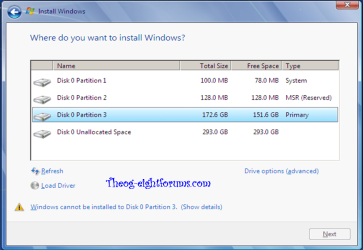
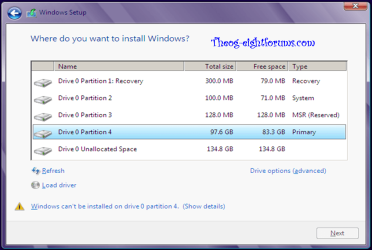
Windows 7 only has one + MSR, Windows 8 has two + MSR.

Windows 8 Downgrade-012 SB.PNG

Windows 8 Downgrade-007 SB.PNG
 

My Computer My Computer

At a glance

ME/XP/Vista/Win7
OS
ME/XP/Vista/Win7
Somehow OP installed Win7 in UEFI mode on SSD creating no EFI partitions, so when he unplugged the HD it would not boot. He then copied the 500mb EFI partition onto the SSD and it booted.

I was hoping you could shed some light on what happened here, Ray. How is this possible? Will it boot off of EFI partitions on another HD? Why was it only necessary to copy one EFI partition over, and no repairs were necessary?

Please correct this if I got any of it wrong, Champ.

The MSR partition was made on SSD for GPT, but boot files where installed to the Windows 8 UEFI System Resevered partition on the HDD.
As we always say, install with only ONE HDD.

yea that is teh thing..I seriously don't remember if I took out the HDD before installing to the SSD. I "thought" I had but obviously if I had...the SSD would have gotten a boot partition, right?

Thought I do recall even with these problems of seeing the boot flag on the SSD partition.
 

My Computer My Computer

At a glance

Windows 7 Ultimate x64i516gb
Computer type
PC/Desktop
Computer Manufacturer/Model Number
Dell Inspiron 15R SE
OS
Windows 7 Ultimate x64
CPU
i5
Memory
16gb
Hard Drives
256gb mSata SSD Crucial
750gb Western Digital
Thanks Ray. That pretty much clears it up.

Interesting that it required no repairs to make the UEFI partition bootable once it was copied to the SSD. Is this to be expected with UEFI, Ray? Or did you run Startup Repair after copying it, Champ?
 

My Computer My Computer

At a glance

ME/XP/Vista/Win7
OS
ME/XP/Vista/Win7
I did not run the Fix Startup after copying it over. I ran a chkdsk to make sure my drives were ok, but that was it.
 

My Computer My Computer

At a glance

Windows 7 Ultimate x64i516gb
Computer type
PC/Desktop
Computer Manufacturer/Model Number
Dell Inspiron 15R SE
OS
Windows 7 Ultimate x64
CPU
i5
Memory
16gb
Hard Drives
256gb mSata SSD Crucial
750gb Western Digital
Back
Top