Installing a XP driver on Win 7

DMHlidor

New member
Local time
6:29 PM
Messages
3
Hi, I put Win7 on my brothers (very) old IBM T30;
Everything works fine except the sound driver - Audio Devices [ <- That's the driver's name ].
I guess it's incompatible with windows 7..

My Question is-
Is it possible to install the windows xp driver on my win7?
Or (and this is probably a bit more complicated- if even possible, but I'll ask anyway)- run windows XP through a virtual machine on the current OS (win7) and use the XP's output?

thanks..
 

My Computer

Computer type
PC/Desktop
Computer Manufacturer/Model Number
IBM
OS
Windows 7 Ultimate 32bit
CPU
Mobile Intel(R) Pentium (R) 4 - M 1.80GHz
Motherboard
Unknown
Memory
1.00GB
Graphics Card(s)
Unknown
Hard Drives
~70GB, Unknown Manufacturer
Antivirus
NA
Browser
Chrome,Firefox,IE
The XP audio driver is not compatible with Windows 7. Vista drivers are compatible.

A virtual machine running XP MAY work.
 

My Computer

Computer type
PC/Desktop
Computer Manufacturer/Model Number
My Own Build
OS
Windows 10 64 bit
CPU
Intel i7 6700K
Motherboard
ASUS ROG Maximus VIII Hero
Memory
16GB Corsair Dominator
Graphics Card(s)
Intel CPU Graphics
Sound Card
RealTek
Monitor(s) Displays
27" Dell S2719dgf
Screen Resolution
2560X1440
Hard Drives
1 TB Samsung 850 EVO SSD for Win 10 Pro
500GB Samsung 850 EVO SSD for Win 10 Insider
2 TB drive for backup
PSU
EVGA Supernova 750G2
Case
BeQuiet Silent Base 600
Cooling
Deepcool Captain 120EX
Keyboard
Microsoft Wireless 2000
Mouse
Microsoft wireless
Internet Speed
100 MB/sec (Cable)
Antivirus
Microsoft Defender and Malwarebytes
Browser
Edge/Firefox
Other Info
Cakewalk (Sonar) by BandLab and Studio One 4.1 Pro recording studio software. MOTU 896Mk3 Hybrid recording interface, Frontier Tranzport wireless control unit, Behringer X-Touch Control Surface.
Five USB connected optical drives for CD Audio production using Nero BurningROM
Did you try installing the driver in compatibility mode? Here is a guide.

Compatibility Mode
 

My Computer

Computer type
Laptop
Computer Manufacturer/Model Number
Alienware
OS
Windows 7 Home Premium 64bit
CPU
iNTEL Core i7 2630QM 2GHz
Memory
8GB
Graphics Card(s)
NVIDIA GeForce GT 555M
Hard Drives
INTEL SSDSC2CW240A3
Antivirus
Windows Defender
Browser
Google Chrome

My Computers

System One System Two

Starting with Vista, Windows handles some sound functions differently than XP and the main reason the XP drivers are not compatible.

I used to work the Dell forums and users tried many different ways to make XP drivers work and they all failed.
 

My Computer

Computer type
PC/Desktop
Computer Manufacturer/Model Number
My Own Build
OS
Windows 10 64 bit
CPU
Intel i7 6700K
Motherboard
ASUS ROG Maximus VIII Hero
Memory
16GB Corsair Dominator
Graphics Card(s)
Intel CPU Graphics
Sound Card
RealTek
Monitor(s) Displays
27" Dell S2719dgf
Screen Resolution
2560X1440
Hard Drives
1 TB Samsung 850 EVO SSD for Win 10 Pro
500GB Samsung 850 EVO SSD for Win 10 Insider
2 TB drive for backup
PSU
EVGA Supernova 750G2
Case
BeQuiet Silent Base 600
Cooling
Deepcool Captain 120EX
Keyboard
Microsoft Wireless 2000
Mouse
Microsoft wireless
Internet Speed
100 MB/sec (Cable)
Antivirus
Microsoft Defender and Malwarebytes
Browser
Edge/Firefox
Other Info
Cakewalk (Sonar) by BandLab and Studio One 4.1 Pro recording studio software. MOTU 896Mk3 Hybrid recording interface, Frontier Tranzport wireless control unit, Behringer X-Touch Control Surface.
Five USB connected optical drives for CD Audio production using Nero BurningROM
Did you try installing the driver in compatibility mode? Here is a guide.

Compatibility Mode

I don't think that's possible, since it's not a program (the driver's installation files cannot be changed)

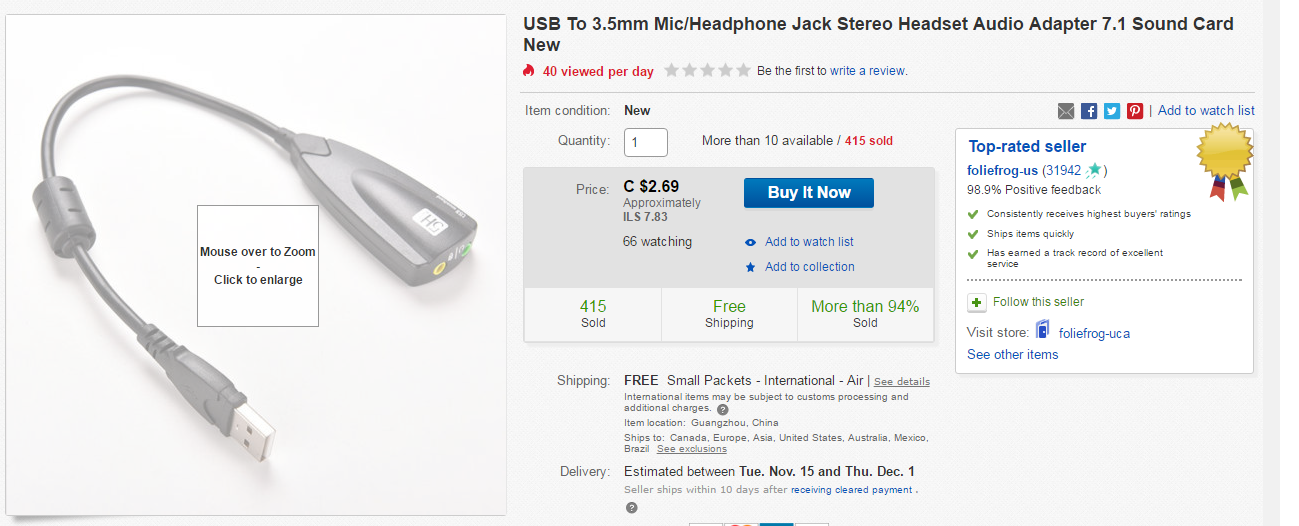
XP drivers are not compatible with Vista or higher so don't even bother with compatibility mode. You can get a usb sound card. USB, Sound Cards, Sound Cards, Components - Newegg.com

Will this work?
e6b2d119db43675f28c1f81ac76f7fab.png
 

My Computer

Computer type
PC/Desktop
Computer Manufacturer/Model Number
IBM
OS
Windows 7 Ultimate 32bit
CPU
Mobile Intel(R) Pentium (R) 4 - M 1.80GHz
Motherboard
Unknown
Memory
1.00GB
Graphics Card(s)
Unknown
Hard Drives
~70GB, Unknown Manufacturer
Antivirus
NA
Browser
Chrome,Firefox,IE

Starting with Vista, Windows handles some sound functions differently than XP and the main reason the XP drivers are not compatible.

I used to work the Dell forums and users tried many different ways to make XP drivers work and they all failed.

XP drivers are not compatible with Vista or higher so don't even bother with compatibility mode. You can get a usb sound card. USB, Sound Cards, Sound Cards, Components - Newegg.com

Update:

Alright guys so after many hours of frustration I found the solution and it was simple:
I used windows update and it downloaded the correct (and wierdly,working) driver for the audio, so everything works fine now.

thanks :)
 

My Computer

Computer type
PC/Desktop
Computer Manufacturer/Model Number
IBM
OS
Windows 7 Ultimate 32bit
CPU
Mobile Intel(R) Pentium (R) 4 - M 1.80GHz
Motherboard
Unknown
Memory
1.00GB
Graphics Card(s)
Unknown
Hard Drives
~70GB, Unknown Manufacturer
Antivirus
NA
Browser
Chrome,Firefox,IE

Just because you can run the installer in compatibility mode doesn't mean that the drivers will install or function correctly. There is a big difference. Drivers for XP generally aren't compatible with Vista/7 even if you can run the installer in compatibility mode. For stability you need to install Vista or 7 drivers and preferably those for 7 but in my experience most Vista drivers will work. Incompatible drivers can cause blue screens or freezes.


Starting with Vista, Windows handles some sound functions differently than XP and the main reason the XP drivers are not compatible.

I used to work the Dell forums and users tried many different ways to make XP drivers work and they all failed.

XP drivers are not compatible with Vista or higher so don't even bother with compatibility mode. You can get a usb sound card. USB, Sound Cards, Sound Cards, Components - Newegg.com

Update:

Alright guys so after many hours of frustration I found the solution and it was simple:
I used windows update and it downloaded the correct (and wierdly,working) driver for the audio, so everything works fine now.

thanks :)

Generally I don't trust Windows update to find the correct or best driver so I ignore drivers offered through WU. I'm glad it worked for you though.
 

My Computers

System One System Two

Back
Top