Solved Installing more RAM. PC-don't start.

Alenor

New member
Local time
6:56 AM
Messages
15
Hi.


I bought more Ram on my PC but it wont start. It is the same model than my first ones.
G.Skill 2x4GB Ripjaws X Performance GSK-F3-12800CL9D-8GBXL-DDR3 1600Mhz-2x4GB

So now I have 4 of them but PC only works whit 2?

Thank you for advance.
 

My Computer

Computer type
PC/Desktop
Computer Manufacturer/Model Number
custom build
OS
Windows 7 Home Premium 64bit
CPU
Intel Core CPU i7-4790K @ 4.00GHz
Motherboard
Gigabyte Z97P-D3
Memory
DDR3 1600Mhz 4GB x4 (16GB)
Graphics Card(s)
GeForce GTX 1070
Hard Drives
1TB SATA 6Gb/s 64MB
PSU
Super Flower-500W-80+GOLD
Case
ZALMAN R1 Midi Tower ATX
Antivirus
Norton
Browser
Chrome/Firefox
Can you get into BIOS? If so, set the sticks at 1333 and try to boot again. If it boots, we'll try to get you running with your RAM at the proper speed.
 

My Computer

Computer type
PC/Desktop
Computer Manufacturer/Model Number
Mellon Labs (custom build)
OS
Win 7 Pro x64/Win 10 Pro x64 dual boot
CPU
AMD FX 8350 Vishera @ 4200
Motherboard
ASUS M5A97 R2.0
Memory
16 GB Mushkin Blackline DDR3-2400 @ 1866 (9-10-10-10-31)
Graphics Card(s)
XFX Radeon R9 280 Double D Black Edition
Sound Card
Realtek HD Audio on MB. Sounds great.
Monitor(s) Displays
Acer 24", Acer 22"
Screen Resolution
3840 x 1080
Hard Drives
1 x Mushkin Chronos 120 GB SSD (Win 10)
1 x Samsung 850 EVO 250 GB SSD (Win 7)
1 x WD 1TB SATA Blue
1 x WD 1TB SATA Green
PSU
Corsair TX-750
Case
CoolerMaster HAF 912+
Cooling
Coolermaster Seidon 240M Liquid AIO. 6 case fans
Keyboard
Logitech G710+
Mouse
Logitech G500s
Internet Speed
Much better since I got fiber, but still way overpriced.
Antivirus
MSE, Malware Bytes for scanning
Browser
Firefox
Other Info
Corsair VOID USB headphones.

A Mellon Labs X-1 - LCD Smartie driven system status display.

Brought to you by the letter E
Can you get into BIOS? If so, set the sticks at 1333 and try to boot again. If it boots, we'll try to get you running with your RAM at the proper speed.

Thanks for the quick response. I set the Sticks at 1333 and it boots now.

I also put the RAM voltage to 1,6V because someone suggested it, should I put it back to 1,5V?
 

My Computer

Computer type
PC/Desktop
Computer Manufacturer/Model Number
custom build
OS
Windows 7 Home Premium 64bit
CPU
Intel Core CPU i7-4790K @ 4.00GHz
Motherboard
Gigabyte Z97P-D3
Memory
DDR3 1600Mhz 4GB x4 (16GB)
Graphics Card(s)
GeForce GTX 1070
Hard Drives
1TB SATA 6Gb/s 64MB
PSU
Super Flower-500W-80+GOLD
Case
ZALMAN R1 Midi Tower ATX
Antivirus
Norton
Browser
Chrome/Firefox
That RAM is only rated at 1.5 Volts. You shouldn't raise the RAM voltage above that. It could damage it.

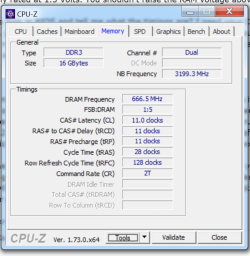
Can you have a look in BIOS and tell me what the timings are? I need your CL-tRCD-tRP-tRAS settings, and your command rate, please. If they aren't labeled or identified in the BIOS, it's usually the first three numbers given, plus the larger number a little bit below. I would imagine, if your RAM is set at stock, that the numbers will be 9-9-9-24, with a command rate of 1 or 2.

EDIT:

Also, the amount of RAM in your computer can alter how the computer uses it. Often four sticks of RAM can change up the timings or speed that the RAM runs at. The RAM might run fine at speed for two sticks, but adding two more causes the speed to go down, or the timings need to be relaxed to get it to run. I have a machine at home that is this way. With 2 sticks it works fine, but with 4, it won't boot unless I back off the timings. It's not a crisis, because it's hard to notice, except on benchmarks, but it is unfortunate when RAM won't work as advertised.

Once we get the timings on your RAM, we can see if relaxing them will help you boot at 1600. You can also try a software package named CPU-Z to look at the timings of your RAM. It's under the "Memory" tab, and it will also show you any XMP profiles available for your RAM. If you could use that package and take some screen shots of the memory tab for each stick, that would really help us diagnose the problem.

CPU-Z | Softwares | CPUID
 
Last edited:

My Computer

Computer type
PC/Desktop
Computer Manufacturer/Model Number
Mellon Labs (custom build)
OS
Win 7 Pro x64/Win 10 Pro x64 dual boot
CPU
AMD FX 8350 Vishera @ 4200
Motherboard
ASUS M5A97 R2.0
Memory
16 GB Mushkin Blackline DDR3-2400 @ 1866 (9-10-10-10-31)
Graphics Card(s)
XFX Radeon R9 280 Double D Black Edition
Sound Card
Realtek HD Audio on MB. Sounds great.
Monitor(s) Displays
Acer 24", Acer 22"
Screen Resolution
3840 x 1080
Hard Drives
1 x Mushkin Chronos 120 GB SSD (Win 10)
1 x Samsung 850 EVO 250 GB SSD (Win 7)
1 x WD 1TB SATA Blue
1 x WD 1TB SATA Green
PSU
Corsair TX-750
Case
CoolerMaster HAF 912+
Cooling
Coolermaster Seidon 240M Liquid AIO. 6 case fans
Keyboard
Logitech G710+
Mouse
Logitech G500s
Internet Speed
Much better since I got fiber, but still way overpriced.
Antivirus
MSE, Malware Bytes for scanning
Browser
Firefox
Other Info
Corsair VOID USB headphones.

A Mellon Labs X-1 - LCD Smartie driven system status display.

Brought to you by the letter E
Ok, here is the screen shot.
 

Attachments

  • cpu-z.png
    cpu-z.png
    49.2 KB · Views: 59

My Computer

Computer type
PC/Desktop
Computer Manufacturer/Model Number
custom build
OS
Windows 7 Home Premium 64bit
CPU
Intel Core CPU i7-4790K @ 4.00GHz
Motherboard
Gigabyte Z97P-D3
Memory
DDR3 1600Mhz 4GB x4 (16GB)
Graphics Card(s)
GeForce GTX 1070
Hard Drives
1TB SATA 6Gb/s 64MB
PSU
Super Flower-500W-80+GOLD
Case
ZALMAN R1 Midi Tower ATX
Antivirus
Norton
Browser
Chrome/Firefox
That's perfect, thanks. Now, can you take screen shots of the SPD tab for each stick of RAM, please?

(Sorry, I should have asked that when I asked for the other shot)
 

My Computer

Computer type
PC/Desktop
Computer Manufacturer/Model Number
Mellon Labs (custom build)
OS
Win 7 Pro x64/Win 10 Pro x64 dual boot
CPU
AMD FX 8350 Vishera @ 4200
Motherboard
ASUS M5A97 R2.0
Memory
16 GB Mushkin Blackline DDR3-2400 @ 1866 (9-10-10-10-31)
Graphics Card(s)
XFX Radeon R9 280 Double D Black Edition
Sound Card
Realtek HD Audio on MB. Sounds great.
Monitor(s) Displays
Acer 24", Acer 22"
Screen Resolution
3840 x 1080
Hard Drives
1 x Mushkin Chronos 120 GB SSD (Win 10)
1 x Samsung 850 EVO 250 GB SSD (Win 7)
1 x WD 1TB SATA Blue
1 x WD 1TB SATA Green
PSU
Corsair TX-750
Case
CoolerMaster HAF 912+
Cooling
Coolermaster Seidon 240M Liquid AIO. 6 case fans
Keyboard
Logitech G710+
Mouse
Logitech G500s
Internet Speed
Much better since I got fiber, but still way overpriced.
Antivirus
MSE, Malware Bytes for scanning
Browser
Firefox
Other Info
Corsair VOID USB headphones.

A Mellon Labs X-1 - LCD Smartie driven system status display.

Brought to you by the letter E
They are all identical.
 

Attachments

  • Untitled.png
    Untitled.png
    58.1 KB · Views: 56

My Computer

Computer type
PC/Desktop
Computer Manufacturer/Model Number
custom build
OS
Windows 7 Home Premium 64bit
CPU
Intel Core CPU i7-4790K @ 4.00GHz
Motherboard
Gigabyte Z97P-D3
Memory
DDR3 1600Mhz 4GB x4 (16GB)
Graphics Card(s)
GeForce GTX 1070
Hard Drives
1TB SATA 6Gb/s 64MB
PSU
Super Flower-500W-80+GOLD
Case
ZALMAN R1 Midi Tower ATX
Antivirus
Norton
Browser
Chrome/Firefox
Well, it's a bit of a procedure, but at this point at least we know what the timings are, and what they should be to successfully boot.

I would try enabling the XMP profile and testing for a successful boot. I expect that to fail. According to G.Skill, that is all you should have to do. If it fails, they suggest an RMA.

Next, I would set the timings at 11-11-11-29 and test for boot at 1600. I expect that to fail too.

Since the two boot attempts will probably not be successful, the next step would be to take out all the RAM sticks but one, and run Memtest86+ overnight. If that passes, swap out a RAM stick with another and repeat until all four RAM sticks have been tested. This will take a few days.

If one of them can't pass the test, you have found your problem. If they all pass, I would suggest contacting G.Skill for more expert advice than we can give. (Note: They will probably make you run Memtest86+ and do the swapping, so you might as well do it before you contact them. )

Memtest86+ - Advanced Memory Diagnostic Tool
 

My Computer

Computer type
PC/Desktop
Computer Manufacturer/Model Number
Mellon Labs (custom build)
OS
Win 7 Pro x64/Win 10 Pro x64 dual boot
CPU
AMD FX 8350 Vishera @ 4200
Motherboard
ASUS M5A97 R2.0
Memory
16 GB Mushkin Blackline DDR3-2400 @ 1866 (9-10-10-10-31)
Graphics Card(s)
XFX Radeon R9 280 Double D Black Edition
Sound Card
Realtek HD Audio on MB. Sounds great.
Monitor(s) Displays
Acer 24", Acer 22"
Screen Resolution
3840 x 1080
Hard Drives
1 x Mushkin Chronos 120 GB SSD (Win 10)
1 x Samsung 850 EVO 250 GB SSD (Win 7)
1 x WD 1TB SATA Blue
1 x WD 1TB SATA Green
PSU
Corsair TX-750
Case
CoolerMaster HAF 912+
Cooling
Coolermaster Seidon 240M Liquid AIO. 6 case fans
Keyboard
Logitech G710+
Mouse
Logitech G500s
Internet Speed
Much better since I got fiber, but still way overpriced.
Antivirus
MSE, Malware Bytes for scanning
Browser
Firefox
Other Info
Corsair VOID USB headphones.

A Mellon Labs X-1 - LCD Smartie driven system status display.

Brought to you by the letter E
Ok I'll try that.
 

My Computer

Computer type
PC/Desktop
Computer Manufacturer/Model Number
custom build
OS
Windows 7 Home Premium 64bit
CPU
Intel Core CPU i7-4790K @ 4.00GHz
Motherboard
Gigabyte Z97P-D3
Memory
DDR3 1600Mhz 4GB x4 (16GB)
Graphics Card(s)
GeForce GTX 1070
Hard Drives
1TB SATA 6Gb/s 64MB
PSU
Super Flower-500W-80+GOLD
Case
ZALMAN R1 Midi Tower ATX
Antivirus
Norton
Browser
Chrome/Firefox
I would not use the XMP profile, I would just set the ram speed to 1600 in the bios, you know your old sticks work, so just test the new ones by themselves in the previously unused slots, if they work at 1600 you should be good to go with all 4 installed.

Your board supports 32 GB, so 16 should not be an issue.

GIGABYTE - Motherboard - Socket 1150 - GA-Z97P-D3 (rev. 1.0)

Even though the sticks were not all bought at the same time, there should be no issues, as long as they are the same models :)
 

My Computer

Computer type
PC/Desktop
Computer Manufacturer/Model Number
Skylake Special #666
OS
Windows 10 Pro x64
CPU
Intel Core i7 6700K
Motherboard
Asus Sabertooth Z170 Mark 1
Memory
GSkill TridentZ RGB 16GB 3600 16-16-16-36
Graphics Card(s)
EVGA GTX 980 Ti SC x2
Sound Card
Realtek High Definition
Monitor(s) Displays
AOC G2460PG
Screen Resolution
1920 x 1080 144Hz
Hard Drives
Samsung 860 Pro 256GB, Seagate Barracuda 4TB x2
PSU
EVGA 1000 P2, EVGA White Custom Braided Cables
Case
Corsair Vengeance C70 Gunmetal Black
Cooling
Corsair H100i v2, Corsair ML120 x2, Thermal Grizzly Kryonaut
Keyboard
Logitech G910 Orion Spectrum
Mouse
Logitech G700s
Internet Speed
Verizon Fios Quantum Gateway 75/75
Antivirus
Windows Defender, Malwarebytes Free 3.8.3
Browser
Chrome
Other Info
Corsair SP120 x4, LG Blu-ray Drive, Durabrand HT-395 100 Watt Dolby Digital Amp, Corsair H2100 Wireless 7.1 Headset

My Computer

Computer type
PC/Desktop
Computer Manufacturer/Model Number
custom build
OS
Windows 7 Home Premium 64bit
CPU
Intel Core CPU i7-4790K @ 4.00GHz
Motherboard
Gigabyte Z97P-D3
Memory
DDR3 1600Mhz 4GB x4 (16GB)
Graphics Card(s)
GeForce GTX 1070
Hard Drives
1TB SATA 6Gb/s 64MB
PSU
Super Flower-500W-80+GOLD
Case
ZALMAN R1 Midi Tower ATX
Antivirus
Norton
Browser
Chrome/Firefox
Well, at least you got it figured out. Sad that you can't run your RAM at 1600, though. :(
 

My Computer

Computer type
PC/Desktop
Computer Manufacturer/Model Number
Mellon Labs (custom build)
OS
Win 7 Pro x64/Win 10 Pro x64 dual boot
CPU
AMD FX 8350 Vishera @ 4200
Motherboard
ASUS M5A97 R2.0
Memory
16 GB Mushkin Blackline DDR3-2400 @ 1866 (9-10-10-10-31)
Graphics Card(s)
XFX Radeon R9 280 Double D Black Edition
Sound Card
Realtek HD Audio on MB. Sounds great.
Monitor(s) Displays
Acer 24", Acer 22"
Screen Resolution
3840 x 1080
Hard Drives
1 x Mushkin Chronos 120 GB SSD (Win 10)
1 x Samsung 850 EVO 250 GB SSD (Win 7)
1 x WD 1TB SATA Blue
1 x WD 1TB SATA Green
PSU
Corsair TX-750
Case
CoolerMaster HAF 912+
Cooling
Coolermaster Seidon 240M Liquid AIO. 6 case fans
Keyboard
Logitech G710+
Mouse
Logitech G500s
Internet Speed
Much better since I got fiber, but still way overpriced.
Antivirus
MSE, Malware Bytes for scanning
Browser
Firefox
Other Info
Corsair VOID USB headphones.

A Mellon Labs X-1 - LCD Smartie driven system status display.

Brought to you by the letter E
Last edited:

My Computer

Computer type
PC/Desktop
Computer Manufacturer/Model Number
Skylake Special #666
OS
Windows 10 Pro x64
CPU
Intel Core i7 6700K
Motherboard
Asus Sabertooth Z170 Mark 1
Memory
GSkill TridentZ RGB 16GB 3600 16-16-16-36
Graphics Card(s)
EVGA GTX 980 Ti SC x2
Sound Card
Realtek High Definition
Monitor(s) Displays
AOC G2460PG
Screen Resolution
1920 x 1080 144Hz
Hard Drives
Samsung 860 Pro 256GB, Seagate Barracuda 4TB x2
PSU
EVGA 1000 P2, EVGA White Custom Braided Cables
Case
Corsair Vengeance C70 Gunmetal Black
Cooling
Corsair H100i v2, Corsair ML120 x2, Thermal Grizzly Kryonaut
Keyboard
Logitech G910 Orion Spectrum
Mouse
Logitech G700s
Internet Speed
Verizon Fios Quantum Gateway 75/75
Antivirus
Windows Defender, Malwarebytes Free 3.8.3
Browser
Chrome
Other Info
Corsair SP120 x4, LG Blu-ray Drive, Durabrand HT-395 100 Watt Dolby Digital Amp, Corsair H2100 Wireless 7.1 Headset
Actually I was thinking to bay new processor. Is that good or should I bay something else, like i7-4790k? Is it worth the extra one hundred?
 

My Computer

Computer type
PC/Desktop
Computer Manufacturer/Model Number
custom build
OS
Windows 7 Home Premium 64bit
CPU
Intel Core CPU i7-4790K @ 4.00GHz
Motherboard
Gigabyte Z97P-D3
Memory
DDR3 1600Mhz 4GB x4 (16GB)
Graphics Card(s)
GeForce GTX 1070
Hard Drives
1TB SATA 6Gb/s 64MB
PSU
Super Flower-500W-80+GOLD
Case
ZALMAN R1 Midi Tower ATX
Antivirus
Norton
Browser
Chrome/Firefox
At stock speeds, the i7-4790K is nearly 3X as fast as the G3258 comparison here

Depends what you use the pc for - for video rendering etc you'd really see the difference (esp with apps that can use all the threads eg Handbrake). The K versions are unlocked, so can be overclocked.
 

My Computer

Computer type
PC/Desktop
Computer Manufacturer/Model Number
self build
OS
W10 Pro x64, W7 Pro x64 in VMware
CPU
i7 2600K @ 4.4GHz
Motherboard
MSI Z68A-GD80
Memory
8GB Mushkin @ 1600MHz
Graphics Card(s)
Nvidia GTX 750 Ti
Monitor(s) Displays
27" Benq + 27" LG
Screen Resolution
1080p
Hard Drives
500GB 850 Evo SSD + 3 * 2TB Seagate
PSU
EVGA 650 GS modular
Case
Antec 300
Cooling
Seidon 120V v2
Internet Speed
62/18 Mbps
Antivirus
Defender (W10) + MSE (W7)
Browser
Firefox

My Computer

Computer type
PC/Desktop
Computer Manufacturer/Model Number
Skylake Special #666
OS
Windows 10 Pro x64
CPU
Intel Core i7 6700K
Motherboard
Asus Sabertooth Z170 Mark 1
Memory
GSkill TridentZ RGB 16GB 3600 16-16-16-36
Graphics Card(s)
EVGA GTX 980 Ti SC x2
Sound Card
Realtek High Definition
Monitor(s) Displays
AOC G2460PG
Screen Resolution
1920 x 1080 144Hz
Hard Drives
Samsung 860 Pro 256GB, Seagate Barracuda 4TB x2
PSU
EVGA 1000 P2, EVGA White Custom Braided Cables
Case
Corsair Vengeance C70 Gunmetal Black
Cooling
Corsair H100i v2, Corsair ML120 x2, Thermal Grizzly Kryonaut
Keyboard
Logitech G910 Orion Spectrum
Mouse
Logitech G700s
Internet Speed
Verizon Fios Quantum Gateway 75/75
Antivirus
Windows Defender, Malwarebytes Free 3.8.3
Browser
Chrome
Other Info
Corsair SP120 x4, LG Blu-ray Drive, Durabrand HT-395 100 Watt Dolby Digital Amp, Corsair H2100 Wireless 7.1 Headset
Of course it`s worth the extra $100, but do you need an i7 ?

If you can afford one, I highly recommend it :)

Intel Core i7-4790K Haswell Refresh Quad-Core 4.0GHz LGA 1150 Desktop Processor BX80646I74790K - Newegg.com - Newegg.com

I agree! it is worth the extra $ to get the unlocked processor because of the fact that you can over-clock it and make it run even faster. I have a much older(3 years now) i7 2600k processor that I can overclock via 7. But I may upgrade my processor to the fastest one that my motherboard will support. But yes it is worth spending the extra dough! :cool:
 

My Computer

Computer type
PC/Desktop
Computer Manufacturer/Model Number
custom built
OS
Windows 7 ultimate 64-bit
CPU
Intel I7 2600K 3.4ghz
Motherboard
Asus Evo P8P67
Memory
Corsair 16gb ddr3 1600mhz
Graphics Card(s)
Nvidia Geforce gt 430
Sound Card
Sound Blaster Titanium x-fi pci express
Monitor(s) Displays
Dell E198WFP
Hard Drives
1 western digital 2TB drive.
PSU
Antec 1200 watt
Case
Inwin Dragon Rider
Cooling
6 case supplied cooling fans
Keyboard
logitech mk700
Mouse
logitech m705
Internet Speed
25-50mbps download; 10mbps upload(i think)
Antivirus
avg free 2014
Browser
mozilla firefox
Other Info
Also have a pretty bad speaker setup which is a klipsch promedia 5.1 surround speaker setup with huge subwoofer and lg blu ray player/writer. Also a hp officejet pro 8600 plus wireless all in one and a logitech s7500 webcam.
Thanks for the advice! I just ordered one. :cool:
 

My Computer

Computer type
PC/Desktop
Computer Manufacturer/Model Number
custom build
OS
Windows 7 Home Premium 64bit
CPU
Intel Core CPU i7-4790K @ 4.00GHz
Motherboard
Gigabyte Z97P-D3
Memory
DDR3 1600Mhz 4GB x4 (16GB)
Graphics Card(s)
GeForce GTX 1070
Hard Drives
1TB SATA 6Gb/s 64MB
PSU
Super Flower-500W-80+GOLD
Case
ZALMAN R1 Midi Tower ATX
Antivirus
Norton
Browser
Chrome/Firefox
Back
Top