Hi there, I've been away from this community for a while but it's good to be back.
I'm currently bringing my old desktop pc (Dell XPS from 2006) back to life to use it as a test machine.
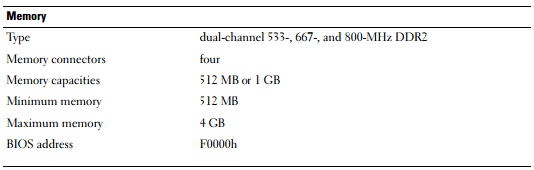
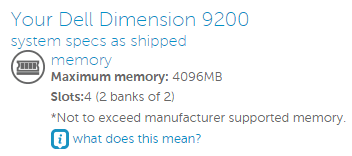
It originally shipped with a whooping 1Gb of RAM on 2 x 512 mb sticks. Later I took those 512 mb sticks out and installed 2 x 1gb DDR2-800 sticks (A total of 2 gb of RAM). This was the current configuration until this morning. Dell's manual says the MOBO has 4 slots (True ) and each one supports either 512 mb or 1 gb sticks for a minimum of 512 mb of RAM and a maximum of 4 gb. It also says it supports DDR2-553, DDR2-667 or DDR2-800 ram.
So I had this 2 gb DDR2-800 sitck lying around and decided to add that stick to the system and see what happened. To my surprise BIOS as well as Windows recognized the stick with no problem and indicates that the system now has a total of 4 gb of RAM (I'm running Windows 7 64 bit now). Also I want to mention that I've never updated the BIOS.
Perhaps the manual says it supports a maximum of 4 gb by the limitation of Windows XP back in the day but the manual is pretty clear stating that the slots have such limitation and not because of the OS. I will try to get another identical 2 gb DDR2-800 sitck and see if the available RAM in Windows increases beyond that 4 gb limit stated in the manual. Since they already lied in the amount of RAM per slot allowed, I think it's worth trying.
So the system right now is like this:
DIMM 1: Mushkin 1 gb
DIMM 2: Mushkin 1 gb
DIMM 3: Adata 2 gb
DIMM 4: Empty
Best case scenario for me is if the system ends up allowing 2 gb per slot so I'm able to install a total of 8gb.
Here comes the question:
If the system recognizes only 4 gb of Ram, what is best, Having all slots working on 4 x 1 gb or 2 x 2 gb with two slots empty?
The MOBO does support dual channel memory.
Thanks for your help
I'm currently bringing my old desktop pc (Dell XPS from 2006) back to life to use it as a test machine.
It originally shipped with a whooping 1Gb of RAM on 2 x 512 mb sticks. Later I took those 512 mb sticks out and installed 2 x 1gb DDR2-800 sticks (A total of 2 gb of RAM). This was the current configuration until this morning. Dell's manual says the MOBO has 4 slots (True
) and each one supports either 512 mb or 1 gb sticks for a minimum of 512 mb of RAM and a maximum of 4 gb. It also says it supports DDR2-553, DDR2-667 or DDR2-800 ram.So I had this 2 gb DDR2-800 sitck lying around and decided to add that stick to the system and see what happened. To my surprise BIOS as well as Windows recognized the stick with no problem and indicates that the system now has a total of 4 gb of RAM (I'm running Windows 7 64 bit now). Also I want to mention that I've never updated the BIOS.
Perhaps the manual says it supports a maximum of 4 gb by the limitation of Windows XP back in the day but the manual is pretty clear stating that the slots have such limitation and not because of the OS. I will try to get another identical 2 gb DDR2-800 sitck and see if the available RAM in Windows increases beyond that 4 gb limit stated in the manual. Since they already lied in the amount of RAM per slot allowed, I think it's worth trying.
So the system right now is like this:
DIMM 1: Mushkin 1 gb
DIMM 2: Mushkin 1 gb
DIMM 3: Adata 2 gb
DIMM 4: Empty
Best case scenario for me is if the system ends up allowing 2 gb per slot so I'm able to install a total of 8gb.
Here comes the question:
If the system recognizes only 4 gb of Ram, what is best, Having all slots working on 4 x 1 gb or 2 x 2 gb with two slots empty?
The MOBO does support dual channel memory.
Thanks for your help
My Computer
- Computer type
- PC/Desktop
- Computer Manufacturer/Model Number
- Custom Build
- OS
- Windows 7
- CPU
- Core i5 2500k
- Motherboard
- Asus P8H67-M PRO/CSM
- Memory
- Kingston HyperX 4GB x 2
- Graphics Card(s)
- AMD Radeon HD 6700
- Monitor(s) Displays
- AOC 27" x 2
- Hard Drives
- Samsung SSD 840 Pro 120 Gb (Windows)
Western Digital 3 TB (Storage)
- PSU
- Thermaltake 430W
- Case
- NZXT Vulcan
- Cooling
- Cooler Master Hyper EVO 212
- Keyboard
- Microsoft Natural ergonomic 4000
- Mouse
- Microsoft Basic Optical Mouse V2.0
- Internet Speed
- 10 MB