Installing Sata DVD Blu Ray Burner

Copson20

New member
Local time
2:51 AM
Messages
19
This will be my first Sata DVD Drive how do I go about installing the drive (hardware).

Thanks
 

My Computer My Computer

At a glance

Windows 7 Ultimate 64-bitAMD Phenom(tm) 9850 Quad-Core Processor 2.50GHzCORSAIR DOMINATOR 4GB (2 x 2GB) 240-Pin DDR2 ...NIVIDA GeForce 8800
OS
Windows 7 Ultimate 64-bit
CPU
AMD Phenom(tm) 9850 Quad-Core Processor 2.50GHz
Motherboard
ASUS M3N72-D
Memory
CORSAIR DOMINATOR 4GB (2 x 2GB) 240-Pin DDR2 SDRAM DDR2 1066
Graphics Card(s)
NIVIDA GeForce 8800
Sound Card
Creative Labs Sound Blaster X-Fi
Monitor(s) Displays
ViewSonic 22"
Hard Drives
2 Western Digital Caviar Blue WD3200AAKS 320GB 7200 RPM 16MB Cache SATA 3.0Gb/s 3.5" Internal Hard Drive -Bare Drive

1 Western Digital Caviar Black WD1001FALS 1TB 7200 RPM 32MB Cache SATA 3.0Gb/s 3.5" Internal Hard Drives -Bare Drive
Case
Coolmaster
This will be my first Sata DVD Drive how do I go about installing the drive (hardware).

Thanks

What do you want to know?

The main difference between the SATA drives and the PATA (IDE) ones is that the SATA drives have no master/slave/cable select jumper, as there is a single drive per SATA controller channel. The cables and connectors are different than with PATA, but the principles are the same. SATA data and power connectors are more likely (in my opinion) to come loose than the old ones, but the SATA data cable is quite slender, which is good from an airflow basis.
 

My Computer My Computer

At a glance

Windows 7 Pro X64 SP1Intel Core I7-3930k16 GB Gskill DDR3-2133eVGA GTX680
Computer Manufacturer/Model Number
homegrown
OS
Windows 7 Pro X64 SP1
CPU
Intel Core I7-3930k
Motherboard
Asus P9X79 Pro
Memory
16 GB Gskill DDR3-2133
Graphics Card(s)
eVGA GTX680
Sound Card
Creative X-Fi Titanium
Monitor(s) Displays
As PA246Q
Screen Resolution
1920 X 1200
Hard Drives
Corsair Force GT, 120 GB
WDC 1.5TB Caviar Black
PSU
PCP&C Silencer 750 Crossfire
Case
Silverstone FT02
Cooling
Noctua NH-D14
Keyboard
cheap Logitech USB
Mouse
Microsoft Intellimouse Explorer (old optical) USB
Internet Speed
6Mb cable
Other Info
Pioneer BDR-205
Samsung SH-203B
Monsoon 5.1 speakers
This will be my first Sata DVD Drive how do I go about installing the drive (hardware).

Thanks
SATA installation is easy depending on your skill level.
  1. Shut down your system
  2. power off and unplug, disconnect all cables
  3. put your pc on a stable work area.
  4. remove the locking screws on port/left side with the computer facing you for ref. point
  5. remove the shield.cover plate
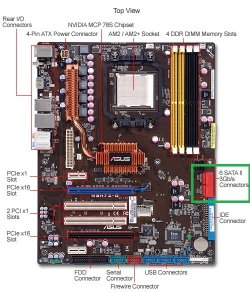
  6. your sata ports are red in color.
  7. mount your drive and lock it down
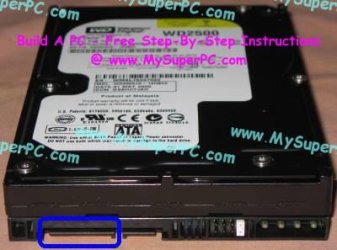
  8. connect the sata power cable connector to your mounted drive (See img)
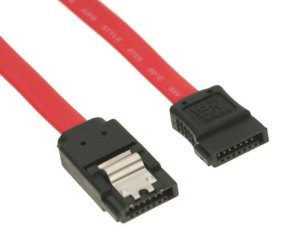
  9. Connect your drive with the red SATA cable to the SATA port on your MOBO
  10. Make sure your connections are secure. Put your side panel back on your pc
  11. connect all your cables and power plug.
  12. turn on your pc, it should begin the post, windows 7 will load and find the new device and then install it.
That should do it for you.
 

Attachments

  • A455-2422-call03-re.jpg
    A455-2422-call03-re.jpg
    65 KB · Views: 482
  • SATA%20Cable-thumb-600x514-49949.jpg
    SATA%20Cable-thumb-600x514-49949.jpg
    29 KB · Views: 184
  • sata-power-cable-extension-8-inch.jpg
    sata-power-cable-extension-8-inch.jpg
    22.8 KB · Views: 421
  • sata_hard_drive_connectors_jumpers.jpg
    sata_hard_drive_connectors_jumpers.jpg
    21.7 KB · Views: 8,551

My Computer My Computer

At a glance

Windows 7 7600 1 X64AMD PHENOM II X 550 PROCESSOR 3.1 ghzCorsair 4 gig ddr 3ati radeon 3300
Computer Manufacturer/Model Number
Custom Build
OS
Windows 7 7600 1 X64
CPU
AMD PHENOM II X 550 PROCESSOR 3.1 ghz
Motherboard
ASUS M4A78-TE
Memory
Corsair 4 gig ddr 3
Graphics Card(s)
ati radeon 3300
Sound Card
ati hd
Monitor(s) Displays
syncmaster 2033sw
Screen Resolution
1600X900 60 hz refresh
Hard Drives
twin_seagates SATA's 1 TB & 500 Gig, hitachi_slimline 160 gig
PSU
antec_550 watt
Case
cooler master GLite
Cooling
stock_heat sink
Internet Speed
20mbs up/ 1.5mbs down
Other Info
favorite child "stewie"
favorite dog "brian"
This will be my first Sata DVD Drive how do I go about installing the drive (hardware).

Thanks
SATA installation is easy depending on your skill level.
  1. Shut down your system
  2. power off and unplug, disconnect all cables
  3. put your pc on a stable work area.
  4. remove the locking screws on port/left side with the computer facing you for ref. point
  5. remove the shield.cover plate
  6. your sata ports are red in color.
  7. mount your drive and lock it down
  8. connect the sata power cable connector to your mounted drive (See img)
  9. Connect your drive with the red SATA cable to the SATA port on your MOBO
  10. Make sure your connections are secure. Put your side panel back on your pc
  11. connect all your cables and power plug.
  12. turn on your pc, it should begin the post, windows 7 will load and find the new device and then install it.
That should do it for you.


thanks exactly what I was looking for
 

My Computer My Computer

At a glance

Windows 7 Ultimate 64-bitAMD Phenom(tm) 9850 Quad-Core Processor 2.50GHzCORSAIR DOMINATOR 4GB (2 x 2GB) 240-Pin DDR2 ...NIVIDA GeForce 8800
OS
Windows 7 Ultimate 64-bit
CPU
AMD Phenom(tm) 9850 Quad-Core Processor 2.50GHz
Motherboard
ASUS M3N72-D
Memory
CORSAIR DOMINATOR 4GB (2 x 2GB) 240-Pin DDR2 SDRAM DDR2 1066
Graphics Card(s)
NIVIDA GeForce 8800
Sound Card
Creative Labs Sound Blaster X-Fi
Monitor(s) Displays
ViewSonic 22"
Hard Drives
2 Western Digital Caviar Blue WD3200AAKS 320GB 7200 RPM 16MB Cache SATA 3.0Gb/s 3.5" Internal Hard Drive -Bare Drive

1 Western Digital Caviar Black WD1001FALS 1TB 7200 RPM 32MB Cache SATA 3.0Gb/s 3.5" Internal Hard Drives -Bare Drive
Case
Coolmaster
Back
Top