Installing software on WinXP virtual machine

Ginmardo

Banned
Local time
2:12 PM
Messages
56
Location
Suriname
Hi,

Yesterday I set up a virtual machine running Windows XP service pack 3 OS as guest. The host OS is Windows 7.
It works and all but how do I let the virtual machine correspond with the hardware from the host? How do I install programs/software/utilities/games on the guest OS?

What do you recommend?
Can you please give me step by step instructions or a link on "how to's"?

Thanks ahead.
 

My Computer

Computer Manufacturer/Model Number
DIYS System
OS
Windows 7 Ultimate 32bit
CPU
AMD Phenom II X2 550 Callisto 3.10GHz
Motherboard
ECS Geforce6100PM-M2 V3.0
Memory
Markvision single channel DDR2 800MHz PC-6400
Graphics Card(s)
XFX GTX260
Monitor(s) Displays
AOC F22 22-inch monitor
Hard Drives
Hitachi Deskstar 500GB @7200RPM HDD
PSU
CoolerMaster eXtreme 600W PSU
Case
GMC Mid-Tower case
Cooling
Air-cooled 2x80mm rear case fans
Keyboard
Xtech multimedia keyboard
Mouse
Xtech standard USB optical mouse
Other Info
I put together the system myself
Please could you first tell which virtualization program you are using? Microsoft Virtual PC, Oracle Virtualbox, VMware Player? It is quite difficult to answer your questions without knowing which platform you are using.

Kari
 

My Computer

Computer type
Laptop
Computer Manufacturer/Model Number
HP ENVY 17-1150eg
OS
Windows 10 Pro x64 EN-GB
CPU
1.6 GHz Intel Core i7-720QM Processor
Memory
6 GB
Graphics Card(s)
ATI Mobility Radeon HD 5850 Graphics
Sound Card
Beats sound system with integrated subwoofer
Monitor(s) Displays
17" laptop display, 22" LED and 32" Full HD TV through HDMI
Screen Resolution
1600*900 (1), 1920*1080 (2&3)
Hard Drives
Internal: 2 x 500 GB SATA Hard Disk Drive 7200 rpm
External: 2TB for backups, 3TB USB3 network drive for media
Cooling
As Envy runs a bit warm, I have it on a Cooler Master pad
Keyboard
Logitech diNovo Media Desktop Laser (bluetooth)
Mouse
Logitech Performance Mouse MX
Internet Speed
50/10 Mbps VDSL
Antivirus
Windows Defender 4.3.9431.0
Browser
Maxthon 3.5.2., IE11
Please could you first tell which virtualization program you are using? Microsoft Virtual PC, Oracle Virtualbox, VMware Player? It is quite difficult to answer your questions without knowing which platform you are using.

Kari

Oh yeah, my bad. I am using Oracle Virtualbox. I think its the latest stale version. Host OS is Windows 7 32-bit and guest OS Windows XP sp 3 32-bit.

Please let me know if you need anymore info about the system to help me out with it. This is my first time running a virtual machine. Is Oracle Virtualbox good or do you recommend me using a different VMware platform?
 

My Computer

Computer Manufacturer/Model Number
DIYS System
OS
Windows 7 Ultimate 32bit
CPU
AMD Phenom II X2 550 Callisto 3.10GHz
Motherboard
ECS Geforce6100PM-M2 V3.0
Memory
Markvision single channel DDR2 800MHz PC-6400
Graphics Card(s)
XFX GTX260
Monitor(s) Displays
AOC F22 22-inch monitor
Hard Drives
Hitachi Deskstar 500GB @7200RPM HDD
PSU
CoolerMaster eXtreme 600W PSU
Case
GMC Mid-Tower case
Cooling
Air-cooled 2x80mm rear case fans
Keyboard
Xtech multimedia keyboard
Mouse
Xtech standard USB optical mouse
Other Info
I put together the system myself
OK, let's start. First you need to install VirtualBox Guest Addiditions to your XP guest. This post shows how. The Guest Additions are essential to really integrate a guest system to host; it gives you for instance easier networking, host to guest or guest to host copy & paste, and so on.

Then network: read this post to set XP guest to communicate with the host. Open the settings windows for XP guest in VirtualBox and just follow the steps.

Give me half an hour, I make you a list of other things you should do, and how to do them :)

Kari
 
Last edited:

My Computer

Computer type
Laptop
Computer Manufacturer/Model Number
HP ENVY 17-1150eg
OS
Windows 10 Pro x64 EN-GB
CPU
1.6 GHz Intel Core i7-720QM Processor
Memory
6 GB
Graphics Card(s)
ATI Mobility Radeon HD 5850 Graphics
Sound Card
Beats sound system with integrated subwoofer
Monitor(s) Displays
17" laptop display, 22" LED and 32" Full HD TV through HDMI
Screen Resolution
1600*900 (1), 1920*1080 (2&3)
Hard Drives
Internal: 2 x 500 GB SATA Hard Disk Drive 7200 rpm
External: 2TB for backups, 3TB USB3 network drive for media
Cooling
As Envy runs a bit warm, I have it on a Cooler Master pad
Keyboard
Logitech diNovo Media Desktop Laser (bluetooth)
Mouse
Logitech Performance Mouse MX
Internet Speed
50/10 Mbps VDSL
Antivirus
Windows Defender 4.3.9431.0
Browser
Maxthon 3.5.2., IE11
OK, let's start. First you need to install VirtualBox Guest Addiditions to your XP guest. This post shows how. The Guest Additions are essential to really integrate a guest system to host; it gives you for instance easier networking, host to guest or guest to host copy & paste, and so on.

Then network: read this post to set XP guest to communicate with the host. Open the settings windows for XP guest in VirtualBox and just follow the steps.

Give me half an hour, I make you a list of other things you should do, and how to do them :)

Kari

Okay. Looking forward to the list of options. Note:I don't have internet access. While running virtual XP, I want to install some additional software and a driver for an USB EDGE modem to access the internet. But first I need the Host and Guest OS to correspond with each other.
 

My Computer

Computer Manufacturer/Model Number
DIYS System
OS
Windows 7 Ultimate 32bit
CPU
AMD Phenom II X2 550 Callisto 3.10GHz
Motherboard
ECS Geforce6100PM-M2 V3.0
Memory
Markvision single channel DDR2 800MHz PC-6400
Graphics Card(s)
XFX GTX260
Monitor(s) Displays
AOC F22 22-inch monitor
Hard Drives
Hitachi Deskstar 500GB @7200RPM HDD
PSU
CoolerMaster eXtreme 600W PSU
Case
GMC Mid-Tower case
Cooling
Air-cooled 2x80mm rear case fans
Keyboard
Xtech multimedia keyboard
Mouse
Xtech standard USB optical mouse
Other Info
I put together the system myself
Some settings you might want to edit:

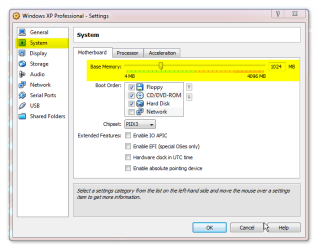
First, the amount of RAM. You can assign as much as you want to. Maximum is about half a gig less than the amount of RAM on your host:

VB_settings_1.png

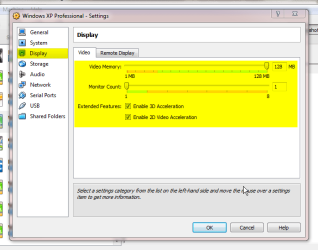
A virtual machine can not use GPU and audio card of your host; instead, it uses emulated hardware. GPU setting lets you to choose how much video RAM is used, my recommendation is to use the maximum 128 MB. Also, with Windows guest machines it is recommended you enable both 3D and 2D acceleration:

VB_settings_2.png

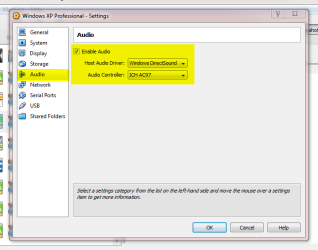
Here you have a very limited choice of audio devices you can use:

VB_settings_3.png

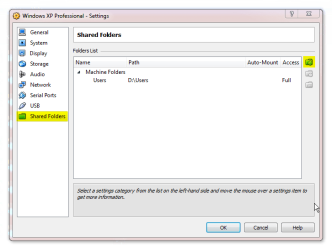
From Shared Folders you can select all host folders you want to have available in guest. Click the small folder symbol at right to add folders:

VB_settings_4.png

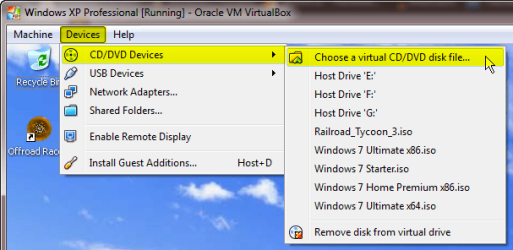
When XP guest is running, you can add any of host's CD/DVD drives or any ISO-file to be used as guest machine's D: drive:

VB_settings_5.png

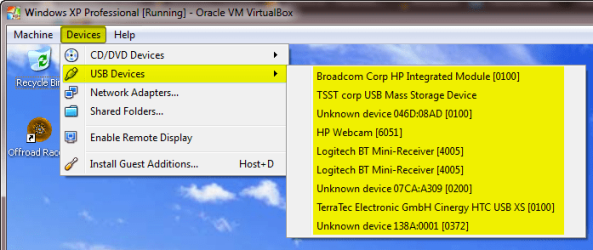
USB menu let's you choose which host USB devices should be attached to guest:

VB_settings_6.png

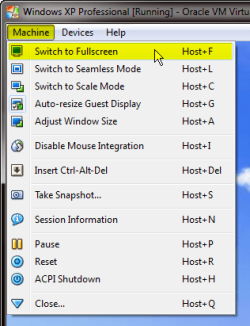
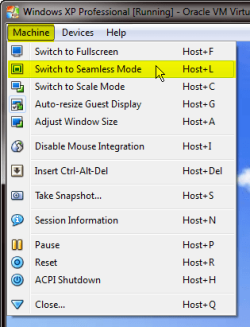
To change the resolution of your XP guest you just need to change its window size (if Guest Additions are installed). Resolution is then adjusted automatically. You can also switch to full screen or seamless mode:

VB_settings_7.png VB_settings_8.png

The VirtualBox menu bar disappears when full screen or seamless mode. To show VirtualBox menus, move the pointer over the lower edge of the taskbar (in the middle of taskbar):

VB_settings_9.png

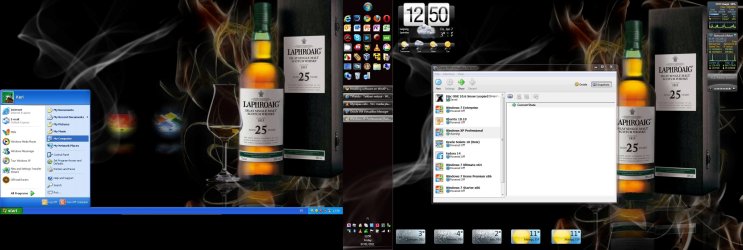
Seamless mode is something I like and use very much. It integrates the guest completely to host desktop, making its display transparent, shared with the host. Here's an example, my desktop just moments ago. Main display on the right showing normal Seven desktop, left display running XP guest in seamless mode:

VB_settings_10.jpg

Ask if you need to know more.

Kari
 

My Computer

Computer type
Laptop
Computer Manufacturer/Model Number
HP ENVY 17-1150eg
OS
Windows 10 Pro x64 EN-GB
CPU
1.6 GHz Intel Core i7-720QM Processor
Memory
6 GB
Graphics Card(s)
ATI Mobility Radeon HD 5850 Graphics
Sound Card
Beats sound system with integrated subwoofer
Monitor(s) Displays
17" laptop display, 22" LED and 32" Full HD TV through HDMI
Screen Resolution
1600*900 (1), 1920*1080 (2&3)
Hard Drives
Internal: 2 x 500 GB SATA Hard Disk Drive 7200 rpm
External: 2TB for backups, 3TB USB3 network drive for media
Cooling
As Envy runs a bit warm, I have it on a Cooler Master pad
Keyboard
Logitech diNovo Media Desktop Laser (bluetooth)
Mouse
Logitech Performance Mouse MX
Internet Speed
50/10 Mbps VDSL
Antivirus
Windows Defender 4.3.9431.0
Browser
Maxthon 3.5.2., IE11
Some settings you might want to edit:

First, the amount of RAM. You can assign as much as you want to. Maximum is about half a gig less than the amount of RAM on your host:

View attachment 129925

A virtual machine can not use GPU and audio card of your host; instead, it uses emulated hardware. GPU setting lets you to choose how much video RAM is used, my recommendation is to use the maximum 128 MB. Also, with Windows guest machines it is recommended you enable both 3D and 2D acceleration:

View attachment 129926

Here you have a very limited choice of audio devices you can use:

View attachment 129927

From Shared Folders you can select all host folders you want to have available in guest. Click the small folder symbol at right to add folders:

View attachment 129930

When XP guest is running, you can add any of host's CD/DVD drives or any ISO-file to be used as guest machine's D: drive:

View attachment 129931

USB menu let's you choose which host USB devices should be attached to guest:

View attachment 129932

To change the resolution of your XP guest you just need to change its window size (if Guest Additions are installed). Resolution is then adjusted automatically. You can also switch to full screen or seamless mode:

View attachment 129933 View attachment 129943

The VirtualBox menu bar disappears when full screen or seamless mode. To show VirtualBox menus, move the pointer over the lower edge of the taskbar (in the middle of taskbar):

View attachment 129935

Seamless mode is something I like and use very much. It integrates the guest completely to host desktop, making its display transparent, shared with the host. Here's an example, my desktop just moments ago. Main display on the right showing normal Seven desktop, left display running XP guest in seamless mode:

View attachment 129936

Ask if you need to know more.

Kari

It is starting to look clearer now, but have yet to try it out. Hopefully it'll work just fine. Hope you don't me bothering you for more help after this one. Thanks again
 

My Computer

Computer Manufacturer/Model Number
DIYS System
OS
Windows 7 Ultimate 32bit
CPU
AMD Phenom II X2 550 Callisto 3.10GHz
Motherboard
ECS Geforce6100PM-M2 V3.0
Memory
Markvision single channel DDR2 800MHz PC-6400
Graphics Card(s)
XFX GTX260
Monitor(s) Displays
AOC F22 22-inch monitor
Hard Drives
Hitachi Deskstar 500GB @7200RPM HDD
PSU
CoolerMaster eXtreme 600W PSU
Case
GMC Mid-Tower case
Cooling
Air-cooled 2x80mm rear case fans
Keyboard
Xtech multimedia keyboard
Mouse
Xtech standard USB optical mouse
Other Info
I put together the system myself
Not at all. Do not hesitate to ask if you need more information.

:) Kari
 

My Computer

Computer type
Laptop
Computer Manufacturer/Model Number
HP ENVY 17-1150eg
OS
Windows 10 Pro x64 EN-GB
CPU
1.6 GHz Intel Core i7-720QM Processor
Memory
6 GB
Graphics Card(s)
ATI Mobility Radeon HD 5850 Graphics
Sound Card
Beats sound system with integrated subwoofer
Monitor(s) Displays
17" laptop display, 22" LED and 32" Full HD TV through HDMI
Screen Resolution
1600*900 (1), 1920*1080 (2&3)
Hard Drives
Internal: 2 x 500 GB SATA Hard Disk Drive 7200 rpm
External: 2TB for backups, 3TB USB3 network drive for media
Cooling
As Envy runs a bit warm, I have it on a Cooler Master pad
Keyboard
Logitech diNovo Media Desktop Laser (bluetooth)
Mouse
Logitech Performance Mouse MX
Internet Speed
50/10 Mbps VDSL
Antivirus
Windows Defender 4.3.9431.0
Browser
Maxthon 3.5.2., IE11
Not at all. Do not hesitate to ask if you need more information.

:) Kari

Dude, the instructions you provided me with are solid. Did everything except for enabling 3D graphix and 2D video accelerator. When enabled, they tend to crash winxp when I'm running it in virtualbox. I successfully created a share folder though between my host & guest os. Transferred a couple of files and voila! Wundebar!
I still am not able to install the edge modem driver though. It seems like it has to be read from win7 through to winxp and the driver is not win7 compatible so it can't finish installing on winxp. I tried installing the driver on win7 in safe mode. I gained access to the internet but stopped shortly after. During installation on host os in virtual machine, the install process sticks right at "installation almost finished, please wait" and this seems to go on forever. I've tried several methods: installing drivers in normal win7 mode, in win7 safe mode, copying the install files to my guest os, but all with the same result... Installation sticks, never completing the install. Any tips?
 

My Computer

Computer Manufacturer/Model Number
DIYS System
OS
Windows 7 Ultimate 32bit
CPU
AMD Phenom II X2 550 Callisto 3.10GHz
Motherboard
ECS Geforce6100PM-M2 V3.0
Memory
Markvision single channel DDR2 800MHz PC-6400
Graphics Card(s)
XFX GTX260
Monitor(s) Displays
AOC F22 22-inch monitor
Hard Drives
Hitachi Deskstar 500GB @7200RPM HDD
PSU
CoolerMaster eXtreme 600W PSU
Case
GMC Mid-Tower case
Cooling
Air-cooled 2x80mm rear case fans
Keyboard
Xtech multimedia keyboard
Mouse
Xtech standard USB optical mouse
Other Info
I put together the system myself
That 3D & 2D issue sounds weird. Those settings are about the first ones I enable for every Windows vm.

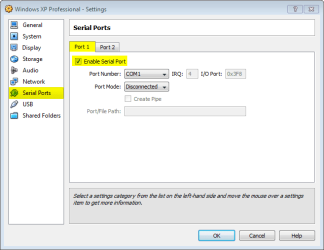
Have you tried to add the modem to guest vm from USB menu? If host does not recognize it, it is one of the unknown devices listed. You could also try to add it through com ports settings.

VB_settings_11.png

Kari
 

My Computer

Computer type
Laptop
Computer Manufacturer/Model Number
HP ENVY 17-1150eg
OS
Windows 10 Pro x64 EN-GB
CPU
1.6 GHz Intel Core i7-720QM Processor
Memory
6 GB
Graphics Card(s)
ATI Mobility Radeon HD 5850 Graphics
Sound Card
Beats sound system with integrated subwoofer
Monitor(s) Displays
17" laptop display, 22" LED and 32" Full HD TV through HDMI
Screen Resolution
1600*900 (1), 1920*1080 (2&3)
Hard Drives
Internal: 2 x 500 GB SATA Hard Disk Drive 7200 rpm
External: 2TB for backups, 3TB USB3 network drive for media
Cooling
As Envy runs a bit warm, I have it on a Cooler Master pad
Keyboard
Logitech diNovo Media Desktop Laser (bluetooth)
Mouse
Logitech Performance Mouse MX
Internet Speed
50/10 Mbps VDSL
Antivirus
Windows Defender 4.3.9431.0
Browser
Maxthon 3.5.2., IE11
Some settings you might want to edit:

Seamless mode is something I like and use very much. It integrates the guest completely to host desktop, making its display transparent, shared with the host. Here's an example, my desktop just moments ago. Main display on the right showing normal Seven desktop, left display running XP guest in seamless mode:

View attachment 129936

Kari
Thanks Kari ^ I just tried out seamless mode and its great - I really like. I have been using VirtualBox for about 6 months with a hackintosh guest in Win7, and just yesterday installed another machine for XP Pro because of all kinds of trouble with Virtual PC access rights for XP Mode;... but now this seamless mode is very cool!

Great right up Kari!
 

My Computer

Computer Manufacturer/Model Number
Acer Aspire 4730Z
OS
Windows 7 Ultimate
CPU
Intel Pentium Dual CPU T3400 @ 2.16GHz
Motherboard
Acer Aspire 4730Z V1.22 GL40
Memory
4.0GB Dual-Channel DDR2 @ 332MHz
Graphics Card(s)
Mobile Intel(R) 4 Series Express Chipset Family 1309 MB
Sound Card
Realtek High Definition Audio
Monitor(s) Displays
AOC 2795V
Screen Resolution
1920 x 1080
Hard Drives
500GB Hitachi HTS545050B9A300 ATA Travelstar
The seamless mode really is something. especially if you have two or more displays. It's a shame you can not use it with Mac guests because of lack of Guest Additions.

Kari
 

My Computer

Computer type
Laptop
Computer Manufacturer/Model Number
HP ENVY 17-1150eg
OS
Windows 10 Pro x64 EN-GB
CPU
1.6 GHz Intel Core i7-720QM Processor
Memory
6 GB
Graphics Card(s)
ATI Mobility Radeon HD 5850 Graphics
Sound Card
Beats sound system with integrated subwoofer
Monitor(s) Displays
17" laptop display, 22" LED and 32" Full HD TV through HDMI
Screen Resolution
1600*900 (1), 1920*1080 (2&3)
Hard Drives
Internal: 2 x 500 GB SATA Hard Disk Drive 7200 rpm
External: 2TB for backups, 3TB USB3 network drive for media
Cooling
As Envy runs a bit warm, I have it on a Cooler Master pad
Keyboard
Logitech diNovo Media Desktop Laser (bluetooth)
Mouse
Logitech Performance Mouse MX
Internet Speed
50/10 Mbps VDSL
Antivirus
Windows Defender 4.3.9431.0
Browser
Maxthon 3.5.2., IE11
That 3D & 2D issue sounds weird. Those settings are about the first ones I enable for every Windows vm.

Have you tried to add the modem to guest vm from USB menu? If host does not recognize it, it is one of the unknown devices listed. You could also try to add it through com ports settings.

View attachment 130125

Kari

Ok, so I enabled 3D graphix accelerator and the guest started up, no crashes no problems. I still have 2D video disabled.

I did try to add the usb edge modem to guest, that worked. The driver install is self extracting and prompted me to install. It worked to a point where the driver had to install on host also, which stopped because of incompatibility. I'll try it by enabling COM port in menu. Do I connect the edge modem then to the rear usb I/O op the pc? Till now, I connected the usb edge modem to the front usb I/O.

I will try to look for an updated driver for the edge modem. I did before but is quite difficult because op the following factors: no/unknown brand, chinese product, no online support. Its almost like this device was manufactured once and never looked back on.
 

My Computer

Computer Manufacturer/Model Number
DIYS System
OS
Windows 7 Ultimate 32bit
CPU
AMD Phenom II X2 550 Callisto 3.10GHz
Motherboard
ECS Geforce6100PM-M2 V3.0
Memory
Markvision single channel DDR2 800MHz PC-6400
Graphics Card(s)
XFX GTX260
Monitor(s) Displays
AOC F22 22-inch monitor
Hard Drives
Hitachi Deskstar 500GB @7200RPM HDD
PSU
CoolerMaster eXtreme 600W PSU
Case
GMC Mid-Tower case
Cooling
Air-cooled 2x80mm rear case fans
Keyboard
Xtech multimedia keyboard
Mouse
Xtech standard USB optical mouse
Other Info
I put together the system myself
I really must say I do not know how and where you should connect the modem. I have only connected virtual machines to network using NIC's.

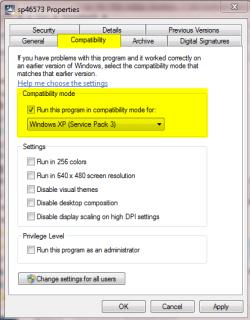
Have you tried to install the modem to host using compatibility settings? Copy the installer to desktop, right click and choose Properties, then change compatibility as XP. Install the modem to host. Then run the XP vm, attach the modem to it and try to reinstall.

Compatibility_mode.png

I asked other geeks to take a look of this issue, let's hope someone has fresh ideas. In the meantime you could try searching a solution here: http://forums.virtualbox.org/

Kari
 

My Computer

Computer type
Laptop
Computer Manufacturer/Model Number
HP ENVY 17-1150eg
OS
Windows 10 Pro x64 EN-GB
CPU
1.6 GHz Intel Core i7-720QM Processor
Memory
6 GB
Graphics Card(s)
ATI Mobility Radeon HD 5850 Graphics
Sound Card
Beats sound system with integrated subwoofer
Monitor(s) Displays
17" laptop display, 22" LED and 32" Full HD TV through HDMI
Screen Resolution
1600*900 (1), 1920*1080 (2&3)
Hard Drives
Internal: 2 x 500 GB SATA Hard Disk Drive 7200 rpm
External: 2TB for backups, 3TB USB3 network drive for media
Cooling
As Envy runs a bit warm, I have it on a Cooler Master pad
Keyboard
Logitech diNovo Media Desktop Laser (bluetooth)
Mouse
Logitech Performance Mouse MX
Internet Speed
50/10 Mbps VDSL
Antivirus
Windows Defender 4.3.9431.0
Browser
Maxthon 3.5.2., IE11
I really must say I do not know how and where you should connect the modem. I have only connected virtual machines to network using NIC's.

Have you tried to install the modem to host using compatibility settings? Copy the installer to desktop, right click and choose Properties, then change compatibility as XP. Install the modem to host. Then run the XP vm, attach the modem to it and try to reinstall.

View attachment 130287

I asked other geeks to take a look of this issue, let's hope someone has fresh ideas. In the meantime you could try searching a solution here: Index page • virtualbox.org

Kari

Hi,

I tried the compatibility settings, but haven't had any luck so far. I'll double check it just to make sure. I'll keep you posted. Its been a few days, haven't been online. I still need to figure this out, so I'll keep you posted.

I also posted this thread on virtualbox forums, no replies as of yet.
 

My Computer

Computer Manufacturer/Model Number
DIYS System
OS
Windows 7 Ultimate 32bit
CPU
AMD Phenom II X2 550 Callisto 3.10GHz
Motherboard
ECS Geforce6100PM-M2 V3.0
Memory
Markvision single channel DDR2 800MHz PC-6400
Graphics Card(s)
XFX GTX260
Monitor(s) Displays
AOC F22 22-inch monitor
Hard Drives
Hitachi Deskstar 500GB @7200RPM HDD
PSU
CoolerMaster eXtreme 600W PSU
Case
GMC Mid-Tower case
Cooling
Air-cooled 2x80mm rear case fans
Keyboard
Xtech multimedia keyboard
Mouse
Xtech standard USB optical mouse
Other Info
I put together the system myself
Back
Top