
Installing Visioneer OneTouch 8100 Scanner

XweAponX

Recycle Bin Diver
Member
VIP
Local time
8:20 AM
Messages
222
Location
Spring Valley
This was originally responsed to over at the VISTA Forums, but Since I found the Solution within Windows 7, I may as well post it here:

Can anyone please assist me with my visioneer one touch 8100 scanner - Vista Forums

Hello there can anyone please assist me with my scanner i have a visioneer one touch 8100 and i have search every way i could find to get an updated version for it to be use with my windows vista 32 bit the website doesn't have any and i tried emailing them but there's no way of contacting them by email can anyone please tell me what i can do to get my scanner working it still in good condition but because i have windows vista 32 it wouldn't work is there anything else i can do. I would very much appreciate your assistance thank you very much for your valuable time. I look forward for and answer.

Since I use my scanner all the time, and it has a 48-bit scanning mode and I did not want to waste another 50 bucks or so getting a new one, I made the "token" attempt at trying to find a Vista or Windows 7 Driver - There ARE none, so I fooled with it a bit and I came up with a procedure that may work.


Visioneer OneTouch 8100:

8100_200px.jpg


I located the Driver on the Visioneer Support Website:

http://support.visioneer.com/products/8100/downloads.asp

And I downloaded the driver for USB:

http://support.visioneer.com/downloads/drivers/8100/8100u.303110.EN.exe

I had the Scanner already hooked up due to a previous installation of XP Media Centre Edition, so When I installed Windows 7, it obviously tried to find a driver for the Scanner. Since it failed, I then obtained that driver installation package from the Visioneer site. I ran the executable With the COMPATIBILITY options (Right Click on the driver Exe file - choose "PROPERTIES", Then choose the "COMPATIBILITY" Property Sheet - Set up the Installer to run as if for "Windows XP Service Pack 2".

Under "Privilege Level" I selected "Run the Program as an Administrator" - So I did all this, and the device then showed up in the Device Manager, but with NO DRIVERS installed. What I did then was to "Update Driver Software" and I selected "Browse My Computer for Software" and I pointed it to "C:\Windows\inf" with Sub-Folders Included check box checked.

To my utter shock and amazement, all of the Visioneer driver files were IN the "C:\Windows\inf" folder - Or at least the INFs were pointing to the correct location of the driver files - And when it was done, I checked the scanner, and it actually worked!

I hope this helps someone, and that driver link is actually on Visioneer's Website. not one of those thousands of fake "driver" websites.

If anyone needs further explanation on this driver issue, please feel free to PM me, and I hope that someone else does have a Visioneer OneTouch 8100 - A fine scanner, need not be trashed because of updating to Windows 7.

Obviously, I am not sure if running the Installer EXE under Compatibility Mode actually helped, but since it worked and I actually got the driver installed and working, well anything is possible.

Thank you,

xWx
 

My Computer My Computer

Computer type
PC/Desktop
Computer Manufacturer/Model Number
Lenovo Thinkcenter M92p
OS
Windows 10/Windows 7 (My Idea- Virtual PC)
CPU
Intel(R) Core(TM) i5-3470 CPU @ 3.20GHz
Motherboard
Lenovo MahoBay
Memory
16 GB
Graphics Card(s)
nVidia GeForce GTX 750 Ti (2GB)
Sound Card
nVidia HD Audio
Monitor(s) Displays
RCA 4KTV 50"
Screen Resolution
3840p x 2160p
Hard Drives
Onboard:
Seagate ST500DM009-2F110A 500GB
WDC WD4000FYYZ-01UL1B1 (WD-WCC131910831) [3726 GB]

USB 3.0
My Book 1140 (WCAZAD122454) [1862 GB]
Apple MDT MD10EAVS-00D7B0 (0000AB123473) [931 GB]

External:
WD Blue Innostar/Matsunichi (465 GB)
WD
PSU
Stock Thinkcenter M92p
Case
Stock Thinkcenter M92p
Cooling
Active
Keyboard
BYTEC BY-GA-KT-100-AC
Mouse
BYTEC
Internet Speed
1 GHz Down, 40 Mbps Up
Antivirus
Windows Defender
Browser
EDGE
Other Info
Old Other Info:
I finally have an Intel machine that has more than 8GB of Ram.
My ASUS M2N-SE AMD Windows 7 machine is back to Windows 7. Replaced the AMD 4400+ CPU and maxed out the RAM (4GB).
My Core Duo machine is only 2GB of Ram and it is locked to Windows XP in order to run Pro Tools 6.4, which I have been using since 2004.
I have one other Dell OptiPlex 980 tower, Identical to this one,
perfect---many thanks!

I have an 8100 scanner and yr method worked perfectly for Win 7

Picasa is a good substitute for the Visioneer software but still need that driver to make it work be it XP Vista or 7

good work!

The key is first download the XP driver from Visioneer
Locate the icon that represents that download it in your downloads folder or wherever you download to
Right click that icon-->>>
And go down and into the properties on that icon and find the compatibility tab--->>
Change compatibility to XP-SP2
Then
Install in XP-SP2 compatibility mode

---You are now half through---

Now you have to go device manager
Right click the 8100 icon
Reinstall your 8100 driver from where the ini files are in yr Windows folder

END
 

My Computer My Computer

OS
win 7 also XP
Thank you guys.. You saved me from buying a new scanner, not to mention the 8100 held a sentimental value to me because I traded for it 4 years ago for my DFI Lanparty S939 which I was trying to sell for $90 but couldn't because I powered the fan header with a floppy psu cable!!! (being an inexperienced PC builder at the time). Because the mobo was "semi" broken, I decided to get rid of it and traded for this scanner.

My 8100 would work under XP but none of the buttons worked.. And under vista is was DEAD. I was going to spend $70 on a new scanner, when I got Win7 and saw this post.... Now ALL buttons work on the scanner and everything works perfectly!!

I am "GIDDY" with excitement!!
 

My Computer My Computer

Computer Manufacturer/Model Number
Custom built by me
OS
Win 7
CPU
e5200 Wolfdale @ 3.01 GHz
Motherboard
Gigabyte EP45-UD3L
Memory
Gskill 4gb DDR2 800
Graphics Card(s)
ATI/AMD Radeon 4890
Sound Card
SB Audigy 2 ZS
Monitor(s) Displays
Asus 1080p 22.5 inch
Hard Drives
500 & 650 GB
Seagate +WD black
PSU
600w OCZ GameXstream
Case
CoolerMaster CM 690
Cooling
Zerotherm Nirvana NV120
Haha! Well I'm glad you dinna have to trash your scanner... I use mine all the time, like DAILY.

---You are now half through---

Now you have to go device manager
Right click the 8100 icon
Reinstall your 8100 driver from where the ini files are in yr Windows folder

I tried to make that clear in the post, but I guess I was not clear- He's right!

So, what you do... AFTER you manually install the driver package with the compatibility changed to Windows Xp (And it can be either SP2 or SP3 I found out TODAY) - You gotta Open the Device Manager, find the Half-Installed Visioneer - Right Klik on it, UPDATE DRIVER, and point it to the c:\Windows\INF" folder- The device will THEN finish the UPDATE Process and install the files which are in the INF Folder.
 

My Computer My Computer

Computer type
PC/Desktop
Computer Manufacturer/Model Number
Lenovo Thinkcenter M92p
OS
Windows 10/Windows 7 (My Idea- Virtual PC)
CPU
Intel(R) Core(TM) i5-3470 CPU @ 3.20GHz
Motherboard
Lenovo MahoBay
Memory
16 GB
Graphics Card(s)
nVidia GeForce GTX 750 Ti (2GB)
Sound Card
nVidia HD Audio
Monitor(s) Displays
RCA 4KTV 50"
Screen Resolution
3840p x 2160p
Hard Drives
Onboard:
Seagate ST500DM009-2F110A 500GB
WDC WD4000FYYZ-01UL1B1 (WD-WCC131910831) [3726 GB]

USB 3.0
My Book 1140 (WCAZAD122454) [1862 GB]
Apple MDT MD10EAVS-00D7B0 (0000AB123473) [931 GB]

External:
WD Blue Innostar/Matsunichi (465 GB)
WD
PSU
Stock Thinkcenter M92p
Case
Stock Thinkcenter M92p
Cooling
Active
Keyboard
BYTEC BY-GA-KT-100-AC
Mouse
BYTEC
Internet Speed
1 GHz Down, 40 Mbps Up
Antivirus
Windows Defender
Browser
EDGE
Other Info
Old Other Info:
I finally have an Intel machine that has more than 8GB of Ram.
My ASUS M2N-SE AMD Windows 7 machine is back to Windows 7. Replaced the AMD 4400+ CPU and maxed out the RAM (4GB).
My Core Duo machine is only 2GB of Ram and it is locked to Windows XP in order to run Pro Tools 6.4, which I have been using since 2004.
I have one other Dell OptiPlex 980 tower, Identical to this one,
Visioneer 8900

I followed the instruction posted for the 8100 and it installed the drivers! Thanks. Jeff
 

My Computer My Computer

OS
Windows 7 Pro
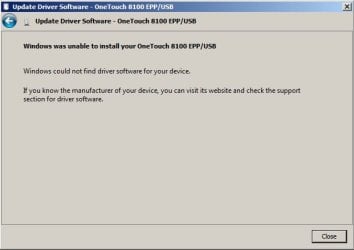
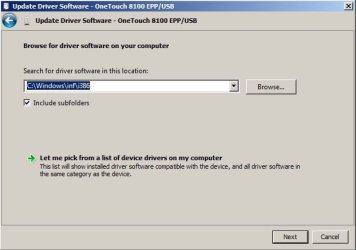
I have Windows 7 and the Visioneer 8100. I tried steps above, several times, and it does NOT work. After installing the drivers (in XP service pack 2 compatibility mode)that I downloaded from the Visioneer website, I went to the device manager and tried to update the drivers manually by pointing to the Windows/INF directory. I even figured out which subfolder the files were in (they install to a subfolder called "i386") and selected that. After clicking "Next" it just says that it was unable to install the drivers and that it couldn't locate them. See the screenshots. Please, can someone help here. This makes no sense. Thanks.

Also, I'm running the 64 bit version of Windows 7. I don't know if this makes a difference.
 

Attachments

  • onetouch.jpg
    onetouch.jpg
    19.2 KB · Views: 68
  • onetouch2.jpg
    onetouch2.jpg
    22.4 KB · Views: 112
Last edited:

My Computer My Computer

OS
Windows 7
I was gonna say, "Got x64 Installed" and, sure enough.

Unfortunately, these drivers are for 32-b-t Windows... I feel for ya, I got a Compaq here, Brand new, it had x64 Win 7 installed.. After wasting almost one hour trying to fix all the problems with it, I made sure there was no important data needed saving, I maliciously and deliberately WIPED the Hard drive and installed XP. But there were absolutely no XP drivers anywhere... So I put Windows 7 32 bit edition, and it works great.

These companies, sticking the most unfriendly and difficult of all 64 bit OSs into computers that are being sold to people who have no need of x64 computing.. are forcing a scenario like yours - This is not the first time I've seen this kind of thing.

If you were to find an x64 Visioneer driver for Windows XP x64 edition, then you MAY be able to get it installed on your machine... But not as it is... You may have to consider either deleting the x64 edition, and/or, make a new partition and/or add a new hard drive, install regular 32 bit Windows 7.

Sorry that this solution did not work for ya, but it was doomed to fail from before you even tried it and I would have tried to tell you not to do it had I known you were going to try it on an x64 machine.

I just found this website:

Visioneer Drivers

Note the place where it says


At this time, Visioneer does not provide drivers for the following Operating Systems:
  • Windows XP 64bit (x64)
  • Windows Tablet PC
  • Windows Server
  • Unix
  • Macintosh (Apple)
So, NO x64 support, sorry - Make a 32 bit partition, I guarantee it will work, I've installed this driver on about 5 different Windows 7 (32 bit) PCs
(edit) They also have pages on that site that list comparisons with availibity of drivers for various scanners. Also, maybe you need x64 bit Win 7, for any of the reasons here:

Windows Vista 32-bit vs 64-bit
 
Last edited:

My Computer My Computer

Computer type
PC/Desktop
Computer Manufacturer/Model Number
Lenovo Thinkcenter M92p
OS
Windows 10/Windows 7 (My Idea- Virtual PC)
CPU
Intel(R) Core(TM) i5-3470 CPU @ 3.20GHz
Motherboard
Lenovo MahoBay
Memory
16 GB
Graphics Card(s)
nVidia GeForce GTX 750 Ti (2GB)
Sound Card
nVidia HD Audio
Monitor(s) Displays
RCA 4KTV 50"
Screen Resolution
3840p x 2160p
Hard Drives
Onboard:
Seagate ST500DM009-2F110A 500GB
WDC WD4000FYYZ-01UL1B1 (WD-WCC131910831) [3726 GB]

USB 3.0
My Book 1140 (WCAZAD122454) [1862 GB]
Apple MDT MD10EAVS-00D7B0 (0000AB123473) [931 GB]

External:
WD Blue Innostar/Matsunichi (465 GB)
WD
PSU
Stock Thinkcenter M92p
Case
Stock Thinkcenter M92p
Cooling
Active
Keyboard
BYTEC BY-GA-KT-100-AC
Mouse
BYTEC
Internet Speed
1 GHz Down, 40 Mbps Up
Antivirus
Windows Defender
Browser
EDGE
Other Info
Old Other Info:
I finally have an Intel machine that has more than 8GB of Ram.
My ASUS M2N-SE AMD Windows 7 machine is back to Windows 7. Replaced the AMD 4400+ CPU and maxed out the RAM (4GB).
My Core Duo machine is only 2GB of Ram and it is locked to Windows XP in order to run Pro Tools 6.4, which I have been using since 2004.
I have one other Dell OptiPlex 980 tower, Identical to this one,
You Guys Are The Best!

I just picked up this computer on ebay to try out Windows 7 (machine was cheap and came with 7 loaded).

Bummed out when my 8100 didn't work. Your fix worked perfect.
I didn't even have to tell it where to find the new driver. It did it all by itself.

Thanks so much. I'll be stopping by again I'm sure until I learn this new system.
So far I really like Win7. My main machine is Win XP but may switch to Win7 on that one too.

Thanks Again.
 

My Computer My Computer

Computer Manufacturer/Model Number
DELL OPTIPLEX SX280
OS
Windows 7 Ultimate x32
CPU
Pentium 4, 2.8
Memory
1 gig
Hard Drives
160 gig
I still have one of first USB scanners released on the market - still works fine on XP!

It wasn't even supported officially with Win XP - but I found a way.

Wonders whether to dig it out and see if it will work on the old drivers 4 a laugh.
 

My Computer My Computer

Computer type
PC/Desktop
Computer Manufacturer/Model Number
D.I.Y.
OS
WIN7 Ultimate 64bit
CPU
AMD FX8150/Trinity A10-5700
Motherboard
Asus Sabertooth v.1 /Asus F2A85-M Pro
Memory
G-Skill 2400 x2 @ 1866 (both pc's)
Graphics Card(s)
Sapphire (factory OC version) AMD 7770
Sound Card
onboard
Monitor(s) Displays
T260 Samsung
Screen Resolution
1920x1080
Hard Drives
Western Digital Sata 2TB/1TB Caviar Blacks
Buffalo 1TB usb (excellent drive)
PSU
Be-Quiet 700W E-9/Be-Quiet 550W E-9(E-9 = built by FSP)
Case
Antec P183/Antec P180mini
Cooling
x2 Xigmatek SXHH7-U01 + C-Master R4-EXBB-20PK-R0 120mm Fans
Keyboard
Cherry
Mouse
MS Explorer 3.0
Other Info
LG Blu ray combo
Pioneer 207D/208 Blu ray burners
Go for it! What do you have to lose.
 

My Computer My Computer

Computer Manufacturer/Model Number
DELL OPTIPLEX SX280
OS
Windows 7 Ultimate x32
CPU
Pentium 4, 2.8
Memory
1 gig
Hard Drives
160 gig
The driver downloads for the onetouch 8100 scanner from visioneers website contains backdoor trojan viruses. I tried downloading the xp and windows 7 version but both were picked up by my AVG as back doors.
 

My Computer My Computer

OS
Windows 7 home premium 32bit
First off, there is no W-7 version of this driver. And the d/l is not a virus.
From the support page;
Avast and a few others recognize certain patterns in the installation packages as Trojan Horse virus. Please disregard such warnings. All drivers were tested with Norton Antivirus and AVG. Both found no virus.
Also scanned with MSE. I have one of these 8100 scanners, and have used them in the past. 'Visioneer' classifies this product as "End of Life". Personaly I never liked it all that much because I thought the software was crap and I always wound up using 3rd party apps to edit the work. But every once in a while there's some nonsence to scan. Having said that I don't recall any major issues with the 8100 on XP.
For the heck of it I tried hooking it up (usb) to 7x64. Basicaly, as others have stated it's not happening. 7 detects the device but there is no driver compatibility. If you search enough you'll discover a possible fix for Vista 64 using the 9420 (OneTouch 4.0) driver. This method also fails. You can waist time going through the device manager and actually install the Vista driver but in the end it will not communicate - scan. Not sure if it would work on 32.
I am a bit curious as to if the old 8100 will function on a virtual PC.
I also remember the girl I bought this scanner from. My my .. if I was 10 years younger I would have been in love.
 

My Computer My Computer

Computer type
PC/Desktop
Computer Manufacturer/Model Number
Self - Build | Asus K53e Laptop
OS
10 x64 | 7 x64
CPU
AMD FX-9590 Vishera 4.7 | i5 Sandy Bridge
Motherboard
MSI 990 FXA | K53e
Memory
16 gigs Crucial Ballistix | 8 gigs Adata ddr3 1600
Graphics Card(s)
RX-570 4gd5 | Intel HD 3000
Sound Card
Realtek HD OnBoard Audio
Monitor(s) Displays
Samsung 22" & 37" Toshiba | 15.6
Hard Drives
ADATA 240 ssd & 750 Caviar Black 7200 sata | 250 840 EVO ssd & samsung ssd
PSU
Thermaltake 700 | 65w
Case
CoolMaster Centurion 534+
Cooling
Corsair H60
Keyboard
Rosewill RK-800G PS/2 Gaming Keyboard | Asus Chiclet
Mouse
Ventus | MS w/side buttons
Internet Speed
RoadRunner
Other Info
I hate the smell of friggin corn chip butt breath snacks.
Visioneer 8100 --- using Visioneer 9420 32/64 drivers

I installed Picasa to manage the scanning. Maybe this is crucial. You press the import tab on the upper left of Picasa to use scanner with Picasa

The below method is verified by me to work with Windows 7 64bit and I'll bet it would work on Win7 32bit also.

Follow steps 5 and 6 exactly!

_______________
_______________
_______________


Visioneer 8100 USB Scanner - Vista Forums

Visioneer 8100 USB Scanner Verified to work with Vista Home Premium x64:


1. Make sure your 8100 is unplugged.


2. Go to Visioneer's website and download drivers for the OneTouch 9420 scanner:

Visioneer OneTouch 9420 Drivers and Manuals


3. Install the drivers. Nothing will work... yet, don't worry.


4. Now plug in your 8100. You'll get a message saying that Vista wants to find drivers. Select "Ask Me Later" or just cancel.


5. Next, open up Control Panel and then Device. Find your 8100 in there (probably listed as "Unknown Device") and then right click on it and say "Update Driver". Now click "Browse My Computer For Driver Software" then "Let Me Pick From A List Of Device Drivers On My Computer".

6. Scroll down to "IMAGING DEVICES" then find Visioneer, then you should see the "Visioneer 9420" driver. Select it. You'll get a warning from Vista, but continue anyways. That's it... everything should work.
 
Last edited:

My Computer My Computer

OS
win 7 also XP
Picasa huh :rolleyes:

Or, use VMware & XP with usb support and the old 8100 works like a charm. Even the wizard scan. Although auto crop is kinda nice.
 

My Computer My Computer

Computer type
PC/Desktop
Computer Manufacturer/Model Number
Self - Build | Asus K53e Laptop
OS
10 x64 | 7 x64
CPU
AMD FX-9590 Vishera 4.7 | i5 Sandy Bridge
Motherboard
MSI 990 FXA | K53e
Memory
16 gigs Crucial Ballistix | 8 gigs Adata ddr3 1600
Graphics Card(s)
RX-570 4gd5 | Intel HD 3000
Sound Card
Realtek HD OnBoard Audio
Monitor(s) Displays
Samsung 22" & 37" Toshiba | 15.6
Hard Drives
ADATA 240 ssd & 750 Caviar Black 7200 sata | 250 840 EVO ssd & samsung ssd
PSU
Thermaltake 700 | 65w
Case
CoolMaster Centurion 534+
Cooling
Corsair H60
Keyboard
Rosewill RK-800G PS/2 Gaming Keyboard | Asus Chiclet
Mouse
Ventus | MS w/side buttons
Internet Speed
RoadRunner
Other Info
I hate the smell of friggin corn chip butt breath snacks.
Thank you for a fine documentation

The 64 bit issue raises it's ugly head again.

Glad I read this. Will install on an old XP machine I have and not even bother to go onto w7x64.

I never needed x64 for anything, never used close to 4g memory ever. Someday may be a reason to use x64. Right now, it has only cause problems (not biggies, but non the less problems)
 

My Computer My Computer

Computer Manufacturer/Model Number
Gateway
OS
Windows 7
CPU
dual core Intel
Motherboard
Don't know
Memory
6g
Worked perfectly / step by step

thanks XweAponX

your instructions were perfect and detailed, most of all easy to follow.
 

My Computer My Computer

OS
Win 7 pro 32
installing visioneer 8100 on win 7 64-bit

I followed the directions but my computer did not give the prompts he said to look for. (the ones that say follow steps 5 and 6 exactly) and I could not "browse my computer for software" nor did it "let me pick from a list" of drivers on my computer. I have the 9420 driver on my computer, but it is still not working- not seeing the 8100--at least not driving it. I already have picasa and can use picasa-- i don't mind using it to manipulate the scans...but I've spent several hours today trying to get this thing to work and this post was the most informative about the situation. I have loved using this scanner- quit using it a couple of years ago when we got a HP all-in-one..but I don't like the software with that scanner and the quality is just NOT THERE. I love the visioneer. I will keep working at it.
 

My Computer My Computer

Computer Manufacturer/Model Number
Toshiba satellite L500
OS
win 7 64 bit home premium
CPU
Intel Core i-3
Motherboard
i don't know
Memory
4 gb
Graphics Card(s)
i don't know
Sound Card
i don't know
Monitor(s) Displays
i don't know
Hard Drives
300 gb
PSU
i don't know
Case
laptop
Cooling
i don't know
The driver downloads for the onetouch 8100 scanner from visioneers website contains backdoor trojan viruses. I tried downloading the xp and windows 7 version but both were picked up by my AVG as back doors.

-Then I say DELETE DELETE DELETE your AVG program, which is worthless anyway uinless you buy the damned thing, cos there is NO VIRUS or trojan or greek or even MALware in that installation file, sorry, I've been using this driver for 4 years, and this is a CLEAN FILE.

Also, I repeat, I posted on PAGE 1 of this thread - THERE ARE NO x64 DRIVERS for this scanner... So, unless you are running some engineering programs that absolutely require 64-bit - Then DELETE your 64 bit Windows 7 and install regular 32 bit.

And if you are not seeing what I described in the very first post, where I put exhaustive instructions on how to make this work, then you are simply not doing it right, and by the amount of people here that have said that THIS WORKS, more than the people who said it DIDNT WORK, then I'll just assume you are either trying to install to a 64 bit OS or you are not doing exactly like I said.

One more thing you may want to do, if you are trying to install this to Windows 7 - Is, first boot up to F8, and choose the option "Shut off Strict Driver Signing"

This will make it a little easier, that whole thing with driver signing is bogus anyway and rediculous.

GAFFERX - Are you saying you got the 32 bit drivers to work on windows 7 x64 through Picasa somehow? Please elucidate!
 
Last edited:

My Computer My Computer

Computer type
PC/Desktop
Computer Manufacturer/Model Number
Lenovo Thinkcenter M92p
OS
Windows 10/Windows 7 (My Idea- Virtual PC)
CPU
Intel(R) Core(TM) i5-3470 CPU @ 3.20GHz
Motherboard
Lenovo MahoBay
Memory
16 GB
Graphics Card(s)
nVidia GeForce GTX 750 Ti (2GB)
Sound Card
nVidia HD Audio
Monitor(s) Displays
RCA 4KTV 50"
Screen Resolution
3840p x 2160p
Hard Drives
Onboard:
Seagate ST500DM009-2F110A 500GB
WDC WD4000FYYZ-01UL1B1 (WD-WCC131910831) [3726 GB]

USB 3.0
My Book 1140 (WCAZAD122454) [1862 GB]
Apple MDT MD10EAVS-00D7B0 (0000AB123473) [931 GB]

External:
WD Blue Innostar/Matsunichi (465 GB)
WD
PSU
Stock Thinkcenter M92p
Case
Stock Thinkcenter M92p
Cooling
Active
Keyboard
BYTEC BY-GA-KT-100-AC
Mouse
BYTEC
Internet Speed
1 GHz Down, 40 Mbps Up
Antivirus
Windows Defender
Browser
EDGE
Other Info
Old Other Info:
I finally have an Intel machine that has more than 8GB of Ram.
My ASUS M2N-SE AMD Windows 7 machine is back to Windows 7. Replaced the AMD 4400+ CPU and maxed out the RAM (4GB).
My Core Duo machine is only 2GB of Ram and it is locked to Windows XP in order to run Pro Tools 6.4, which I have been using since 2004.
I have one other Dell OptiPlex 980 tower, Identical to this one,
I installed Picasa to manage the scanning. Maybe this is crucial. You press the import tab on the upper left of Picasa to use scanner with Picasa

The below method is verified by me to work with Windows 7 64bit and I'll bet it would work on Win7 32bit also. .

So obviously this is a very old thread, but I just tried this on my 8100 under Wndows 7 64 bit. Using the instructions, I was able to get the scanner installed and the Device Manager shows it as a valid imaging device (and a self-test I found on some screen actually says it's working). However, when I actually try to scan, I get an error, whether I'm doing it from Windows Fax and Scan or Picassa. Here are the errors:

Picasa:
An error has occured while attempting to import. Either the source is unavailable or the destination is full or read only.

Windows Fax and Scan:
An error occurred while setting scanner properties. If another program is scanning, please wait for it to complete and try again.

Any idea?
 

My Computer My Computer

OS
Windows 7 Professional x64
MRBILL2

I must level with you....
On a new Win 7 64 bit I was not able to pull this off...maybe due to Service Pack 1 ???
I have a Win7-32 bit laptop that it works OK with the tricks mentioned here

I have not gotten around to it but try doing Win98 or WinXP VIRTUALIZATION within Win7-64 and you should be able to use this scanner. You can save VIRTUALIZATION sessions....I still like and use this scanner

Your CPU has to support VIRTUALIZATION

If you reply to this I will try the VIRTUALIZATION and let you know

gx
 

My Computer My Computer

OS
win 7 also XP
Back
Top