Installing VMWare Workstation

Antman

New member
Local time
8:23 AM
Messages
4,573
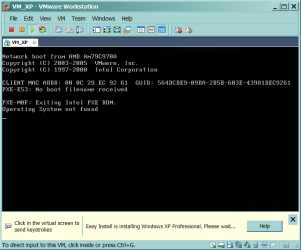
I have my 30 day trial VMWare WS 6.5.2. Installing Windows XP SP2 from ISO and mounted ISO yields the attached result. The target drive is RAID0. Am I missing an opportunity to Press F6? My fingers are not fast enough if I am.

Any insight from members who have successfully installed and operate VMware?

I will purchase VMWare if it will allow Media Player playback in the VM with better quality than Virtual XP.

Never mind. Used bootable CD. I now have the opportunity to Press F6, but I forgot to do so. Will wait for this install to fail and try again.

Two thumbs up to VMWare for the EasyInstall feature. It corrected the F6 driver error automatically, or had a native driver. Also, by some PFM, it corrected for my error in using a custom CD with references to a second (non-existent) drive - without creating the second drive. That is worth $189 if I choose to include WMWare in my customer toolbox.
 

Attachments
  • Capture.PNG
    Capture.PNG
    15.4 KB · Views: 288
Last edited:
Freakin' WOW - MS Virtual PC inhales really hard

At least one order of magnitude separates VMWare Workstation from VirtualPC/XP. Absolutely not in the same ballgame.

I am off now to learn all about VirtualBox.

I'll go to any ballgame with free tickets. ;)
 
Uncommon valor was a common virtual machine

Did I mention that I am trying Virtual Box now?

Mistakes made:
1. Created Vdisks as IDE instead of SATA.
This was not a mistake, after all. It is the correct method. The virtual controller interface is changed AFTER system setup.

I did not want to deal with attaching a USB floppy drive for the Press F6 drivers. I have a floppy, but it's not a disk. I am experiencing some lag/jitter that I cannot attribute to VirtualBox design until I rule out this as a possible cause.

2. Created Vdisks as dynamically resizable instead of fixed size.

Now I can watch the Vdisk grow, so I am waiting on additional disk writes. Fragging my disks as well. Again, this may have some impact on the lag/jitter.
The lag/jitter disapperaed after I changed this.

3. I used a custom XP install disk that writes the User Profile(s) and temp files to a second drive.

While this is prudent in a real machine, it is not the correct approach working with Vdrives. This is accomplished in the Vmachine host application setup. I have the two Vdrives sitting on a RAID0 volume. Again, this may have some impact on the lag/jitter.
My final implementation kept this intact - solely because the version of XP that I am using is a volome license OEM release. An advantage would be the ability to replicate the volume in other VMs without affecting the target VMs OS, but I am keping no data on it that would be useful elsewhere. Laziness triumphs over practicality.

So, I am a few hours into this and I will not have a solid comparison value when I am done. Still, my goal remains the same - watch streaming video on the same HTPC platform that I do everything else on, from within Windows 7.

ARRGGGH! Stupid attack! I set my OS Vdisk size as 2GB. WTFWIT?!? At least I can fix the earlier mistakes. It is only valuable time...
 
Last edited:
VirtualBox takes the lead

I wrestled a bit with VirtualBox, but it is now working flawlessly and suits my purpose 100%. I now have a virtual streaming HTPC running on a second monitor. This VM HTPC has it's own HID - ATI Remote Wonder Plus. Two separate users are utilizing a single computer independently and simultaneously.

What I learned:
VirtualXP is well-suited for it's target environment. I am not in that environment. System integration is top-notch.

VMWare Workstation is an outstanding program - worth every penny. System integration is workable and nearly perfect.

VirtualBox lacks the ease-of-use that some end-users might require. System integration is in a different realm, but works perfectly in my specific application.

Wrestling with VirtualBox, I may have learned enough about the limitations of streaming DRM from ABS-CBN's TFC Now! to eliminate the need for the virtual machine altogether! The problem appears to be unrelated to codecs after all, but rather in the implementation of the EdgeStream client.
 
I love virtual box out of all the vm players that are out there. It is a LOT more performant as well considering I have seen all the differences up close and in first hand.
 

My Computer

OS
Windows 7 x64 Pro
CPU
Intel 990X
Motherboard
Asus P6T Deluxe V2
Memory
CORSAIR XMS3 6GB SDRAM DDR3 1600 (7-7-7-20)
Graphics Card(s)
2 x BFG 285 GTX OCXs in SLI
Sound Card
X-fi Elite Pro
Monitor(s) Displays
HP LP 3065
Screen Resolution
2560 x 1600
Hard Drives
2 x 150 gb Velociraptors RAID 0
PSU
PC Power & Cooling 750W
Case
CM Stacker 832
Cooling
Stock cooler
Keyboard
Saitek Eclipse II
Mouse
Logitech MX Revolution
i like Sun Vm. it supports all windows version, linux, solaris, os/2 and etc.
It works very good in windows 7. And more over it is 100% free software.:D
 

My Computer

Computer Manufacturer/Model Number
Custom made
OS
Window 7 build 7600, Xp pro(VM)
CPU
Amd Athlon 2000 xp+
Motherboard
Asus x series
Memory
kingstone(1gb+256MB)
Graphics Card(s)
Nvdia 6200(256 mb+255mb(shared))
Sound Card
soundmax
Monitor(s) Displays
Lg Flatron w1943
Screen Resolution
1360x768
Hard Drives
segate 80GB
Case
i-ball
Keyboard
i-ball
Mouse
i-ball
Internet Speed
256kbps up and 256 kbps down
I use VMware Workstation (virtual machine) V6.0.2 Build 59824, runs XP SP2 to be smooth.I thought that in the virtual machine aspect, VMware is more powerful than Microsoft!


xpsp2.jpg
 

My Computer

Computer Manufacturer/Model Number
Compatible machine
OS
Windows 7 RC_64bit(VM:XP SP2)+Vista Ultimate SP 2_32bit+XP SP3
CPU
IntelR PentiumR Dual-Core CPU E2200
Motherboard
ASUS P5N73-AM ( Nvidia MCP73 )
Memory
4 GB (DDR2 800MHz )
Graphics Card(s)
Nvidia GeForce 9500 GT (128 MB)
Sound Card
VIA @ Nvidia MCP73 HD Audio
Monitor(s) Displays
CGC0000 L9W (19.8')
Screen Resolution
1440×900
Hard Drives
ST3250310AS (250 GB)×2
Internet Speed
ADSL(1M)
Other Info
Windows 7 RC_64bit(VM:XP SP2)+Vista Ultimate SP 2_32bit+XP SP3
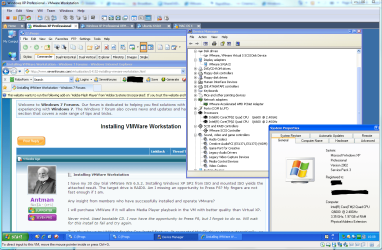
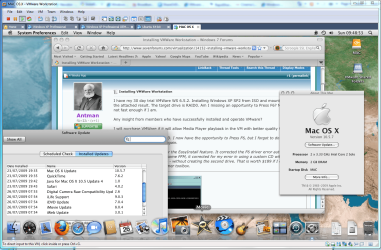
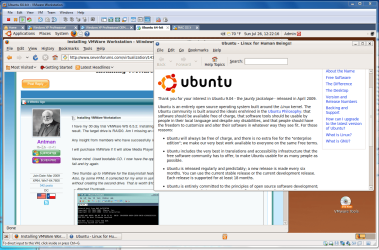
Virtualization, specifically VMware Workstation has changed the way I use my computer. Since the days of Windows 98 I've dual or multi-booted, but now I've given all that up and gone the way of virtualization. I still need XP to run a couple of old quirky progs that I use, Linux because I'm interested in learning about it, and Mac OS X because I can.

I do dual boot, but that is now just two partitions with W7 x64, the second being an instant back-up in case of catastrophic failure, (ie me being a complete dunce and messing up big style).

With XP SP3, Ubuntu64 and Mac OS X Leopard all installed as guest operating systems, I have what I consider a pc more flexible than I could have imagined not long ago. Virtualization is definitely going to be a big part of the future of computing.
 

Attachments

  • Capture6.PNG
    Capture6.PNG
    118.9 KB · Views: 271
  • Capture5.PNG
    Capture5.PNG
    242.4 KB · Views: 251
  • Capture8.PNG
    Capture8.PNG
    123.8 KB · Views: 147
Last edited:

My Computer

OS
W7
I have my 30 day trial VMWare WS 6.5.2. Installing Windows XP SP2 from ISO and mounted ISO yields the attached result. The target drive is RAID0. Am I missing an opportunity to Press F6? My fingers are not fast enough if I am.

Any insight from members who have successfully installed and operate VMware?

I will purchase VMWare if it will allow Media Player playback in the VM with better quality than Virtual XP.

Never mind. Used bootable CD. I now have the opportunity to Press F6, but I forgot to do so. Will wait for this install to fail and try again.

Two thumbs up to VMWare for the EasyInstall feature. It corrected the F6 driver error automatically, or had a native driver. Also, by some PFM, it corrected for my error in using a custom CD with references to a second (non-existent) drive - without creating the second drive. That is worth $189 if I choose to include WMWare in my customer toolbox.

Hi there
You need to get into the "Virtual Bios" to change the boot order of the Virtual machine, Then either mount a CD or an ISO to install your guest.

Incidentally if you use QEMU to create your virtual machines you can then use vmware player (FREE) to run them.

Google on create vmware VM with QEMU. I can't remember the link at the moment but I think some months ago I posted this on the Forum.

Cheers
jimbo
 

My Computer

Computer type
PC/Desktop
Computer Manufacturer/Model Number
Custom built, several laptops HP/ASUS
OS
Linux CENTOS 7 / various Windows OS'es and servers
CPU
Intel i7 Intel i5
Memory
8GB, 16GB
Graphics Card(s)
On Motherboard
Sound Card
Realtek HD audio
Monitor(s) Displays
Apple Cinema display, Samsung LCD
Screen Resolution
1920 X 1080
Hard Drives
4 X 1TB SATA
Mouse
Toshiba wireless laser
Internet Speed
> 20MB up
Hi there... Cheers
jimbo
Thank you, Viking raider! But where were you six weeks ago? My VMware 30 day trial is expired. I have since implemented VBox and have 99% working solution. There are "oddities" in window resizing the guest, and I sometimes have to re-boot the guest to get audio. Otherwise, solved my application need.

I may eventually purchase VMware Workstation. Hands down, it was the superior VM package.
 
Virtual Machines are truly the way to go. VM Ware Workstation is my choice over the others even if I had to pay for it. Started using VMs when MS bought out Virtual PC and made it their own sometime around 2003. I can understand Antman the problems you had with VM workstation, I too had the same problems, but stay with it and I got everyting working except in OpenSuse 11.1/.2, just cannot get it to recognize the HD sound card (bummer). But all the other OSs work great.

This post is being type in Firefoxe on Ubuntu 9.1 in VM workstation.

Enjoy the world of Virtual Machines. :)
 

My Computer

Computer Manufacturer/Model Number
HP Pavilion a4302f
OS
Win 7 Pro x64, VM Win XP, Win7 Pro Sandbox, Kubuntu 11
CPU
AMD Athlon(tm) II X4 640 @ 3.0 Gbz
Memory
12GB 1066MHz DDR3 SDRAM - 2x4GB, 2x2GB
Graphics Card(s)
ATI Radeon HD 4350 HD Graphics/Audio with 512MB
Sound Card
Realtek High Definition Audio
Monitor(s) Displays
1. Dell 23" SP2307, 2. Mitsublishi 40" HDTV, Hannspree 25"
Screen Resolution
1. 2048x1152, 2. 1920-1080, 3. 1920x1200
Hard Drives
Int: 1 120 Gig SSD i
1 - 2.5" 500 USB External HDD
1 -1 Tb USB External HDD
Case
Mid Tower
Cooling
Standard Fans - 5 fans (very quiet)
Keyboard
Microsoft Wireless 2000
Mouse
Microsoft Wireless Mouse 5000
Internet Speed
10 Mbit (realistically 500 Kbit - 1.2 Mbit)
Other Info
Speakers - Bose Desktop (Excellent Sound)
1 external CD|DVD\Blue-ray Recorders/Players (Sony)
@Lee - I am virtually enjoying VMs. The problems that I had with VMware were limited to the learning curve.
 
Antman - I can understand the learning curve. It is actually designed more for the IT Tech world then the at home environment. And, Virtual Box is actually the best for someone who is just out to test drive different OSs, on a home system.
 

My Computer

Computer Manufacturer/Model Number
HP Pavilion a4302f
OS
Win 7 Pro x64, VM Win XP, Win7 Pro Sandbox, Kubuntu 11
CPU
AMD Athlon(tm) II X4 640 @ 3.0 Gbz
Memory
12GB 1066MHz DDR3 SDRAM - 2x4GB, 2x2GB
Graphics Card(s)
ATI Radeon HD 4350 HD Graphics/Audio with 512MB
Sound Card
Realtek High Definition Audio
Monitor(s) Displays
1. Dell 23" SP2307, 2. Mitsublishi 40" HDTV, Hannspree 25"
Screen Resolution
1. 2048x1152, 2. 1920-1080, 3. 1920x1200
Hard Drives
Int: 1 120 Gig SSD i
1 - 2.5" 500 USB External HDD
1 -1 Tb USB External HDD
Case
Mid Tower
Cooling
Standard Fans - 5 fans (very quiet)
Keyboard
Microsoft Wireless 2000
Mouse
Microsoft Wireless Mouse 5000
Internet Speed
10 Mbit (realistically 500 Kbit - 1.2 Mbit)
Other Info
Speakers - Bose Desktop (Excellent Sound)
1 external CD|DVD\Blue-ray Recorders/Players (Sony)
Thank you, Viking raider! But where were you six weeks ago? .....

I may eventually purchase VMware Workstation. Hands down, it was the superior VM package.


Cheers there

I do quite a bit of travelling -- A lot of people are on holiday (Vacation) in July so during the "Credit Crunch" I boosted my overtime a bit so didn't have a lot of time for this (excellent and informative) forum.

Anyway here's one link for creating vmware images with QEMU -- after build run vmware player (free).

Using VMware Player to Create Images for New Virtual Machines

However if you do purchase vmware workstation it is IMO worth while although a little expensive for some I agree.


Cheers
jimbo
 

My Computer

Computer type
PC/Desktop
Computer Manufacturer/Model Number
Custom built, several laptops HP/ASUS
OS
Linux CENTOS 7 / various Windows OS'es and servers
CPU
Intel i7 Intel i5
Memory
8GB, 16GB
Graphics Card(s)
On Motherboard
Sound Card
Realtek HD audio
Monitor(s) Displays
Apple Cinema display, Samsung LCD
Screen Resolution
1920 X 1080
Hard Drives
4 X 1TB SATA
Mouse
Toshiba wireless laser
Internet Speed
> 20MB up
Antman,

Welcome to the wonderful world of virtual machines. I will admit, for me, they are the most exciting thing to have happened to the desktop PC in the past 10 years. I think back to the days of studying for certification exams and so forth and how much easier it would have been with the use of something like this.

At work, it's a great tool in our data centre, because in almost every case the use of an actual machine is just overkill for the process on hand. Instead, we buy 1 server and then run 10-15 virtual machines on that server. It's absolutely awesome for installing patches or making a bit change. You can take a snapshot if you are concerned and you can reboot the machine in about 20 seconds. On a real server which has to POST...that is usually a 2-3 minute process.

Next, at work, they are fantastic for learning purposes. I've built entire training classes at work for the others guys about Linux and how software RAID works, or how the LVM (logical volume management) system works. With virtual machines, you can actually add additional drives, expand and shrink volumes and learn firsthand exactly what is involved. It's irreplaceable as a learning tool. And the best part is that you can get it ready, then you can make a quick backup of the virtual hard drive file, then bring up the VM and screw around all you want and if you mess it up...you simply copy over your backup and you are right back in business.

As far as VMWare is concerned, I typically use their free VMWare Server product. It installs and runs fine on Windows Vista or Windows 7. In my opinion, it has a little more bloat then some of the other products out there and I don't LOVE the web only interface ( I prefer a small EXE that I can run to manage my virtual machines). You should certainly give it a try in your evaluations.

At work, we tend to use VMWare ESXi...which is their free "bare metal hypervisor product". So, rather than running a host operating system of Windows or Linux...this installer has it's own tiny OS which installs on the system and provides the foundation for running virtual machines. These are often a far better way to go because they 1). consume less resources because there isn't an entire HOST OS to run on the machine 2). have a much smaller install footprint and thus don't have anywhere near the vulnerabilities or surface area to attack, 3). Must better hardware allocation for the virtual machines themselves. However, the "hypervisor" products due tend to be finicky about the hardware they support...generally speaking they want honest to goodness "server class machines". You can however find ESXi "whitebox" sites which provide information on various pieces of commodity hardware that will work with the product.
 

My Computer

Computer Manufacturer/Model Number
Self-Built in July 2009
OS
Windows 7 Ultimate x64
CPU
Intel Q9550 2.83Ghz OC'd to 3.40Ghz
Motherboard
Gigabyte GA-EP45-UD3R rev. 1.1, F12 BIOS
Memory
8GB G.Skill PI DDR2-800, 4-4-4-12 timings
Graphics Card(s)
EVGA 1280MB Nvidia GeForce GTX570
Sound Card
Realtek ALC899A 8 channel onboard audio
Monitor(s) Displays
23" Acer x233H
Screen Resolution
1920x1080
Hard Drives
Intel X25-M 80GB Gen 2 SSD
Western Digital 1TB Caviar Black, 32MB cache. WD1001FALS
PSU
Corsair 620HX modular
Case
Antec P182
Cooling
stock
Keyboard
ABS M1 Mechanical
Mouse
Logitech G9 Laser Mouse
Internet Speed
15/2 cable modem
Other Info
Windows and Linux enthusiast. Logitech G35 Headset.
Virtualization, specifically VMware Workstation has changed the way I use my computer. Since the days of Windows 98 I've dual or multi-booted, but now I've given all that up and gone the way of virtualization. I still need XP to run a couple of old quirky progs that I use, Linux because I'm interested in learning about it, and Mac OS X because I can.

I do dual boot, but that is now just two partitions with W7 x64, the second being an instant back-up in case of catastrophic failure, (ie me being a complete dunce and messing up big style).

With XP SP3, Ubuntu64 and Mac OS X Leopard all installed as guest operating systems, I have what I consider a pc more flexible than I could have imagined not long ago. Virtualization is definitely going to be a big part of the future of computing.


How did you get Mac OS X Leopard running on vmware?
 

My Computer

Computer Manufacturer/Model Number
Custom Built
OS
Windows 7 Pro 64-bit
CPU
AMD Phenom II X2 550 BE
Motherboard
ASUS M4A79XTD EVO
Memory
A-Data DDR3 1600 4gb
Graphics Card(s)
HIS Radeon HD 4670
Sound Card
VIA VT1708S (8 channel onboard)
Monitor(s) Displays
Dell 23" S2309W
Screen Resolution
1920 x 1080
Hard Drives
WD 320,750gb, Seagate 500gb External Backup
PSU
Rosewill Green Series 430W
Case
Coolermaster
Cooling
Scythe SCKTN-3000
vBox 3.06 was released. I installed it. VM CPU usage skyrocketed, sometimes pegging.

3.06 is now unistalled. I don't care why it pegged the CPU.

New builds are coming fairly steadily.
 
Once you have a working VM, you can just use VMPlayer to run it. Although you can also make VMs by getting a virtual drive and then getting into the bios and installing the OS, also may require tweaking the vmx file some.

EasyVMX!: Virtual Machine Creator
 

My Computer

Computer Manufacturer/Model Number
custom built
OS
Windows 7 RC 64bit
CPU
amd
Motherboard
msi
Memory
2gb
Graphics Card(s)
nvidia
Sound Card
audigy 2 zs
Monitor(s) Displays
21" lcd widescreen
Hard Drives
300gb in 3 partitions (1 for winxp, 1 for win7-64, and 1 for data)
Keyboard
old HP
Mouse
5 button
Internet Speed
cable
Other Info
xpmode installed and working :)
dualbooting with xp pro on same hdd
Virtual Machines are truly the way to go. VM Ware Workstation is my choice over the others even if I had to pay for it. Started using VMs when MS bought out Virtual PC and made it their own sometime around 2003. I can understand Antman the problems you had with VM workstation, I too had the same problems, but stay with it and I got everyting working except in OpenSuse 11.1/.2, just cannot get it to recognize the HD sound card (bummer). But all the other OSs work great.

This post is being type in Firefoxe on Ubuntu 9.1 in VM workstation.

Enjoy the world of Virtual Machines. :)

I am interested in VMWare, for home use mainly, but also for the advantage of its position in the enterprise virtualized world.

Just a couple questions. Is that in fact the case? That VMW is the standard out in the "real world"

And how much does an individual pay to use a single license? $$
 

My Computer

Computer Manufacturer/Model Number
Homebuilt
OS
Win 7 64
CPU
Intel Quad 2.4
Motherboard
MSI 875X Platinum
Memory
6 Gb
Graphics Card(s)
GE Force 7600 GS
Sound Card
OnBoard
Monitor(s) Displays
Gateway FPD218SW DCDi
Hard Drives
SATA & eSATA
PSU
250 W
Case
MidTower
Cooling
Sealed Liquid Copper Coil
Back
Top