Installing Win 7 with only USB 3 ports

Nozzle

New member
Local time
4:16 AM
Messages
3
Looking at the various Youtube and forum posts out there, I can see the problem I have encountered is common, but the solution I saw on Youtube (YouTube) doesn't work on my ne motherboard as I don't have the emulate option.


I understand that the problem is Windows 7 does not support USB 3 natively in the same way that it also doesn't support NVMe. I have followed the instructions for adding NVMe drivers (Update your Win 7 installation media.) and I was excited to see a file named "iusb3hcs.inf_amd64_neutral" and similar so thought this might be problem solved. It still doesn't recongise Mouse/Keyboard on Win 7 installation, so I never got as far as finding out of the NVMe drive was also recognised.


I considered putting this query on the ASUS/ROG forum but as Win 7 is not supported for this board (ROG STRIX B450-I) officially, I can't really expect them to help out.


There seems to be some support on the Intel side of things to get generic USB 3 support, but nothing from AMD for the B450 or these newer ones.


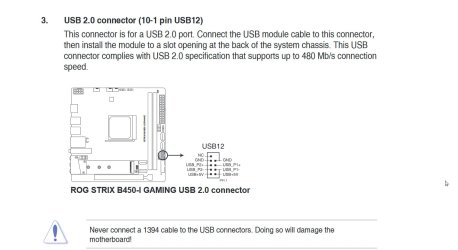
Please advise how I can obtain a generic driver to support USB 3.0 hub and therefore use the keyboard/mouse to progress the Windows 7 Install. I note this motherboard has a USB 2.0 header and I knocked up a cable to connect to it, but it still was not recognised.


Nozzle
 
Last edited:

My Computer My Computer

Computer type
PC/Desktop
Computer Manufacturer/Model Number
Asus
OS
7 64bit 10 64bit
CPU
Ryzen 5 2600x
Motherboard
B450-I
Memory
16GB
Graphics Card(s)
nvidia 960
Hard Drives
NVME ADATA
SSD
Clanky
Antivirus
Kaspersky
Browser
Firefox
Not sure if usb3.1 ports will work with win7 on that mobo. Probably need a card for usb 3.0


The usb2 port should work if it is wired correctly. Alternatively, an external dvdrom drive should also work.


Otherwise, you could use win10 installation media and replace the win10 sources\install.wim with your updated win7 install.wim


In addition:
Code:
Windows® 7/10 for
        2nd Gen AMD Ryzen™ Desktop Processor
        7th-Gen AMD A-Series Processors
        AMD Ryzen™ Desktop Processor
        AMD X470 Chipset
        AMD X370 Chipset
        AMD B450 Chipset
        AMD B350 Chipset
        AMD A320 Chipset
https://www.amd.com/en/support/chipsets/amd-socket-am4/b450

Direct download amd_chipset_drivers_v1.07.29.0115.exe
 

My Computers My Computers

System One System Two

  • Computer type
    PC/Desktop
    OS
    7 X64
    CPU
    i5 8400
    Motherboard
    gigabyte b365m ds3h
    Memory
    2x8gb 3200mhz
    Hard Drives
    various
    PSU
    pure power 11 400w cm
    Case
    Coolermaster
    Cooling
    cryorig m9i
  • Computer type
    PC/Desktop
    OS
    7x64
    CPU
    g5400
    Motherboard
    ga b365m ds3h
    Memory
    8gb ddr4 2400
    PSU
    xfx pro 450w

My Computers My Computers

System One System Two

  • Computer type
    PC/Desktop
    OS
    7 X64
    CPU
    i5 8400
    Motherboard
    gigabyte b365m ds3h
    Memory
    2x8gb 3200mhz
    Hard Drives
    various
    PSU
    pure power 11 400w cm
    Case
    Coolermaster
    Cooling
    cryorig m9i
  • Computer type
    PC/Desktop
    OS
    7x64
    CPU
    g5400
    Motherboard
    ga b365m ds3h
    Memory
    8gb ddr4 2400
    PSU
    xfx pro 450w
Many many thanks for taking the time to write your thoughts on my query... it's taken a little while to get back to you on account of having to get work on my Car sorted as a priority, and then attempting to build a system with a bit more functionality. Now done...


I tried the internal USB header as you have marked up - Keyboard/Mouse works while plugged in here while on the UEFI screens (therefore the connections are satisfactory), but then stops working again as soon as Win 7 DVD boots up. (Num Lock LED and IR LED on mouse extinguish during the load).


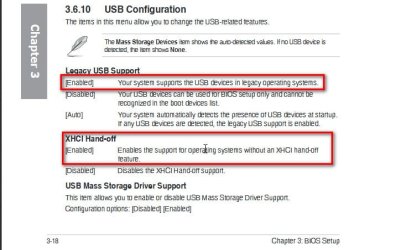
Legacy USB is "Enabled" by default and I've tried the XHCI Hand-off in both different options - but I actually I don't understand what it means by 'hand-off'...


How do I incorporate the AMD Win 7 Driver onto a Win 7 installation disc when it is .exe format? Sure enough, I can decompress it with PeaZip and there is a directory structure within, but it's quite different to the structure as outlined in the guide for NVMe driver incorporation.


Nozzle (edit - also using an SATA DVD-ROM rather than USB so that does at least clear this problem)
 

My Computer My Computer

Computer type
PC/Desktop
Computer Manufacturer/Model Number
Asus
OS
7 64bit 10 64bit
CPU
Ryzen 5 2600x
Motherboard
B450-I
Memory
16GB
Graphics Card(s)
nvidia 960
Hard Drives
NVME ADATA
SSD
Clanky
Antivirus
Kaspersky
Browser
Firefox

My Computers My Computers

System One System Two

  • Computer type
    PC/Desktop
    OS
    7 X64
    CPU
    i5 8400
    Motherboard
    gigabyte b365m ds3h
    Memory
    2x8gb 3200mhz
    Hard Drives
    various
    PSU
    pure power 11 400w cm
    Case
    Coolermaster
    Cooling
    cryorig m9i
  • Computer type
    PC/Desktop
    OS
    7x64
    CPU
    g5400
    Motherboard
    ga b365m ds3h
    Memory
    8gb ddr4 2400
    PSU
    xfx pro 450w
So how did you extract the relevent files in order to produce these Zips.. was it a matter of installing them then just repackaging the relevent dirs from the resultant installation?


Nozzle
 

My Computer My Computer

Computer type
PC/Desktop
Computer Manufacturer/Model Number
Asus
OS
7 64bit 10 64bit
CPU
Ryzen 5 2600x
Motherboard
B450-I
Memory
16GB
Graphics Card(s)
nvidia 960
Hard Drives
NVME ADATA
SSD
Clanky
Antivirus
Kaspersky
Browser
Firefox
Last edited:

My Computers My Computers

System One System Two

  • Computer type
    PC/Desktop
    OS
    7 X64
    CPU
    i5 8400
    Motherboard
    gigabyte b365m ds3h
    Memory
    2x8gb 3200mhz
    Hard Drives
    various
    PSU
    pure power 11 400w cm
    Case
    Coolermaster
    Cooling
    cryorig m9i
  • Computer type
    PC/Desktop
    OS
    7x64
    CPU
    g5400
    Motherboard
    ga b365m ds3h
    Memory
    8gb ddr4 2400
    PSU
    xfx pro 450w
You might need to integrate the Microsoft Visual C++ 2015 Redistributables as well.
 

My Computers My Computers

System One System Two

  • Computer type
    PC/Desktop
    OS
    7 X64
    CPU
    i5 8400
    Motherboard
    gigabyte b365m ds3h
    Memory
    2x8gb 3200mhz
    Hard Drives
    various
    PSU
    pure power 11 400w cm
    Case
    Coolermaster
    Cooling
    cryorig m9i
  • Computer type
    PC/Desktop
    OS
    7x64
    CPU
    g5400
    Motherboard
    ga b365m ds3h
    Memory
    8gb ddr4 2400
    PSU
    xfx pro 450w
One way to do this is to install from the dvd.

copy the amd_chipset_drivers_v1.07.29.0115.exe onto a cd/dvd

Then run the chipset exe after it has installed.

You will need a ps2 mouse or a usb2 connection for that method

If you don't have a ps2 port, there are cards you can get.


YouTube
 

My Computers My Computers

System One System Two

  • Computer type
    PC/Desktop
    OS
    7 X64
    CPU
    i5 8400
    Motherboard
    gigabyte b365m ds3h
    Memory
    2x8gb 3200mhz
    Hard Drives
    various
    PSU
    pure power 11 400w cm
    Case
    Coolermaster
    Cooling
    cryorig m9i
  • Computer type
    PC/Desktop
    OS
    7x64
    CPU
    g5400
    Motherboard
    ga b365m ds3h
    Memory
    8gb ddr4 2400
    PSU
    xfx pro 450w

My Computers My Computers

System One System Two

  • Computer type
    PC/Desktop
    OS
    7 X64
    CPU
    i5 8400
    Motherboard
    gigabyte b365m ds3h
    Memory
    2x8gb 3200mhz
    Hard Drives
    various
    PSU
    pure power 11 400w cm
    Case
    Coolermaster
    Cooling
    cryorig m9i
  • Computer type
    PC/Desktop
    OS
    7x64
    CPU
    g5400
    Motherboard
    ga b365m ds3h
    Memory
    8gb ddr4 2400
    PSU
    xfx pro 450w
Nozzle (edit - also using an SATA DVD-ROM rather than USB so that does at least clear this problem)
If you are not able to use usb2 or ps2, the other thing I can think of is try integrating the files extracted from the chipset executable.

AS well as the three zip files in my earlier post

This one ( it is an update )

View attachment Windows6.1-KB2999226-x64.zip

and looks like these need to be copied into windows system32

View attachment System32.zip
View attachment 409092

Then when you have integrated all of them and the three zips from earlier post, use win10 installation media and replace the win10 install.wim/install.esd with the win7 install.wim you have just prepared.
 

My Computers My Computers

System One System Two

  • Computer type
    PC/Desktop
    OS
    7 X64
    CPU
    i5 8400
    Motherboard
    gigabyte b365m ds3h
    Memory
    2x8gb 3200mhz
    Hard Drives
    various
    PSU
    pure power 11 400w cm
    Case
    Coolermaster
    Cooling
    cryorig m9i
  • Computer type
    PC/Desktop
    OS
    7x64
    CPU
    g5400
    Motherboard
    ga b365m ds3h
    Memory
    8gb ddr4 2400
    PSU
    xfx pro 450w
Back
Top