Installing win7 on an SSD - missing driver

confused1

New member
Local time
8:36 PM
Messages
10
I'm trying to install windows 7 onto a new ssd (samsung 970 evo) and it's being installed from a working computer with windows 10. I loaded the windows 7 cd into the drive, started the installation process, and got to the "expanding files" part before it put out an error stating that it can't install windows due to a missing driver.

It didn't have any details on what it was talking about and booted me out of the installation screen after hitting ok. Anyone know what drivers I'm missing?
 

My Computer

OS
windows 7 64 bit

My Computer

Computer type
Laptop
Computer Manufacturer/Model Number
Dell M6500 Precision Work Station
OS
Windows 7 Pro SP1 64 bit
Memory
8 GB
Screen Resolution
1920x
Internet Speed
30 Mbps
Antivirus
Norton Security
Browser
IE 11
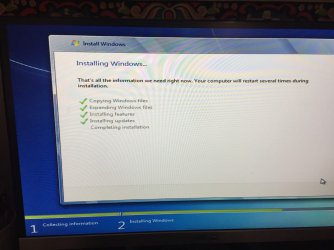
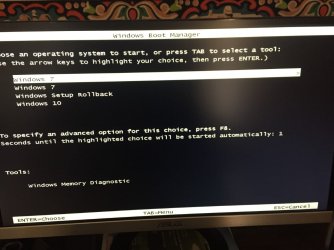
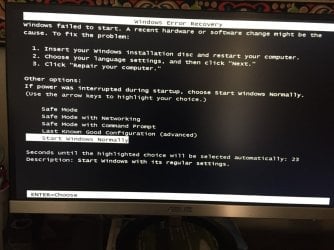
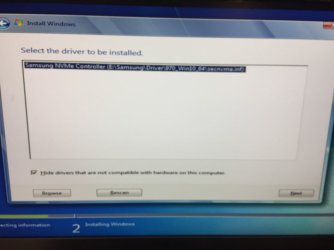
I tried using the method above and here is what I got. It appeared to install everything fine but then when it went to restart the computer, it kept going through the windows failed to start screen. I chose safe mode to see if it made a difference which it did not. I loaded the drive with windows 10 and saw that the nvme drive I used had the windows files on it (user, program files, etc). Not sure what's going on with that.
 

Attachments

  • thumbnail_IMG_2670.jpg
    thumbnail_IMG_2670.jpg
    186.8 KB · Views: 0
  • thumbnail_IMG_2671.jpg
    thumbnail_IMG_2671.jpg
    181.2 KB · Views: 0
  • thumbnail_IMG_2672.jpg
    thumbnail_IMG_2672.jpg
    210.2 KB · Views: 0

My Computer

OS
windows 7 64 bit
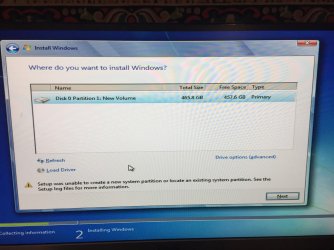
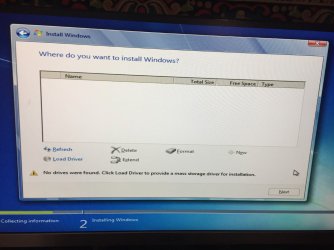
I then tried removing the working drive out of the computer just in case that was causing any issues with my new drive. I selected it, loaded the nvme driver, then the partition vanished before I could even install it.
 

Attachments

  • thumbnail_IMG_2665.jpg
    thumbnail_IMG_2665.jpg
    202.9 KB · Views: 0
  • thumbnail_IMG_2666.jpg
    thumbnail_IMG_2666.jpg
    106.1 KB · Views: 0
  • thumbnail_IMG_2667.jpg
    thumbnail_IMG_2667.jpg
    176.8 KB · Views: 0

My Computer

OS
windows 7 64 bit

My Computers

System One System Two

  • Computer type
    PC/Desktop
    OS
    7 X64
    CPU
    i5 8400
    Motherboard
    gigabyte b365m ds3h
    Memory
    2x8gb 3200mhz
    Hard Drives
    various
    PSU
    pure power 11 400w cm
    Case
    Coolermaster
    Cooling
    cryorig m9i
  • Computer type
    PC/Desktop
    OS
    7x64
    CPU
    g5400
    Motherboard
    ga b365m ds3h
    Memory
    8gb ddr4 2400
    PSU
    xfx pro 450w
Look at the motherboard manufacturer`s website, if it has a M.2 slot than they should have a driver for it.

But SIW2`s reply should work for you.

Just an example but ....

Asus has a great program called Asus EZ Installer which lets you create a W7 installer with the M.2 driver added.

A W7 installer does not have USB 3.0 drivers either.
 

My Computer

Computer type
PC/Desktop
Computer Manufacturer/Model Number
Skylake Special #666
OS
Windows 10 Pro x64
CPU
Intel Core i7 6700K
Motherboard
Asus Sabertooth Z170 Mark 1
Memory
GSkill TridentZ RGB 16GB 3600 16-16-16-36
Graphics Card(s)
EVGA GTX 980 Ti SC x2
Sound Card
Realtek High Definition
Monitor(s) Displays
AOC G2460PG
Screen Resolution
1920 x 1080 144Hz
Hard Drives
Samsung 860 Pro 256GB, Seagate Barracuda 4TB x2
PSU
EVGA 1000 P2, EVGA White Custom Braided Cables
Case
Corsair Vengeance C70 Gunmetal Black
Cooling
Corsair H100i v2, Corsair ML120 x2, Thermal Grizzly Kryonaut
Keyboard
Logitech G910 Orion Spectrum
Mouse
Logitech G700s
Internet Speed
Verizon Fios Quantum Gateway 75/75
Antivirus
Windows Defender, Malwarebytes Free 3.8.3
Browser
Chrome
Other Info
Corsair SP120 x4, LG Blu-ray Drive, Durabrand HT-395 100 Watt Dolby Digital Amp, Corsair H2100 Wireless 7.1 Headset
Back
Top