Solved Installing Windows 7 on an old computerI am trying to install window 7

Bilbo

New member
Local time
4:30 AM
Messages
8
I am trying to install window 7 on my old PC (10 years). It is a 32 bit system so I am using a 32 bit installation disk and everything seems to go fine, but it does not see my other hard drive. If I go to Disk Management and use 'Rescan Disks;' (from the Action Menu), it to now sees the other drive, but if I reboot, it does not see the other drive until I do it again. Anybody have any ideas?!
 

My Computer My Computer

At a glance

Windows 7 Home Premium 64bit.AMD FX-83708GB DDR3NVIDIA GeForce GT 720
Computer type
PC/Desktop
Computer Manufacturer/Model Number
custom build
OS
Windows 7 Home Premium 64bit.
CPU
AMD FX-8370
Motherboard
ASRock 970 Extreme3 R2.0
Memory
8GB DDR3
Graphics Card(s)
NVIDIA GeForce GT 720
Monitor(s) Displays
DELL S2009W
Screen Resolution
1600 x 900
Hard Drives
WD10 EZEX-00BN5A0
WD20 EZRX-00DC0B0
PSU
HEFIMALTAKE TR2 43OW
Case
Thermaltake COMMANDER BLACK WINDOW
Mouse
Logitech M310
Internet Speed
1Gb
Antivirus
MSSE
Browser
Firefox
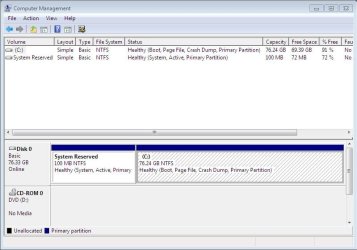
Post a snapshot of a fullscreen Disk Management:

To open Disk Management, press Windows key+r, type diskmgmt.msc and press Enter or click GO. Make it full screen. Expand the fields as necessary so everything can be seen.

How to Use the Snipping Tool in Vista - Vista Forums (says it's for Vista but also works with Win 7/8).

Once you have the image saved, click on the Paperclip Icon next to the Smiley Icon. In the Manage Attachments window, click Browse and navigate to where you saved the image and select it.
Click the Upload button.
Close the Manage Attachments window.
Click on the Paperclip Icon again and select the image you uploaded. It will be placed in your post.
 

My Computer My Computer

At a glance

Windows 10 Pro X64Intel Quad Core i7-4770 @ 3.4Ghz16.0GB PC3-12800 DDR3 SDRAM 1600 MHzIntel Integrated HD Graphics
Computer type
PC/Desktop
Computer Manufacturer/Model Number
Lenovo IdeaCenter 450
OS
Windows 10 Pro X64
CPU
Intel Quad Core i7-4770 @ 3.4Ghz
Memory
16.0GB PC3-12800 DDR3 SDRAM 1600 MHz
Graphics Card(s)
Intel Integrated HD Graphics
Sound Card
Realtek HD Audio
Monitor(s) Displays
HP 22" LCD
Screen Resolution
1680 x 1050
Hard Drives
250GB Samsung EVO SATA-3 SSD
2TB Seagate ST2000DM001 SATA-2
1.5TB Seagate ST3150041AS SATA
Keyboard
Dell USB
Mouse
Lenovo USB
Internet Speed
Cable via Road Runner 3MB Upload, 30MB Download
Antivirus
Windows Defender, MBAM Pro, MBAE
Browser
Seamonkey
Other Info
UEFI/GPT
PLDS DVD-RW DH16AERSH
Disk Management Screen Shots

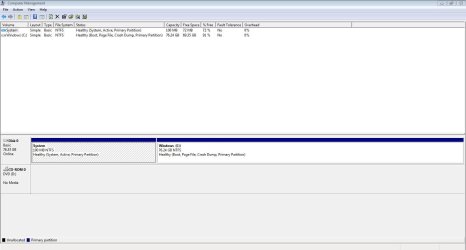
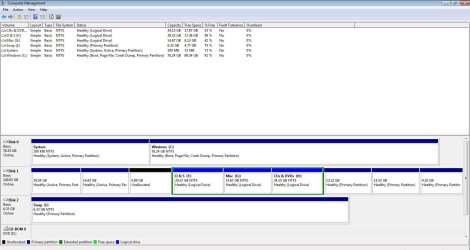
I have two screen shots. First is before I use 'Rescan Disks' and the other is after
 

Attachments

  • Before.JPG
    Before.JPG
    74.4 KB · Views: 8
  • After.JPG
    After.JPG
    115.6 KB · Views: 15

My Computer My Computer

At a glance

Windows 7 Home Premium 64bit.AMD FX-83708GB DDR3NVIDIA GeForce GT 720
Computer type
PC/Desktop
Computer Manufacturer/Model Number
custom build
OS
Windows 7 Home Premium 64bit.
CPU
AMD FX-8370
Motherboard
ASRock 970 Extreme3 R2.0
Memory
8GB DDR3
Graphics Card(s)
NVIDIA GeForce GT 720
Monitor(s) Displays
DELL S2009W
Screen Resolution
1600 x 900
Hard Drives
WD10 EZEX-00BN5A0
WD20 EZRX-00DC0B0
PSU
HEFIMALTAKE TR2 43OW
Case
Thermaltake COMMANDER BLACK WINDOW
Mouse
Logitech M310
Internet Speed
1Gb
Antivirus
MSSE
Browser
Firefox
Since you have five primary partitions on the other HD it must be a GPT disk. Your BIOS may not be able to handle GPT disks. Is there a newer BIOS update on the PC or mobo's Support Downloads webpage?

If not you can move the data off to Convert GPT Disk to MBR Disk - Windows 7 Forums
and then reformat your partitions as you wish to copy the data back in.
 
New Screen shots

Hi again. I removed all primary partitions, as gregrocker sugested and I am having the same problem. The other disks don't show up until I click 'Rescan Disks' in disk management. I am posting the new screen shots to show what is there now. First is before and then after.
 

Attachments

  • Before.JPG
    Before.JPG
    60.1 KB · Views: 0
  • After.JPG
    After.JPG
    89.4 KB · Views: 1

My Computer My Computer

At a glance

Windows 7 Home Premium 64bit.AMD FX-83708GB DDR3NVIDIA GeForce GT 720
Computer type
PC/Desktop
Computer Manufacturer/Model Number
custom build
OS
Windows 7 Home Premium 64bit.
CPU
AMD FX-8370
Motherboard
ASRock 970 Extreme3 R2.0
Memory
8GB DDR3
Graphics Card(s)
NVIDIA GeForce GT 720
Monitor(s) Displays
DELL S2009W
Screen Resolution
1600 x 900
Hard Drives
WD10 EZEX-00BN5A0
WD20 EZRX-00DC0B0
PSU
HEFIMALTAKE TR2 43OW
Case
Thermaltake COMMANDER BLACK WINDOW
Mouse
Logitech M310
Internet Speed
1Gb
Antivirus
MSSE
Browser
Firefox
Sometimes Disk Mgmt is not accurate. Do these drives show up in Explorer or Start>Computer before you need to Rescan Disks to show them in Disk Mgmt?

Next test the HD with Disk Check followed by the maker's HD Diagnostic extended CD scan.
 
Test results

These drives do not show up in Explorer or Start>Computer before I need to Rescan Disks to show them in Disk Mgmt!!! I ran Disk Check and other programs to see if I could find any problems. Only disk that showed problems was the Disk I: marked as swap. I also tried reinstalling win 7. All to no avail. Tomorrow I am going to try installing with the other disks disconnected. Maybe this will fix(?) my problem (Ha Ha).
 

My Computer My Computer

At a glance

Windows 7 Home Premium 64bit.AMD FX-83708GB DDR3NVIDIA GeForce GT 720
Computer type
PC/Desktop
Computer Manufacturer/Model Number
custom build
OS
Windows 7 Home Premium 64bit.
CPU
AMD FX-8370
Motherboard
ASRock 970 Extreme3 R2.0
Memory
8GB DDR3
Graphics Card(s)
NVIDIA GeForce GT 720
Monitor(s) Displays
DELL S2009W
Screen Resolution
1600 x 900
Hard Drives
WD10 EZEX-00BN5A0
WD20 EZRX-00DC0B0
PSU
HEFIMALTAKE TR2 43OW
Case
Thermaltake COMMANDER BLACK WINDOW
Mouse
Logitech M310
Internet Speed
1Gb
Antivirus
MSSE
Browser
Firefox
If not then move the data off the other drives, wipe them with Diskpart Clean Command to clear the drive of all code that might interfere. Do this with the OS drive, too, before reinstall.
 
Problem Solved

After I wiped all hard drives and disconnected extras I re-installed. After installation I then connected the other drives, one at a time. The small 6.8Gb was causing all my problems, so I switched it out with another drive of similar size. Everything is working just fine. I did several re-installs to make sure that I had fixed the problem and I had.

I am now a happy installer.
Thank you everybody that replied to my problem and helped to solve it.:D
 

My Computer My Computer

At a glance

Windows 7 Home Premium 64bit.AMD FX-83708GB DDR3NVIDIA GeForce GT 720
Computer type
PC/Desktop
Computer Manufacturer/Model Number
custom build
OS
Windows 7 Home Premium 64bit.
CPU
AMD FX-8370
Motherboard
ASRock 970 Extreme3 R2.0
Memory
8GB DDR3
Graphics Card(s)
NVIDIA GeForce GT 720
Monitor(s) Displays
DELL S2009W
Screen Resolution
1600 x 900
Hard Drives
WD10 EZEX-00BN5A0
WD20 EZRX-00DC0B0
PSU
HEFIMALTAKE TR2 43OW
Case
Thermaltake COMMANDER BLACK WINDOW
Mouse
Logitech M310
Internet Speed
1Gb
Antivirus
MSSE
Browser
Firefox
6.8Gb Drive

If you look at the second screen shot in post #4 you will see it at the bottom. It is a IDE Hard Drive. Yes it is small, but my computer is old. It is 10 years old!!! The hard drive itself is even older. I was using it to put my pagefile.sys in XP. I read it was better on another drive to the OS.

Thanks again for your help.:)
 

My Computer My Computer

At a glance

Windows 7 Home Premium 64bit.AMD FX-83708GB DDR3NVIDIA GeForce GT 720
Computer type
PC/Desktop
Computer Manufacturer/Model Number
custom build
OS
Windows 7 Home Premium 64bit.
CPU
AMD FX-8370
Motherboard
ASRock 970 Extreme3 R2.0
Memory
8GB DDR3
Graphics Card(s)
NVIDIA GeForce GT 720
Monitor(s) Displays
DELL S2009W
Screen Resolution
1600 x 900
Hard Drives
WD10 EZEX-00BN5A0
WD20 EZRX-00DC0B0
PSU
HEFIMALTAKE TR2 43OW
Case
Thermaltake COMMANDER BLACK WINDOW
Mouse
Logitech M310
Internet Speed
1Gb
Antivirus
MSSE
Browser
Firefox
Back
Top