Installing Windows 7 via DVD on Motion Computing Tablet

lgoodman123

New member
Local time
2:28 PM
Messages
5
I bought an old Motion Computing Tablet J3500 but it came with no OS and I need to install Windows 7.

Though the computer can read NTFS, it can't when you're booting up into the BIOS. I have only had success getting it to recognize USB keys formatted with FAT32.


So next I tried a DVD player. I know it can read this because it reads it when Linux is installed, but the BIOS itself doesn't seem to be able to read a DVD burned with a Windows 7 iso on bootup.


Is there a specific way I need to burn the Windows 7 iso to get the BIOS to recognize it on startup? Otherwise I am screwed because I can't burn the iso to a USB key in FAT32.


Thanks!
 

My Computer

Computer type
PC/Desktop
OS
Windows 7
Otherwise I am screwed because I can't burn the iso to a USB key in FAT32.


Format usb stick to fat32 - best use win7 or newer to do that - or any decent partition manager so the boot sector is nt60.

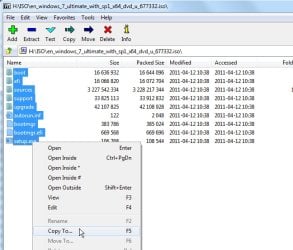
Then extract/copy the iso contents to the usb stick. Easy with 7-zip


7-zip-copyto.jpg
 

My Computers

System One System Two

  • Computer type
    PC/Desktop
    OS
    7 X64
    CPU
    i5 8400
    Motherboard
    gigabyte b365m ds3h
    Memory
    2x8gb 3200mhz
    Hard Drives
    various
    PSU
    pure power 11 400w cm
    Case
    Coolermaster
    Cooling
    cryorig m9i
  • Computer type
    PC/Desktop
    OS
    7x64
    CPU
    g5400
    Motherboard
    ga b365m ds3h
    Memory
    8gb ddr4 2400
    PSU
    xfx pro 450w
You can make a Win 7 installation drive on a Fat32 USB.

- Format a USB drive as Fat32
- With 7zip extract ALL files and folders to the USB Fat32 drive.
- Open a CMD window as administrator and type:
diskpart
list disk (take note the drive number assigned to the USB drive)
select disk n (replace n with the number found above)
list part (take note the partition number assigned to the USB drive)
select part m (replace m with the number found above)
active
exit (to exit diskpart)

Insert the USB drive on the tablet and boot from it.

Rem.: Win 7 64 bits can be installed as UEFI-GPT or Legacy-MBR. Win 7 32 bits can only be installed as Legacy-MBR.
 
Last edited:

My Computers

System One System Two

  • Computer type
    PC/Desktop
    Computer Manufacturer/Model Number
    custom build
    OS
    Windows 7 HP 64
    CPU
    i5 6600K - 800MHz to 4200MHz
    Motherboard
    GA-Z170-HD3P
    Memory
    4+4G GSkill DDR4 3000
    Graphics Card(s)
    IG - Intel 530
    Monitor(s) Displays
    Samsung 226BW
    Screen Resolution
    1680x1050
    Hard Drives
    (1) -1 SM951 – 128GB M.2 AHCI PCIe SSD drive for Windows 7 and Lubuntu
    (2) -1 WD SATA 3 - 1T for Data
    (3) -1 WD SATA 3 - 1T for backup
    PSU
    Thermaltake 450W TR2 gold
    Keyboard
    Old and good Chicony mechanical keyboard
    Mouse
    Logitech mX performance - 9 buttons (had to disable some)
    Internet Speed
    500Mb/s
    Browser
    Firefox 64
    Other Info
    TinyWall firewall
  • Computer type
    Laptop
    System Manufacturer/Model Number
    Asus Q550LF
    OS
    Windows 7 Pro
    CPU
    i7-4500U 800MHz to 3.0GHz
    Motherboard
    Asus Q550LF
    Memory
    (4+4)G DDR3 1600
    Graphics Card(s)
    IG intel 4400 + NVIDIA GeForce GT 745M
    Sound Card
    Realtek
    Monitor(s) Displays
    LG Display LP156WF4-SPH1
    Screen Resolution
    1920 x 1080
    Hard Drives
    BX500 120G SSD for Windows and programs +
    1T HDD for data
    Internet Speed
    500 Mb/s
    Browser
    Firefox
    Other Info
    TinyWall firewall
Is there a specific way I need to burn the Windows 7 iso to get the BIOS to recognize it on startup?

Some ancient hardware can't load the sectors required by win7 etfsboot.com The solution is often to use vista etfsboot.com.

One way is to extract the win7 iso contents into a folder ( call the folder e.g. ISO or DVD or something sensible )

Then create an .iso file from that folder using vista version of etfsboot.com . Much more likely to work on old machines.

View attachment VistaETFSboot.zip

I haven't tested this , but maybe just replacing the iso boot info using something like gburner gui will also do the job.
Download gBurner
 

My Computers

System One System Two

  • Computer type
    PC/Desktop
    OS
    7 X64
    CPU
    i5 8400
    Motherboard
    gigabyte b365m ds3h
    Memory
    2x8gb 3200mhz
    Hard Drives
    various
    PSU
    pure power 11 400w cm
    Case
    Coolermaster
    Cooling
    cryorig m9i
  • Computer type
    PC/Desktop
    OS
    7x64
    CPU
    g5400
    Motherboard
    ga b365m ds3h
    Memory
    8gb ddr4 2400
    PSU
    xfx pro 450w
Thanks for the help.
The problem now is that when I type in "active" it tells me it can't find the partition on the disk.
Someone elsewhere said you need to clean the disk but that erases it and I am back where I started.

Any advice?
 

My Computer

Computer type
PC/Desktop
OS
Windows 7
Never mind. You have to also select partition 1 after selecting the disk.
 

My Computer

Computer type
PC/Desktop
OS
Windows 7
You have to also select partition 1 after selecting the disk

If you are using diskpart commands, yes you need to select a partition or volume or disk by typing.

If you are using something graphical, selecting can usually be done by clicking.
 

My Computers

System One System Two

  • Computer type
    PC/Desktop
    OS
    7 X64
    CPU
    i5 8400
    Motherboard
    gigabyte b365m ds3h
    Memory
    2x8gb 3200mhz
    Hard Drives
    various
    PSU
    pure power 11 400w cm
    Case
    Coolermaster
    Cooling
    cryorig m9i
  • Computer type
    PC/Desktop
    OS
    7x64
    CPU
    g5400
    Motherboard
    ga b365m ds3h
    Memory
    8gb ddr4 2400
    PSU
    xfx pro 450w
Never mind. You have to also select partition 1 after selecting the disk.

Yes, you're right. I edited to correct.
Normally I list volume and select volume

diskpart
list volume (take note the volume number assigned to the USB drive)
select volume n (replace n with the number found above)
active
exit (to exit diskpart)
 

My Computers

System One System Two

  • Computer type
    PC/Desktop
    Computer Manufacturer/Model Number
    custom build
    OS
    Windows 7 HP 64
    CPU
    i5 6600K - 800MHz to 4200MHz
    Motherboard
    GA-Z170-HD3P
    Memory
    4+4G GSkill DDR4 3000
    Graphics Card(s)
    IG - Intel 530
    Monitor(s) Displays
    Samsung 226BW
    Screen Resolution
    1680x1050
    Hard Drives
    (1) -1 SM951 – 128GB M.2 AHCI PCIe SSD drive for Windows 7 and Lubuntu
    (2) -1 WD SATA 3 - 1T for Data
    (3) -1 WD SATA 3 - 1T for backup
    PSU
    Thermaltake 450W TR2 gold
    Keyboard
    Old and good Chicony mechanical keyboard
    Mouse
    Logitech mX performance - 9 buttons (had to disable some)
    Internet Speed
    500Mb/s
    Browser
    Firefox 64
    Other Info
    TinyWall firewall
  • Computer type
    Laptop
    System Manufacturer/Model Number
    Asus Q550LF
    OS
    Windows 7 Pro
    CPU
    i7-4500U 800MHz to 3.0GHz
    Motherboard
    Asus Q550LF
    Memory
    (4+4)G DDR3 1600
    Graphics Card(s)
    IG intel 4400 + NVIDIA GeForce GT 745M
    Sound Card
    Realtek
    Monitor(s) Displays
    LG Display LP156WF4-SPH1
    Screen Resolution
    1920 x 1080
    Hard Drives
    BX500 120G SSD for Windows and programs +
    1T HDD for data
    Internet Speed
    500 Mb/s
    Browser
    Firefox
    Other Info
    TinyWall firewall
Back
Top