Intel 2600k Overheating

AlexRD

New member
Pro User
Local time
6:01 PM
Messages
505
Location
Ponta Porã, MS
Hi,

I have bought my computer something like 5 months ago.

It has recently come to my attention that its reaching very high temperatures, such as 70C during mild stress. I do mean mild, as games aren't very CPU intensive.

Yesterday i cleaned it, of all the dust, and it went from 70 to 50-55 on idle.
That still is high though. So i'm wondering, what could possibly be the problem?
I don't overclock or anything.

Could it be that the temperature monitor is defective? Or is the CPU defective? Or is it something simple like re-applying thermal paste? I really hate doing that.

I remember doing a stress test on it for 48 hours when i first bought it and it never went over 60C.


What do you guys suggest?


I want to keep the thermal paste as a last resort, as i hate opening my computer. Everytime i carry it to a table i think "This is it. I am going to trip on something and crash it."

By the way, the room temperature is something around 25C. And yes, all the fans are working at 1360 RPM. I'm using default voltage ( i think its 1.22V ) and i'm using HW Monitor to check these.
 

My Computer

Computer Manufacturer/Model Number
Custom Built
OS
Windows 7 Professional x64
CPU
Intel Core i7 2600k - 3.4 GHz
Motherboard
Asus Maximus IV Z68 - Extreme
Memory
4x4 Ripjaws X79 Series 2133 MHz (9-11-10-28)
Graphics Card(s)
1x eVGA GTX 580 - 3GB Classified
Sound Card
Realtek ALC 889 HD Audio
Monitor(s) Displays
Full HD Philips TV 32"
Screen Resolution
1920x1080
Hard Drives
1x Crucial m4 SSD 512 GB
PSU
800W Coolermaster Silentpro Gold
Case
Sentey - Renegade GS-6200
Cooling
Stock
Keyboard
Logitech K800 Wireless
Mouse
Logitech Performance MX Laser
Internet Speed
10MB Internet Connection
50C idle temperature is too hot. It will depend on your ambient temp though.
You could try reseating the the Heat sink using a good thermal paste like Artic Silver. Their Web site will show you the best application technique for a specific processor.
I also did not like the stock cooler and used a Hyper 212+ (about $30 I think). It can be a bit fiddly to fit and you need to check your Motherboard and case for clearances. There are others of course.

Also here is the link to the Intel Processor Diagnostic Tool (64 bit).
http://downloadcenter.intel.com/Detail_Desc.aspx?agr=Y&DwnldID=19792
 

My Computer

Computer type
PC/Desktop
Computer Manufacturer/Model Number
Own build
OS
Windows 7x64 Home Premium SP1
CPU
Intel i7 2600k
Motherboard
ASUS P8Z68 Deluxe
Memory
G.Skill Ripjaws (DDR3-1600) 2x4GB
Graphics Card(s)
Nvidia GeForce GTS 450; Intel HD Graphics 3000(GT2+)
Monitor(s) Displays
Dell Ultrasharp IPS panel U2311H, Samsung SyncMaster P2350
Screen Resolution
1920x1080
Hard Drives
Samsung 850 Pro SSD 256GB, Samsung SSD 840 120GB, Seagates 1TB Barracuda ST31000528AS x2
PSU
Seasonic M12II 520W
Case
Lian Li Lancool PC-K60
Cooling
Case: 1x120mm, 3x140mm CPU: Hyper 212+
Keyboard
Logitech MK520 (wireless)
Mouse
Logitech MK520
Internet Speed
6-7 Mbps
Antivirus
Norton Security Premium, Malwarebytes on 2 (MSE on 3rd PC)
Browser
FireFox
Other Info
Audio: Logitech Z523 2.1
I like the better cooler idea that has been mentioned. I never use a stock cooler. You will have to do you Google research to make your choice. Their are many O/C websites that could help your research. For air cooling this is what I would use. Noctua NH-D14 review If your temps went up and your haven't done any changes but cleaning things and they went down it sounds like cpu thermal compound and proper mounting of cpu cooler. All the stock Intel coolers I have seen have 4 push and pop in pins that hold the cooler down. Sometimes these pins don't snap all the way into the proper position and will cause overheating. I also use Artic Silver and install it as per their website.
Arctic Silver, Inc. - Intel® Application Methods
------------------------------------------------------------
Doing a little research I found people clocking your type cpu to 4.4 running 60c under load on air.
 

My Computer

Computer type
PC/Desktop
Computer Manufacturer/Model Number
Home made Desktop
OS
Windows 10 Pro. 64/ version 1709 Windows 7 Pro/64
CPU
Intel i7-6800K @ 4.3
Motherboard
ASUS X-99 Deluxe II
Memory
Corsair Platinum 16 gig @2400
Graphics Card(s)
EVGA GTX 1070 OC
Monitor(s) Displays
Asus 27" LED LCD/VE278Q
Screen Resolution
1920-1080 or 1280-720 HDMI
Hard Drives
INTEL SSD 730-240 Gb Sata 3.0/
PSU
EVGA Platium 1200W
Case
Phanteks Luxe Tempered Glass 8 fans/ one radiator
Cooling
XSPC/ Water Cooled CPU
Keyboard
Das 4 Professional
Mouse
Logitech M705/MX Anywhere 2-S
Internet Speed
100 mbits
Antivirus
Microsoft Security Essentials/ Malwarebytes Premium 3.0/ SAS
Browser
I.E. 11 default/Firefox/ ISP Time Warner Cable/Spectrum
Other Info
LG BluRay Burner/
Sound system-KLipsch-THX/
Icy Dock ssd Hot Swap bays.
Alex,
Are you overclocking? Yes/No

Be sure that the computer is not flush or even close to a wall on any side.
 

My Computer

Computer Manufacturer/Model Number
Toshiba Satellite S875D-S7239 laptop
OS
MS Windows 7 Ultimate SP1 64-bit
CPU
AMD A10-4600M
Motherboard
AMD Pumori (Socket FT1)
Memory
6.00 GB Dual-Channel DDR3 @ 798MHz (11-11-12-28)
Graphics Card(s)
AMD Radeon HD 7660G
Sound Card
High Definition Audio Device
Monitor(s) Displays
Generic PnP Monitor (1600x900@60Hz)
Screen Resolution
1600x900@60Hz
Hard Drives
SSD 119GB Corsair CSSD-V128GB2 ATA Device
Keyboard
Standard PS/2 Keyboard
Mouse
HP Wireless Optical Mobile Mouse Model FHA-3410
Internet Speed
What the local pub, local coffee shop offers.
Other Info
Optical Drive:MATSHITA BD-CMB UJ160B ATA Device


Also have an Asus ha1002xp netbook with Win 7 Ultimate installed.
Alex,
Are you overclocking? Yes/No

Be sure that the computer is not flush or even close to a wall on any side.

No i am not overclocking, and it is not close to wall
By the way, i tried that intel diagnose software, but in one minute of stress test it went to 80C. I closed the app in fear that it might damage my CPU.
 

My Computer

Computer Manufacturer/Model Number
Custom Built
OS
Windows 7 Professional x64
CPU
Intel Core i7 2600k - 3.4 GHz
Motherboard
Asus Maximus IV Z68 - Extreme
Memory
4x4 Ripjaws X79 Series 2133 MHz (9-11-10-28)
Graphics Card(s)
1x eVGA GTX 580 - 3GB Classified
Sound Card
Realtek ALC 889 HD Audio
Monitor(s) Displays
Full HD Philips TV 32"
Screen Resolution
1920x1080
Hard Drives
1x Crucial m4 SSD 512 GB
PSU
800W Coolermaster Silentpro Gold
Case
Sentey - Renegade GS-6200
Cooling
Stock
Keyboard
Logitech K800 Wireless
Mouse
Logitech Performance MX Laser
Internet Speed
10MB Internet Connection
Doing a little research I found people clocking your type cpu to 4.4 running 60c under load on air.
Interesting I overclock for some video encoding and these figures are pretty much spot for what I get with a Hyper 212+. CPU all threads flat out for a couple of hours. Maybe a bit cooler if it's a cold day.
 

My Computer

Computer type
PC/Desktop
Computer Manufacturer/Model Number
Own build
OS
Windows 7x64 Home Premium SP1
CPU
Intel i7 2600k
Motherboard
ASUS P8Z68 Deluxe
Memory
G.Skill Ripjaws (DDR3-1600) 2x4GB
Graphics Card(s)
Nvidia GeForce GTS 450; Intel HD Graphics 3000(GT2+)
Monitor(s) Displays
Dell Ultrasharp IPS panel U2311H, Samsung SyncMaster P2350
Screen Resolution
1920x1080
Hard Drives
Samsung 850 Pro SSD 256GB, Samsung SSD 840 120GB, Seagates 1TB Barracuda ST31000528AS x2
PSU
Seasonic M12II 520W
Case
Lian Li Lancool PC-K60
Cooling
Case: 1x120mm, 3x140mm CPU: Hyper 212+
Keyboard
Logitech MK520 (wireless)
Mouse
Logitech MK520
Internet Speed
6-7 Mbps
Antivirus
Norton Security Premium, Malwarebytes on 2 (MSE on 3rd PC)
Browser
FireFox
Other Info
Audio: Logitech Z523 2.1
I just checked in the bios, and the when its idling there the temperature sits at 40C.
When i check the temp idling in OS, its about 55C

Perhaps flashing the bios will help?
 

My Computer

Computer Manufacturer/Model Number
Custom Built
OS
Windows 7 Professional x64
CPU
Intel Core i7 2600k - 3.4 GHz
Motherboard
Asus Maximus IV Z68 - Extreme
Memory
4x4 Ripjaws X79 Series 2133 MHz (9-11-10-28)
Graphics Card(s)
1x eVGA GTX 580 - 3GB Classified
Sound Card
Realtek ALC 889 HD Audio
Monitor(s) Displays
Full HD Philips TV 32"
Screen Resolution
1920x1080
Hard Drives
1x Crucial m4 SSD 512 GB
PSU
800W Coolermaster Silentpro Gold
Case
Sentey - Renegade GS-6200
Cooling
Stock
Keyboard
Logitech K800 Wireless
Mouse
Logitech Performance MX Laser
Internet Speed
10MB Internet Connection
I've a simple approach.
Speccy shows temps. link to speccy in my sig.
 

My Computer

Computer Manufacturer/Model Number
Toshiba Satellite S875D-S7239 laptop
OS
MS Windows 7 Ultimate SP1 64-bit
CPU
AMD A10-4600M
Motherboard
AMD Pumori (Socket FT1)
Memory
6.00 GB Dual-Channel DDR3 @ 798MHz (11-11-12-28)
Graphics Card(s)
AMD Radeon HD 7660G
Sound Card
High Definition Audio Device
Monitor(s) Displays
Generic PnP Monitor (1600x900@60Hz)
Screen Resolution
1600x900@60Hz
Hard Drives
SSD 119GB Corsair CSSD-V128GB2 ATA Device
Keyboard
Standard PS/2 Keyboard
Mouse
HP Wireless Optical Mobile Mouse Model FHA-3410
Internet Speed
What the local pub, local coffee shop offers.
Other Info
Optical Drive:MATSHITA BD-CMB UJ160B ATA Device


Also have an Asus ha1002xp netbook with Win 7 Ultimate installed.
I use this processor.
A aftermarket heatsink is a good idea for it.
If you are at 50-55 idle it's very possible it could reach dangerous temps when under full load.

It's obvious the heatsink you are using is simply not conducting the heat properly.
It could be a factory screw up in the heatsink, it could be due to high ambient temperature where you have the computer.
Either way a aftermarket heatsink is the best solution I have based on what information is here.

The bios idle state is completely different from the windows idle state as far as the cpu is concerned.
Bios data is simply 'powered on'
Once windows loads it actually opens up all the features of the chip.
Turbo also comes into play, though it shouldn't be activating while idle.
 

My Computer

Computer Manufacturer/Model Number
Insane hobo technologies. ;-)
OS
Windows 7 x64
CPU
Intel i7 2600k
Motherboard
Asrock z68 extreme 4 gen 3
Memory
G.skill Ripjaw 16gigs @ 1866
Graphics Card(s)
Nvidia gtx580 (evga)
Sound Card
Integrated HD audio + hdmi
Monitor(s) Displays
24" ASUS widescreen + 42" insignia
Screen Resolution
1080p (1920x1080)
Hard Drives
128 Samsung 830
256 Samsung 840
3 x 1tb storage drive (various)
1 western digital 1tb (eSATA)
1 Seagate 1tb (eSATA)
PSU
1 kilowatt SLI/Crossfire rated Silverstone modular
Case
NZXT Phantom + additional 220 fan
Cooling
Zalmann
Keyboard
Microsoft wireless 3000 (v2)
Mouse
MS - wireless 5000 (bluetrack)
Internet Speed
depends on if you ask me or my provider.
Other Info
The above information is provided as is, and the author assumes no responsibility for issues it may cause with your sanity or fanboyism.
Alright, so i flashed the BIOS and it dropped 10C.
But that may just be due to the fact that i turned it off for 5-10 minutes.
 

My Computer

Computer Manufacturer/Model Number
Custom Built
OS
Windows 7 Professional x64
CPU
Intel Core i7 2600k - 3.4 GHz
Motherboard
Asus Maximus IV Z68 - Extreme
Memory
4x4 Ripjaws X79 Series 2133 MHz (9-11-10-28)
Graphics Card(s)
1x eVGA GTX 580 - 3GB Classified
Sound Card
Realtek ALC 889 HD Audio
Monitor(s) Displays
Full HD Philips TV 32"
Screen Resolution
1920x1080
Hard Drives
1x Crucial m4 SSD 512 GB
PSU
800W Coolermaster Silentpro Gold
Case
Sentey - Renegade GS-6200
Cooling
Stock
Keyboard
Logitech K800 Wireless
Mouse
Logitech Performance MX Laser
Internet Speed
10MB Internet Connection
You need to know what temperature is actually being provided.
http://www.sevenforums.com/hardware...es-running-9c-24c-too-cold-2.html#post1786631
The BIOS in my ASUS motherboard appeared to change from T(core) to T(case) which is consistent with what you are seeing.

In the first instance I would reseat your CPU using the existing stock heatsink.
1) Get a small tube of good thermal paste like Artic Silver
2) Get some thermal paste cleaning solution. But I use a high purity Isopropyl Alcohol (99.7% purity in my case)
3) Use coffee filter paper (cheap lint free paper) and the fluid to clean the old thermal paste from the CPU top surface and the heat sink base.
4) Apply the new thermal paste and just apply a small amount. Too much gives you worse results. Use the vertical line method for i7 2600k
Arctic Silver, Inc. - Intel® Application Methods
5) The paste will spread after the CPU has heated up for a while. Make sure all the stock cooler pins are clipped in place.
 

My Computer

Computer type
PC/Desktop
Computer Manufacturer/Model Number
Own build
OS
Windows 7x64 Home Premium SP1
CPU
Intel i7 2600k
Motherboard
ASUS P8Z68 Deluxe
Memory
G.Skill Ripjaws (DDR3-1600) 2x4GB
Graphics Card(s)
Nvidia GeForce GTS 450; Intel HD Graphics 3000(GT2+)
Monitor(s) Displays
Dell Ultrasharp IPS panel U2311H, Samsung SyncMaster P2350
Screen Resolution
1920x1080
Hard Drives
Samsung 850 Pro SSD 256GB, Samsung SSD 840 120GB, Seagates 1TB Barracuda ST31000528AS x2
PSU
Seasonic M12II 520W
Case
Lian Li Lancool PC-K60
Cooling
Case: 1x120mm, 3x140mm CPU: Hyper 212+
Keyboard
Logitech MK520 (wireless)
Mouse
Logitech MK520
Internet Speed
6-7 Mbps
Antivirus
Norton Security Premium, Malwarebytes on 2 (MSE on 3rd PC)
Browser
FireFox
Other Info
Audio: Logitech Z523 2.1
Ok, i will give this a go. While upgrading the bios to the newest version chopped 10C off when idling, it still peaks at 80C under full stress.
I wonder what caused this.

Is it normal to have overheating processor after six months?


By the way, my ram is at 2133 MHz default, but since the bios doesn't accept it, you have to set it manually. Does that count as overclocking?
 

My Computer

Computer Manufacturer/Model Number
Custom Built
OS
Windows 7 Professional x64
CPU
Intel Core i7 2600k - 3.4 GHz
Motherboard
Asus Maximus IV Z68 - Extreme
Memory
4x4 Ripjaws X79 Series 2133 MHz (9-11-10-28)
Graphics Card(s)
1x eVGA GTX 580 - 3GB Classified
Sound Card
Realtek ALC 889 HD Audio
Monitor(s) Displays
Full HD Philips TV 32"
Screen Resolution
1920x1080
Hard Drives
1x Crucial m4 SSD 512 GB
PSU
800W Coolermaster Silentpro Gold
Case
Sentey - Renegade GS-6200
Cooling
Stock
Keyboard
Logitech K800 Wireless
Mouse
Logitech Performance MX Laser
Internet Speed
10MB Internet Connection
Ok, i will give this a go. While upgrading the bios to the newest version chopped 10C off when idling, it still peaks at 80C under full stress.
I wonder what caused this.

Is it normal to have overheating processor after six months?


By the way, my ram is at 2133 MHz default, but since the bios doesn't accept it, you have to set it manually. Does that count as overclocking?

uh... I don't even know where to begin.
but yeah I think we found your problem.
For one thing the chip is designed for ram @1600
1800 if it's XMP supported.

If you've done what I think you've done I'm surprised it hasn't exploded on you.
Could you please grab cpu-z and post a screenshot of the cpu and memory tabs would you?

you can attach images to your post using the paperclip icon.
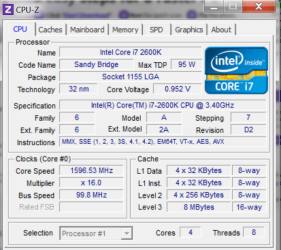
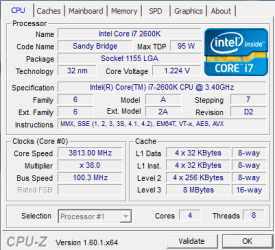
Should look something like this.. (and yes the timed down speeds are normal in idle state)
 

Attachments

  • Untitled.png
    Untitled.png
    187.9 KB · Views: 7

My Computer

Computer Manufacturer/Model Number
Insane hobo technologies. ;-)
OS
Windows 7 x64
CPU
Intel i7 2600k
Motherboard
Asrock z68 extreme 4 gen 3
Memory
G.skill Ripjaw 16gigs @ 1866
Graphics Card(s)
Nvidia gtx580 (evga)
Sound Card
Integrated HD audio + hdmi
Monitor(s) Displays
24" ASUS widescreen + 42" insignia
Screen Resolution
1080p (1920x1080)
Hard Drives
128 Samsung 830
256 Samsung 840
3 x 1tb storage drive (various)
1 western digital 1tb (eSATA)
1 Seagate 1tb (eSATA)
PSU
1 kilowatt SLI/Crossfire rated Silverstone modular
Case
NZXT Phantom + additional 220 fan
Cooling
Zalmann
Keyboard
Microsoft wireless 3000 (v2)
Mouse
MS - wireless 5000 (bluetrack)
Internet Speed
depends on if you ask me or my provider.
Other Info
The above information is provided as is, and the author assumes no responsibility for issues it may cause with your sanity or fanboyism.
If you've done what I think you've done I'm surprised it hasn't exploded on you.

Asus lists DDR3-2133 on its QVL (qualified vendors list) for AlexRD's board (Maximus IV Extreme). That's outside the range specified by Intel, but apparently Asus doesn't regard that as over the top.

AlexRD probably has not done what you think he has done. His BIOS (EFI, really) has settings for that RAM frequency. It's not necessary to do anything insane with the base CPU frequency or multiplier.
 

My Computer

Computer Manufacturer/Model Number
homegrown
OS
Windows 7 Pro X64 SP1
CPU
Intel Core I7-3930k
Motherboard
Asus P9X79 Pro
Memory
16 GB Gskill DDR3-2133
Graphics Card(s)
eVGA GTX680
Sound Card
Creative X-Fi Titanium
Monitor(s) Displays
As PA246Q
Screen Resolution
1920 X 1200
Hard Drives
Corsair Force GT, 120 GB
WDC 1.5TB Caviar Black
PSU
PCP&C Silencer 750 Crossfire
Case
Silverstone FT02
Cooling
Noctua NH-D14
Keyboard
cheap Logitech USB
Mouse
Microsoft Intellimouse Explorer (old optical) USB
Internet Speed
6Mb cable
Other Info
Pioneer BDR-205
Samsung SH-203B
Monsoon 5.1 speakers
If you've done what I think you've done I'm surprised it hasn't exploded on you.

His and, oh let's say Thousands of others who are doing the same ;)
 

My Computer

Computer type
PC/Desktop
Computer Manufacturer/Model Number
Systems by SmartEyeball
OS
8 Pro x64
CPU
i7 3770K 4.6GHz
Motherboard
ASUS P8Z77 WS
Memory
16GB G.Skill Trident X 2666mhz
Graphics Card(s)
x2 EVGA 780 Ti Superclocked SLI
Sound Card
SB X-FI Surround 5.1 PRO USB / ATH-AD900 Headphones
Monitor(s) Displays
x3 Dell U2410 / 58" Samsung
Screen Resolution
5760*1200/ 1920*1200
Hard Drives
2x Intel 520 240GB (RAID 0) * 2x WD Caviar Blacks 2TB (RAID 0) * 2TB WD Caviar Black * Sony Optirac DVD
PSU
Silverstone Strider Evolution 1200W
Case
Thermaltake Level 10 GT Snow Edition
Cooling
Noctua NH-D14
Keyboard
Topre Realforce // Ducky Shine MX Black // Filco Ninja TKL
Mouse
Thermaltake Theron (Highly Recommended) + Razer Imperator
Antivirus
MSE
Browser
IE, FF, WaterFox
Other Info
GT Extreme V2 Sim Racing Cockpit + 40" LCD and K/B Mouse stand ▼
Fanatec CSR Elite Wheel + Clubsport V1 Pedals + CSR shifter/7G-H ▼Saitek X52 Pro ▼ TrackIR 5 Pro
Buttkicker v2 Seat Rumbler with Dedicated 5.1 and Sub Woofer attached to frame ▼
=
Bloody Big Grin
FWIW I recently fitted an Arctic Freezer 13 Pro cooler and my i5 2500 dropped form an average of 42-44C and now idles at 27C and bounces 33-34C occasionally.

Mind you that is FWIW of course cos I don't game but do have my room temp around 25C.
 

My Computer

Computer type
PC/Desktop
Computer Manufacturer/Model Number
Own build (new) Desk1 / Asus ROG Win 7 / Desk2 1st build
OS
Desk1 7 Home Prem / Desk2 10 Pro / Main lap Asus ROG 10 Pro 2 laptop Toshiba 7 Pro Asus P2520 7 & 10
CPU
Desk1 i5 3750K / Laptop i7 GTX 860M / Desk2 i5 2500
Motherboard
Desk1 Asus P877-V / Desk2 Gigabyte H67 UD3H / Laptop ?
Memory
Desk1 8GB (1866) / Desk2 16GB (1333) / Laptop 8Gb DDR3
Graphics Card(s)
Desk 1& 2NVidia GTX 650 & Laptops on board Intel
Sound Card
Desk 1 & 2 -XONAR DG Realtek High Def audio Laptop
Monitor(s) Displays
Desk 1 Benq HD 2450 / Desk2 Philips 24" / Laptop 17.5"
Screen Resolution
1920x1080 D1 & D2 & Laptop 1
Hard Drives
Desk1 Samsung 120GB 830 SSD
Asus ROG 256GB 850 Pro SSD
Desk2 Samsung 840 256 SSD
Toshiba 120GB EVO
PSU
Desk 1 Corsair HX 1050/ Laptop ? / Desk 2 Corsair HX 650
Case
Desk 1 Cooler HAF XM ? Toshiba laptop / Desk2 Coolermaster
Cooling
Fans on all Desk1 -2 Desk2 - all Coolermasters 5 Laptop ?
Keyboard
Desk 1 MS Sidewinder X6 Desk 2 MS Sidewinder X 4
Mouse
Desk 1&2 - Gigabyte MS 900 gamer - laptop - Logitec wireless
Internet Speed
ADSL2+
Other Info
One other Desktop (tester) and spare Toshba laptop both with SSD's
Running Kaspersky 2016 ISS on all machines config'd identically
Logitec audio stereo systems on each machine (x3)
Canon MG5250MFC
Router/modem TP-Link running WPA2SK
So as per my post #11 you may want to simply reapply some thermal paste and see how you go.
 

My Computer

Computer type
PC/Desktop
Computer Manufacturer/Model Number
Own build
OS
Windows 7x64 Home Premium SP1
CPU
Intel i7 2600k
Motherboard
ASUS P8Z68 Deluxe
Memory
G.Skill Ripjaws (DDR3-1600) 2x4GB
Graphics Card(s)
Nvidia GeForce GTS 450; Intel HD Graphics 3000(GT2+)
Monitor(s) Displays
Dell Ultrasharp IPS panel U2311H, Samsung SyncMaster P2350
Screen Resolution
1920x1080
Hard Drives
Samsung 850 Pro SSD 256GB, Samsung SSD 840 120GB, Seagates 1TB Barracuda ST31000528AS x2
PSU
Seasonic M12II 520W
Case
Lian Li Lancool PC-K60
Cooling
Case: 1x120mm, 3x140mm CPU: Hyper 212+
Keyboard
Logitech MK520 (wireless)
Mouse
Logitech MK520
Internet Speed
6-7 Mbps
Antivirus
Norton Security Premium, Malwarebytes on 2 (MSE on 3rd PC)
Browser
FireFox
Other Info
Audio: Logitech Z523 2.1
....ah see if I set my ram like that my chip would be at about 5.8 ghz.
I just use the xmp.
 

My Computer

Computer Manufacturer/Model Number
Insane hobo technologies. ;-)
OS
Windows 7 x64
CPU
Intel i7 2600k
Motherboard
Asrock z68 extreme 4 gen 3
Memory
G.skill Ripjaw 16gigs @ 1866
Graphics Card(s)
Nvidia gtx580 (evga)
Sound Card
Integrated HD audio + hdmi
Monitor(s) Displays
24" ASUS widescreen + 42" insignia
Screen Resolution
1080p (1920x1080)
Hard Drives
128 Samsung 830
256 Samsung 840
3 x 1tb storage drive (various)
1 western digital 1tb (eSATA)
1 Seagate 1tb (eSATA)
PSU
1 kilowatt SLI/Crossfire rated Silverstone modular
Case
NZXT Phantom + additional 220 fan
Cooling
Zalmann
Keyboard
Microsoft wireless 3000 (v2)
Mouse
MS - wireless 5000 (bluetrack)
Internet Speed
depends on if you ask me or my provider.
Other Info
The above information is provided as is, and the author assumes no responsibility for issues it may cause with your sanity or fanboyism.
Here is a snapshot of CPUZ:

By the way, my CPU isn't under stress right there, so i have no idea why its on turbo mode when it should really idling. Nevermind, high performance power plan did that.

Also, regarding the 2133 MHz setting, i don't think that was the problem, as i've used this setting for six months, and the overheating started something like a week ago. When i first bought it, (and set it to 2133 MHz) i ran a 48h stress test. No high temps.

By the way, why is your core voltage at 0.952?
 

Attachments

  • CPUZINFO.png
    CPUZINFO.png
    26.2 KB · Views: 7

My Computer

Computer Manufacturer/Model Number
Custom Built
OS
Windows 7 Professional x64
CPU
Intel Core i7 2600k - 3.4 GHz
Motherboard
Asus Maximus IV Z68 - Extreme
Memory
4x4 Ripjaws X79 Series 2133 MHz (9-11-10-28)
Graphics Card(s)
1x eVGA GTX 580 - 3GB Classified
Sound Card
Realtek ALC 889 HD Audio
Monitor(s) Displays
Full HD Philips TV 32"
Screen Resolution
1920x1080
Hard Drives
1x Crucial m4 SSD 512 GB
PSU
800W Coolermaster Silentpro Gold
Case
Sentey - Renegade GS-6200
Cooling
Stock
Keyboard
Logitech K800 Wireless
Mouse
Logitech Performance MX Laser
Internet Speed
10MB Internet Connection
What is the ram voltage set to?

The board lists the 2133 ram because it also accepts the Extreme Edition CPU's which have a faster memory controller.

Core voltage varies with core speed Intel Speedstep(EIST) if enabled varies the core speed and voltages to reduce heat and conserve power when the CPU is under light load.
 

My Computer

OS
Win 7
Back
Top