Intel 2600k Overheating

When you over clock the memory you are over heating the cpu because the memory controler is onboard the cpu.
Yes jacking up the settings on the ram is concidered overclocking.
Here is Intels specs.
http://ark.intel.com/products/52214/
 

My Computer

Computer type
PC/Desktop
Computer Manufacturer/Model Number
Home made Desktop
OS
Windows 10 Pro. 64/ version 1709 Windows 7 Pro/64
CPU
Intel i7-6800K @ 4.3
Motherboard
ASUS X-99 Deluxe II
Memory
Corsair Platinum 16 gig @2400
Graphics Card(s)
EVGA GTX 1070 OC
Monitor(s) Displays
Asus 27" LED LCD/VE278Q
Screen Resolution
1920-1080 or 1280-720 HDMI
Hard Drives
INTEL SSD 730-240 Gb Sata 3.0/
PSU
EVGA Platium 1200W
Case
Phanteks Luxe Tempered Glass 8 fans/ one radiator
Cooling
XSPC/ Water Cooled CPU
Keyboard
Das 4 Professional
Mouse
Logitech M705/MX Anywhere 2-S
Internet Speed
100 mbits
Antivirus
Microsoft Security Essentials/ Malwarebytes Premium 3.0/ SAS
Browser
I.E. 11 default/Firefox/ ISP Time Warner Cable/Spectrum
Other Info
LG BluRay Burner/
Sound system-KLipsch-THX/
Icy Dock ssd Hot Swap bays.
The board lists the 2133 ram because it also accepts the Extreme Edition CPU's which have a faster memory controller.

Can you provide an example of a Sandy Bridge Socket 1155 Extreme Edition CPU?
 

My Computer

Computer Manufacturer/Model Number
homegrown
OS
Windows 7 Pro X64 SP1
CPU
Intel Core I7-3930k
Motherboard
Asus P9X79 Pro
Memory
16 GB Gskill DDR3-2133
Graphics Card(s)
eVGA GTX680
Sound Card
Creative X-Fi Titanium
Monitor(s) Displays
As PA246Q
Screen Resolution
1920 X 1200
Hard Drives
Corsair Force GT, 120 GB
WDC 1.5TB Caviar Black
PSU
PCP&C Silencer 750 Crossfire
Case
Silverstone FT02
Cooling
Noctua NH-D14
Keyboard
cheap Logitech USB
Mouse
Microsoft Intellimouse Explorer (old optical) USB
Internet Speed
6Mb cable
Other Info
Pioneer BDR-205
Samsung SH-203B
Monsoon 5.1 speakers
When you over clock the memory you are over heating the cpu because the memory controler is onboard the cpu.
Yes jacking up the settings on the ram is concidered overclocking.
Here is Intels specs.
http://ark.intel.com/products/52214/

I'm skeptical.

While clearly DDR3-2133 is outside the Intel specs, how much additional power is dissipated in the CPU? (I have no idea.)

Simple enough to test. Revert to the default settings, which will run the RAM at DDR3-1333.
 

My Computer

Computer Manufacturer/Model Number
homegrown
OS
Windows 7 Pro X64 SP1
CPU
Intel Core I7-3930k
Motherboard
Asus P9X79 Pro
Memory
16 GB Gskill DDR3-2133
Graphics Card(s)
eVGA GTX680
Sound Card
Creative X-Fi Titanium
Monitor(s) Displays
As PA246Q
Screen Resolution
1920 X 1200
Hard Drives
Corsair Force GT, 120 GB
WDC 1.5TB Caviar Black
PSU
PCP&C Silencer 750 Crossfire
Case
Silverstone FT02
Cooling
Noctua NH-D14
Keyboard
cheap Logitech USB
Mouse
Microsoft Intellimouse Explorer (old optical) USB
Internet Speed
6Mb cable
Other Info
Pioneer BDR-205
Samsung SH-203B
Monsoon 5.1 speakers
Funnily enough, i reverted to automatic settings ( 1333 ) and the CPU still overheats when under stress (80C)
 

My Computer

Computer Manufacturer/Model Number
Custom Built
OS
Windows 7 Professional x64
CPU
Intel Core i7 2600k - 3.4 GHz
Motherboard
Asus Maximus IV Z68 - Extreme
Memory
4x4 Ripjaws X79 Series 2133 MHz (9-11-10-28)
Graphics Card(s)
1x eVGA GTX 580 - 3GB Classified
Sound Card
Realtek ALC 889 HD Audio
Monitor(s) Displays
Full HD Philips TV 32"
Screen Resolution
1920x1080
Hard Drives
1x Crucial m4 SSD 512 GB
PSU
800W Coolermaster Silentpro Gold
Case
Sentey - Renegade GS-6200
Cooling
Stock
Keyboard
Logitech K800 Wireless
Mouse
Logitech Performance MX Laser
Internet Speed
10MB Internet Connection
No two computers are the same. Most certainly no two cpu's are the same. Applies and Oranges.
If you are using Prime 95 100% torture test at 80 C that IMHO is okay. Your chances of working your computer that hard under normal use are slim. That doesn't mean that better cooling wouldn't help. Keeping in mind that no two systems are the same. When I clock my computer a lot I gain about 10c in temp over stock (default) with 100% load to about 80 to 82C. I'm at default now because the ambient temps are very hot 32-33C. No one can tell every thing over a Forum because your computer is where you are and were not. Use your computer as you would normally and monitor your temps. If you want better temps, my best guess would be better cpu cooling. Other than fun I really haven't seen any advantage overclocking today's computers.
 

My Computer

Computer type
PC/Desktop
Computer Manufacturer/Model Number
Home made Desktop
OS
Windows 10 Pro. 64/ version 1709 Windows 7 Pro/64
CPU
Intel i7-6800K @ 4.3
Motherboard
ASUS X-99 Deluxe II
Memory
Corsair Platinum 16 gig @2400
Graphics Card(s)
EVGA GTX 1070 OC
Monitor(s) Displays
Asus 27" LED LCD/VE278Q
Screen Resolution
1920-1080 or 1280-720 HDMI
Hard Drives
INTEL SSD 730-240 Gb Sata 3.0/
PSU
EVGA Platium 1200W
Case
Phanteks Luxe Tempered Glass 8 fans/ one radiator
Cooling
XSPC/ Water Cooled CPU
Keyboard
Das 4 Professional
Mouse
Logitech M705/MX Anywhere 2-S
Internet Speed
100 mbits
Antivirus
Microsoft Security Essentials/ Malwarebytes Premium 3.0/ SAS
Browser
I.E. 11 default/Firefox/ ISP Time Warner Cable/Spectrum
Other Info
LG BluRay Burner/
Sound system-KLipsch-THX/
Icy Dock ssd Hot Swap bays.
Funnily enough, i reverted to automatic settings ( 1333 ) and the CPU still overheats when under stress (80C)
Not good AlexRD.
Be bold try the thermal paste solution. You don't need to remove the CPU chip just the heatsink fan. Just be patient and work slowly.

To add: try to get the two surfaces totally clean as possible. Small particles such as lint will reduce the heat transfer.
 
Last edited:

My Computer

Computer type
PC/Desktop
Computer Manufacturer/Model Number
Own build
OS
Windows 7x64 Home Premium SP1
CPU
Intel i7 2600k
Motherboard
ASUS P8Z68 Deluxe
Memory
G.Skill Ripjaws (DDR3-1600) 2x4GB
Graphics Card(s)
Nvidia GeForce GTS 450; Intel HD Graphics 3000(GT2+)
Monitor(s) Displays
Dell Ultrasharp IPS panel U2311H, Samsung SyncMaster P2350
Screen Resolution
1920x1080
Hard Drives
Samsung 850 Pro SSD 256GB, Samsung SSD 840 120GB, Seagates 1TB Barracuda ST31000528AS x2
PSU
Seasonic M12II 520W
Case
Lian Li Lancool PC-K60
Cooling
Case: 1x120mm, 3x140mm CPU: Hyper 212+
Keyboard
Logitech MK520 (wireless)
Mouse
Logitech MK520
Internet Speed
6-7 Mbps
Antivirus
Norton Security Premium, Malwarebytes on 2 (MSE on 3rd PC)
Browser
FireFox
Other Info
Audio: Logitech Z523 2.1
With a modern copper core heatsink (which is oem with the chip) the heat shouldn't even really be that bad if no thermal compound was used at all.
 

My Computer

Computer Manufacturer/Model Number
Insane hobo technologies. ;-)
OS
Windows 7 x64
CPU
Intel i7 2600k
Motherboard
Asrock z68 extreme 4 gen 3
Memory
G.skill Ripjaw 16gigs @ 1866
Graphics Card(s)
Nvidia gtx580 (evga)
Sound Card
Integrated HD audio + hdmi
Monitor(s) Displays
24" ASUS widescreen + 42" insignia
Screen Resolution
1080p (1920x1080)
Hard Drives
128 Samsung 830
256 Samsung 840
3 x 1tb storage drive (various)
1 western digital 1tb (eSATA)
1 Seagate 1tb (eSATA)
PSU
1 kilowatt SLI/Crossfire rated Silverstone modular
Case
NZXT Phantom + additional 220 fan
Cooling
Zalmann
Keyboard
Microsoft wireless 3000 (v2)
Mouse
MS - wireless 5000 (bluetrack)
Internet Speed
depends on if you ask me or my provider.
Other Info
The above information is provided as is, and the author assumes no responsibility for issues it may cause with your sanity or fanboyism.
Alright, i'll first try the thermal paste solution today, then if it doesn't work i'll try an aftermarket cooler.

Will any paste do? Or is there a specific brand i should be looking out for?
 

My Computer

Computer Manufacturer/Model Number
Custom Built
OS
Windows 7 Professional x64
CPU
Intel Core i7 2600k - 3.4 GHz
Motherboard
Asus Maximus IV Z68 - Extreme
Memory
4x4 Ripjaws X79 Series 2133 MHz (9-11-10-28)
Graphics Card(s)
1x eVGA GTX 580 - 3GB Classified
Sound Card
Realtek ALC 889 HD Audio
Monitor(s) Displays
Full HD Philips TV 32"
Screen Resolution
1920x1080
Hard Drives
1x Crucial m4 SSD 512 GB
PSU
800W Coolermaster Silentpro Gold
Case
Sentey - Renegade GS-6200
Cooling
Stock
Keyboard
Logitech K800 Wireless
Mouse
Logitech Performance MX Laser
Internet Speed
10MB Internet Connection
Their are many types and brands to read reviews. Like in post # 3, the one that has always worked for me is Artic Silver.
http://www.arcticsilver.com/as5.htm
Their are some that try many and then test. If you want to keep taking your cooler on and off for testing different ones, it's a pain. It's very important to apply thermal compound properly. To much compound will raise the temps.
 

My Computer

Computer type
PC/Desktop
Computer Manufacturer/Model Number
Home made Desktop
OS
Windows 10 Pro. 64/ version 1709 Windows 7 Pro/64
CPU
Intel i7-6800K @ 4.3
Motherboard
ASUS X-99 Deluxe II
Memory
Corsair Platinum 16 gig @2400
Graphics Card(s)
EVGA GTX 1070 OC
Monitor(s) Displays
Asus 27" LED LCD/VE278Q
Screen Resolution
1920-1080 or 1280-720 HDMI
Hard Drives
INTEL SSD 730-240 Gb Sata 3.0/
PSU
EVGA Platium 1200W
Case
Phanteks Luxe Tempered Glass 8 fans/ one radiator
Cooling
XSPC/ Water Cooled CPU
Keyboard
Das 4 Professional
Mouse
Logitech M705/MX Anywhere 2-S
Internet Speed
100 mbits
Antivirus
Microsoft Security Essentials/ Malwarebytes Premium 3.0/ SAS
Browser
I.E. 11 default/Firefox/ ISP Time Warner Cable/Spectrum
Other Info
LG BluRay Burner/
Sound system-KLipsch-THX/
Icy Dock ssd Hot Swap bays.
The truth of the matter is I don't think the brand of thermal compound is nearly so important as we make certain there is some there.

That chip shouldn't be hitting those temps especially not now that we've even reduced his ram to speed.
 

My Computer

Computer Manufacturer/Model Number
Insane hobo technologies. ;-)
OS
Windows 7 x64
CPU
Intel i7 2600k
Motherboard
Asrock z68 extreme 4 gen 3
Memory
G.skill Ripjaw 16gigs @ 1866
Graphics Card(s)
Nvidia gtx580 (evga)
Sound Card
Integrated HD audio + hdmi
Monitor(s) Displays
24" ASUS widescreen + 42" insignia
Screen Resolution
1080p (1920x1080)
Hard Drives
128 Samsung 830
256 Samsung 840
3 x 1tb storage drive (various)
1 western digital 1tb (eSATA)
1 Seagate 1tb (eSATA)
PSU
1 kilowatt SLI/Crossfire rated Silverstone modular
Case
NZXT Phantom + additional 220 fan
Cooling
Zalmann
Keyboard
Microsoft wireless 3000 (v2)
Mouse
MS - wireless 5000 (bluetrack)
Internet Speed
depends on if you ask me or my provider.
Other Info
The above information is provided as is, and the author assumes no responsibility for issues it may cause with your sanity or fanboyism.
But (I'm sounding like a broken record) don't apply too much thermal paste and make sure your surfaces are very (lint free) clean. Coffee filter paper + high purity Isopropyl alcohol.

Of course your stock cooler is working? Have you checked the RPM.
 

My Computer

Computer type
PC/Desktop
Computer Manufacturer/Model Number
Own build
OS
Windows 7x64 Home Premium SP1
CPU
Intel i7 2600k
Motherboard
ASUS P8Z68 Deluxe
Memory
G.Skill Ripjaws (DDR3-1600) 2x4GB
Graphics Card(s)
Nvidia GeForce GTS 450; Intel HD Graphics 3000(GT2+)
Monitor(s) Displays
Dell Ultrasharp IPS panel U2311H, Samsung SyncMaster P2350
Screen Resolution
1920x1080
Hard Drives
Samsung 850 Pro SSD 256GB, Samsung SSD 840 120GB, Seagates 1TB Barracuda ST31000528AS x2
PSU
Seasonic M12II 520W
Case
Lian Li Lancool PC-K60
Cooling
Case: 1x120mm, 3x140mm CPU: Hyper 212+
Keyboard
Logitech MK520 (wireless)
Mouse
Logitech MK520
Internet Speed
6-7 Mbps
Antivirus
Norton Security Premium, Malwarebytes on 2 (MSE on 3rd PC)
Browser
FireFox
Other Info
Audio: Logitech Z523 2.1
But (I'm sounding like a broken record) don't apply too much thermal paste and make sure your surfaces are very (lint free) clean. Coffee filter paper + high purity Isopropyl alcohol.

Of course your stock cooler is working? Have you checked the RPM.
Hum MJF I use that Arctic cleaning kit which has a very good final prep solution too as getting the old stuff off was easy and although the chip looked clean the final clean came up still showing traces of grey compound.

I did try that nano diamond stuff too (No7 mix) - very difficult to spread and it is supposed to fill in even smaller gaps than the silver. Anyway the end result was about the same temps as Arctic Silver.

But as per previous post I found the Arctic Freezer 13 Pro gave me the best returns for temps
Arctic Cooling Freezer 13 Pro CPU Cooler [AC-FRZER-13PRO] - $49.00 : PC Case Gear
 

My Computer

Computer type
PC/Desktop
Computer Manufacturer/Model Number
Own build (new) Desk1 / Asus ROG Win 7 / Desk2 1st build
OS
Desk1 7 Home Prem / Desk2 10 Pro / Main lap Asus ROG 10 Pro 2 laptop Toshiba 7 Pro Asus P2520 7 & 10
CPU
Desk1 i5 3750K / Laptop i7 GTX 860M / Desk2 i5 2500
Motherboard
Desk1 Asus P877-V / Desk2 Gigabyte H67 UD3H / Laptop ?
Memory
Desk1 8GB (1866) / Desk2 16GB (1333) / Laptop 8Gb DDR3
Graphics Card(s)
Desk 1& 2NVidia GTX 650 & Laptops on board Intel
Sound Card
Desk 1 & 2 -XONAR DG Realtek High Def audio Laptop
Monitor(s) Displays
Desk 1 Benq HD 2450 / Desk2 Philips 24" / Laptop 17.5"
Screen Resolution
1920x1080 D1 & D2 & Laptop 1
Hard Drives
Desk1 Samsung 120GB 830 SSD
Asus ROG 256GB 850 Pro SSD
Desk2 Samsung 840 256 SSD
Toshiba 120GB EVO
PSU
Desk 1 Corsair HX 1050/ Laptop ? / Desk 2 Corsair HX 650
Case
Desk 1 Cooler HAF XM ? Toshiba laptop / Desk2 Coolermaster
Cooling
Fans on all Desk1 -2 Desk2 - all Coolermasters 5 Laptop ?
Keyboard
Desk 1 MS Sidewinder X6 Desk 2 MS Sidewinder X 4
Mouse
Desk 1&2 - Gigabyte MS 900 gamer - laptop - Logitec wireless
Internet Speed
ADSL2+
Other Info
One other Desktop (tester) and spare Toshba laptop both with SSD's
Running Kaspersky 2016 ISS on all machines config'd identically
Logitec audio stereo systems on each machine (x3)
Canon MG5250MFC
Router/modem TP-Link running WPA2SK
I've only done this a few times myself and read a bit about it. I think some grey are probably ok as long you don't have lint type particles on the surface. In Australia Dick Smith used to sell ISO PRO which is 99.7% pure isopropyl alcohol which is what I use. I think in the US drug stores sell high purity isopropyl alcohol and it's quite cheap. I wouldn't use tissues or absorbent paper towels. The coffee filter paper is great.

The way I see it is the clean surface which when magnified is a jagged surface. The Artic Silver people recommend that once the surface is clean you apply a very light smear to the surface then wipe off as much as possible without the cleaning fluid. This fills in the "valleys". Then apply thin lines over the core positions. Heat will then spead it. The objective is to get the thinnest layer between all parts of the CPU top case and the heat sink. Too much thermal paste increases the thermal resistance. As I say this is my view and putting on great mounds of the stuff is counter productive.
 

My Computer

Computer type
PC/Desktop
Computer Manufacturer/Model Number
Own build
OS
Windows 7x64 Home Premium SP1
CPU
Intel i7 2600k
Motherboard
ASUS P8Z68 Deluxe
Memory
G.Skill Ripjaws (DDR3-1600) 2x4GB
Graphics Card(s)
Nvidia GeForce GTS 450; Intel HD Graphics 3000(GT2+)
Monitor(s) Displays
Dell Ultrasharp IPS panel U2311H, Samsung SyncMaster P2350
Screen Resolution
1920x1080
Hard Drives
Samsung 850 Pro SSD 256GB, Samsung SSD 840 120GB, Seagates 1TB Barracuda ST31000528AS x2
PSU
Seasonic M12II 520W
Case
Lian Li Lancool PC-K60
Cooling
Case: 1x120mm, 3x140mm CPU: Hyper 212+
Keyboard
Logitech MK520 (wireless)
Mouse
Logitech MK520
Internet Speed
6-7 Mbps
Antivirus
Norton Security Premium, Malwarebytes on 2 (MSE on 3rd PC)
Browser
FireFox
Other Info
Audio: Logitech Z523 2.1
I've only done this a few times myself and read a bit about it. I think some grey are probably ok as long you don't have lint type particles on the surface. In Australia Dick Smith used to sell ISO PRO which is 99.7% pure isopropyl alcohol which is what I use. I think in the US drug stores sell high purity isopropyl alcohol and it's quite cheap. I wouldn't use tissues or absorbent paper towels. The coffee filter paper is great.

The way I see it is the clean surface which when magnified is a jagged surface. The Artic Silver people recommend that once the surface is clean you apply a very light smear to the surface then wipe off as much as possible without the cleaning fluid. This fills in the "valleys". Then apply thin lines over the core positions. Heat will then spead it. The objective is to get the thinnest layer between all parts of the CPU top case and the heat sink. Too much thermal paste increases the thermal resistance. As I say this is my view and putting on great mounds of the stuff is counter productive.
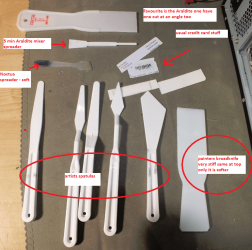
Now I think about MJF what about those cloths one can get for cleaning spectacles they are like a silky based type material and always leave my specs crystal as, and there are some ones that have a rubbery feel about them too and I couldn't agree more with the amount you put on - I found those plastic artists spatulas are the bees knees as they come in all shapes and sizes and not expensive either.
I usually spread real thin on the cooler (stock ones) and just a real thin layer on the heatsink with a tiny dot in the centre where the cooler will be, cos I really dislike that mess you have to clean off some off them a they must back the ruck up and pump it. Same goes for NB and adaptor heatsimks if you can get to them eh?
 

Attachments

  • SPATULAS.PNG
    SPATULAS.PNG
    1.1 MB · Views: 7

My Computer

Computer type
PC/Desktop
Computer Manufacturer/Model Number
Own build (new) Desk1 / Asus ROG Win 7 / Desk2 1st build
OS
Desk1 7 Home Prem / Desk2 10 Pro / Main lap Asus ROG 10 Pro 2 laptop Toshiba 7 Pro Asus P2520 7 & 10
CPU
Desk1 i5 3750K / Laptop i7 GTX 860M / Desk2 i5 2500
Motherboard
Desk1 Asus P877-V / Desk2 Gigabyte H67 UD3H / Laptop ?
Memory
Desk1 8GB (1866) / Desk2 16GB (1333) / Laptop 8Gb DDR3
Graphics Card(s)
Desk 1& 2NVidia GTX 650 & Laptops on board Intel
Sound Card
Desk 1 & 2 -XONAR DG Realtek High Def audio Laptop
Monitor(s) Displays
Desk 1 Benq HD 2450 / Desk2 Philips 24" / Laptop 17.5"
Screen Resolution
1920x1080 D1 & D2 & Laptop 1
Hard Drives
Desk1 Samsung 120GB 830 SSD
Asus ROG 256GB 850 Pro SSD
Desk2 Samsung 840 256 SSD
Toshiba 120GB EVO
PSU
Desk 1 Corsair HX 1050/ Laptop ? / Desk 2 Corsair HX 650
Case
Desk 1 Cooler HAF XM ? Toshiba laptop / Desk2 Coolermaster
Cooling
Fans on all Desk1 -2 Desk2 - all Coolermasters 5 Laptop ?
Keyboard
Desk 1 MS Sidewinder X6 Desk 2 MS Sidewinder X 4
Mouse
Desk 1&2 - Gigabyte MS 900 gamer - laptop - Logitec wireless
Internet Speed
ADSL2+
Other Info
One other Desktop (tester) and spare Toshba laptop both with SSD's
Running Kaspersky 2016 ISS on all machines config'd identically
Logitec audio stereo systems on each machine (x3)
Canon MG5250MFC
Router/modem TP-Link running WPA2SK
Back
Top