Intel display adapter causing problem

HT2013

New member
Local time
9:38 AM
Messages
37
Hello everyone.
I am facing a problem and would like to get some help.
My laptop started getting prob last month. It rebooted and then got prob at the startup.
First i thought this is because of my avast internet security, so i uninstalled it but it didn't help.

In Safe mode with networking, i was unable to connect to the internet.
I did many experiments,so that i can run the windows in normal mode and finally i found a way.
Out of the 2 display adapters, i disabled "Intel (R) HD graphics" and now my windows is running fine.

I know the performance is not good but that's okay. The only prob is that i am not able to use the
hibernation which i need very much.

So please help me. i am not good in tech, so fixing such things isn't easy for me.

PS: Its a windows 7 pro. Check disk scan, full anti virus scan etc already performed.
 

My Computer

Computer type
Laptop
Computer Manufacturer/Model Number
HP tm2t
OS
Windows 7 Pro 64 bit
CPU
Intel i5
Memory
8 GB
Hard Drives
500 GB
Antivirus
Avast Internet Security
Hello everyone.
I am facing a problem and would like to get some help.
My laptop started getting prob last month. It rebooted and then got prob at the startup.
First i thought this is because of my avast internet security, so i uninstalled it but it didn't help.

In Safe mode with networking, i was unable to connect to the internet.
I did many experiments,so that i can run the windows in normal mode and finally i found a way.
Out of the 2 display adapters, i disabled "Intel (R) HD graphics" and now my windows is running fine.

I know the performance is not good but that's okay. The only prob is that i am not able to use the
hibernation which i need very much.

So please help me. i am not good in tech, so fixing such things isn't easy for me.

PS: Its a windows 7 pro. Check disk scan, full anti virus scan etc already performed.
What's the computer brand and specs? How old is the computer? The graphics card may be failing, not an unusual occurrence or there could be a software conflict, have you installed any third party apps related to graphics or monitoring system hardware? Recent MS update that included graphics drivers?
 

My Computer

Computer type
PC/Desktop
OS
Multiple Windows 7 and Linux
Thanks fore replying.
There are few windows updates pending. I did try to install them but none of them resolved the issue, then i did a system restore.
Few are: security monthly quality roll up
Advanced Micro driver media 3/21/2016
July 2017 preview of quality rollup for .net

I can't recall i installed any new app or software. BTW, Its few years old HP tm2 touchsmart.
 

My Computer

Computer type
Laptop
Computer Manufacturer/Model Number
HP tm2t
OS
Windows 7 Pro 64 bit
CPU
Intel i5
Memory
8 GB
Hard Drives
500 GB
Antivirus
Avast Internet Security
Thanks fore replying.
There are few windows updates pending. I did try to install them but none of them resolved the issue, then i did a system restore.
Few are: security monthly quality roll up
Advanced Micro driver media 3/21/2016
July 2017 preview of quality rollup for .net

I can't recall i installed any new app or software. BTW, Its few years old HP tm2 touchsmart.
Okay, there have been some issues with the Advanced Micro driver media update, did you uninstall that update?
 

My Computer

Computer type
PC/Desktop
OS
Multiple Windows 7 and Linux
Okay, there have been some issues with the Advanced Micro driver media update, did you uninstall that update?
Yes, its shown under optional updates. Yet to install.
 

My Computer

Computer type
Laptop
Computer Manufacturer/Model Number
HP tm2t
OS
Windows 7 Pro 64 bit
CPU
Intel i5
Memory
8 GB
Hard Drives
500 GB
Antivirus
Avast Internet Security
Yes, its shown under optional updates. Yet to install.
Uuuummmm. Does HP have a diagnostics in BIOs? If you haven't already you might want to run it, it will tell you if your graphics card is failing.
 

My Computer

Computer type
PC/Desktop
OS
Multiple Windows 7 and Linux

My Computer

Computer type
Laptop
Computer Manufacturer/Model Number
HP tm2t
OS
Windows 7 Pro 64 bit
CPU
Intel i5
Memory
8 GB
Hard Drives
500 GB
Antivirus
Avast Internet Security
should i download and use the first tool ? HP PC Hardware Diagnostics | HP® Official Site
You probably don't need it as you said your computer was only a couple of years old therefore the diagnostic tool is already in your BIOs.

Running the test from the startup screen (boot) If your computer was manufactured in 2008 or later, you may be able to run a hardware diagnostic test during the startup process. To do so, turn on the computer and press the F9 key during the screen with the HP or Compaq logo.
Figure : Example of Boot screen that displays the key press to enter the BIOS test.
c05350724.jpg

Diagnostic Tools opens and performs a variety of hardware tests. Green checkmarks appear next to hardware items that pass the test. Any problems found are reported.
Figure : Screen example: Diagnostic Tools test
c05350725.jpg
 

My Computer

Computer type
PC/Desktop
OS
Multiple Windows 7 and Linux
Thanks you for the details.Although its older than a couple of years but not older than 2008 for sure.
Let me test and post the results.
 

My Computer

Computer type
Laptop
Computer Manufacturer/Model Number
HP tm2t
OS
Windows 7 Pro 64 bit
CPU
Intel i5
Memory
8 GB
Hard Drives
500 GB
Antivirus
Avast Internet Security
Thanks you for the details.Although its older than a couple of years but not older than 2008 for sure.
Let me test and post the results.
Just be aware that a full diagnostic could take up to two hours to complete.
 

My Computer

Computer type
PC/Desktop
OS
Multiple Windows 7 and Linux
I tried it but could only find a test for hdd and memory. do i need to download that diagnostic tool from p website ?
 

My Computer

Computer type
Laptop
Computer Manufacturer/Model Number
HP tm2t
OS
Windows 7 Pro 64 bit
CPU
Intel i5
Memory
8 GB
Hard Drives
500 GB
Antivirus
Avast Internet Security
I tried it but could only find a test for hdd and memory. do i need to download that diagnostic tool from p website ?
From the HP support site? Yes, if it's not as comprehensive as to test all hardware you can always uninstall it.
 

My Computer

Computer type
PC/Desktop
OS
Multiple Windows 7 and Linux
From the HP support site? Yes, if it's not as comprehensive as to test all hardware you can always uninstall it.
No, i tried the default one but didn't find the option. will download and use the HP tool now
 

My Computer

Computer type
Laptop
Computer Manufacturer/Model Number
HP tm2t
OS
Windows 7 Pro 64 bit
CPU
Intel i5
Memory
8 GB
Hard Drives
500 GB
Antivirus
Avast Internet Security
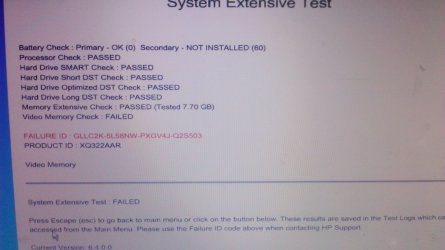
Update: Please see the scan results in the attached screenshot. Although i don't think it did check the display adapter.
 

Attachments

  • DSC_0130.JPG
    DSC_0130.JPG
    872.8 KB · Views: 2

My Computer

Computer type
Laptop
Computer Manufacturer/Model Number
HP tm2t
OS
Windows 7 Pro 64 bit
CPU
Intel i5
Memory
8 GB
Hard Drives
500 GB
Antivirus
Avast Internet Security

My Computer

Computer type
PC/Desktop
OS
Multiple Windows 7 and Linux
Oh, so video memory means display adapter. I don't know how it suddenly got a prob.
I thank you for the help. wouldn't be able to find this much of info without your help.
 

My Computer

Computer type
Laptop
Computer Manufacturer/Model Number
HP tm2t
OS
Windows 7 Pro 64 bit
CPU
Intel i5
Memory
8 GB
Hard Drives
500 GB
Antivirus
Avast Internet Security
Back
Top