
I think my question is this: how do I set up VSX-1124 (a Pioneer AVR) in Control Panel/Sound and Hardware/Sound so that its driver is Realtek HD Audio and not the Intel Display Audio one?
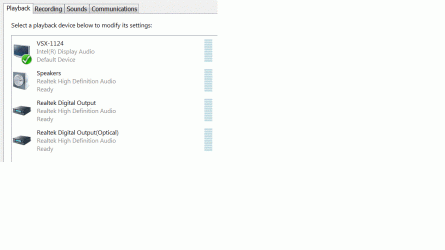
In Device Manager under Sound, Video and game controllers, I have two sound card drivers, Realtek High Definition and Intel Display Audio. I don't understand how Realtek High Definition Audio drivers work in relation to the Intel Display Audio drivers. If I go to Control Panel/Hardware and Sound/Sound then Playback, there are four options, as you can see from the picture below.
I'm guessing that if I choose the receiver as my default device that I'm using the Intel Display Audio drivers and any of the other three options that I'm using the Realtek drivers. Is this correct? If the receiver is the default device, everything works fine; I get sound from sites like cnn.com and I can listen to internet radio, etc. However, if Speakers are the default device, I don't get sound. Is this normal? If so, what's the reason for having Realtek? If it isn't normal, will I notice a difference if I use the Realtek drivers? If I would see/hear a difference, how do I get them to work?
In Device Manager under Sound, Video and game controllers, I have two sound card drivers, Realtek High Definition and Intel Display Audio. I don't understand how Realtek High Definition Audio drivers work in relation to the Intel Display Audio drivers. If I go to Control Panel/Hardware and Sound/Sound then Playback, there are four options, as you can see from the picture below.
I'm guessing that if I choose the receiver as my default device that I'm using the Intel Display Audio drivers and any of the other three options that I'm using the Realtek drivers. Is this correct? If the receiver is the default device, everything works fine; I get sound from sites like cnn.com and I can listen to internet radio, etc. However, if Speakers are the default device, I don't get sound. Is this normal? If so, what's the reason for having Realtek? If it isn't normal, will I notice a difference if I use the Realtek drivers? If I would see/hear a difference, how do I get them to work?
Attachments
Last edited:
My Computer
At a glance
Windows 7 ultimate 64 bitIntel i3-5304 gbOnboard
- Computer type
- PC/Desktop
- OS
- Windows 7 ultimate 64 bit
- CPU
- Intel i3-530
- Motherboard
- Gigabyte GA-H55M-USB3
- Memory
- 4 gb
- Graphics Card(s)
- Onboard
- Sound Card
- Onboard
- Other Info
- It's an HTPC, connected HTPC->HDMI->Pioneer VSX-1124-K->HDMI->Sony KDL-46-W3000


