intel matrix storage manager

gizbug

New member
Power User
Local time
9:16 AM
Messages
115
Save to install the windows vista 64 drivers onto Windows 7 RC 7100?
 

My Computer

OS
Windows 7
CPU
i5
Motherboard
Gigabyte P55-UD3R
Memory
4gb
Graphics Card(s)
8800GTS 512
Sound Card
Auzentech Prelude 7.1
Monitor(s) Displays
HP w2207
Keyboard
G15
Mouse
G5
I'm using Intel Matrix Manager (IATA88ENU.exe) and it works fine in both Windows 7 build 7100 (RC) x86 and x64.
 

My Computer

Computer type
PC/Desktop
Computer Manufacturer/Model Number
Custom Built
OS
Windows 10 Pro x64, Windows 8.1 Pro x64, Windows 7 Ultimate x64 SP1,
CPU
INTEL i9-7920X LGA 2066
Motherboard
Gigabyte X299-WU8 F3
Memory
64 GB (4 X 16 GB) G-Skill V Series DDR4 3200 Quad Channel
Graphics Card(s)
EVGA GTX 1060 SC 3 GB
Sound Card
Realtek Onboard ALC1220
Monitor(s) Displays
2 x Samsung S27E310
Screen Resolution
1920x1080
Hard Drives
Samsung 2 x 970 EVO Plus 500 GB NVMe
1 x 6TB WD 6003FZBX SATA
1 x 6TB WD 60EFRX SATA
12 x 3TB WD 30EFRX SATA
PSU
Seasonic X-1050
Case
Thermaltake Armor+
Cooling
Corsair H80i V2 Liquid AOI Cooler
Keyboard
Logitech G510s
Mouse
Logitech MX Master 2S
Internet Speed
200 Mb/s
Antivirus
ESET NOD32 13.1
Browser
EDGE (Dev, Canary, Beta), Chrome
Other Info
ASUS RT-AC68U router
Malwarebytes 4.0.4
Thanks
 

My Computer

OS
Windows 7
CPU
i5
Motherboard
Gigabyte P55-UD3R
Memory
4gb
Graphics Card(s)
8800GTS 512
Sound Card
Auzentech Prelude 7.1
Monitor(s) Displays
HP w2207
Keyboard
G15
Mouse
G5
I'm using Intel Matrix Manager (IATA88ENU.exe) and it works fine in both Windows 7 build 7100 (RC) x86 and x64.

I'm curious as to "How" you installed these drivers because they are not listed as compatible with the RC doing the pre-install method.
And, when I went ahead anyways & installed them it crashed the installation process to where I had to start all over again without them.

Now, I can install the manually after the the RC installation is complete via Device Manager, but...then I loose the other drivers to where I can't switch from AHCI to IDE mode on the drives which is actually has faster access times than AHCI when running single drive configurations.

What chipset & drive configuration are you running?
IDE
AHCI
RAID

My system specs are below. ;)

So the question is, how did you install these drivers & what version are they as the newest for my board is STOR_allOS_8.7.0.1007_PV.exe 1/9/2009.

 
Last edited:

My Computer

Computer Manufacturer/Model Number
ABS Tech Ultimate X9
OS
Windows® 7 Ultimate x64 SP1
CPU
Intel Core 2 Duo E8400 (E0) @ 4.0GHz
Motherboard
ASUS P5Q Pro Turbo / 1780 FSB
Memory
G.SKILL-F2-8500CL5D-4GBPK (2x2Gbs) (5-5-5-15) @ 1067Mhz
Graphics Card(s)
EVGA GTX 470 SC (845/1690/2000) 160Gbs
Sound Card
VIA HD Audio / Boston Acoustics
Monitor(s) Displays
Acer X222W HD 22" LCD 2500:1 / 5ms
Screen Resolution
1680x1050
Hard Drives
Seagate Barracuda SATAII 2 x 320GB
Seagate Barracuda SATAII 1Tb
Intel® Rapid Storage Technology v10.1.0.1008
AHCI-NCQ Enabled
PSU
Silent Pro GOLD 80 PLUS 800w /95% efficiency / SLI-Crossfire
Case
ABS Stealth Black-Custom
Cooling
CoolerMaster V6GT 6 Heatpipe 200w CPU Cooler
Keyboard
Logitech G15 Gaming Keyboard (Old Style Blue!)
Mouse
Logitech MX518 Gaming Mouse
Internet Speed
1Mbs-up/ 6Mbs-down
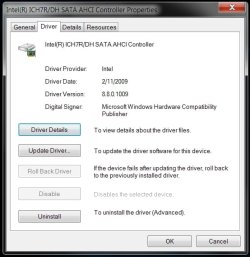
With Windows 7 you do not need to install extra drivers during install for either ACHI or RAID. It will crash if you do. Once installed, then run the Matrix manager software . I am running RAID 1. The driver is 8.8.0.1009 2/11/2009
 

My Computer

Computer type
PC/Desktop
Computer Manufacturer/Model Number
Custom Built
OS
Windows 10 Pro x64, Windows 8.1 Pro x64, Windows 7 Ultimate x64 SP1,
CPU
INTEL i9-7920X LGA 2066
Motherboard
Gigabyte X299-WU8 F3
Memory
64 GB (4 X 16 GB) G-Skill V Series DDR4 3200 Quad Channel
Graphics Card(s)
EVGA GTX 1060 SC 3 GB
Sound Card
Realtek Onboard ALC1220
Monitor(s) Displays
2 x Samsung S27E310
Screen Resolution
1920x1080
Hard Drives
Samsung 2 x 970 EVO Plus 500 GB NVMe
1 x 6TB WD 6003FZBX SATA
1 x 6TB WD 60EFRX SATA
12 x 3TB WD 30EFRX SATA
PSU
Seasonic X-1050
Case
Thermaltake Armor+
Cooling
Corsair H80i V2 Liquid AOI Cooler
Keyboard
Logitech G510s
Mouse
Logitech MX Master 2S
Internet Speed
200 Mb/s
Antivirus
ESET NOD32 13.1
Browser
EDGE (Dev, Canary, Beta), Chrome
Other Info
ASUS RT-AC68U router
Malwarebytes 4.0.4
I'm curious as to "How" you installed these drivers because they are not listed as compatible with the RC doing the pre-install method.
And, when I went ahead anyways & installed them it crashed the installation process to where I had to start all over again without them.

Now, I can install the manually after the the RC installation is complete via Device Manager, but...then I loose the other drivers to where I can't switch from AHCI to IDE mode on the drives which is actually has faster access times than AHCI when running single drive configurations.

What chipset & drive configuration are you running?
IDE
AHCI
RAID

My system specs are below. ;)

So the question is, how did you install these drivers & what version are they as the newest for my board is STOR_allOS_8.7.0.1007_PV.exe 1/9/2009.

You havent had to do an F6 Pre driver install for any kind of RAID be it Intel or nVidia since Windows Vista, all of the pre install drivers are built in. I too am not having any problems with the IMSM software in x64 nor x86 versions on Windows 7.
 

Attachments

  • Untitled.jpg
    Untitled.jpg
    405.6 KB · Views: 1,276

My Computer

OS
Windows 7
Question ???

i have Intel Board, but it cant install any IATA**ENU.exe's ... not older ones or new ome's. Earlier i could do it ( With XP SP2 and Vista 64 )

How did you installed that driver, what were your BIOS settings ???

or did you upgrade Win7 to max and then installed it ?


Kari
 

My Computer

OS
OSX / WIN7
i have Intel Board, but it cant install any IATA**ENU.exe's ... not older ones or new ome's. Earlier i could do it ( With XP SP2 and Vista 64 )

How did you installed that driver, what were your BIOS settings ???

or did you upgrade Win7 to max and then installed it ?


Kari

Hi Kari & Welcome to the Seven Forums! :)
Another member here (scaramonga) pointed me to this fix so I'm not taking credit for this...but here is the fix for this!!!
It's a registry value that has to be changed. Once changed it installs the drivers with no problems at all.
With this fix I now have AHIC set in the bios with NQC enabled! :p

AHIC (Advanced Host Controller Interface) enables native command queuing and hot-plugging through SATA host controllers (Serial-ATA) for your hard drives. In many scenarios it enables more efficient multi-tasking. Vista was the first Windows OS to support AHCI out of the box, where as Windows 7 does the same. But an issue with AHCI is that if you install the OS without enabling AHCI in the BIOS, enabling it after installation will render your OS unusable. This is because Windows disable the AHCI driver since it is not needed during the installation.
There is one way to fix this, although you need to have knowledge of registry editing. The detailed steps from Microsoft are as follows:
To resolve this issue, enable the AHCI driver in the registry before you change the SATA mode of the boot drive. To do this, follow these steps:

  1. Exit all Windows-based programs.
  2. Click Start, type regedit in the Start Search box, and then press ENTER.
  3. If you receive the User Account Control dialog box, click Continue.
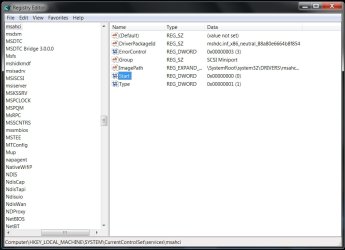
  4. Locate and then click the following registry subkey:
HKEY_LOCAL_MACHINE\System\CurrentControlSet\Services\Msahci

  1. In the right pane, right-click Start in the Name column, and then click Modify.
  2. In the Value data box, type 0, and then click OK.
  3. On the File menu, click Exit to close Registry Editor.
After this you’ll have to restart your computer, go to BIOS and enable AHCI. When you log in to Windows again, you’ll notice the installation of drivers for AHCI. Another restart will be required to finish the driver installation.

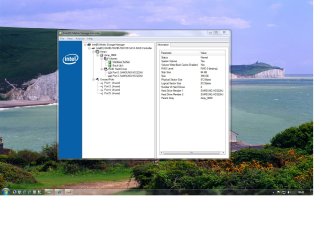
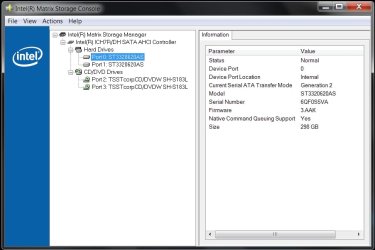
After it does all this, you can then update the drivers to the newest available as I did shown in the screenshots below... ;)
Hope this helps you Kari!
 

Attachments

  • Image 1.jpg
    Image 1.jpg
    154.8 KB · Views: 561
  • Image 0.jpg
    Image 0.jpg
    172.8 KB · Views: 2,516
  • Registry Location of Msahci.jpg
    Registry Location of Msahci.jpg
    240.7 KB · Views: 467
Last edited:

My Computer

Computer Manufacturer/Model Number
ABS Tech Ultimate X9
OS
Windows® 7 Ultimate x64 SP1
CPU
Intel Core 2 Duo E8400 (E0) @ 4.0GHz
Motherboard
ASUS P5Q Pro Turbo / 1780 FSB
Memory
G.SKILL-F2-8500CL5D-4GBPK (2x2Gbs) (5-5-5-15) @ 1067Mhz
Graphics Card(s)
EVGA GTX 470 SC (845/1690/2000) 160Gbs
Sound Card
VIA HD Audio / Boston Acoustics
Monitor(s) Displays
Acer X222W HD 22" LCD 2500:1 / 5ms
Screen Resolution
1680x1050
Hard Drives
Seagate Barracuda SATAII 2 x 320GB
Seagate Barracuda SATAII 1Tb
Intel® Rapid Storage Technology v10.1.0.1008
AHCI-NCQ Enabled
PSU
Silent Pro GOLD 80 PLUS 800w /95% efficiency / SLI-Crossfire
Case
ABS Stealth Black-Custom
Cooling
CoolerMaster V6GT 6 Heatpipe 200w CPU Cooler
Keyboard
Logitech G15 Gaming Keyboard (Old Style Blue!)
Mouse
Logitech MX518 Gaming Mouse
Internet Speed
1Mbs-up/ 6Mbs-down
Duh !

Thanks Muff1n, now it works....

i was stupid - it's the same thing that i had to do with my first Vista 64 - install. With XP i had to write some regkey's (with help, of course)

Now i just need to install Acronis back and voilá : Dualboot Win7 + OSX


Kari
 

My Computer

OS
OSX / WIN7
Thanks Muff1n, now it works....

i was stupid - it's the same thing that i had to do with my first Vista 64 - install. With XP i had to write some regkey's (with help, of course)

Now i just need to install Acronis back and voilá : Dualboot Win7 + OSX


Kari

You are quite welcome Kari, glad I could help!
You might want to copy paste this info into your drivers folder so that you have this for future reference.
This is what I did & why I was able to repost this information for you so easily as I already had it on a Word doc in my Intel Matrix Storage Manager drivers folder. ;)
 

My Computer

Computer Manufacturer/Model Number
ABS Tech Ultimate X9
OS
Windows® 7 Ultimate x64 SP1
CPU
Intel Core 2 Duo E8400 (E0) @ 4.0GHz
Motherboard
ASUS P5Q Pro Turbo / 1780 FSB
Memory
G.SKILL-F2-8500CL5D-4GBPK (2x2Gbs) (5-5-5-15) @ 1067Mhz
Graphics Card(s)
EVGA GTX 470 SC (845/1690/2000) 160Gbs
Sound Card
VIA HD Audio / Boston Acoustics
Monitor(s) Displays
Acer X222W HD 22" LCD 2500:1 / 5ms
Screen Resolution
1680x1050
Hard Drives
Seagate Barracuda SATAII 2 x 320GB
Seagate Barracuda SATAII 1Tb
Intel® Rapid Storage Technology v10.1.0.1008
AHCI-NCQ Enabled
PSU
Silent Pro GOLD 80 PLUS 800w /95% efficiency / SLI-Crossfire
Case
ABS Stealth Black-Custom
Cooling
CoolerMaster V6GT 6 Heatpipe 200w CPU Cooler
Keyboard
Logitech G15 Gaming Keyboard (Old Style Blue!)
Mouse
Logitech MX518 Gaming Mouse
Internet Speed
1Mbs-up/ 6Mbs-down
Hp 8730

I cannot get the 7 ultimate 64 bit to install on my new laptop. I get: "A required CD/DVD drive device driver is missing. If you have a driver floppy..."

I got to this forum by googling: Intel® Matrix Storage Technology + "windows 7"

I cannot get these drivers to load for this machine at all during setup/install. I have changed the BIOS to be IDE, AHCI, RAID with no joy. Any quick suggestions to point me in the right direction?
 

My Computer

OS
7
I cannot get the 7 ultimate 64 bit to install on my new laptop. I get: "A required CD/DVD drive device driver is missing. If you have a driver floppy..."

I got to this forum by googling: Intel® Matrix Storage Technology + "windows 7"

I cannot get these drivers to load for this machine at all during setup/install. I have changed the BIOS to be IDE, AHCI, RAID with no joy. Any quick suggestions to point me in the right direction?

DT

Hi and welcome to seven forums

I think its the raid driver. do you have a cd for the controller? We could help more if we knew abt your system. please fill out the system specs in your userCP

Ken
 

My Computer

Computer Manufacturer/Model Number
HP Pavillion dv-7 1005 Tx
OS
Win 8 Release candidate 8400
CPU
[email protected]
Memory
4 gigs
Graphics Card(s)
Nvidia 9600M
Sound Card
HD built-in
Monitor(s) Displays
17" Wxga
Screen Resolution
1440x900
Cooling
none
Internet Speed
45Mb down 5Mb up
Just about every instance of that error is a result of a bad DVD burn. I suggest burning it again using Imgburn and use 4x or less burn speed.
 

My Computer

Computer type
PC/Desktop
Computer Manufacturer/Model Number
Custom Built
OS
Windows 10 Pro x64, Windows 8.1 Pro x64, Windows 7 Ultimate x64 SP1,
CPU
INTEL i9-7920X LGA 2066
Motherboard
Gigabyte X299-WU8 F3
Memory
64 GB (4 X 16 GB) G-Skill V Series DDR4 3200 Quad Channel
Graphics Card(s)
EVGA GTX 1060 SC 3 GB
Sound Card
Realtek Onboard ALC1220
Monitor(s) Displays
2 x Samsung S27E310
Screen Resolution
1920x1080
Hard Drives
Samsung 2 x 970 EVO Plus 500 GB NVMe
1 x 6TB WD 6003FZBX SATA
1 x 6TB WD 60EFRX SATA
12 x 3TB WD 30EFRX SATA
PSU
Seasonic X-1050
Case
Thermaltake Armor+
Cooling
Corsair H80i V2 Liquid AOI Cooler
Keyboard
Logitech G510s
Mouse
Logitech MX Master 2S
Internet Speed
200 Mb/s
Antivirus
ESET NOD32 13.1
Browser
EDGE (Dev, Canary, Beta), Chrome
Other Info
ASUS RT-AC68U router
Malwarebytes 4.0.4
Thanks a lot for the quick replies.

It's "Mobile Intel® PM45 Express Chipset" in a HP Elitebook 8730W, but I got here looking for the search: Intel® Matrix Storage Technology + "windows 7". I have the original CD from HP, but it will not pull the drivers off of it as it is for Vista 32bit or XP.

I took the .iso for 7 off of Technet and burned it with ImgBurn at the highest speed on a crappy DVD so perhaps there is something to your post pbcopter.

I will try a new burn and post the results; thanks a bunch!
 

My Computer

OS
7
Thanks a lot for the quick replies.

It's "Mobile Intel® PM45 Express Chipset" in a HP Elitebook 8730W, but I got here looking for the search: Intel® Matrix Storage Technology + "windows 7". I have the original CD from HP, but it will not pull the drivers off of it as it is for Vista 32bit or XP.

I took the .iso for 7 off of Technet and burned it with ImgBurn at the highest speed on a crappy DVD so perhaps there is something to your post pbcopter.

I will try a new burn and post the results; thanks a bunch!

You can install the vista 32 driver (if your win 7 is 32 bit) in compatibility mode

Ken
 

My Computer

Computer Manufacturer/Model Number
HP Pavillion dv-7 1005 Tx
OS
Win 8 Release candidate 8400
CPU
[email protected]
Memory
4 gigs
Graphics Card(s)
Nvidia 9600M
Sound Card
HD built-in
Monitor(s) Displays
17" Wxga
Screen Resolution
1440x900
Cooling
none
Internet Speed
45Mb down 5Mb up
Many thanks to everyone in the thread!

pbcopter you are the man as it was in fact bad media... My 64bit 7 Enterprise is now running after slowing down ImgBurn and using a better quality DVD.

Thanks again to all. I hope someone else finds this post and saves some time.

Great Forum!
 

My Computer

OS
7
Thanks, I'm glad it worked out.
 

My Computer

Computer type
PC/Desktop
Computer Manufacturer/Model Number
Custom Built
OS
Windows 10 Pro x64, Windows 8.1 Pro x64, Windows 7 Ultimate x64 SP1,
CPU
INTEL i9-7920X LGA 2066
Motherboard
Gigabyte X299-WU8 F3
Memory
64 GB (4 X 16 GB) G-Skill V Series DDR4 3200 Quad Channel
Graphics Card(s)
EVGA GTX 1060 SC 3 GB
Sound Card
Realtek Onboard ALC1220
Monitor(s) Displays
2 x Samsung S27E310
Screen Resolution
1920x1080
Hard Drives
Samsung 2 x 970 EVO Plus 500 GB NVMe
1 x 6TB WD 6003FZBX SATA
1 x 6TB WD 60EFRX SATA
12 x 3TB WD 30EFRX SATA
PSU
Seasonic X-1050
Case
Thermaltake Armor+
Cooling
Corsair H80i V2 Liquid AOI Cooler
Keyboard
Logitech G510s
Mouse
Logitech MX Master 2S
Internet Speed
200 Mb/s
Antivirus
ESET NOD32 13.1
Browser
EDGE (Dev, Canary, Beta), Chrome
Other Info
ASUS RT-AC68U router
Malwarebytes 4.0.4
Sorry if I bump the thread but I've got problem with the Matrix Storage Manager.
I followed the suggestion to change in regedit and made it AHCI in bios. I booted fine and tried to install the program and it still says I dont meet the minimum requirements.
 

My Computer

OS
Windows 7 RC r.7100 64bit
CPU
E8400 Core 2 Duo
Motherboard
Gigabyte GA-X48-DQ6
Memory
Dominator 4Gb 1066Mhz
Graphics Card(s)
ATi HD4870 512mb
Sound Card
Realtek built in
Screen Resolution
1280x1024
PSU
Corsair TX750W
Internet Speed
24Mbit
Back
Top