Intel(R) Management Engine Interface

thescreensavers

New member
Member
Local time
3:11 PM
Messages
25
Getting an error with this saying I need to install the driver for this, but I dont know which one to download for Win 7
 

My Computer

OS
Windows 7

My Computer

Computer Manufacturer/Model Number
Custom Desktop & HP G60-120US
OS
Windows 7 Pro x64 & Win7 Pre x64 / Ubuntu 9.10 Beta
CPU
Q6600 Quad Core 2 - 2.4Ghz
Motherboard
EVGA - 680i SLI
Memory
4GB Kingston DDR2 800
Graphics Card(s)
XFX 8800GT Alpha Dog Ed. X 2 SLI
Sound Card
On Board
Monitor(s) Displays
24"Dell Wide Screen and Gateway 17" Widescreen & HP 15.4"
Screen Resolution
1920 x1200 (Dell) 1440 x 900(Gateway) & 1366x768 (HP Laptop)
Hard Drives
WD 500GB, Seagate 1.5 TB
PSU
Rosewell RX750
Case
Antec 900
Cooling
Zalman 8700
Keyboard
Saitek Cyborg & Logitech wireless
Mouse
Logitech G5 & Logitech wireless
Internet Speed
Cable - 20Mbs/sec DOWN 5Mbs/s UP
"This computer does not meet the minimum requirements for installing the software" Is there error I get
 

My Computer

OS
Windows 7
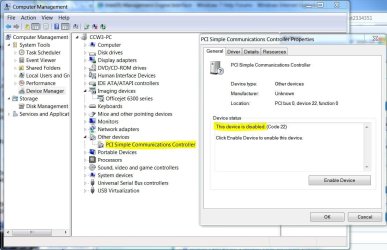
I had this problem with an unknown device "PCI Simple Communications Controller"
Vendor: 8086
Device: 1c3a

www.pcidatabase.com told me it was an "Intel Management Engine Interface"

Installing the Intel Management Engine Interface drivers gave the following errror though:
"This computer does not meet the minimum requirements for installing the software", "setup will now exit"

I solved my original problem by downloading and installing the Intel inf update for the intel chipset (H67) on my asus mobo (P8H67):
"INF Update Utility - Primarily for Intel® 6, 5, 4, 3, 900 Series Chipsets"

After that, the "PCI Simple Communications Controller" popped-up as:
"Intel(R) 6 Series/C200 Series Management Engine Interface - 1C3a"

Guys.... this was a f...... difficult one. Maybe it was caused by my migration (without clean XP install, just a XP repair) from an AMD Phenom2 mobo to an Intel I3 mobo.

Greetings from Amsterdam.
 

My Computer

OS
Windows 7
Solve installing Intel Management Engine issue

Please check if you have microsoft dot net 4.5" installed in programs and features.
If yes, then try the following:
- Uninstall .net 4.5
- Install version 4.0

If you tried now to install Intel management engine, it will work out this time.
It's not logic at all, don't ask me how i knew it by trial and error.

Thanks,
Antony
 

My Computer

Computer type
PC/Desktop
Computer Manufacturer/Model Number
Dell
OS
Windows 7 Enterprise x64
Personally, I'd just disable and ignore it unless your PC is serviced or maintained in a work/office environment and controlled by an IT department. Intel Management Engine Interface and the PCI Simple Comm Controller allows your computer to be controlled and updated by a central maintenance location. And it can do this even when the PC is shut down. (But still plugged in with PSU on.) The feature is built into Intel chipsets along with firmware and software. There's some fairly large overhead for it even when it's not in use. I'm not sure why Intel chose to install this "feature" on all PC chipsets even if it's a private PC but it's there. To me, it's just another hole into my personal property and a security risk.

For the last few months, I've been trying to find a way to disable the PCISCC but apparently, no one else is too worried about it. It's part of the hardware and as such, can't be disabled except to remove the drivers and software. So that's what I did along with hiding the Windows update for it that kept showing up. It shows up in Device Manager with a warning sign but I just ignore it and feel safer with it that way.

 

Attachments

  • PCI-SCC.JPG
    PCI-SCC.JPG
    132.4 KB · Views: 72

My Computer

Computer type
PC/Desktop
Computer Manufacturer/Model Number
Built 2/11/2011
OS
Windows 7 Pro-x64
CPU
i7-2600 3.4GHz - 3.8GHz Turbo
Motherboard
Intel DH67BL-B3
Memory
8Gb - 2x4GB, Muskin 991770 PC3-1333
Graphics Card(s)
Integrated Intel HD 2000
Sound Card
Integrated Intel 10.1 HD, RealTek ALC892
Monitor(s) Displays
Asus LCD VH222H, Haier HL24XSL2a
Screen Resolution
1920x1080, 1920x1080
Hard Drives
Crucial SSD C300-128Gb,
Western Digital WD5002AALX - 500Gb,
Western Digital WD7501AALS - 750Gb
PSU
Seasonic 650W 80+ Gold Modular
Case
Rosewill Defender
Cooling
Stock CPU, Four 120mm case fans, PCH fan added
Keyboard
Logitech EX100 Y-RBH94 Wireless
Mouse
Logitech EX100 M-RCE95 Wireless
Internet Speed
3.0/1.5 Mbs
Antivirus
Microsoft Security Essentials
Browser
Microsoft Internet Explorer 11
Other Info
Antec Veris Premier-Multimedia IR Station,
Cyber Accoustics-3602 Speakers,
AFT XM-5U Card Reader,
Hauppauge TV-HVR-2250,
Sony LX300 USB Turntable
It can be for home use in some circumstances. I have an MSI motherboard, with it comes a utility called control center. You can use it with click bios to oc, monitor and etc. If op uses any such utilities through UEFI bios, he would need it.
 

My Computer

Computer type
PC/Desktop
Computer Manufacturer/Model Number
Dude Build
OS
Windows 10 Pro X64
CPU
Intel(R) Core(TM) i5-3570K CPU OC@ 4.5GHZ Turbo
Motherboard
MSI Z77A-G45 Gaming
Memory
8.00 GB DDR3 1600Mhz
Graphics Card(s)
MSI Gaming X GTX 1070
Sound Card
Realtek High Definition
Monitor(s) Displays
Dell S23O9W, HP L1710
Screen Resolution
DELL-1920 x 1080 HP-1280 x1024
Hard Drives
Crucial m4 256 SSD, WD 7200RPM 500GB WD 1TB
PSU
Seasonic X650 GOLD
Case
Zalman Z12
Cooling
Antec Kuhler 920
Keyboard
Logitech
Mouse
MSI DS100 Interceptor
Internet Speed
50 down and 5 up
Antivirus
MSE
Browser
Chrome, IE 11
Other Info
Logitech X-620 Speakers
I think you are mistaken. Show me where you got your info on this.

IME requires a password setup along with a paid key from Intel and the Simple Comm Controller doesn't even use the PC's BIOS. It has it's own built into the Intel chip set.
 

My Computer

Computer type
PC/Desktop
Computer Manufacturer/Model Number
Built 2/11/2011
OS
Windows 7 Pro-x64
CPU
i7-2600 3.4GHz - 3.8GHz Turbo
Motherboard
Intel DH67BL-B3
Memory
8Gb - 2x4GB, Muskin 991770 PC3-1333
Graphics Card(s)
Integrated Intel HD 2000
Sound Card
Integrated Intel 10.1 HD, RealTek ALC892
Monitor(s) Displays
Asus LCD VH222H, Haier HL24XSL2a
Screen Resolution
1920x1080, 1920x1080
Hard Drives
Crucial SSD C300-128Gb,
Western Digital WD5002AALX - 500Gb,
Western Digital WD7501AALS - 750Gb
PSU
Seasonic 650W 80+ Gold Modular
Case
Rosewill Defender
Cooling
Stock CPU, Four 120mm case fans, PCH fan added
Keyboard
Logitech EX100 Y-RBH94 Wireless
Mouse
Logitech EX100 M-RCE95 Wireless
Internet Speed
3.0/1.5 Mbs
Antivirus
Microsoft Security Essentials
Browser
Microsoft Internet Explorer 11
Other Info
Antec Veris Premier-Multimedia IR Station,
Cyber Accoustics-3602 Speakers,
AFT XM-5U Card Reader,
Hauppauge TV-HVR-2250,
Sony LX300 USB Turntable
I'm talking about Intel Management Engine Interface, which the op referred to. I don't see where op mentioned Simple Comm Controller. only you in your post. I'm not trying to confuse anyone, but Intel Management Engine Interface has use in home computers too, as it is part of Intels new chipsets.


Just read through all post, apologies, I was only referring to the original ops question. (2009), I should view the dates before I dive in.

But it's cool, we are texans we do this sometimes!!:o
 

My Computer

Computer type
PC/Desktop
Computer Manufacturer/Model Number
Dude Build
OS
Windows 10 Pro X64
CPU
Intel(R) Core(TM) i5-3570K CPU OC@ 4.5GHZ Turbo
Motherboard
MSI Z77A-G45 Gaming
Memory
8.00 GB DDR3 1600Mhz
Graphics Card(s)
MSI Gaming X GTX 1070
Sound Card
Realtek High Definition
Monitor(s) Displays
Dell S23O9W, HP L1710
Screen Resolution
DELL-1920 x 1080 HP-1280 x1024
Hard Drives
Crucial m4 256 SSD, WD 7200RPM 500GB WD 1TB
PSU
Seasonic X650 GOLD
Case
Zalman Z12
Cooling
Antec Kuhler 920
Keyboard
Logitech
Mouse
MSI DS100 Interceptor
Internet Speed
50 down and 5 up
Antivirus
MSE
Browser
Chrome, IE 11
Other Info
Logitech X-620 Speakers
IO have this same Intel management problem too. i have a Compaq 6910p with the later Intel chip set that runs the Active Management Technology that primarily controls updates/driver installations and more. Mine disabled itself and shows a code 43 in Device manager properties. My windows 7 update told me today, that this device is not compatible with Windows 7. I have not found anything anywhere to replace it. It is not a driver issue.
 

My Computer

Computer type
Laptop
Computer Manufacturer/Model Number
HP Compaq 6910p
OS
windows 7 pro 64 bit
CPU
Intel Centrino Duo-core 2.0 mhz.
Motherboard
HP
Memory
4 Gb's
Graphics Card(s)
Mobil Intel (R) 965 Chipset Family
Hard Drives
37.26 ST94011A ATA Device Fixed hard disk media Fixed hard disk media CD/DVD ROM

My Computer

Computer type
PC/Desktop
Computer Manufacturer/Model Number
Built 2/11/2011
OS
Windows 7 Pro-x64
CPU
i7-2600 3.4GHz - 3.8GHz Turbo
Motherboard
Intel DH67BL-B3
Memory
8Gb - 2x4GB, Muskin 991770 PC3-1333
Graphics Card(s)
Integrated Intel HD 2000
Sound Card
Integrated Intel 10.1 HD, RealTek ALC892
Monitor(s) Displays
Asus LCD VH222H, Haier HL24XSL2a
Screen Resolution
1920x1080, 1920x1080
Hard Drives
Crucial SSD C300-128Gb,
Western Digital WD5002AALX - 500Gb,
Western Digital WD7501AALS - 750Gb
PSU
Seasonic 650W 80+ Gold Modular
Case
Rosewill Defender
Cooling
Stock CPU, Four 120mm case fans, PCH fan added
Keyboard
Logitech EX100 Y-RBH94 Wireless
Mouse
Logitech EX100 M-RCE95 Wireless
Internet Speed
3.0/1.5 Mbs
Antivirus
Microsoft Security Essentials
Browser
Microsoft Internet Explorer 11
Other Info
Antec Veris Premier-Multimedia IR Station,
Cyber Accoustics-3602 Speakers,
AFT XM-5U Card Reader,
Hauppauge TV-HVR-2250,
Sony LX300 USB Turntable
I installed Win 7 Enterprise 32-bit on Intel Board DG33BU, and got some problem with PSI simple communication driver.
Decision fo this issue is very simple. I installed intel desktop utilities for 3 series desktop board. During the instalation process, the utility installs the driver for PCI simple communication controler. Thats all :)

https://downloadcenter.intel.com/co...ng&Dwnldid=18281&OSFullname=Windows+7+(32-bit)*
 

My Computer

Computer type
PC/Desktop
OS
windows 7 Enterprise
Back
Top