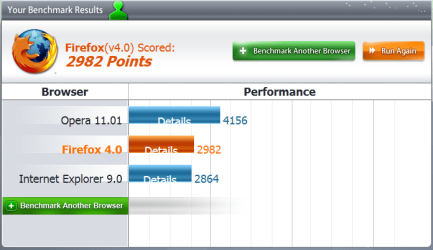
Interesting browser comparison

Geez, foolish me.

I thought that they were going to test the security and vulnerability among the browsers both with and without addons.
 

My Computer

Computer Manufacturer/Model Number
Dell 570MT
OS
Windows 7 Home Premium 64bit
CPU
Athlon XII
Motherboard
?
Memory
4GB
Graphics Card(s)
ATI Radeon 4200
Sound Card
?
Monitor(s) Displays
Asus and Dell
Hard Drives
Unknown
PSU
unknown
Case
unknown
Cooling
unknown

My Computer

Computer type
Laptop
Computer Manufacturer/Model Number
Custom
OS
Windows 7 Home Premium x64
CPU
Intel Core i5 2500K
Motherboard
MSI MS-7750
Memory
8GB DDR3
Graphics Card(s)
nVidia GeForce GTX650 Ti BOOST
Sound Card
Realtek
Monitor(s) Displays
21' Philips
Screen Resolution
Full HD
Hard Drives
1TB
PSU
500W
Well, I know HTML5 is far off from being mainstream, but I am glad that is around in a minor capacity. With the way things were going, more and more web sites were making a simple HTML welcome page then redirecting to a 100% Flash site. Then you have those free file/image host sites that are making their uploader area 100% Flash. A bad trend, since the Flash production suite is not free and its plugin is not as good as it was pre-Adobe. It looked like Adobe are/were trying to monopolize the Internet :/

There is one conundrum that I do not understand though, with the OS+Browser coming pre-installed with Sun Java. For such a plugin, that has minor web usage, it is extremely prevalent and poorly maintained/coded.

There's just too much proprietary software dependence going around Internet use currently, I hope to see that change just as you said. Computer security would be increased too.

As for the record of benchmarks, I found IE9 to perform near identical to Firefox 4 :) Too bad that it (IE9) doesn't have a spell check or default webm support. Catch up yes, but not catchup enough.

I completely agree, but unfortunately, Flash content is still very prevalent. Adobe has ruined what was once a great technology. By using open standards, we could truly get to a point where browsers were 100% a matter of opinion. We're close now, but some people also hold on to old thoughts and feelings...like anything from Microsoft is bad and evil.

Personally, I browse the internet with Flash disabled. Those blinking ads are rather annoying. I can always enable it if I get to a page with some interestign video. Now, Html5 will be harder to disable, so I definitely don't want to see any html5 ads. No, I don't like to use ad-blocking extensions.

There are a couple of "live feed" types of sites that I use and those are all Flash. That's why I prefer to keep several browsers - one for Flash, one for banking, one for general browsing.

On the contrary, java seems to be used by the majority of the sites I visit. I limit the javacript though - I hate it when they resize windows or disable buttons, in my opinion they should not be allowed to do that at all.

Now as far as the software being proprietary - I see nothing wrong with that. Firefox is the only "open source" software that works for me, and given all the money that Google pays Mozilla, it's not really different from any other software company, except for the fact that the code is open.
 

My Computer

Computer Manufacturer/Model Number
Dell Inspiron 530
OS
Windows 7 Ultimate (x64)
CPU
Q6600
Memory
8 GB
Graphics Card(s)
ATI Radeon HD 2600 XT
Monitor(s) Displays
Samsung Syncmaster P2450
Screen Resolution
1920x1080
Hard Drives
Samsung HD103UJ
Samsung HD501LJ
Internet Speed
25 Mb/s
I don't really notice much speed difference in real-world use between IE9 x64 vs Ie9 x32 vs FF4 vs Chrome. However they all did highlight how slow IE8 was.

I'll be glad when MS update IE 9 64bit's JavaScript engine to Chakra JIT.

I understand Silverlight 5 is going to be avaliable in 64-bit too.
 
Last edited:

My Computer

Computer type
PC/Desktop
Computer Manufacturer/Model Number
Me
OS
Windows 7 Ultimate 64-bit
CPU
Intel Core i7 3770K
Motherboard
Asus P8Z77-V PRO
Memory
G.Skill ARES DDR3 1600 - 3 x 4GB
Graphics Card(s)
ASUS HD7770-DC-1GD5-V2
Sound Card
on board
Monitor(s) Displays
ASUS PB278Q PLS LED LCD 6ms
Screen Resolution
2560 x 1440
Hard Drives
Samsung 840 EVO SSD 500GB
2 x Seagate SATA3 2TB 64Mb Cache (ST2000DM001)
PSU
Corsair HX-650
Case
Coolermaster Centurion 5 II
Cooling
Coolermaster Hyper 212 Plus
Keyboard
Logitech K290
Mouse
MS Wireless Laser Mouse 5000
Internet Speed
100Mb down / 2.5Mb up
Other Info
Leadtek DTV2000DS Dual HD TV Tuner
USB3 kit for 2 front panel USB3 ports
Speckie - spell check for IE ;)
Better than ieSpell as it automatically checks spelling, whereas ieSpell needs user input "Check spelling" :D
Thanks for this link. It works much better than ieSpell, but still not perfectly since the spell check system doesn't actually work until you right-click on the window (although at least you don't have to click "Check Spelling" or something like that).
 

My Computer

Computer Manufacturer/Model Number
Dell Inspiron 14R N4110
OS
Windows 7 Home Premium x64
CPU
Intel Core i5-2410M Quad Core CPU @ 2.30 GHz
Memory
8 GB Shared Channel DDR3 Memory
Graphics Card(s)
Intel HD Graphics 3000, AMD Radeon HD 6470M
Sound Card
Intel Display Audio, Realtek High Definition Audio
Monitor(s) Displays
14" HD 720p LED Display
Screen Resolution
1366x768
Hard Drives
500 GB 5400 RPM SATA Hard Drive
Mouse
Microsoft USB IntelliMouse Explorer 3.0
You imagine we would have an automatic spell checker for the reply window - with all the jargon we are using. That always bothers me in e.g. Word. I shut it off when I work on a tutorial for example.
 

My Computer

Computer Manufacturer/Model Number
HP, Dell, Gateway, Toshiba - 4 laptops and 2 desktops
OS
Vista, Windows7, Mint Mate, Zorin, Windows 8
CPU
from 1.6GHz Duo to i7
Monitor(s) Displays
2x HP w2207
Hard Drives
5x HDD, 7x SSD, 12x Externals
Keyboard
with trackball - no mices
Mouse
Trackball mice
Internet Speed
DSL 6000
For me, such comparisons don't mean too much, because all of those tests, except the one by peacekeeper, are devised by the same people that created the browsers. I know that tests can be weighed in a fashion to favor the browser that is desired. Obviously, a browser creator is not going to devise a test that makes them look bad.

I also find it curious that despite the fact that Opera tests very well on peacekeeper, not much is said about it. I just ran my own comparison, leaving out IE x64, and Chrome, which I have no desire to use, and below are my results. Though I have begun to adopt FF somewhat, I still consider Opera to be superior in many ways.
 

Attachments

  • Peacekeeper.PNG
    Peacekeeper.PNG
    23.1 KB · Views: 7

My Computer

Computer Manufacturer/Model Number
DIY
OS
W7x64 Pro, SuSe 12.1/** W7 x64 Pro, XP MCE
CPU
Phenom II 1090T w/Noctua NH-D14 /**4400+ X2 w/CM Hyper TX 3
Motherboard
ASRock 890FX Deluxe 4/**A8N-SLI
Memory
2 x 2GB Patriot PGS34g1600LLKA/**4x1GB Corsair VS
Graphics Card(s)
EVGA GTX460 SC/**EVGA 8800GTS
Sound Card
Asus Xonar D2X/**Xonar D1
Monitor(s) Displays
Acer X233H, Dell E152FPc /**LG M237-WD
Screen Resolution
1920x1080 & 1024x768/**1980x1080
Hard Drives
WDC 2TB, 1.5TB, 1TB, 500GB,Seagate 500GB , Maxtor 80GB /**500GB Seagate & WDC 1TB Black
PSU
CM RS600 w/ APC BX1000G/**Antec 500 TP w/ APC BX1000
Case
HAF922/**Antec 1040IIB
Cooling
3x200mm, 1x140 and 1x120mm/**5x80mm fans
Keyboard
Logitech Media USB/**Saitek Eclipse
Mouse
Cordless Trackman Wheel/**Ditto
Internet Speed
3.3Mbps
Other Info
SB 560 5.1 w/ Sennheiser RS140/**Creative T20 speakers, Dvico FusionHDTV7 Gold RT, Cisco E3000, HP 5510V AIO, Linksys E3000, Belkin F5U237 hub and **F5D8055 adapter
(** = 2nd rig)
These comparisons might be of some interest to "power users", (a much over-used term which has basically come to mean anybody who can switch a machine on and off without crippling it), but they are not relevant at all to most users. What most users want, (surprise! ),is ease of use.

Instead of becoming easier and more intuitive, browsers and operating systems are becoming more and more complex to set up and use. Even some quite simple things are more or less impossible for a "normal" user to achieve.

These issues are rarely addressed, or are addressed in some way that results in knowledgeable users being "nannied" and annoyed to death.

The actual speed of these browsers makes little or no difference to most people who use them, they are dependent on their internet connections, not the browser speed.

Also, there is an ever-increasing trend towards the use of "eye-candy", often to the detriment of basic function.

Personally I use Firefox, because I can set it up exactly as I want it, I don't much care about the speed, as long as it is reasonable.

Even if IE9 was ten times faster than Firefox I still wouldn't use it, because it wont do what I want.

Opera is a great deal better, but still not as versatile as Firefox.

Regards....Mike Connor
 

My Computer

OS
Several, including Windows 7 x64 Ultimate
I also find it curious that despite the fact that Opera tests very well on peacekeeper, not much is said about it.

This is just personal opinion, Im neither right nor wrong, this is just the way I see it.

I actually quite like Opera, and for me, like you Peacekeeper results trump Firefox and IE8 every time. However, in real world usage to me at least, Opera seems noticeably slower. Not slower than IE8, which runs like a dog on my machine (haven't played with IE9 so can't comment on that) but certainly a bit slower than my regular browser, Firefox.

Now I admit that this could be because I was running Opera on default settings with no tweaking at all, wheras my Firefox is quite heavily customised, but the difference is there, plus I prefer the almost endless configurations of Firefox, with Addons and such.

The thing that REALLY put me off Opera though, was the fact that they were acting like whiny children over the "Browser Choice" thing here in the EU. Fair enough, a little competition is not a bad thing, but moaning because they were in alphabetical order so Opera was always number 5 on the list? Pathetic.

Having said that, I DO use Opera on my mobile. IMO the Opera mobile browser is the best thing since sliced bread.

Just my tuppence worth.
 

My Computer

Computer type
PC/Desktop
Computer Manufacturer/Model Number
Medion Erazer (note to self: insert model number) - with custom additions
OS
Windows 10 Pro x64
CPU
Intel Core i5 7400 @ 3.00GHz
Motherboard
OEM supllied with PC
Memory
8GB 2133Mhz DDR4 (OEM supplied)
Graphics Card(s)
Gygabyte Windforce GTX 1050Ti (Factory Overclocked)
Sound Card
Realtek
Monitor(s) Displays
Acer Al1980 + HKC
Screen Resolution
1360*768(HKC) / 1280*1024(Acer)
Hard Drives
1TB Toshiba
1TB WD Caviar Green
120GB Samsung Evo 840
PSU
OEM supplied (no power rating on case)
Case
OEM Supplied
Cooling
Stock
Keyboard
Logitech Wireless
Mouse
Logitect Wireless
Internet Speed
40Mb/s Down 10Mb/s Up
Antivirus
Defender
Browser
Firefox
Opera is a great deal better, but still not as versatile as Firefox.

Regards....Mike Connor
How versatile that Opera is depends a lot on how well that a person knows the browser. I have found some things about Firefox that is easier to do with the right add on, but hunting through the myriads of add ons available to find the right one is a chore in itself, and there are a few things that Opera can do that Firefox can't, regardless of the number of add ons it has installed.
 

My Computer

Computer Manufacturer/Model Number
DIY
OS
W7x64 Pro, SuSe 12.1/** W7 x64 Pro, XP MCE
CPU
Phenom II 1090T w/Noctua NH-D14 /**4400+ X2 w/CM Hyper TX 3
Motherboard
ASRock 890FX Deluxe 4/**A8N-SLI
Memory
2 x 2GB Patriot PGS34g1600LLKA/**4x1GB Corsair VS
Graphics Card(s)
EVGA GTX460 SC/**EVGA 8800GTS
Sound Card
Asus Xonar D2X/**Xonar D1
Monitor(s) Displays
Acer X233H, Dell E152FPc /**LG M237-WD
Screen Resolution
1920x1080 & 1024x768/**1980x1080
Hard Drives
WDC 2TB, 1.5TB, 1TB, 500GB,Seagate 500GB , Maxtor 80GB /**500GB Seagate & WDC 1TB Black
PSU
CM RS600 w/ APC BX1000G/**Antec 500 TP w/ APC BX1000
Case
HAF922/**Antec 1040IIB
Cooling
3x200mm, 1x140 and 1x120mm/**5x80mm fans
Keyboard
Logitech Media USB/**Saitek Eclipse
Mouse
Cordless Trackman Wheel/**Ditto
Internet Speed
3.3Mbps
Other Info
SB 560 5.1 w/ Sennheiser RS140/**Creative T20 speakers, Dvico FusionHDTV7 Gold RT, Cisco E3000, HP 5510V AIO, Linksys E3000, Belkin F5U237 hub and **F5D8055 adapter
(** = 2nd rig)
Im not botherd what browser is better all that matters is i can see some porn lol
 

My Computer

Computer Manufacturer/Model Number
acer aspire x3950
OS
windows 7 home prem 64 bit
CPU
i3 530
Memory
4 gig ddr 3
Graphics Card(s)
onboard i only play game using onlive cloud gaming
Sound Card
onboard
Monitor(s) Displays
i-inc 19 wide screen
Hard Drives
640 gig
PSU
250
Case
small form
Cooling
fan
Keyboard
logitech
Mouse
motor mouse
Internet Speed
50 meg
Other Info
Firefox nightly 64bit

My Computer

Computer type
PC/Desktop
Computer Manufacturer/Model Number
Medion Erazer (note to self: insert model number) - with custom additions
OS
Windows 10 Pro x64
CPU
Intel Core i5 7400 @ 3.00GHz
Motherboard
OEM supllied with PC
Memory
8GB 2133Mhz DDR4 (OEM supplied)
Graphics Card(s)
Gygabyte Windforce GTX 1050Ti (Factory Overclocked)
Sound Card
Realtek
Monitor(s) Displays
Acer Al1980 + HKC
Screen Resolution
1360*768(HKC) / 1280*1024(Acer)
Hard Drives
1TB Toshiba
1TB WD Caviar Green
120GB Samsung Evo 840
PSU
OEM supplied (no power rating on case)
Case
OEM Supplied
Cooling
Stock
Keyboard
Logitech Wireless
Mouse
Logitect Wireless
Internet Speed
40Mb/s Down 10Mb/s Up
Antivirus
Defender
Browser
Firefox
Opera is a great deal better, but still not as versatile as Firefox.

Regards....Mike Connor
How versatile that Opera is depends a lot on how well that a person knows the browser. I have found some things about Firefox that is easier to do with the right add on, but hunting through the myriads of add ons available to find the right one is a chore in itself, and there are a few things that Opera can do that Firefox can't, regardless of the number of add ons it has installed.

That's mostly true enough. I used Opera quite a lot at one time, but once I got Firefox set up as I wanted it, I did not want to miss any of the customised features, so I very rarely use other browsers now, usually only on other people's machines where I have no choice.

Hunting through addons can definitely be a pain, but it's worth it if you get the exact setup you are looking for.

Regards....Mike Connor
 

My Computer

OS
Several, including Windows 7 x64 Ultimate
Well ...... Opera does all I need it to do pretty much "out of the box" , I do have a couple of extensions but thats all I do need. Have tried all the major browsers at one time or the other and a good number of the lesser used ones too. I have found very few sites that just refuse to accept my browser. For them I keep IE up to date but turned off (as a last resort) and either Chrome or FF as my standbys................. most of the time.
 

My Computer

Computer type
Laptop
Computer Manufacturer/Model Number
MSI GE72VR Apache Pro-416
OS
Windows 10x64 Build 1709
CPU
Intel i7 7700HQ Kaby Lake
Motherboard
Micro-Star Intl. MS-179B (U3C1)
Memory
16 GB DDR4 @2400
Graphics Card(s)
Nvidia Geforce GTX 1060
Screen Resolution
1920x1080 120Hz
Hard Drives
256 GB Nvme M.2 SSD

1TB HDD@7200
Cooling
Cooler Blast 4
Keyboard
Steel Series
Antivirus
Bit Defender Free
Browser
Edge
i like Opera too, at least some aspects of it. But it sometimes has a very strange behavior. E.g. it is difficult to start from the taskbar and then I get this little window where I have to chose what window to start - completely useless. Also, when i download something, I never know whether it is doing it or not. It kind of does it completely invisible to me. And finally it is slow - slower than IE and Chrome.
I use it "out of the box" and never bothered with settings. But IE and Chrome I use the same way.
 

My Computer

Computer Manufacturer/Model Number
HP, Dell, Gateway, Toshiba - 4 laptops and 2 desktops
OS
Vista, Windows7, Mint Mate, Zorin, Windows 8
CPU
from 1.6GHz Duo to i7
Monitor(s) Displays
2x HP w2207
Hard Drives
5x HDD, 7x SSD, 12x Externals
Keyboard
with trackball - no mices
Mouse
Trackball mice
Internet Speed
DSL 6000
My take on benchmarks....

They have become so over used, so mainstream that they are almost useless.

Maybe I am cynical towards them, but I remember a time where the Benchmarks are so well know (and still are) that ATI and Nvidia were suing each other every other day about how one or the other was coding their drivers to ride the rails of the benchmark and give better numbers.

If you are buying based solely on benchmarks, your gonna lose in the end.
 

My Computer

Computer Manufacturer/Model Number
Self Built
OS
Win 7 Ultimate 32bit
CPU
C2D E6600 2.4Ghz
Motherboard
Intel D965WH
Memory
4G Kingston KHX5400D2
Graphics Card(s)
EVGA GTX 570 HD SC (012-P3-1573-KR)
Sound Card
On-Board
Monitor(s) Displays
Samsung 226BW
Screen Resolution
1680 x 1050
Hard Drives
2 x 250 Seagate Barracuda
2 x 500 Seagate Barracuda (Raid1)
PSU
Corsair TX750W
Case
In-Win C589
Cooling
Stock Intel Cooling
I'm beginning to agree with Mike Connor.
Now that IE 9, FF 4, Chrome and Opera are all reasonably quick, my browsing is limited more by the speed and latency of my internet connection.

I found IE9 and FF4 the most reliably displayed the sites I use regularly. Chrome bugged out on a couple.
I was using IE9 but when one small addon like McAfee Site Advisor adds a whole unnecessary toolbar row right across a widescreen monitor, with nearly all of it being blank space, you lose valuable screen real eastate. No free ad blocking (that works properly) for IE is a negative too.

So right now my fav is FF4, customized with addons to maximise usable screen space and with buttons where I want them. I do hope the font rendering is fixed in FF4.2.
 

My Computer

Computer type
PC/Desktop
Computer Manufacturer/Model Number
Me
OS
Windows 7 Ultimate 64-bit
CPU
Intel Core i7 3770K
Motherboard
Asus P8Z77-V PRO
Memory
G.Skill ARES DDR3 1600 - 3 x 4GB
Graphics Card(s)
ASUS HD7770-DC-1GD5-V2
Sound Card
on board
Monitor(s) Displays
ASUS PB278Q PLS LED LCD 6ms
Screen Resolution
2560 x 1440
Hard Drives
Samsung 840 EVO SSD 500GB
2 x Seagate SATA3 2TB 64Mb Cache (ST2000DM001)
PSU
Corsair HX-650
Case
Coolermaster Centurion 5 II
Cooling
Coolermaster Hyper 212 Plus
Keyboard
Logitech K290
Mouse
MS Wireless Laser Mouse 5000
Internet Speed
100Mb down / 2.5Mb up
Other Info
Leadtek DTV2000DS Dual HD TV Tuner
USB3 kit for 2 front panel USB3 ports
I'm beginning to agree with Mike Connor.
Now that IE 9, FF 4, Chrome and Opera are all reasonably quick, my browsing is limited more by the speed and latency of my internet connection.

I found IE9 and FF4 the most reliably displayed the sites I use regularly. Chrome bugged out on a couple.
I was using IE9 but when one small addon like McAfee Site Advisor adds a whole unnecessary toolbar row right across a widescreen monitor, with nearly all of it being blank space, you lose valuable screen real eastate. No free ad blocking (that works properly) for IE is a negative too.

So right now my fav is FF4, customized with addons to maximise usable screen space and with buttons where I want them. I do hope the font rendering is fixed in FF4.2.

If you want to get some sensible functions and lose some annoyances in IE9;

Quero Toolbar. Hassle-Free Browsing

<http://www.quero.at/>


Just as a matter of interest, here is an IE "Test Drive" http://ie.microsoft.com/testdrive/performance/fishIETank/default.html running on Firefox 4.0:


http://ie.microsoft.com/testdrive/

Regards....Mike Connor
 

My Computer

OS
Several, including Windows 7 x64 Ultimate
I tried the Quero Toolbar. It is almost right, but despite fiddling with the setup options I could not get it to work the way I wanted it to.
It seems to be based around forcing the tabs to a separate row. I don't want this, I quite like having the combined search bar and tabs on the same row as it frees up screen space.
It also needs a toggle button in the toolbar which you can click to allow specific sites to disable ad blocking on specific sites.

In FF4 I managed to get bearable font rendering with 'Anti-Aliasing Tuner' set as follows:

Enhanced Contrast: 50%
Clear Type level: 60%
Anti-aliasing mode: Clear Type
Rendering mode: GDI Natural

Same settings for both small & large fonts.
 
Last edited:

My Computer

Computer type
PC/Desktop
Computer Manufacturer/Model Number
Me
OS
Windows 7 Ultimate 64-bit
CPU
Intel Core i7 3770K
Motherboard
Asus P8Z77-V PRO
Memory
G.Skill ARES DDR3 1600 - 3 x 4GB
Graphics Card(s)
ASUS HD7770-DC-1GD5-V2
Sound Card
on board
Monitor(s) Displays
ASUS PB278Q PLS LED LCD 6ms
Screen Resolution
2560 x 1440
Hard Drives
Samsung 840 EVO SSD 500GB
2 x Seagate SATA3 2TB 64Mb Cache (ST2000DM001)
PSU
Corsair HX-650
Case
Coolermaster Centurion 5 II
Cooling
Coolermaster Hyper 212 Plus
Keyboard
Logitech K290
Mouse
MS Wireless Laser Mouse 5000
Internet Speed
100Mb down / 2.5Mb up
Other Info
Leadtek DTV2000DS Dual HD TV Tuner
USB3 kit for 2 front panel USB3 ports
I never had any problems with fuzzy fonts on my machines, but I know a couple of people who did.

Yes, the bar doesn't suit everybody, but there aren't many to choose from for Internet Explorer!

I prefer the customisation possibilities in Firefox. Much more comfortable.

Regards....Mike Connor
 

My Computer

OS
Several, including Windows 7 x64 Ultimate
Back
Top