
Interesting explorer.exe issue

Ram4x4

New member
Local time
3:06 AM
Messages
7
I have discovered that when I open a picture file (.jpg) from the desktop it opens fine, but when I go to close it Photoviewer freezes up. It only does it when opening picture files from the desktop.

If I open them from a folder anywhere else on the PC they open and close fine.

I've read tons of forums and help posts and tried everything recommended, but nothing fixes the issue. I have done a full repair/install on the system to no avail.

My system is Win7 Pro 64-bit.

This is driving me nuts!
 

My Computer

Computer type
PC/Desktop
Computer Manufacturer/Model Number
Dell Optiplex 960
OS
Windows 7 Pro 64-bit
CPU
Core 2 DUO E8400 3.0GHz
Motherboard
stock
Memory
8GB
Graphics Card(s)
Nvidia 8800GT
Sound Card
onboard
Monitor(s) Displays
Dell s2209w
Screen Resolution
1920x1080
Hard Drives
Toshiba 128GB SSD
Case
stock
Cooling
stock
Internet Speed
12Mbs
Antivirus
none
Browser
IE 11, Firefox 43.0, Chrome 46.0.2490
Hi and welcome to SevenForums,
Pretty odd behavior :/
Use the link above my signature to Fill in your system spec's page

Use Clean boot,
http://www.sevenforums.com/tutorial...ation-conflicts-performing-clean-startup.html
Click Start and type in the search box,
msconfig
Click on the suggestion on top or hit the Enter key,
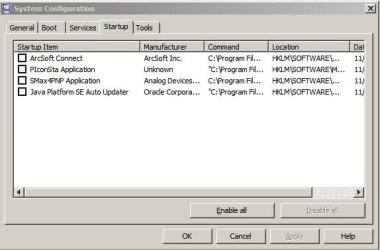
Go to the Startup section and take some screen shots for a complete list,
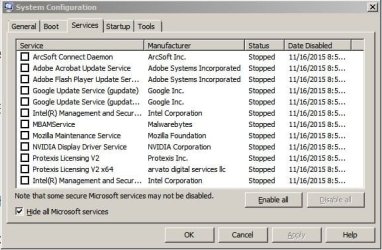
Go to the Services section and on the bottom left Check the box to Hide All Microsoft services,
Repeat the screen shots,
See the links above my signature on how to take and upload screen shots here,
Cheers.
 

My Computer

Computer type
PC/Desktop
Computer Manufacturer/Model Number
Custom assembled by me :}
OS
Win-7-Pro64bit 7-H-Prem-64bit
CPU
i7-5930K 2nd i9-9940x both water blocked VRM's too
Motherboard
ASUS SABERTOOTH X99 2nd ASUS x299 Apex
Memory
Trident-z 3200C14 2nd Trident-z 3600C16
Graphics Card(s)
EVGA 1080ti ftw3 2nd Titan Xp both water blocked
Sound Card
Built-in Realtek
Monitor(s) Displays
1-AOC G2460PG 24"G-Sync 144Hz/ 2nd 1-ASUS VG248QE 24" 144Hz
Screen Resolution
1920 x 1080 144Hz
Hard Drives
2-Samsung M.2 Evo & Evo Plus
2-Samsung 850 EVO 500GB SSD's/ 3-2.5 W.D. Black 1tb-&3-1tb/3-3.5 WD Black 1tb hdd's
PSU
EVGA SuperNOVA 1000-P2 2nd 1200-P2
Case
2-Corsair Obsidian Series 450D Black ATX Mid Tower
Cooling
Custom water loops
Keyboard
Logitech G710+/ 2nd Logitech G910
Mouse
2-RedDragon M901 Perdition 16400 dpi Gaming mouse = wired
Internet Speed
Comcast Ping 19ms 89.31mbps download speed 6.12mbps upload
Antivirus
Malwarebytes Pro/ Superantispyware Pro
Browser
FireFox & Pale moon
Other Info
2nd ASUS X299 Apex/Intel i9-9940x with Custom water loop/7H-Prem-x64/Corsair 450D case/Ram Trident-z 3600C16 4x8gb / Samsung970Evo plus 500gb SSD/Dual ssd EZ swap evo/PSU EVGA SuperNova 1200w-P2 80+Platinum/GPU Titan Xp /8-ML-140 on push-pull on 2-280GTX rads
Clean booted, msconfig set as requested. Here's the screen shots.

Also, I created another user account on the system to see if it was something corrupt in the profile. At first photoviewer works fine, but after a minute or so, it starts exhibiting the same issues on the new user.

I've scanned system with a couple of virus tools, it's clean.
 

Attachments

  • Capture1.JPG
    Capture1.JPG
    33.8 KB · Views: 43
  • Capture2.JPG
    Capture2.JPG
    57.6 KB · Views: 42

My Computer

Computer type
PC/Desktop
Computer Manufacturer/Model Number
Dell Optiplex 960
OS
Windows 7 Pro 64-bit
CPU
Core 2 DUO E8400 3.0GHz
Motherboard
stock
Memory
8GB
Graphics Card(s)
Nvidia 8800GT
Sound Card
onboard
Monitor(s) Displays
Dell s2209w
Screen Resolution
1920x1080
Hard Drives
Toshiba 128GB SSD
Case
stock
Cooling
stock
Internet Speed
12Mbs
Antivirus
none
Browser
IE 11, Firefox 43.0, Chrome 46.0.2490
Hi,
Open task manager and performance section and open an image and close it after a minute or 2 and see if anything jumps up = cpu..
 

My Computer

Computer type
PC/Desktop
Computer Manufacturer/Model Number
Custom assembled by me :}
OS
Win-7-Pro64bit 7-H-Prem-64bit
CPU
i7-5930K 2nd i9-9940x both water blocked VRM's too
Motherboard
ASUS SABERTOOTH X99 2nd ASUS x299 Apex
Memory
Trident-z 3200C14 2nd Trident-z 3600C16
Graphics Card(s)
EVGA 1080ti ftw3 2nd Titan Xp both water blocked
Sound Card
Built-in Realtek
Monitor(s) Displays
1-AOC G2460PG 24"G-Sync 144Hz/ 2nd 1-ASUS VG248QE 24" 144Hz
Screen Resolution
1920 x 1080 144Hz
Hard Drives
2-Samsung M.2 Evo & Evo Plus
2-Samsung 850 EVO 500GB SSD's/ 3-2.5 W.D. Black 1tb-&3-1tb/3-3.5 WD Black 1tb hdd's
PSU
EVGA SuperNOVA 1000-P2 2nd 1200-P2
Case
2-Corsair Obsidian Series 450D Black ATX Mid Tower
Cooling
Custom water loops
Keyboard
Logitech G710+/ 2nd Logitech G910
Mouse
2-RedDragon M901 Perdition 16400 dpi Gaming mouse = wired
Internet Speed
Comcast Ping 19ms 89.31mbps download speed 6.12mbps upload
Antivirus
Malwarebytes Pro/ Superantispyware Pro
Browser
FireFox & Pale moon
Other Info
2nd ASUS X299 Apex/Intel i9-9940x with Custom water loop/7H-Prem-x64/Corsair 450D case/Ram Trident-z 3600C16 4x8gb / Samsung970Evo plus 500gb SSD/Dual ssd EZ swap evo/PSU EVGA SuperNova 1200w-P2 80+Platinum/GPU Titan Xp /8-ML-140 on push-pull on 2-280GTX rads
I noticed in your specs you have listed "No Anti-Virus". That needs to be corrected very very soon.
 

My Computer

Computer type
PC/Desktop
Computer Manufacturer/Model Number
Custom Build
OS
Windows 7 Home Premium 32-Bit - Build 7600 SP1
CPU
Intel Core i3-2120 3.30Ghz
Motherboard
Asus P8Z68-V LX Intel Z68 Socket H2 ATX
Memory
Kingston 4 GB DDR3 1333 mhz
Graphics Card(s)
AMD Radeon HD6670
Sound Card
Sound Blaster Audigy SE 24-Bit
Monitor(s) Displays
Asus VE228
Screen Resolution
1440 X 900
Hard Drives
OCZ Vertex 3 120 GB Sata 3 SSD ==
Kingston SH103/S3 120 G Hyper X 120 GB SSD ==
Western Digital 500 GB Caviar Green 7200 RPM ==
PSU
Corsair CX600M == 600 Watt
Case
NZXT Apollo - Silver with Clear Side Panel
Cooling
Three 120 mm Fans
Keyboard
Microsoft Natural 4000
Mouse
Microsoft Custom Optical 3000
Internet Speed
AT&T Fiber Optic Wireless Network
Antivirus
Microsoft Security Essentials
Browser
Chrome
Other Info
120 mm Blue LED Fan -- Three Blue LED Lazer Light Sticks
With a picture opened from the desktop, task manager/performance after 7-8 minutes shows nothing on CPU or memory. CPU blips to 2-3% every 30-45 seconds, but that's it.

I did discover something though...

While the picture is open, if I move the cursor over the taskbar, the hour glass shows...and then, after approximately 4-5 minutes, the hour glass goes away (normal cursor) on task bar and THEN I can close the picture without it hanging up!

So, it seems when I open a picture from the desktop, it's like the system is waiting for something that takes several minutes to complete, and then it is ok....but only when a picture is opened from the desktop.

I have a Western Digital "My Cloud" NAS and store all my pictures on it (photography is a hobby of mine) and opening them from the NAS, I can close them right away with no issue (or from any other folder on the local system)...it's just the desktop that takes 4-5 minutes before I can close it without an explorer.exe hang.
 

My Computer

Computer type
PC/Desktop
Computer Manufacturer/Model Number
Dell Optiplex 960
OS
Windows 7 Pro 64-bit
CPU
Core 2 DUO E8400 3.0GHz
Motherboard
stock
Memory
8GB
Graphics Card(s)
Nvidia 8800GT
Sound Card
onboard
Monitor(s) Displays
Dell s2209w
Screen Resolution
1920x1080
Hard Drives
Toshiba 128GB SSD
Case
stock
Cooling
stock
Internet Speed
12Mbs
Antivirus
none
Browser
IE 11, Firefox 43.0, Chrome 46.0.2490
And another interesting find...

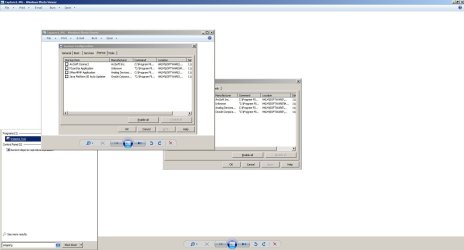
When I click on a picture, Photo Viewer opens full screen. If I then click the box in upper right to make it smaller, I get a smaller window with the picture, but also the full screen image stays behind it. See screen cap below:

The smaller window I can manipulate the image (rotate, resize, etc). After several minutes the full screen image closes on its own and I can then close the smaller window with no error. It's like the picture is opened twice?
 

Attachments

  • Capture3.JPG
    Capture3.JPG
    86.5 KB · Views: 1

My Computer

Computer type
PC/Desktop
Computer Manufacturer/Model Number
Dell Optiplex 960
OS
Windows 7 Pro 64-bit
CPU
Core 2 DUO E8400 3.0GHz
Motherboard
stock
Memory
8GB
Graphics Card(s)
Nvidia 8800GT
Sound Card
onboard
Monitor(s) Displays
Dell s2209w
Screen Resolution
1920x1080
Hard Drives
Toshiba 128GB SSD
Case
stock
Cooling
stock
Internet Speed
12Mbs
Antivirus
none
Browser
IE 11, Firefox 43.0, Chrome 46.0.2490
Hi,
The only things I can think of is recheck Java on startup tab and restart the machine
The uninstall Java

Arcsoft connect is an interesting one
Multimedia bundle just how many programs come with that ?
 

My Computer

Computer type
PC/Desktop
Computer Manufacturer/Model Number
Custom assembled by me :}
OS
Win-7-Pro64bit 7-H-Prem-64bit
CPU
i7-5930K 2nd i9-9940x both water blocked VRM's too
Motherboard
ASUS SABERTOOTH X99 2nd ASUS x299 Apex
Memory
Trident-z 3200C14 2nd Trident-z 3600C16
Graphics Card(s)
EVGA 1080ti ftw3 2nd Titan Xp both water blocked
Sound Card
Built-in Realtek
Monitor(s) Displays
1-AOC G2460PG 24"G-Sync 144Hz/ 2nd 1-ASUS VG248QE 24" 144Hz
Screen Resolution
1920 x 1080 144Hz
Hard Drives
2-Samsung M.2 Evo & Evo Plus
2-Samsung 850 EVO 500GB SSD's/ 3-2.5 W.D. Black 1tb-&3-1tb/3-3.5 WD Black 1tb hdd's
PSU
EVGA SuperNOVA 1000-P2 2nd 1200-P2
Case
2-Corsair Obsidian Series 450D Black ATX Mid Tower
Cooling
Custom water loops
Keyboard
Logitech G710+/ 2nd Logitech G910
Mouse
2-RedDragon M901 Perdition 16400 dpi Gaming mouse = wired
Internet Speed
Comcast Ping 19ms 89.31mbps download speed 6.12mbps upload
Antivirus
Malwarebytes Pro/ Superantispyware Pro
Browser
FireFox & Pale moon
Other Info
2nd ASUS X299 Apex/Intel i9-9940x with Custom water loop/7H-Prem-x64/Corsair 450D case/Ram Trident-z 3600C16 4x8gb / Samsung970Evo plus 500gb SSD/Dual ssd EZ swap evo/PSU EVGA SuperNova 1200w-P2 80+Platinum/GPU Titan Xp /8-ML-140 on push-pull on 2-280GTX rads
Arcsoft is an EXIF data reader for looking at the EXIF data on picture files. I removed it completely and uninstalled Java, then installed latest Java version.

Still a no-go...same problem.
 

My Computer

Computer type
PC/Desktop
Computer Manufacturer/Model Number
Dell Optiplex 960
OS
Windows 7 Pro 64-bit
CPU
Core 2 DUO E8400 3.0GHz
Motherboard
stock
Memory
8GB
Graphics Card(s)
Nvidia 8800GT
Sound Card
onboard
Monitor(s) Displays
Dell s2209w
Screen Resolution
1920x1080
Hard Drives
Toshiba 128GB SSD
Case
stock
Cooling
stock
Internet Speed
12Mbs
Antivirus
none
Browser
IE 11, Firefox 43.0, Chrome 46.0.2490

My Computer

Computer type
Laptop
Computer Manufacturer/Model Number
Employer provided Dell Latitude
OS
W7 Pro SP1 64bit
CPU
i7
Memory
8GB
Graphics Card(s)
Intel HD Graphics
Hard Drives
crappy SSD
Antivirus
Employer mandated Symantec Endpoint Protection
Browser
Pale Moon 64bit, IE11 64bit & Chrome 64bit
Uhhhh...I always install java? Websites use it, etc?
 

My Computer

Computer type
PC/Desktop
Computer Manufacturer/Model Number
Dell Optiplex 960
OS
Windows 7 Pro 64-bit
CPU
Core 2 DUO E8400 3.0GHz
Motherboard
stock
Memory
8GB
Graphics Card(s)
Nvidia 8800GT
Sound Card
onboard
Monitor(s) Displays
Dell s2209w
Screen Resolution
1920x1080
Hard Drives
Toshiba 128GB SSD
Case
stock
Cooling
stock
Internet Speed
12Mbs
Antivirus
none
Browser
IE 11, Firefox 43.0, Chrome 46.0.2490
Very few websites use Java. Uninstall it and see if you miss it.

If you happen to find a website that requires it, then you can decide if it is worth the risk of having it installed.
 

My Computer

Computer type
Laptop
Computer Manufacturer/Model Number
Employer provided Dell Latitude
OS
W7 Pro SP1 64bit
CPU
i7
Memory
8GB
Graphics Card(s)
Intel HD Graphics
Hard Drives
crappy SSD
Antivirus
Employer mandated Symantec Endpoint Protection
Browser
Pale Moon 64bit, IE11 64bit & Chrome 64bit
Java completely uninstalled. Still having exact same issue with explorer.
 

My Computer

Computer type
PC/Desktop
Computer Manufacturer/Model Number
Dell Optiplex 960
OS
Windows 7 Pro 64-bit
CPU
Core 2 DUO E8400 3.0GHz
Motherboard
stock
Memory
8GB
Graphics Card(s)
Nvidia 8800GT
Sound Card
onboard
Monitor(s) Displays
Dell s2209w
Screen Resolution
1920x1080
Hard Drives
Toshiba 128GB SSD
Case
stock
Cooling
stock
Internet Speed
12Mbs
Antivirus
none
Browser
IE 11, Firefox 43.0, Chrome 46.0.2490
I did not expect Java to impact the problem detailed in your original post. I just saw no reason to have a security risk like Java installed.
 

My Computer

Computer type
Laptop
Computer Manufacturer/Model Number
Employer provided Dell Latitude
OS
W7 Pro SP1 64bit
CPU
i7
Memory
8GB
Graphics Card(s)
Intel HD Graphics
Hard Drives
crappy SSD
Antivirus
Employer mandated Symantec Endpoint Protection
Browser
Pale Moon 64bit, IE11 64bit & Chrome 64bit
Back
Top