Intermittent BSODs with no obvious commonality

Saraiguma

New member
Local time
5:42 PM
Messages
38
I have been having BSOD issues for the past few months, they started very rarely and have become increasingly more common, to the point where I will crash once every other day at least. There does not seem to be a common cause to them, they have happened playing games, writing email, clicking links, receiving messages on Steam, and even overnight when nothing out of the ordinary would have happened to trigger them.

Unfortunately the actual blue screen goes away very quickly so I never have a chance to copy what they say the only time I actually got a chance I believe the messages were 0xc00000e9 and BAD_POOL_HEADER though I did not see what the sys file was.

I have followed all the steps to have Windows create minidump files but it does not do so unfortunately. I have run Malwarebytes, a system file check, 10 passes of memtest, a chkdsk, and run an antivirus scan and each test has come up clean.

I attached the zip file created by the tool in the sticky thread, though I am unsure how helpful it will be without minidumps.
 
Last edited:

My Computer My Computer

Computer type
PC/Desktop
Computer Manufacturer/Model Number
Custom build
OS
Windows 7 Home Premium x64
CPU
Intel i5 750 2.67 ghz
Motherboard
Asus P7P55 LX
Memory
12gb
Graphics Card(s)
Galaxy 60XMH6HS3HMW GeForce GTX 460
Hard Drives
Samsung 1TB HD103SJ
Antivirus
ESET NOD32
Browser
Google Chrome

My Computer My Computer

Computer type
PC/Desktop
Computer Manufacturer/Model Number
Custom
OS
Dual Boot: Windows 8.1 & Server 2012r2 VMs: Kali Linux, Backbox, Matriux, Windows 8.1
CPU
A10 7700 Kavari SteamRoller
Motherboard
ASUS A88XM-PLUS (FM2+ )
Memory
8GB DDR3 SDRAM PC3-8500
Graphics Card(s)
1024MB ATI AMD Radeon R7 Graphics
Sound Card
Realtek High Definition Audio
Monitor(s) Displays
Samsung
Hard Drives
SSD Crucial 120gb
WD VelociRaptor 1tb
PSU
Rosewill Gaming 650w
Case
Rosewill Galaxy 2
Internet Speed
55/12
Antivirus
Malwarebytes, MSE, SAS
Browser
FireFox, Chrome
Hello Saraiguma, Welcome to Sevenforums.

Your file doesn't include the dump files. Please setup your PC to create a small memory dump upon receiving a BSOD.
http://www.sevenforums.com/tutorials/174459-dump-files-configure-windows-create-bsod.html

as I said I have followed all of these steps but Windows simply does not produce minidump files, Minidumps are enabled in startup and recovery, the page file is enabled on the same drive as my windows install, and the Windows error reporting service starts automatically with Windows (I am not positive that this is correlated to minidumps but I saw someone suggest it so I checked it)
 

My Computer My Computer

Computer type
PC/Desktop
Computer Manufacturer/Model Number
Custom build
OS
Windows 7 Home Premium x64
CPU
Intel i5 750 2.67 ghz
Motherboard
Asus P7P55 LX
Memory
12gb
Graphics Card(s)
Galaxy 60XMH6HS3HMW GeForce GTX 460
Hard Drives
Samsung 1TB HD103SJ
Antivirus
ESET NOD32
Browser
Google Chrome
Hello Saraiguma, Welcome to Sevenforums.

Your file doesn't include the dump files. Please setup your PC to create a small memory dump upon receiving a BSOD.
http://www.sevenforums.com/tutorials/174459-dump-files-configure-windows-create-bsod.html

as I said I have followed all of these steps but Windows simply does not produce minidump files, Minidumps are enabled in startup and recovery, the page file is enabled on the same drive as my windows install, and the Windows error reporting service starts automatically with Windows (I am not positive that this is correlated to minidumps but I saw someone suggest it so I checked it)

Oops, sometimes I jump straight into the files lol.. :o My apologies.

Try this:
http://www.sevenforums.com/general-...ng-no-minidump-being-created.html#post2896261

Or this
How do I generate a memory dump manually? - ESET Knowledgebase
 

My Computer My Computer

Computer type
PC/Desktop
Computer Manufacturer/Model Number
Custom
OS
Dual Boot: Windows 8.1 & Server 2012r2 VMs: Kali Linux, Backbox, Matriux, Windows 8.1
CPU
A10 7700 Kavari SteamRoller
Motherboard
ASUS A88XM-PLUS (FM2+ )
Memory
8GB DDR3 SDRAM PC3-8500
Graphics Card(s)
1024MB ATI AMD Radeon R7 Graphics
Sound Card
Realtek High Definition Audio
Monitor(s) Displays
Samsung
Hard Drives
SSD Crucial 120gb
WD VelociRaptor 1tb
PSU
Rosewill Gaming 650w
Case
Rosewill Galaxy 2
Internet Speed
55/12
Antivirus
Malwarebytes, MSE, SAS
Browser
FireFox, Chrome
Hello Saraiguma, Welcome to Sevenforums.

Your file doesn't include the dump files. Please setup your PC to create a small memory dump upon receiving a BSOD.
http://www.sevenforums.com/tutorials/174459-dump-files-configure-windows-create-bsod.html

as I said I have followed all of these steps but Windows simply does not produce minidump files, Minidumps are enabled in startup and recovery, the page file is enabled on the same drive as my windows install, and the Windows error reporting service starts automatically with Windows (I am not positive that this is correlated to minidumps but I saw someone suggest it so I checked it)

Oops, sometimes I jump straight into the files lol.. :o My apologies.

Try this:
http://www.sevenforums.com/general-...ng-no-minidump-being-created.html#post2896261

Or this
How do I generate a memory dump manually? - ESET Knowledgebase

I've turned on the driver verifier and will report back if it causes a crash, I have also turned off automatic reboot so I can take a picture of the blue screen if nothing else.

The second link seems to be a way to force a false stop error which would be a way to dump memory but since my install is currently not making dumps at all and this would likely not create the same error that a legitimate crash would I do not see how it would be helpful in diagnosis of my problem, if I am mistaken feel free to correct me and I will attempt it though.
 

My Computer My Computer

Computer type
PC/Desktop
Computer Manufacturer/Model Number
Custom build
OS
Windows 7 Home Premium x64
CPU
Intel i5 750 2.67 ghz
Motherboard
Asus P7P55 LX
Memory
12gb
Graphics Card(s)
Galaxy 60XMH6HS3HMW GeForce GTX 460
Hard Drives
Samsung 1TB HD103SJ
Antivirus
ESET NOD32
Browser
Google Chrome
as I said I have followed all of these steps but Windows simply does not produce minidump files, Minidumps are enabled in startup and recovery, the page file is enabled on the same drive as my windows install, and the Windows error reporting service starts automatically with Windows (I am not positive that this is correlated to minidumps but I saw someone suggest it so I checked it)

Oops, sometimes I jump straight into the files lol.. :o My apologies.

Try this:
http://www.sevenforums.com/general-...ng-no-minidump-being-created.html#post2896261

Or this
How do I generate a memory dump manually? - ESET Knowledgebase

I've turned on the driver verifier and will report back if it causes a crash, I have also turned off automatic reboot so I can take a picture of the blue screen if nothing else.

The second link seems to be a way to force a false stop error which would be a way to dump memory but since my install is currently not making dumps at all and this would likely not create the same error that a legitimate crash would I do not see how it would be helpful in diagnosis of my problem, if I am mistaken feel free to correct me and I will attempt it though.

Possibly, but we can still dig in and find out if there are other underlying problems and also check drivers and other things.

Follow the steps in the thread below. Make sure to use Microsoft Security essentials for now while we troubleshoot your BSOD. It will provide a more stable environment.

http://www.sevenforums.com/tutorials/220165-troubleshooting-steps-windows-7-a.html

Follow everything as close as possible stopping short of when it asks you to reinstall.
 

My Computer My Computer

Computer type
PC/Desktop
Computer Manufacturer/Model Number
Custom
OS
Dual Boot: Windows 8.1 & Server 2012r2 VMs: Kali Linux, Backbox, Matriux, Windows 8.1
CPU
A10 7700 Kavari SteamRoller
Motherboard
ASUS A88XM-PLUS (FM2+ )
Memory
8GB DDR3 SDRAM PC3-8500
Graphics Card(s)
1024MB ATI AMD Radeon R7 Graphics
Sound Card
Realtek High Definition Audio
Monitor(s) Displays
Samsung
Hard Drives
SSD Crucial 120gb
WD VelociRaptor 1tb
PSU
Rosewill Gaming 650w
Case
Rosewill Galaxy 2
Internet Speed
55/12
Antivirus
Malwarebytes, MSE, SAS
Browser
FireFox, Chrome

I've turned on the driver verifier and will report back if it causes a crash, I have also turned off automatic reboot so I can take a picture of the blue screen if nothing else.

The second link seems to be a way to force a false stop error which would be a way to dump memory but since my install is currently not making dumps at all and this would likely not create the same error that a legitimate crash would I do not see how it would be helpful in diagnosis of my problem, if I am mistaken feel free to correct me and I will attempt it though.

Possibly, but we can still dig in and find out if there are other underlying problems and also check drivers and other things.

Follow the steps in the thread below. Make sure to use Microsoft Security essentials for now while we troubleshoot your BSOD. It will provide a more stable environment.

http://www.sevenforums.com/tutorials/220165-troubleshooting-steps-windows-7-a.html

Follow everything as close as possible stopping short of when it asks you to reinstall.

I'd already done all of those except installing Coretemp, which I did and it shows no problems.

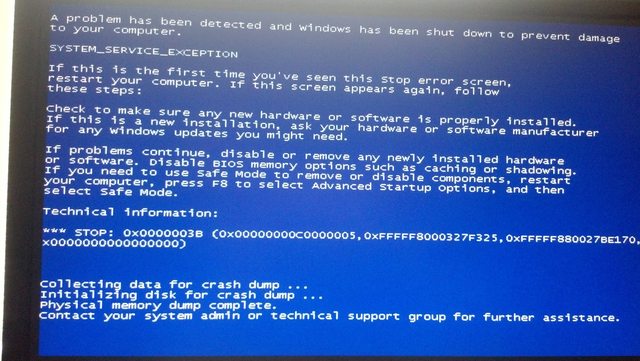
I have had a Bluescreen since enabling the driver verifier and it is not a message I have ever seen before


Despite the message at the bottom it did not create a crash dump
 

My Computer My Computer

Computer type
PC/Desktop
Computer Manufacturer/Model Number
Custom build
OS
Windows 7 Home Premium x64
CPU
Intel i5 750 2.67 ghz
Motherboard
Asus P7P55 LX
Memory
12gb
Graphics Card(s)
Galaxy 60XMH6HS3HMW GeForce GTX 460
Hard Drives
Samsung 1TB HD103SJ
Antivirus
ESET NOD32
Browser
Google Chrome
Can you upload the ZIP file anyway....there may be clues as to the issue.

Check in C:\Windows\Minidump.....are there any .dmp files present there?
 

My Computer My Computer

Computer type
PC/Desktop
Computer Manufacturer/Model Number
Golden Mk. I.4
OS
Windows 10 Pro x64 ; Xubuntu x64
CPU
Intel i7 860 @ 2.80 GHz O/C'ed to 4.0GHz
Motherboard
Gigabyte P55A-UD3R Rev.1. Award BIOS F13
Memory
16GB Corsair Vengance DDR3 @ 661 MHz Dual Channel (9-9-9-24)
Graphics Card(s)
EVGA NVidia GTX 560 1024MB
Sound Card
Realtek Integrated
Monitor(s) Displays
Dual Samsung SyncMaster 2494HS
Screen Resolution
1920*1080 and 1920*1080
Hard Drives
1*Samsung 840 EVO 120GB SSD;
1*OCZ Vertex 2 60GB SSD;
2*Samsung F3 SpinPoint 1TB in RAID0;
1*Samsung F1 SpinPoint 1TB;
2*Western Digital 1TB External USB 3.0
1*Western Digital 500GB External USB 3.0
1*Seagate 500GB External USB 2.0
PSU
Thermaltake ToughPower QFan 750W
Case
Thermaltake Element S VK60001W2Z
Cooling
Corsair H60 Water Cooling, 2*230mm and 2*80mm case fans
Keyboard
Logitech G110
Mouse
Logitech MX518
Also, if you've disabled your paging file, or moved it to a drive other than the one that \Windows is on, or if you've made it too small to capture a dump file, then that could explain not capturing a file like \Windows\Memory.dmp or \Windows\minidump\*.dmp. If you're sure you've already handled that, certain security software can impede the ability to create a .dmp file, as can a disk controller driver actually causing the crash (as one needs to be running properly when the OS crashes, so that the .dmp file can be written out to the disk it presents to the OS). There are other reasons too, but those are the most common. Given you've enabled special pool, and are seeing a crash, it's at least possible this is driver-related, so the fact you aren't getting .dmp files could actually be giving us a clue as to what's going on (have you updated drivers or security/antivirus software recently?).
 

My Computer My Computer

Computer type
PC/Desktop
Computer Manufacturer/Model Number
Custom
OS
Windows 10 Pro x64
CPU
Intel Core i7 4790K @ 4.5GHz
Motherboard
Asus Maximus Hero VII
Memory
32GB DDR3
Graphics Card(s)
Nvidia GeForce GTX970
Sound Card
Realtek HD Audio
Screen Resolution
1920x1200
Hard Drives
1x Samsung 250GB SSD
4x WD RE 2TB (RAIDZ)
PSU
Corsair AX760i
Case
Fractal Design Define R4
Cooling
Noctua NH-D15
Can you upload the ZIP file anyway....there may be clues as to the issue.

Check in C:\Windows\Minidump.....are there any .dmp files present there?
I originally uploaded it then managed to accidentally remove it, I added it back to the original post, the \minidump\ folder exists but is empty (system and hidden files are set to be visible.)


Also, if you've disabled your paging file, or moved it to a drive other than the one that \Windows is on, or if you've made it too small to capture a dump file, then that could explain not capturing a file like \Windows\Memory.dmp or \Windows\minidump\*.dmp. If you're sure you've already handled that, certain security software can impede the ability to create a .dmp file, as can a disk controller driver actually causing the crash (as one needs to be running properly when the OS crashes, so that the .dmp file can be written out to the disk it presents to the OS). There are other reasons too, but those are the most common. Given you've enabled special pool, and are seeing a crash, it's at least possible this is driver-related, so the fact you aren't getting .dmp files could actually be giving us a clue as to what's going on (have you updated drivers or security/antivirus software recently?).
I only have a single hard drive with a single partition that the page file is on, it is set to allocate automatically and has a listed total paging file size of 12279MB which I presume would be enough for that. I did not (to my knowledge) enable special pool, this error seems to have been caused by a program designed to stress test drivers.

My antivirus and most drivers are kept up to date automatically and checking manually they all appear to be in order.
 

My Computer My Computer

Computer type
PC/Desktop
Computer Manufacturer/Model Number
Custom build
OS
Windows 7 Home Premium x64
CPU
Intel i5 750 2.67 ghz
Motherboard
Asus P7P55 LX
Memory
12gb
Graphics Card(s)
Galaxy 60XMH6HS3HMW GeForce GTX 460
Hard Drives
Samsung 1TB HD103SJ
Antivirus
ESET NOD32
Browser
Google Chrome


Another bluescreen, no memory dump created
 

My Computer My Computer

Computer type
PC/Desktop
Computer Manufacturer/Model Number
Custom build
OS
Windows 7 Home Premium x64
CPU
Intel i5 750 2.67 ghz
Motherboard
Asus P7P55 LX
Memory
12gb
Graphics Card(s)
Galaxy 60XMH6HS3HMW GeForce GTX 460
Hard Drives
Samsung 1TB HD103SJ
Antivirus
ESET NOD32
Browser
Google Chrome
The last one seems to indicate a disc error

See "Ntfs.sys"

Run extensive tests on your Hard drive with the utility provided by the hard drive manufacturer

Bug Check 0x24


Cause


One possible cause of this bug check is disk corruption. Corruption in the NTFS file system or bad blocks (sectors) on the hard disk can induce this error. Corrupted SCSI and IDE drivers can also adversely affect the system's ability to read and write to disk, thus causing the error.
Another possible cause is depletion of nonpaged pool memory. If the nonpaged pool memory is completely depleted, this error can stop the system. However, during the indexing process, if the amount of available nonpaged pool memory is very low, another kernel-mode driver requiring nonpaged pool memory can also trigger this error.


To resolve a disk corruption problem: Check Event Viewer for error messages from SCSI and FASTFAT (System Log) or Autochk (Application Log) that might help pinpoint the device or driver that is causing the error. Try disabling any virus scanners, backup programs, or disk defragmenter tools that continually monitor the system. You should also run hardware diagnostics supplied by the system manufacturer. For details on these procedures, see the owner's manual for your computer. Run Chkdsk /f /r to detect and resolve any file system structural corruption. You must restart the system before the disk scan begins on a system partition.
To resolve a nonpaged pool memory depletion problem: Either add new physical memory to the computer (thus increasing the quantity of nonpaged pool memory available to the kernel), or reduce the number of files on the Services for Macintosh (SFM) volume.


Also, see here:
Code:
Event[10376]:
  Log Name: System
  Source: Microsoft-Windows-WHEA-Logger
  Date: 2014-07-15T12:28:50.978
  Event ID: 18
  Task: N/A
  Level: Error
  Opcode: Info
  Keyword: N/A
  User: S-1-5-19
  User Name: NT AUTHORITY\LOCAL SERVICE
  Computer: Serket
  Description: 
A fatal hardware error has occurred.
Explanation


This error indicates that there is a hardware problem. A machine check exception indicates a computer hardware error that occurs when a computer's central processing unit detects a hardware problem.

Note: WHEA stands for Windows Hardware Error Architecture.

Some of the main hardware problems which cause machine check exceptions include:


  • System bus errors (error communicating between the processor and the motherboard)
  • Memory errors that may include parity and error correction code (ECC) problems. Error checking ensures that data is stored correctly in the RAM; if information is corrupted, then random errors occur.
  • Cache errors in the processor; the cache stores important data and code. If this is corrupted, errors often occur.
  • Poor voltage regulation (i.e. power supply problem, voltage regulator malfunction, capacitor degradation)
  • Damage due to power spikes
  • Static damage to the motherboard
  • Incorrect processor voltage setting in the BIOS (too low or too high)
  • Overclocking
  • Permanent motherboard or power supply damage caused by prior overclocking
  • Excessive temperature caused by insufficient airflow (possibly caused by fan failure or blockage of air inlet/outlet)
  • Improper BIOS initialization (the BIOS configuring the motherboard or CPU incorrectly)
  • Installation of a processor that is too much for your motherboard to handle (excessive power requirement, incompatibility)
  • Defective hardware that may be drawing excessive power or otherwise disrupting proper voltage regulation
User Action


  • Update the BIOS and the drivers for the motherboard chipset.
  • Update all the hardware drivers, if updates are available from your manufacturer.
  • Check the temperature inside the computer to make sure your processor and related peripherals are not overheating.
  • Check the fan on your CPU to make sure it is properly attached to the CPU.
  • If you have overclocked your CPU, reset your settings to the default settings.
  • Make sure you power supply fan is working correctly
 

My Computer My Computer

Computer type
PC/Desktop
Computer Manufacturer/Model Number
Custom
OS
Dual Boot: Windows 8.1 & Server 2012r2 VMs: Kali Linux, Backbox, Matriux, Windows 8.1
CPU
A10 7700 Kavari SteamRoller
Motherboard
ASUS A88XM-PLUS (FM2+ )
Memory
8GB DDR3 SDRAM PC3-8500
Graphics Card(s)
1024MB ATI AMD Radeon R7 Graphics
Sound Card
Realtek High Definition Audio
Monitor(s) Displays
Samsung
Hard Drives
SSD Crucial 120gb
WD VelociRaptor 1tb
PSU
Rosewill Gaming 650w
Case
Rosewill Galaxy 2
Internet Speed
55/12
Antivirus
Malwarebytes, MSE, SAS
Browser
FireFox, Chrome
The last one seems to indicate a disc error

See "Ntfs.sys"

Run extensive tests on your Hard drive with the utility provided by the hard drive manufacturer

Bug Check 0x24


Cause


One possible cause of this bug check is disk corruption. Corruption in the NTFS file system or bad blocks (sectors) on the hard disk can induce this error. Corrupted SCSI and IDE drivers can also adversely affect the system's ability to read and write to disk, thus causing the error.
Another possible cause is depletion of nonpaged pool memory. If the nonpaged pool memory is completely depleted, this error can stop the system. However, during the indexing process, if the amount of available nonpaged pool memory is very low, another kernel-mode driver requiring nonpaged pool memory can also trigger this error.


To resolve a disk corruption problem: Check Event Viewer for error messages from SCSI and FASTFAT (System Log) or Autochk (Application Log) that might help pinpoint the device or driver that is causing the error. Try disabling any virus scanners, backup programs, or disk defragmenter tools that continually monitor the system. You should also run hardware diagnostics supplied by the system manufacturer. For details on these procedures, see the owner's manual for your computer. Run Chkdsk /f /r to detect and resolve any file system structural corruption. You must restart the system before the disk scan begins on a system partition.
To resolve a nonpaged pool memory depletion problem: Either add new physical memory to the computer (thus increasing the quantity of nonpaged pool memory available to the kernel), or reduce the number of files on the Services for Macintosh (SFM) volume.


Also, see here:
Code:
Event[10376]:
  Log Name: System
  Source: Microsoft-Windows-WHEA-Logger
  Date: 2014-07-15T12:28:50.978
  Event ID: 18
  Task: N/A
  Level: Error
  Opcode: Info
  Keyword: N/A
  User: S-1-5-19
  User Name: NT AUTHORITY\LOCAL SERVICE
  Computer: Serket
  Description: 
A fatal hardware error has occurred.
Explanation


This error indicates that there is a hardware problem. A machine check exception indicates a computer hardware error that occurs when a computer's central processing unit detects a hardware problem.

Note: WHEA stands for Windows Hardware Error Architecture.

Some of the main hardware problems which cause machine check exceptions include:


  • System bus errors (error communicating between the processor and the motherboard)
  • Memory errors that may include parity and error correction code (ECC) problems. Error checking ensures that data is stored correctly in the RAM; if information is corrupted, then random errors occur.
  • Cache errors in the processor; the cache stores important data and code. If this is corrupted, errors often occur.
  • Poor voltage regulation (i.e. power supply problem, voltage regulator malfunction, capacitor degradation)
  • Damage due to power spikes
  • Static damage to the motherboard
  • Incorrect processor voltage setting in the BIOS (too low or too high)
  • Overclocking
  • Permanent motherboard or power supply damage caused by prior overclocking
  • Excessive temperature caused by insufficient airflow (possibly caused by fan failure or blockage of air inlet/outlet)
  • Improper BIOS initialization (the BIOS configuring the motherboard or CPU incorrectly)
  • Installation of a processor that is too much for your motherboard to handle (excessive power requirement, incompatibility)
  • Defective hardware that may be drawing excessive power or otherwise disrupting proper voltage regulation
User Action


  • Update the BIOS and the drivers for the motherboard chipset.
  • Update all the hardware drivers, if updates are available from your manufacturer.
  • Check the temperature inside the computer to make sure your processor and related peripherals are not overheating.
  • Check the fan on your CPU to make sure it is properly attached to the CPU.
  • If you have overclocked your CPU, reset your settings to the default settings.
  • Make sure you power supply fan is working correctly


I've run chkdsk several times with no errors of any type reported, Samsung claims that their Hutil tool works on my model of drive but the tool itself claims my model is not supported.
I have 12g of physical memory and rarely even approach utilizing it all.
Unless I'm mistaken Services for Macintosh is a tool for Windows servers to allow Apple computers to connect to them and is not applicable here.
All drivers including BIOS are up to date, all fans are fully seated and functional, all temperatures are within manufacturer's specifications, no hardware is overclocked in any way.

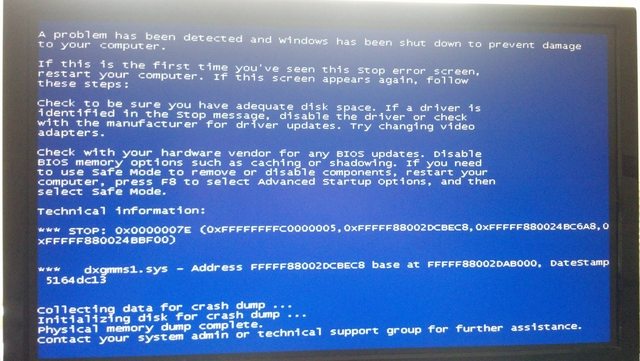
Here are two more bluescreens though


My Computer My Computer

Computer type
PC/Desktop
Computer Manufacturer/Model Number
Custom build
OS
Windows 7 Home Premium x64
CPU
Intel i5 750 2.67 ghz
Motherboard
Asus P7P55 LX
Memory
12gb
Graphics Card(s)
Galaxy 60XMH6HS3HMW GeForce GTX 460
Hard Drives
Samsung 1TB HD103SJ
Antivirus
ESET NOD32
Browser
Google Chrome
That post was a copy/paste from the errors you are receiving. Its very difficult to troubleshoot a BSOD without a dump.

You can use Seatools or Western Digitals hard drive testing utilities to test your hard drive for errors.
 

My Computer My Computer

Computer type
PC/Desktop
Computer Manufacturer/Model Number
Custom
OS
Dual Boot: Windows 8.1 & Server 2012r2 VMs: Kali Linux, Backbox, Matriux, Windows 8.1
CPU
A10 7700 Kavari SteamRoller
Motherboard
ASUS A88XM-PLUS (FM2+ )
Memory
8GB DDR3 SDRAM PC3-8500
Graphics Card(s)
1024MB ATI AMD Radeon R7 Graphics
Sound Card
Realtek High Definition Audio
Monitor(s) Displays
Samsung
Hard Drives
SSD Crucial 120gb
WD VelociRaptor 1tb
PSU
Rosewill Gaming 650w
Case
Rosewill Galaxy 2
Internet Speed
55/12
Antivirus
Malwarebytes, MSE, SAS
Browser
FireFox, Chrome
The fact that no dump is being created should be a hint, as I mentioned before.....
 

My Computer My Computer

Computer type
PC/Desktop
Computer Manufacturer/Model Number
Custom
OS
Windows 10 Pro x64
CPU
Intel Core i7 4790K @ 4.5GHz
Motherboard
Asus Maximus Hero VII
Memory
32GB DDR3
Graphics Card(s)
Nvidia GeForce GTX970
Sound Card
Realtek HD Audio
Screen Resolution
1920x1200
Hard Drives
1x Samsung 250GB SSD
4x WD RE 2TB (RAIDZ)
PSU
Corsair AX760i
Case
Fractal Design Define R4
Cooling
Noctua NH-D15
The fact that no dump is being created should be a hint, as I mentioned before.....

It does seem logical but chkdsk doesn't report any errors and none of the short Seatools tests reported errors though the long test is still ongoing
 

My Computer My Computer

Computer type
PC/Desktop
Computer Manufacturer/Model Number
Custom build
OS
Windows 7 Home Premium x64
CPU
Intel i5 750 2.67 ghz
Motherboard
Asus P7P55 LX
Memory
12gb
Graphics Card(s)
Galaxy 60XMH6HS3HMW GeForce GTX 460
Hard Drives
Samsung 1TB HD103SJ
Antivirus
ESET NOD32
Browser
Google Chrome
I see the potential assumption of a disk or hardware issue, but if you're telling us everything, then it's more likely a driver issue. The only thing running on Windows when a system crashes is the basest of the kernel to handle the bugcheck call and write out RAM to the pagefile, and kernel-mode drivers associated with security software and disk drivers. If you aren't getting a memory dump, and the system is configured with an automatic paging file (so it should be at least 1x RAM in size and on the same volume as the \Windows install), then that eliminates the OS itself (in all likelihood) and leaves system drivers and hardware. Given that you're getting some *really* random bugcheck codes without any real consistency, and if your RAM and hard disks all pass thorough hardware checks, that eliminates that as well and leaves only drivers. Knowing which drivers are still loaded when Windows crashes reduces the possibilities there as well....

Like I said, it's a clue.
 

My Computer My Computer

Computer type
PC/Desktop
Computer Manufacturer/Model Number
Custom
OS
Windows 10 Pro x64
CPU
Intel Core i7 4790K @ 4.5GHz
Motherboard
Asus Maximus Hero VII
Memory
32GB DDR3
Graphics Card(s)
Nvidia GeForce GTX970
Sound Card
Realtek HD Audio
Screen Resolution
1920x1200
Hard Drives
1x Samsung 250GB SSD
4x WD RE 2TB (RAIDZ)
PSU
Corsair AX760i
Case
Fractal Design Define R4
Cooling
Noctua NH-D15
I see the potential assumption of a disk or hardware issue, but if you're telling us everything, then it's more likely a driver issue. The only thing running on Windows when a system crashes is the basest of the kernel to handle the bugcheck call and write out RAM to the pagefile, and kernel-mode drivers associated with security software and disk drivers. If you aren't getting a memory dump, and the system is configured with an automatic paging file (so it should be at least 1x RAM in size and on the same volume as the \Windows install), then that eliminates the OS itself (in all likelihood) and leaves system drivers and hardware. Given that you're getting some *really* random bugcheck codes without any real consistency, and if your RAM and hard disks all pass thorough hardware checks, that eliminates that as well and leaves only drivers. Knowing which drivers are still loaded when Windows crashes reduces the possibilities there as well....

Like I said, it's a clue.

The Seatools long test came back clean so this seems increasingly plausible, is there an easy way to test for driver corruption (?) or is it reinstall every driver manually/flatten and reinstall territory?
 

My Computer My Computer

Computer type
PC/Desktop
Computer Manufacturer/Model Number
Custom build
OS
Windows 7 Home Premium x64
CPU
Intel i5 750 2.67 ghz
Motherboard
Asus P7P55 LX
Memory
12gb
Graphics Card(s)
Galaxy 60XMH6HS3HMW GeForce GTX 460
Hard Drives
Samsung 1TB HD103SJ
Antivirus
ESET NOD32
Browser
Google Chrome


and another BSOD

Nghb0EN.png


and this since then which is new to me
 
Last edited:

My Computer My Computer

Computer type
PC/Desktop
Computer Manufacturer/Model Number
Custom build
OS
Windows 7 Home Premium x64
CPU
Intel i5 750 2.67 ghz
Motherboard
Asus P7P55 LX
Memory
12gb
Graphics Card(s)
Galaxy 60XMH6HS3HMW GeForce GTX 460
Hard Drives
Samsung 1TB HD103SJ
Antivirus
ESET NOD32
Browser
Google Chrome
How much free disk space do you have on C:?
 

My Computer My Computer

Computer type
PC/Desktop
Computer Manufacturer/Model Number
Golden Mk. I.4
OS
Windows 10 Pro x64 ; Xubuntu x64
CPU
Intel i7 860 @ 2.80 GHz O/C'ed to 4.0GHz
Motherboard
Gigabyte P55A-UD3R Rev.1. Award BIOS F13
Memory
16GB Corsair Vengance DDR3 @ 661 MHz Dual Channel (9-9-9-24)
Graphics Card(s)
EVGA NVidia GTX 560 1024MB
Sound Card
Realtek Integrated
Monitor(s) Displays
Dual Samsung SyncMaster 2494HS
Screen Resolution
1920*1080 and 1920*1080
Hard Drives
1*Samsung 840 EVO 120GB SSD;
1*OCZ Vertex 2 60GB SSD;
2*Samsung F3 SpinPoint 1TB in RAID0;
1*Samsung F1 SpinPoint 1TB;
2*Western Digital 1TB External USB 3.0
1*Western Digital 500GB External USB 3.0
1*Seagate 500GB External USB 2.0
PSU
Thermaltake ToughPower QFan 750W
Case
Thermaltake Element S VK60001W2Z
Cooling
Corsair H60 Water Cooling, 2*230mm and 2*80mm case fans
Keyboard
Logitech G110
Mouse
Logitech MX518
Back
Top