
Intermittent connection issues, "Default gateway is not available."
I have a Motorola SB5100 modem connected to a Netgear WGR614 v7 router. I then have my Xbox 360 and Desktop connected to the router. With this setup, there will be periods of time in which my internet will disconnect, but all the lights on both devices will stay lit. When I disconnect my Desktop from my router and plug it directly into my modem, and this issue appears, when I run the Network Troubleshooting on Windows 7 it tells me "The default gateway is not available."
This issue has been driving me crazy for the past few weeks now. I've placed multiple calls to my ISP and had several tech visits, all to no avail. I've also tried searching the internet for fixes, of which none worked. I have tried:
-Flushing DNS
-Manually setting default gateway in command prompt
-Unplugging my modem and plugging it back in
-Setting a static IP
-Turning off all TCP/UDP offload settings on my NIC
-Updating my NIC's drivers
-Removing and reinstalling my NIC's drivers
-Installing a NEW NIC, to no avail
-Replacing the modem
-Replacing the ethernet and coax cables
-Turning off IPv6
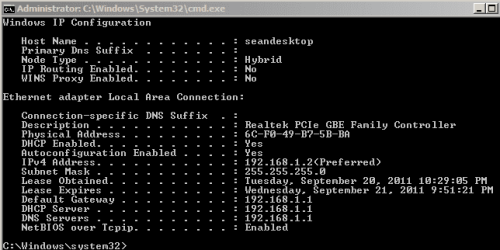
If anyone has had this similar problem and has advice/a fix, I'm open to suggestions. Attached is IPCONFIG and a HijackThis log.
I have a Motorola SB5100 modem connected to a Netgear WGR614 v7 router. I then have my Xbox 360 and Desktop connected to the router. With this setup, there will be periods of time in which my internet will disconnect, but all the lights on both devices will stay lit. When I disconnect my Desktop from my router and plug it directly into my modem, and this issue appears, when I run the Network Troubleshooting on Windows 7 it tells me "The default gateway is not available."
This issue has been driving me crazy for the past few weeks now. I've placed multiple calls to my ISP and had several tech visits, all to no avail. I've also tried searching the internet for fixes, of which none worked. I have tried:
-Flushing DNS
-Manually setting default gateway in command prompt
-Unplugging my modem and plugging it back in
-Setting a static IP
-Turning off all TCP/UDP offload settings on my NIC
-Updating my NIC's drivers
-Removing and reinstalling my NIC's drivers
-Installing a NEW NIC, to no avail
-Replacing the modem
-Replacing the ethernet and coax cables
-Turning off IPv6
If anyone has had this similar problem and has advice/a fix, I'm open to suggestions. Attached is IPCONFIG and a HijackThis log.
Attachments
My Computer
At a glance
Windows 7 Professional 32bit SP1Intel Core 2 Quad Q8400 @ 2.6Ghz4096MB (2 x 2048 DDR3-SDRAM )NVIDIA GeForce GTX 260
- Computer Manufacturer/Model Number
- Custom Built
- OS
- Windows 7 Professional 32bit SP1
- CPU
- Intel Core 2 Quad Q8400 @ 2.6Ghz
- Motherboard
- Gigabyte EP45T-UD3LR
- Memory
- 4096MB (2 x 2048 DDR3-SDRAM )
- Graphics Card(s)
- NVIDIA GeForce GTX 260
- Sound Card
- GigaByte Technology 82801J (ICH10) HD Audio C
- Monitor(s) Displays
- Acer X223W
- Hard Drives
- WDC WD5000AAKS-00V1A0
- PSU
- GBT GBTUACPI
- Case
- Lian-Li


