- Local time
- 3:52 AM
- Messages
- 152
Hello,
A computer in my small P2P network of six 2010 computers that all run Win 7 Pro has been behaving sluggishly for the past couple of weeks. The user says that some days it seems fine but other days it takes forever to do a simple task.
With the user out of the office for a couple of days, yesterday I began trying to diagnose the problem. I have noticed and experienced the following:
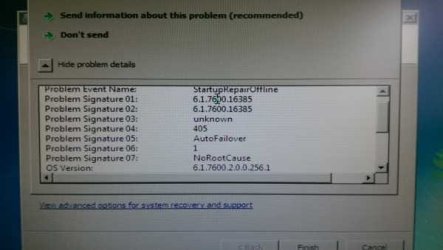
1) The first time I tried to boot the computer, it got caught in a boot loop and froze on the black Windows screen that says “Starting Windows”. I had to do a hard shut down to break the freeze.
I booted into Safe Mode and followed the recommended action to run “Startup Repair”, which was unsuccessful in fixing the problem.
I did a System Restore to the ONLY restore point, which was 3/24. This enabled me to boot the computer normally.
2) Once the computer had booted normally, I noticed that when I booted MalwareBytes (free version), it was unable to connect to the internet to update its definitions. Firefox (the default browser) also cannot connect to the internet, although Internet Explorer can. MalwareBytes found no threats in its scan.
3) Our default firewall/AV is Norton 360, and it is not running. Nor can I get it to boot (I get an “unspecified error” when attempting to boot).
4) Reviewing the System Log in Event Viewer, I have found in the past month increasingly frequent errors, one of which was critical (system reboot w/o clean shutdown). The most frequent errors are:
- Service Control Manager (Error) – Event ID 7001
- Disk (Warning) – Event ID 51 (error during paging operation
- HAL (Error) – Event ID 12 (platform firmware has corrupted memory)
- iaStore (Error) – Event ID 9 (did not respond within timeout period)
- volsnap (Error) – Event ID 14 (shadow copies failed)
- HECIx64 (Warning) – Event ID 1 (Intel Mgt Engine Interface is being reset)
- Kernal PnP (Warning) – Event ID 219 (USB load fail)
Am I looking at impending system failure? Malware?
A computer in my small P2P network of six 2010 computers that all run Win 7 Pro has been behaving sluggishly for the past couple of weeks. The user says that some days it seems fine but other days it takes forever to do a simple task.
With the user out of the office for a couple of days, yesterday I began trying to diagnose the problem. I have noticed and experienced the following:
1) The first time I tried to boot the computer, it got caught in a boot loop and froze on the black Windows screen that says “Starting Windows”. I had to do a hard shut down to break the freeze.
I booted into Safe Mode and followed the recommended action to run “Startup Repair”, which was unsuccessful in fixing the problem.
I did a System Restore to the ONLY restore point, which was 3/24. This enabled me to boot the computer normally.
2) Once the computer had booted normally, I noticed that when I booted MalwareBytes (free version), it was unable to connect to the internet to update its definitions. Firefox (the default browser) also cannot connect to the internet, although Internet Explorer can. MalwareBytes found no threats in its scan.
3) Our default firewall/AV is Norton 360, and it is not running. Nor can I get it to boot (I get an “unspecified error” when attempting to boot).
4) Reviewing the System Log in Event Viewer, I have found in the past month increasingly frequent errors, one of which was critical (system reboot w/o clean shutdown). The most frequent errors are:
- Service Control Manager (Error) – Event ID 7001
- Disk (Warning) – Event ID 51 (error during paging operation
- HAL (Error) – Event ID 12 (platform firmware has corrupted memory)
- iaStore (Error) – Event ID 9 (did not respond within timeout period)
- volsnap (Error) – Event ID 14 (shadow copies failed)
- HECIx64 (Warning) – Event ID 1 (Intel Mgt Engine Interface is being reset)
- Kernal PnP (Warning) – Event ID 219 (USB load fail)
Am I looking at impending system failure? Malware?
My Computer
- Computer type
- PC/Desktop
- Computer Manufacturer/Model Number
- Lenovo ThinkPad E545 / Dell Optiplex 980
- OS
- Windows 7 Pro 64-bit
- CPU
- AMD 2.9GHz / Intel 3.2GHz
- Memory
- 8GB / 4GB
- Antivirus
- AVG / Norton 360
- Browser
- Firefox & Chrome