Intermittent wired connection? Check this 1st.

Tarka Dal

New member
Pro User
VIP
Local time
4:35 AM
Messages
567
You need to:-
1st check that your router is not overheating they don't have to get very warm before they break down. At room temp they only need to be on the carpet to overheat...
2nd Reboot the router and check all settings.
3rd Still a problem it's more than likely the router. ( Although not an absolute fact!)
All the best
 

My Computer My Computer

OS
Stools
No router, using ISP provided modem.
 

My Computer My Computer

OS
Windows 7
and what is your problem...
 

My Computer My Computer

OS
Stools
Oh sigh...

Seems to be I'm having the problem that most are, randomly disconnecting. From what I can tell it is COMPLETELY random, as times of disconnection can happen between 5-10 minutes of each other, hours within each other, even days between (known) disconnects.

The catch: I use a modem and hard wire with Ethernet to either my desktop with Windows 7 64 bit or my laptop with Vista 64 bit, and the problem happens on both. My ISP (Comcast) has come out and replaced both lines going from the road to the in yard pole, and the pole to my house. I have had about 3 different modems in the past month and I still have the problem and have yet to find a solution.

I have reformatted my desktop multiple times in an attempt to fix this, updated/deleted/reinstalled drivers for my motherboard, ethernet and etc.

My desktop specs:
Windows 7 Home
4GB RAM
eFe-Force 8800GT
Gigabyte EP45-UD3P
Intel 3.2 Duo Core CPU

These are the logs of my modem as of late:
2010-02-08 01:49:33 4-Error IGMP: ERROR - Group address 0.0.0.1 is not a legal multicast
2010-02-07 07:41:57 3-Critical R02.0 No Ranging Response received - T3 time-out
2010-02-07 07:19:05 4-Error IGMP: ERROR - Group address 0.0.0.1 is not a legal multicast
2010-02-07 03:53:29 3-Critical R02.0 No Ranging Response received - T3 time-out
2010-02-07 03:50:19 4-Error IGMP: ERROR - Group address 0.0.0.1 is not a legal multicast
2010-02-06 16:32:27 3-Critical R02.0 No Ranging Response received - T3 time-out
2010-02-06 15:46:41 4-Error IGMP: ERROR - Group address 0.0.0.1 is not a legal multicast
2010-02-06 05:16:12 5-Warning TSM: TxError WatchDog - Restart Upstream
2010-02-06 05:16:12 5-Warning HAL: Overcoming Tx Error (reseting the US - DMA)
2010-02-06 01:23:54 4-Error IGMP: ERROR - Group address 0.0.0.1 is not a legal multicast
2010-02-04 04:56:30 5-Warning TSM: TxError WatchDog - Restart Upstream
2010-02-04 04:56:30 5-Warning HAL: Overcoming Tx Error (reseting the US - DMA)
2010-02-04 04:54:16 5-Warning TSM: TxError WatchDog - Restart Upstream
2010-02-04 04:54:16 5-Warning HAL: Overcoming Tx Error (reseting the US - DMA)
2010-02-04 04:51:06 5-Warning TSM: TxError WatchDog - Restart Upstream
2010-02-04 04:51:06 5-Warning HAL: Overcoming Tx Error (reseting the US - DMA)
2010-02-04 04:46:18 4-Error IGMP: ERROR - Group address 0.0.0.1 is not a legal multicast
2010-02-03 13:32:28 3-Critical R02.0 No Ranging Response received - T3 time-out
2010-02-03 13:29:09 4-Error IGMP: ERROR - Group address 0.0.0.1 is not a legal multicast
2010-02-02 23:26:21 5-Warning TSM: TxError WatchDog - Restart Upstream

 

My Computer My Computer

OS
Windows 7
strange question..
Do you do a lot of downloading?
Probably not!
 

My Computer My Computer

OS
Stools
Yes, I also do a lot of streaming as well as listen to streams such as radio and watch streaming video. Torrenting and such is casual but not overly excessive.
 

My Computer My Computer

OS
Windows 7
You will find that it is your ISP trying to control your account. Eventually you will find that they can nearly stop all torrent downloading whilst allowing you to stream from say the BBC. ISP's have got very clever at this and it is simple enough for me to say I can't download torrents anymore and therefore no longer try as the ISP (Virgin) can put a plug in the hole anytime they want to. They have even cut off my VPN. So I can tell you with some certainty you will not be able to download torrents fairly soon now.
 

My Computer My Computer

OS
Stools
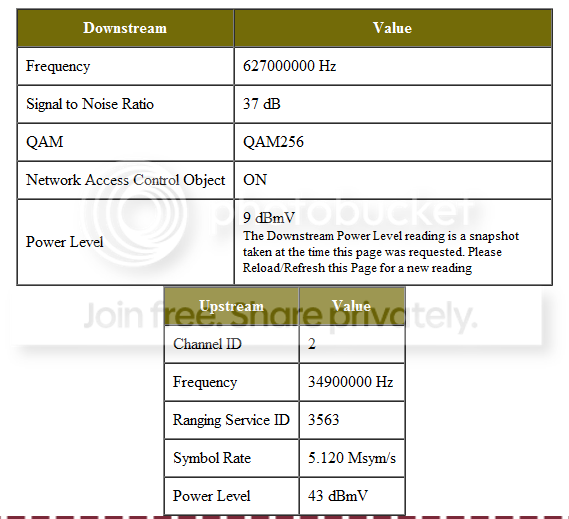
Honestly I haven't done much downloading of anything the past month or so, due to this problem, little to none to be exact. However I have a friend that may have found a potential problem: My downstream power level may be too high, making my modem get too much power without diverting it.

x.png
 

My Computer My Computer

OS
Windows 7
''2nd Reboot the router and check all settings'':sleepy:
 

My Computer My Computer

OS
Stools
K maybe you can't read but I don't have a router, I have a modem, and you don't think I've already reset it hundreds of times?
 

My Computer My Computer

OS
Windows 7
Back
Top