Internal Hard drive Not Recognized

MedicineMan

New member
Local time
11:05 PM
Messages
2
Hi forum

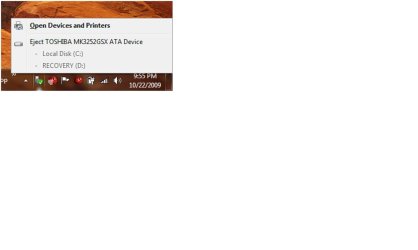
I just installed windows 7 and noticed that my internal hard drive is being recognized as an external disk drive. Whats going on and how do i change it?

My hard drive is a TOSHIBA MK3252GSX ATA Device, my computer is an hp dv5

thanks
 

My Computer

OS
Windows 7
Can we have visual representation of your finding?
 

My Computer

Computer Manufacturer/Model Number
Lenovo ThinkPad T60
OS
Windows 7 Ultimate 64Bit
CPU
GenuineIntel Intel(R) Core(TM) DuoCore T2400 @ 1.83GHz
Motherboard
Intel(R) 82801G (ICH7 Family)
Memory
2.00 GB
Graphics Card(s)
Mobile Intel(R) 945 Express Chipset
Sound Card
SoundMAX Integrated Digital HD Audio
Monitor(s) Displays
ThinkPad Display
Screen Resolution
1400x1050
Hard Drives
100Gb SATA
Keyboard
Standard Keyboard
Mouse
HID-compliant Mouse
Internet Speed
Cable Broadband - 54Mbps
Other Info
Intel(R) PRO/1000 PL Network Connection
11a/b/g Wireless LAN Mini PCI Express Adapter
Here, i can't figure out how to paste it, but here is the attachment
 

Attachments

  • problem.jpg
    problem.jpg
    31.2 KB · Views: 272

My Computer

OS
Windows 7
How can u tell from that, that your HDD is external or internal?
 

My Computer

Computer Manufacturer/Model Number
Lenovo ThinkPad T60
OS
Windows 7 Ultimate 64Bit
CPU
GenuineIntel Intel(R) Core(TM) DuoCore T2400 @ 1.83GHz
Motherboard
Intel(R) 82801G (ICH7 Family)
Memory
2.00 GB
Graphics Card(s)
Mobile Intel(R) 945 Express Chipset
Sound Card
SoundMAX Integrated Digital HD Audio
Monitor(s) Displays
ThinkPad Display
Screen Resolution
1400x1050
Hard Drives
100Gb SATA
Keyboard
Standard Keyboard
Mouse
HID-compliant Mouse
Internet Speed
Cable Broadband - 54Mbps
Other Info
Intel(R) PRO/1000 PL Network Connection
11a/b/g Wireless LAN Mini PCI Express Adapter
Here, i can't figure out how to paste it, but here is the attachment

Try this:
  1. Click the Start orb
  2. Right-click on "Computer", then click "Properties"
  3. Click on "Device Manager" in the upper left
  4. Open the "Disk Drive" catagory by clicking the little triangle
  5. Right-click on your particular drive, then click "Properties"
  6. Click the "Policies" tab
  7. If you have an option in the lines of "Optimze for Quick Removal", or something similar, turn that option off.
This MIGHT work, then again it might not. I've never had this issue with with either Windows Vista or Windows 7, so I also can't give screenshots of what I mean. Have you also tried downloading updated driver for your computer motherboard?

How can u tell from that, that your HDD is external or internal?

Because you should be able to "eject" and internal hard disk. I had a similar issue with my SATA hard disk on and older machine of mine that used a Gigabyte motherboard, when SATA was still a relatively new concept.
 

My Computer

Computer type
PC/Desktop
Computer Manufacturer/Model Number
Virtual Machine
OS
Windows 7 Professional 32-bit SP1
CPU
AMD A4/A6
Motherboard
Intel Corporation 440BX Desktop Reference Platform
Memory
3.00GB EDO
Graphics Card(s)
VMware SVGA 3D
Sound Card
High Definition Audio Device
Monitor(s) Displays
Generic Non-PnP Monitor on VMware SVGA 3D
Screen Resolution
1440x900
Hard Drives
1 x 60GB VMware Virtual SATA Hard Drive ATA Device
Antivirus
Kaspersky Total Security
"Because you should be able to "eject" and internal hard disk."

So from his attachment, he can't click on the Eject TOSHIBA MK3252GSX ATA Device? I'm not sure if this is a way to tell if it's internal or external, by external, does it mean something connected via USB?
 

My Computer

Computer Manufacturer/Model Number
Lenovo ThinkPad T60
OS
Windows 7 Ultimate 64Bit
CPU
GenuineIntel Intel(R) Core(TM) DuoCore T2400 @ 1.83GHz
Motherboard
Intel(R) 82801G (ICH7 Family)
Memory
2.00 GB
Graphics Card(s)
Mobile Intel(R) 945 Express Chipset
Sound Card
SoundMAX Integrated Digital HD Audio
Monitor(s) Displays
ThinkPad Display
Screen Resolution
1400x1050
Hard Drives
100Gb SATA
Keyboard
Standard Keyboard
Mouse
HID-compliant Mouse
Internet Speed
Cable Broadband - 54Mbps
Other Info
Intel(R) PRO/1000 PL Network Connection
11a/b/g Wireless LAN Mini PCI Express Adapter
HDD

I'm guessing he meant, you shouldn't be able to eject an internal hard disk..

Yeah, usually external hard drives are located outside the tower and connected via usb.. by ejecting it you help to ensure all data has finished transferring so there is not corruption.
 

My Computer

OS
Seven
The Device Instance ID, should be one giveaway. Eg.

IDE\... internal HDD
USBSTOR\...USB attached HDD.

Btw, you can use the DVD enclosure to house a removable HDD, but even so i do not think you will be getting IDE\ as Device Instance ID.
 

My Computer

Computer Manufacturer/Model Number
Lenovo ThinkPad T60
OS
Windows 7 Ultimate 64Bit
CPU
GenuineIntel Intel(R) Core(TM) DuoCore T2400 @ 1.83GHz
Motherboard
Intel(R) 82801G (ICH7 Family)
Memory
2.00 GB
Graphics Card(s)
Mobile Intel(R) 945 Express Chipset
Sound Card
SoundMAX Integrated Digital HD Audio
Monitor(s) Displays
ThinkPad Display
Screen Resolution
1400x1050
Hard Drives
100Gb SATA
Keyboard
Standard Keyboard
Mouse
HID-compliant Mouse
Internet Speed
Cable Broadband - 54Mbps
Other Info
Intel(R) PRO/1000 PL Network Connection
11a/b/g Wireless LAN Mini PCI Express Adapter
Isn't this normal now for secondary SATA drives? i.e. they appear in the 'Safe to Remove Hardware' option, as in below:

http://www.ctcd.edu/infotech/ctcitd/Images/safelyremovehardwaremessage.png

I have 3 machines, each with two SATA hard disks, and it looks like I have the option to safely remove them, as if they were hot swappable disks, which they're not of course !

I find it annoying, and a bit scary at times, as when safely removing a USB memory stick, I sometimes click on the wrong device.

Is this what the original poster is talking about ?

At least I can report Windows 7 doesn't seem to do this - it's on XP that I see this.
 

My Computer

OS
Windows 7 Professional 32 Bit
CPU
AMD Athlon X2 4000
Motherboard
Asrock AM2NF3-VSTA
Memory
Crucial Ballistix DDR2-800
Graphics Card(s)
GeForce 6200 AGP (256MB)
Screen Resolution
1600 x 1200
Hard Drives
Seagate Barracuda SATAII 250GB & 500GB
Case
Thermaltake Sonata
Because you should be able to "eject" and internal hard disk. I had a similar issue with my SATA hard disk on and older machine of mine that used a Gigabyte motherboard, when SATA was still a relatively new concept.

To correct myself:

Because you should not be able to "eject" an internal hard disk. I had a similar issue with my SATA hard disk on and older machine of mine that used a Gigabyte motherboard, when SATA was still a relatively new concept.


Sorry about that guys. I was typing too fast again, and was in a hurry to get to work. :o
 

My Computer

Computer type
PC/Desktop
Computer Manufacturer/Model Number
Virtual Machine
OS
Windows 7 Professional 32-bit SP1
CPU
AMD A4/A6
Motherboard
Intel Corporation 440BX Desktop Reference Platform
Memory
3.00GB EDO
Graphics Card(s)
VMware SVGA 3D
Sound Card
High Definition Audio Device
Monitor(s) Displays
Generic Non-PnP Monitor on VMware SVGA 3D
Screen Resolution
1440x900
Hard Drives
1 x 60GB VMware Virtual SATA Hard Drive ATA Device
Antivirus
Kaspersky Total Security
I've seen several inquiries on this subject and I found the answer, at least for me. Toshiba did a very poor job of informing it's customers of where to go to get the drivers needed for the Windows 7 upgrade/clean install. You have to sort through tons of pages to find the support forum and then if you don't happen to the right page, you're out of luck.

For users who are having problems with new Toshibas who have opted to take the Win7 upgrade, you should visit Toshiba Support - Homepage#

Their is a BIOS update and all of the original Toshiba add-ons, if you will, are also available for Win7. It solved the problem of the hard drive and many others. Hope this helps.
 

My Computer

Computer Manufacturer/Model Number
Toshiba L305D-5928
OS
Windows 7
Sorry, I left something out. When you navigate to the link I provided above, you must click on "product support" and then select your model as usual. Do NOT click on Windows 7 support because you will get nowhere.
 

My Computer

Computer Manufacturer/Model Number
Toshiba L305D-5928
OS
Windows 7
Back
Top