Internet connected but no access

wooja978

New member
Local time
4:01 PM
Messages
4
1. Is this a wired or wireless connection issue? Wireless

2. Who is your Internet Service Provider (ISP)? New Zealand

3. What type of Broadband connection are you using? DSL

4. What is the exact Make and Model of your Modem, Router or Modem/Router Combo - Linksys

5. What is the Name of the Anti-Virus, Security or Firewall Software installed from the problematic computer - n/a

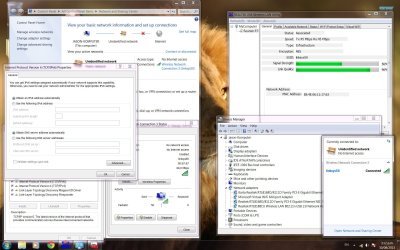
I recently purchased a wireless USB and installed the EDUP driver for it. It appears there is connectivity but I have no internet access. I have looked everywhere but am unsure how to fix this problem. Your help is much appreciated! Thanks.
 

Attachments
  • internet not working 01 - 09 - 13.jpg
    internet not working 01 - 09 - 13.jpg
    305.7 KB · Views: 9
  • internet not working 30 - 08 - 13.jpg
    internet not working 30 - 08 - 13.jpg
    298 KB · Views: 7

My Computer

Computer type
PC/Desktop
Computer Manufacturer/Model Number
custom build
OS
Windows 7 Home x64
CPU
AMD Phenom II x4 955 3.2 ghz
Motherboard
MSI 790FX-GD70 Motherboard AMD
Memory
16 gb
Graphics Card(s)
amd radeon hd 6800
Hard Drives
500 gb wd
64gb ssd patriot
Antivirus
n/a
Browser
firefox
Welcome to Seven Forums wooja978. Can you ping a website?

Start> In search box type cmd.exe> Enter> When command prompt opens type

ping www.sevenforums.com

Enter

Does it successfully connect?

If so, Start> All programs> Windows Update

Does Update connect?

A Guy
 

My Computer

Computer type
PC/Desktop
OS
Windows 10 Home x64
CPU
INTEL Core i5-750 Quad-Core 3.37GHz
Motherboard
ASUS P7P55D
Memory
HyperX Fury Black Series 8GB (2 x 4GB) 1866Mhz
Graphics Card(s)
EVGA GeForce GTX 750 Superclocked 1GB 128-Bit GDDR5
Monitor(s) Displays
LG 32MA68HY 32" IPS
Screen Resolution
1920 x 1080
Hard Drives
Samsung 840 Evo 120GB, SEAGATE 500GB Barracuda® 7200.12, SATA 3 Gb/s, 7200 RPM, 16MB cache
PSU
ANTEC TruePower New TP-550, 80 PLUS, 550W
Case
ANTEC Three Hundred Illusion
Cooling
COOLER MASTER Hyper 212 Plus, 4 x 120mm 1 x 140mm Noctua's
Internet Speed
85 + Mbps
Antivirus
Avast
Browser
Vivaldi
hi a guy. thanks for the welcome message.

i tried pinging. it says ping request could not find host xxx. please check the name and try again.

windows update doesn't work either.

what could it be ? :(
 

My Computer

Computer type
PC/Desktop
Computer Manufacturer/Model Number
custom build
OS
Windows 7 Home x64
CPU
AMD Phenom II x4 955 3.2 ghz
Motherboard
MSI 790FX-GD70 Motherboard AMD
Memory
16 gb
Graphics Card(s)
amd radeon hd 6800
Hard Drives
500 gb wd
64gb ssd patriot
Antivirus
n/a
Browser
firefox
Hi wooja

I wouldn't worry about Windows Update. That's not going to work until we get your connectivity issue solved.

From the looks of it, I'd suggest you delete your current connection, and try to set it up from scratch. First thing is to be sure that you're actually connecting to "Linksys50". It seems obvious, but again, there can be things you miss... Be sure that you're telling the configuration that this is your home network, not public or something like that.

Once this is completed, show us another IPCONFIG /ALL and we'll go from there.
 

My Computer

Computer type
PC/Desktop
Computer Manufacturer/Model Number
iBuyPower NZXT
OS
Microsoft Windows 10 Home Build 15036
CPU
Intel(R) Core(TM) i7-860 @ 2.80GHz
Motherboard
Gigabyte Technology Co., Ltd. P55-UD3L
Memory
4.00 GB
Graphics Card(s)
NVIDIA GeForce GTX 750
Sound Card
(1) Line 6 UX2 (2) Realtek High Definition Audio
Monitor(s) Displays
23" acer
Screen Resolution
1920 x 1080 x 32 bits (4294967296 colors) @ 60 Hz
Hard Drives
(1) WDC WD5000AAKS-00D2B0 ATA Device (2) Seagate FreeAgent Go 250G USB Device
Cooling
Corsair H75 liquid cooler (Very easy to install, actually)
Internet Speed
60M cable modem-->Linksys E1200-->1Gbps net card
Browser
Chrome
Other Info
This is probably the longest I've ever had a Windows machine run without having to restore it to scratch. I'm used to restoring to "factory" about every 2 yrs. I've run with Win7 since new in 2009 and only recently (Nov, '14) restored to clean up the machine from all my 'xperimenting. LOL!! I may never need another machine.

Upgraded to 10 when it was still free, then installed 2017 update.
Thanks for the reply Pea.

I reinstalled the driver, but am unsure how to change public -> home etc. Could you explain please?

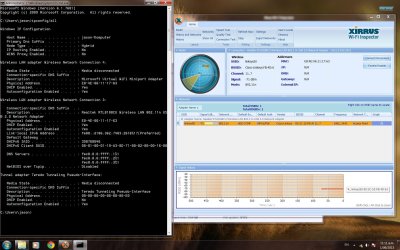
Here's the new ipconfig/all


Windows IP Configuration

Host Name . . . . . . . . . . . . : jason-Komputer
Primary Dns Suffix . . . . . . . :
Node Type . . . . . . . . . . . . : Hybrid
IP Routing Enabled. . . . . . . . : No
WINS Proxy Enabled. . . . . . . . : No

Wireless LAN adapter Wireless Network Connection 4:

Media State . . . . . . . . . . . : Media disconnected
Connection-specific DNS Suffix . :
Description . . . . . . . . . . . : Microsoft Virtual WiFi Miniport Adapter
Physical Address. . . . . . . . . : E8-4E-06-11-17-63
DHCP Enabled. . . . . . . . . . . : Yes
Autoconfiguration Enabled . . . . : Yes

Wireless LAN adapter Wireless Network Connection 3:

Media State . . . . . . . . . . . : Media disconnected
Connection-specific DNS Suffix . :
Description . . . . . . . . . . . : Realtek RTL8188CU Wireless LAN 802.11n USB 2.0 Network Adapter
Physical Address. . . . . . . . . : E8-4E-06-11-17-63
DHCP Enabled. . . . . . . . . . . : Yes
Autoconfiguration Enabled . . . . : Yes

Ethernet adapter Local Area Connection 2:

Media State . . . . . . . . . . . : Media disconnected
Connection-specific DNS Suffix . :
Description . . . . . . . . . . . : Realtek RTL8168D/8111D Family PCI-E Gigabit Ethernet NIC (NDIS 6.20) #2
Physical Address. . . . . . . . . : 40-61-86-01-E7-E8
DHCP Enabled. . . . . . . . . . . : Yes
Autoconfiguration Enabled . . . . : Yes

Ethernet adapter Local Area Connection:

Media State . . . . . . . . . . . : Media disconnected
Connection-specific DNS Suffix . :
Description . . . . . . . . . . . : Realtek RTL8168D/8111D Family PCI-E Gigabit Ethernet NIC (NDIS 6.20)
Physical Address. . . . . . . . . : 00-02-00-00-16-00
DHCP Enabled. . . . . . . . . . . : Yes
Autoconfiguration Enabled . . . . : Yes

Tunnel adapter Teredo Tunneling Pseudo-Interface:

Media State . . . . . . . . . . . : Media disconnected
Connection-specific DNS Suffix . :
Description . . . . . . . . . . . : Teredo Tunneling Pseudo-Interface
Physical Address. . . . . . . . . : 00-00-00-00-00-00-00-E0
DHCP Enabled. . . . . . . . . . . : No
Autoconfiguration Enabled . . . . : Yes
 

My Computer

Computer type
PC/Desktop
Computer Manufacturer/Model Number
custom build
OS
Windows 7 Home x64
CPU
AMD Phenom II x4 955 3.2 ghz
Motherboard
MSI 790FX-GD70 Motherboard AMD
Memory
16 gb
Graphics Card(s)
amd radeon hd 6800
Hard Drives
500 gb wd
64gb ssd patriot
Antivirus
n/a
Browser
firefox
All your media states are media disconnected. I'm not at all good with wireless as I have never set it up. Have you tried connecting directly with an ethernet cable? Something to try

Start> In search box type cmd> Right click cmd.exe in results above and choose Run as administrator> When command prompt loads type

netsh winsock reset

Enter

This will cause no harm if it doesn't help.

A Guy
 

My Computer

Computer type
PC/Desktop
OS
Windows 10 Home x64
CPU
INTEL Core i5-750 Quad-Core 3.37GHz
Motherboard
ASUS P7P55D
Memory
HyperX Fury Black Series 8GB (2 x 4GB) 1866Mhz
Graphics Card(s)
EVGA GeForce GTX 750 Superclocked 1GB 128-Bit GDDR5
Monitor(s) Displays
LG 32MA68HY 32" IPS
Screen Resolution
1920 x 1080
Hard Drives
Samsung 840 Evo 120GB, SEAGATE 500GB Barracuda® 7200.12, SATA 3 Gb/s, 7200 RPM, 16MB cache
PSU
ANTEC TruePower New TP-550, 80 PLUS, 550W
Case
ANTEC Three Hundred Illusion
Cooling
COOLER MASTER Hyper 212 Plus, 4 x 120mm 1 x 140mm Noctua's
Internet Speed
85 + Mbps
Antivirus
Avast
Browser
Vivaldi
That's why I'm asking to set up a completely new connection to the LinkSys network. Set it up from scratch. It looks like there are more than one connection setup on the sys (maybe one for home, one for work) for the wireless adapter. I'm just trying to get a good connection and work up.
 

My Computer

Computer type
PC/Desktop
Computer Manufacturer/Model Number
iBuyPower NZXT
OS
Microsoft Windows 10 Home Build 15036
CPU
Intel(R) Core(TM) i7-860 @ 2.80GHz
Motherboard
Gigabyte Technology Co., Ltd. P55-UD3L
Memory
4.00 GB
Graphics Card(s)
NVIDIA GeForce GTX 750
Sound Card
(1) Line 6 UX2 (2) Realtek High Definition Audio
Monitor(s) Displays
23" acer
Screen Resolution
1920 x 1080 x 32 bits (4294967296 colors) @ 60 Hz
Hard Drives
(1) WDC WD5000AAKS-00D2B0 ATA Device (2) Seagate FreeAgent Go 250G USB Device
Cooling
Corsair H75 liquid cooler (Very easy to install, actually)
Internet Speed
60M cable modem-->Linksys E1200-->1Gbps net card
Browser
Chrome
Other Info
This is probably the longest I've ever had a Windows machine run without having to restore it to scratch. I'm used to restoring to "factory" about every 2 yrs. I've run with Win7 since new in 2009 and only recently (Nov, '14) restored to clean up the machine from all my 'xperimenting. LOL!! I may never need another machine.

Upgraded to 10 when it was still free, then installed 2017 update.
1. Is this a wired or wireless connection issue? Wireless

2. Who is your Internet Service Provider (ISP)? New Zealand

3. What type of Broadband connection are you using? DSL

4. What is the exact Make and Model of your Modem, Router or Modem/Router Combo - Linksys

5. What is the Name of the Anti-Virus, Security or Firewall Software installed from the problematic computer - n/a

I recently purchased a wireless USB and installed the EDUP driver for it. It appears there is connectivity but I have no internet access. I have looked everywhere but am unsure how to fix this problem. Your help is much appreciated! Thanks.

When it appears that you are connected but not online then most likely the router requires a reset in order to fix the problem. Have you tried to reset the router yet?

After resetting the router it's required that you type in the SSID, type of security, encryption, password etc. then create a new wireless profile for this connection. You should remove or delete the old wireless profiles.
 

My Computer

Computer type
PC/Desktop
Computer Manufacturer/Model Number
Home built
OS
Windows 7 Ult, Windows 8.1 Pro,
CPU
Q9650-4.275GHz, E8600 4.5GHz, E6750-3.8GHz
Motherboard
Evga 780i FTW
Memory
G.Skill PC2 9600 1200Mhz 5 5 5 15 2T
Graphics Card(s)
GTX480
Sound Card
Asus Xonar D2
Monitor(s) Displays
HannsG
Screen Resolution
1680X1050
Hard Drives
GSkill Phoenix Pro 120GB SSD
PSU
ThermalTake Toughpower 1000Watt modular
Case
ThermalTake XaserV
Cooling
Xigmatek S1283
Keyboard
Logitech G15
Mouse
Logitech G9
Internet Speed
T1
When it appears that you are connected but not online then most likely the router requires a reset in order to fix the problem. Have you tried to reset the router yet?

I think we need to understand that you're not just asking OP to reboot the router, but to reset it to factory and start the process of setting up everything from scratch. Correct?
 

My Computer

Computer type
PC/Desktop
Computer Manufacturer/Model Number
iBuyPower NZXT
OS
Microsoft Windows 10 Home Build 15036
CPU
Intel(R) Core(TM) i7-860 @ 2.80GHz
Motherboard
Gigabyte Technology Co., Ltd. P55-UD3L
Memory
4.00 GB
Graphics Card(s)
NVIDIA GeForce GTX 750
Sound Card
(1) Line 6 UX2 (2) Realtek High Definition Audio
Monitor(s) Displays
23" acer
Screen Resolution
1920 x 1080 x 32 bits (4294967296 colors) @ 60 Hz
Hard Drives
(1) WDC WD5000AAKS-00D2B0 ATA Device (2) Seagate FreeAgent Go 250G USB Device
Cooling
Corsair H75 liquid cooler (Very easy to install, actually)
Internet Speed
60M cable modem-->Linksys E1200-->1Gbps net card
Browser
Chrome
Other Info
This is probably the longest I've ever had a Windows machine run without having to restore it to scratch. I'm used to restoring to "factory" about every 2 yrs. I've run with Win7 since new in 2009 and only recently (Nov, '14) restored to clean up the machine from all my 'xperimenting. LOL!! I may never need another machine.

Upgraded to 10 when it was still free, then installed 2017 update.
Hey guys,

Thanks for the replies. I have tried the netsh winsock reset to no avail. I am hesitant to reset the router as I am boarding at another person's house with multiple computers on the network. If that is what's needed though, I could have a sit down with everyone and try to convince them.

Pea, I have reinstalled the adapter driver, is that what you meant?

Thanks
 

My Computer

Computer type
PC/Desktop
Computer Manufacturer/Model Number
custom build
OS
Windows 7 Home x64
CPU
AMD Phenom II x4 955 3.2 ghz
Motherboard
MSI 790FX-GD70 Motherboard AMD
Memory
16 gb
Graphics Card(s)
amd radeon hd 6800
Hard Drives
500 gb wd
64gb ssd patriot
Antivirus
n/a
Browser
firefox
No. I'm sure that when you look at Network and Sharing, you find more than one wireless connection. You may not be using them, but they're there. I'm saying get rid of all of the old connections and start fresh. Be sure you're hitting the correct SSID, the correct security protocols, the whole enchilada.
 

My Computer

Computer type
PC/Desktop
Computer Manufacturer/Model Number
iBuyPower NZXT
OS
Microsoft Windows 10 Home Build 15036
CPU
Intel(R) Core(TM) i7-860 @ 2.80GHz
Motherboard
Gigabyte Technology Co., Ltd. P55-UD3L
Memory
4.00 GB
Graphics Card(s)
NVIDIA GeForce GTX 750
Sound Card
(1) Line 6 UX2 (2) Realtek High Definition Audio
Monitor(s) Displays
23" acer
Screen Resolution
1920 x 1080 x 32 bits (4294967296 colors) @ 60 Hz
Hard Drives
(1) WDC WD5000AAKS-00D2B0 ATA Device (2) Seagate FreeAgent Go 250G USB Device
Cooling
Corsair H75 liquid cooler (Very easy to install, actually)
Internet Speed
60M cable modem-->Linksys E1200-->1Gbps net card
Browser
Chrome
Other Info
This is probably the longest I've ever had a Windows machine run without having to restore it to scratch. I'm used to restoring to "factory" about every 2 yrs. I've run with Win7 since new in 2009 and only recently (Nov, '14) restored to clean up the machine from all my 'xperimenting. LOL!! I may never need another machine.

Upgraded to 10 when it was still free, then installed 2017 update.
Hey guys,

Thanks for the replies. I have tried the netsh winsock reset to no avail. I am hesitant to reset the router as I am boarding at another person's house with multiple computers on the network. If that is what's needed though, I could have a sit down with everyone and try to convince them.

Pea, I have reinstalled the adapter driver, is that what you meant?

Thanks

After resetting the router it's required that you type in the SSID, type of security, encryption, password etc. then create a new wireless profile for this connection. You should remove or delete the old wireless profiles.

If you can't access the router and other machines are connected to this router with a valid IP then simply move on to where I mentioned removing the old wireless profiles from "Manage Wireless Connections" which you can access from the Network and Sharing Center.

Try creating a new wireless profile for this connection, it sometimes helps to find out what type of security, password and encryption the router is set up to use then designate those when you set up the new wireless profile.
 

My Computer

Computer type
PC/Desktop
Computer Manufacturer/Model Number
Home built
OS
Windows 7 Ult, Windows 8.1 Pro,
CPU
Q9650-4.275GHz, E8600 4.5GHz, E6750-3.8GHz
Motherboard
Evga 780i FTW
Memory
G.Skill PC2 9600 1200Mhz 5 5 5 15 2T
Graphics Card(s)
GTX480
Sound Card
Asus Xonar D2
Monitor(s) Displays
HannsG
Screen Resolution
1680X1050
Hard Drives
GSkill Phoenix Pro 120GB SSD
PSU
ThermalTake Toughpower 1000Watt modular
Case
ThermalTake XaserV
Cooling
Xigmatek S1283
Keyboard
Logitech G15
Mouse
Logitech G9
Internet Speed
T1
Back
Top