internet connection needs reset every morning

klaus

New member
Local time
3:07 AM
Messages
6
Hello,

I am new to the forum, I hope someone can help me out with this.

When i start my computer (w7) the icon for internet connection on the tray is red and says "unknown network". So every morning i have to open the Local area network status, disable the Local area network, and restart it again as admin, and then it works.

It has been working perfectly well until now, the only thing I've done recently is I had several firewalls on (zonealarm, then comodo, now windows firewall, and the last two overlapped in time), so i don't know if some setting might be keeping my computer from connecting every time?

Sorry if this is quite a basic problem, but i can't find anything in google on how to proceed. Any help is much appreciated,
Klaus
 
Last edited:

My Computer My Computer

At a glance

w7xeon w3520 2.67Ghtz4G
Computer Manufacturer/Model Number
dell precision t3500
OS
w7
CPU
xeon w3520 2.67Ghtz
Memory
4G
I would blame either zone alarm or comodo or just having both enabled will do this. Uninstall one or the other. These third party softwares and firewalls cause problems like this all the time.
 

My Computer My Computer

At a glance

Windows 7 Ult, Windows 8.1 Pro,Q9650-4.275GHz, E8600 4.5GHz, E6750-3.8GHzG.Skill PC2 9600 1200Mhz 5 5 5 15 2TGTX480
Computer type
PC/Desktop
Computer Manufacturer/Model Number
Home built
OS
Windows 7 Ult, Windows 8.1 Pro,
CPU
Q9650-4.275GHz, E8600 4.5GHz, E6750-3.8GHz
Motherboard
Evga 780i FTW
Memory
G.Skill PC2 9600 1200Mhz 5 5 5 15 2T
Graphics Card(s)
GTX480
Sound Card
Asus Xonar D2
Monitor(s) Displays
HannsG
Screen Resolution
1680X1050
Hard Drives
GSkill Phoenix Pro 120GB SSD
PSU
ThermalTake Toughpower 1000Watt modular
Case
ThermalTake XaserV
Cooling
Xigmatek S1283
Keyboard
Logitech G15
Mouse
Logitech G9
Internet Speed
T1
I have used Window 7 built in firewall with complete success. I suggest giving it a try after removing the others. One firewall at a time.
 

My Computer My Computer

At a glance

Windows 10 Pro. 64/ version 1709 Windows 7 Pr...Intel i7-6800K @ 4.3Corsair Platinum 16 gig @2400EVGA GTX 1070 OC
Computer type
PC/Desktop
Computer Manufacturer/Model Number
Home made Desktop
OS
Windows 10 Pro. 64/ version 1709 Windows 7 Pro/64
CPU
Intel i7-6800K @ 4.3
Motherboard
ASUS X-99 Deluxe II
Memory
Corsair Platinum 16 gig @2400
Graphics Card(s)
EVGA GTX 1070 OC
Monitor(s) Displays
Asus 27" LED LCD/VE278Q
Screen Resolution
1920-1080 or 1280-720 HDMI
Hard Drives
INTEL SSD 730-240 Gb Sata 3.0/
PSU
EVGA Platium 1200W
Case
Phanteks Luxe Tempered Glass 8 fans/ one radiator
Cooling
XSPC/ Water Cooled CPU
Keyboard
Das 4 Professional
Mouse
Logitech M705/MX Anywhere 2-S
Internet Speed
100 mbits
Antivirus
Microsoft Security Essentials/ Malwarebytes Premium 3.0/ SAS
Browser
I.E. 11 default/Firefox/ ISP Time Warner Cable/Spectrum
Other Info
LG BluRay Burner/
Sound system-KLipsch-THX/
Icy Dock ssd Hot Swap bays.
Hi thanks both for the answers,
Sorry I wasn't clear about this but I only have windows firewall at the moment, ZA and comodo are not installed anymore, that's why i can't figure out what is blocking my internet.
 

My Computer My Computer

At a glance

w7xeon w3520 2.67Ghtz4G
Computer Manufacturer/Model Number
dell precision t3500
OS
w7
CPU
xeon w3520 2.67Ghtz
Memory
4G
Hi thanks both for the answers,
Sorry I wasn't clear about this but I only have windows firewall at the moment, ZA and comodo are not installed anymore, that's why i can't figure out what is blocking my internet.

If you can post a screen shot of your ipconfig /all I can give you a better idea about what the problem might be.
 

My Computer My Computer

At a glance

Windows 7 Ult, Windows 8.1 Pro,Q9650-4.275GHz, E8600 4.5GHz, E6750-3.8GHzG.Skill PC2 9600 1200Mhz 5 5 5 15 2TGTX480
Computer type
PC/Desktop
Computer Manufacturer/Model Number
Home built
OS
Windows 7 Ult, Windows 8.1 Pro,
CPU
Q9650-4.275GHz, E8600 4.5GHz, E6750-3.8GHz
Motherboard
Evga 780i FTW
Memory
G.Skill PC2 9600 1200Mhz 5 5 5 15 2T
Graphics Card(s)
GTX480
Sound Card
Asus Xonar D2
Monitor(s) Displays
HannsG
Screen Resolution
1680X1050
Hard Drives
GSkill Phoenix Pro 120GB SSD
PSU
ThermalTake Toughpower 1000Watt modular
Case
ThermalTake XaserV
Cooling
Xigmatek S1283
Keyboard
Logitech G15
Mouse
Logitech G9
Internet Speed
T1
yes of course, here it is.

beforeb.jpg


this is just after turning on the computer, if i reset manually the local area network controller, and do ipconfig again, it's all the same except default gateway doesn't have the 0.0.0.0, only one line (192.168.0.1)
 

My Computer My Computer

At a glance

w7xeon w3520 2.67Ghtz4G
Computer Manufacturer/Model Number
dell precision t3500
OS
w7
CPU
xeon w3520 2.67Ghtz
Memory
4G
Last edited:

My Computer My Computer

At a glance

Windows 7 Ult, Windows 8.1 Pro,Q9650-4.275GHz, E8600 4.5GHz, E6750-3.8GHzG.Skill PC2 9600 1200Mhz 5 5 5 15 2TGTX480
Computer type
PC/Desktop
Computer Manufacturer/Model Number
Home built
OS
Windows 7 Ult, Windows 8.1 Pro,
CPU
Q9650-4.275GHz, E8600 4.5GHz, E6750-3.8GHz
Motherboard
Evga 780i FTW
Memory
G.Skill PC2 9600 1200Mhz 5 5 5 15 2T
Graphics Card(s)
GTX480
Sound Card
Asus Xonar D2
Monitor(s) Displays
HannsG
Screen Resolution
1680X1050
Hard Drives
GSkill Phoenix Pro 120GB SSD
PSU
ThermalTake Toughpower 1000Watt modular
Case
ThermalTake XaserV
Cooling
Xigmatek S1283
Keyboard
Logitech G15
Mouse
Logitech G9
Internet Speed
T1
Thanks Chev65,
It sounds like this is my problem, but somehow i still didn't manage to solve it, I introduce my default gateway ip in the tcp/ip as explained in the tut, then restart but still no luck, all is same.
It's as if the number doesn't stay in the default gateways list. because if i check again it's not there.
 

My Computer My Computer

At a glance

w7xeon w3520 2.67Ghtz4G
Computer Manufacturer/Model Number
dell precision t3500
OS
w7
CPU
xeon w3520 2.67Ghtz
Memory
4G
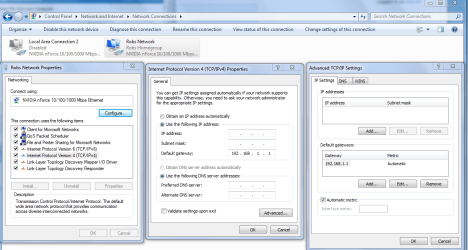
It should look like this and I think you might need to enter the default gateway in both places like in the picture but in your case use 192.168.0.1

Although there is a good possibility that one of your delated firewalls is causing this problem to occur.

If you have anything from apple like iTunes or adobe photo suite then bonjour service needs to be disabled and removed from the system.
 

Attachments

  • IPV4 properties manual default gateway entry.PNG
    IPV4 properties manual default gateway entry.PNG
    63.2 KB · Views: 54

My Computer My Computer

At a glance

Windows 7 Ult, Windows 8.1 Pro,Q9650-4.275GHz, E8600 4.5GHz, E6750-3.8GHzG.Skill PC2 9600 1200Mhz 5 5 5 15 2TGTX480
Computer type
PC/Desktop
Computer Manufacturer/Model Number
Home built
OS
Windows 7 Ult, Windows 8.1 Pro,
CPU
Q9650-4.275GHz, E8600 4.5GHz, E6750-3.8GHz
Motherboard
Evga 780i FTW
Memory
G.Skill PC2 9600 1200Mhz 5 5 5 15 2T
Graphics Card(s)
GTX480
Sound Card
Asus Xonar D2
Monitor(s) Displays
HannsG
Screen Resolution
1680X1050
Hard Drives
GSkill Phoenix Pro 120GB SSD
PSU
ThermalTake Toughpower 1000Watt modular
Case
ThermalTake XaserV
Cooling
Xigmatek S1283
Keyboard
Logitech G15
Mouse
Logitech G9
Internet Speed
T1


It asks for an IP address, is that the IPV4 number from the ipconfig command? (sorry i realize this might be very basic).
I do have some adobe stuff, will try to uninstall bonjour and see if that helps.
 

My Computer My Computer

At a glance

w7xeon w3520 2.67Ghtz4G
Computer Manufacturer/Model Number
dell precision t3500
OS
w7
CPU
xeon w3520 2.67Ghtz
Memory
4G
Yes, but use the one displayed when you have working internet, i.e. after manual reset.
 

My Computer My Computer

At a glance

W7 Professional x64AMD Athlon II X3 445 Rana 3.10 GHzPNY XLR DDR3 1600 4x2GBNVIDIA GeForce GTS 450 (fermi) 1GB GDDR5
Computer Manufacturer/Model Number
Pugh Technologies
OS
W7 Professional x64
CPU
AMD Athlon II X3 445 Rana 3.10 GHz
Motherboard
MSI 870A-G54
Memory
PNY XLR DDR3 1600 4x2GB
Graphics Card(s)
NVIDIA GeForce GTS 450 (fermi) 1GB GDDR5
Sound Card
Realtek ALC892 onboard
Monitor(s) Displays
ASUS VE205t, Viewsonic VX2035WM
Screen Resolution
1600x900, 1600x1050
Hard Drives
977GB Hitachi Hitachi HDS721010CLA332
244GB Western Digital WDC WD2500AAJS-65B4A0
488GB Western Digital WDC WD5000AAJS-00A8B0
488GB Western Digital WDC WD5000AAKS-00UU3A0
PSU
Antec EarthWatts EA650 650W
Case
ThermalTake Armor A90 Mid Tower
Cooling
3x 120mm in, 1x 120mm & 200mm out, self built hydro-cooler
Keyboard
Logitec 55
Mouse
Razer Deathadder
Internet Speed
20 Mbps D/L, 9 Mbps U/L


It asks for an IP address, is that the IPV4 number from the ipconfig command? (sorry i realize this might be very basic).
I do have some adobe stuff, will try to uninstall bonjour and see if that helps.

You won't need to mess with any of this as long as you remove bonjour service from you system. It causes problems like this all the time.

Under the Services tab uncheck the service called "bonjour ##Id_String1.6844[... and then a bunch of numbers]" by Apple, disable the service then reboot.

To remove bonjour from your system.
1. Navigate to C:\Program Files\Bonjour
2. Rename the mdnsNSP.dll file in that folder to mdnsNSP.old
3. Restart your computer
4. Delete the Program Files\Bonjour folder
 

My Computer My Computer

At a glance

Windows 7 Ult, Windows 8.1 Pro,Q9650-4.275GHz, E8600 4.5GHz, E6750-3.8GHzG.Skill PC2 9600 1200Mhz 5 5 5 15 2TGTX480
Computer type
PC/Desktop
Computer Manufacturer/Model Number
Home built
OS
Windows 7 Ult, Windows 8.1 Pro,
CPU
Q9650-4.275GHz, E8600 4.5GHz, E6750-3.8GHz
Motherboard
Evga 780i FTW
Memory
G.Skill PC2 9600 1200Mhz 5 5 5 15 2T
Graphics Card(s)
GTX480
Sound Card
Asus Xonar D2
Monitor(s) Displays
HannsG
Screen Resolution
1680X1050
Hard Drives
GSkill Phoenix Pro 120GB SSD
PSU
ThermalTake Toughpower 1000Watt modular
Case
ThermalTake XaserV
Cooling
Xigmatek S1283
Keyboard
Logitech G15
Mouse
Logitech G9
Internet Speed
T1
Oh my god! I've been days trying to solve this, and in the end it was down to this bonjour! i just followed your instructions on removal, restarted, and the connection was suddenly fine.. thanks so much.
This confirms my totally irrational but deeply rooted belief that apple is evil.
Thanks a lot man!
 

My Computer My Computer

At a glance

w7xeon w3520 2.67Ghtz4G
Computer Manufacturer/Model Number
dell precision t3500
OS
w7
CPU
xeon w3520 2.67Ghtz
Memory
4G
Thanks for reporting back in klaus. Yes indeed, apple is evil and bonjour is sabotage LOL.
 

My Computer My Computer

At a glance

Windows 7 Ult, Windows 8.1 Pro,Q9650-4.275GHz, E8600 4.5GHz, E6750-3.8GHzG.Skill PC2 9600 1200Mhz 5 5 5 15 2TGTX480
Computer type
PC/Desktop
Computer Manufacturer/Model Number
Home built
OS
Windows 7 Ult, Windows 8.1 Pro,
CPU
Q9650-4.275GHz, E8600 4.5GHz, E6750-3.8GHz
Motherboard
Evga 780i FTW
Memory
G.Skill PC2 9600 1200Mhz 5 5 5 15 2T
Graphics Card(s)
GTX480
Sound Card
Asus Xonar D2
Monitor(s) Displays
HannsG
Screen Resolution
1680X1050
Hard Drives
GSkill Phoenix Pro 120GB SSD
PSU
ThermalTake Toughpower 1000Watt modular
Case
ThermalTake XaserV
Cooling
Xigmatek S1283
Keyboard
Logitech G15
Mouse
Logitech G9
Internet Speed
T1
Back
Top